
Zenwire A10
Zenwire A10 Mini Portable Projector User Manual
Modail: A10
1. Ro-ràdh
Tapadh leibh airson ceannachasing the Zenwire A10 Mini Portable Projector. This device is designed to provide a versatile and convenient projection experience, allowing you to display content from various sources, including smartphones, tablets, and computers. Please read this manual carefully before using the projector to ensure proper operation and to maximize its lifespan.
2. Stiùireadh Sàbhailteachd Cudromach
- Na seall gu dìreach a-steach do lionsa a’ phròiseictar nuair a bhios an lamp tha air adhart.
- Dèan cinnteach gu bheil fionnarachadh ceart timcheall air a’ phròiseictar gus casg a chur air cus teasachadh. Na cuir bacadh air fosglaidhean fionnarachaidh.
- Cleachd an inneal-atharrachaidh cumhachd a tha air a thoirt seachad leis a’ phròiseictar a-mhàin.
- Keep the projector away from water, moisture, and flammable materials.
- Na feuch ri am proiseactair a thoirt às a chèile no a chàradh thu fhèin. Cuir fios gu luchd-obrach seirbheis teisteanasach airson cuideachadh.
- Cuir am proiseactair air uachdar seasmhach, còmhnard.
- Thoir a-mach am pluga bhon phroiseactair rè stoirmean dealanaich no nuair nach tèid a chleachdadh airson ùine mhòr.
3. Pasgan-susbaint
Thoir sùil air susbaint a’ phacaid nuair a dh’fhosglas tu am bogsa. Ma tha rud sam bith a dhìth no millte, cuir fios chun neach-reic agad.
- Zenwire A10 Mini Portable Projector
- Smachd Iomallach
- Adapter cumhachd
- Leabhar-làimhe cleachdaiche
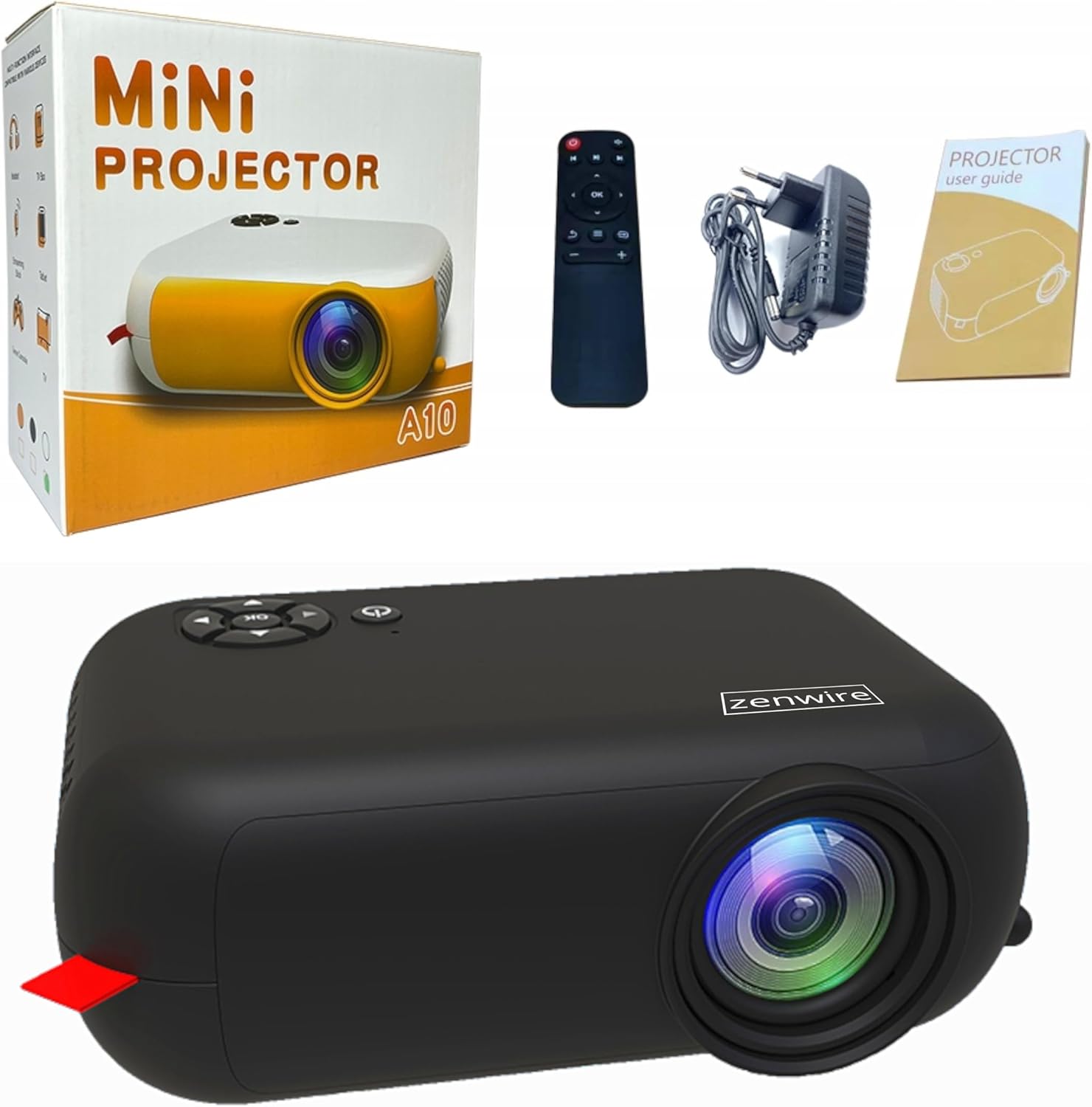
Image: Contents of the Zenwire A10 Mini Projector package, including the projector, remote control, power adapter, and user manual.
4. Toradh thallview
4.1 Projector Dimensions and Design
The Zenwire A10 is designed for portability, featuring a compact and lightweight form factor. Its dimensions are approximately 14cm x 10cm x 5.5cm, making it easy to carry and set up in various locations.

Image: The Zenwire A10 Mini Projector held in a hand, illustrating its compact size and portability.
4.2 Puirt agus Smachdan
The projector features a range of input and output ports for versatile connectivity, along with intuitive controls.

Image: Rear panel of the Zenwire A10 Mini Projector, showing the 5V-IN DC power input, IR receiver, USB port, 3.5mm audio jack, HDMI port, and SD card slot.
- 5V-IN DC: Cuir a-steach cumhachd airson a’ phròiseictar.
- IR: Glacadair fo-dhearg airson an smachd iomallach.
- USB: Ceangail innealan stòraidh USB airson ath-chluich meadhanan.
- Jack headphone (3.5mm): Ceangail luchd-labhairt no fònaichean-cluaise taobh a-muigh.
- HDMI: Connect devices such as laptops, gaming consoles, or streaming sticks.
- SD: Cuir a-steach cairtean Micro SD airson ath-chluich meadhanan.
- Cuibhle Fòcas: Adjust image sharpness (located on the side).
- Pannal Smachd: Buttons on top for navigation and selection.
5. Suidhich
5.1 Ceangal cumhachd
- Ceangail an inneal-atharrachaidh cumhachd a tha air a thoirt seachad ris an 5V-IN DC port air an proiseactair.
- Plug an adapter cumhachd a-steach do bhalla a-muigh.
- Brùth am putan cumhachd air a’ phroiseactair no air an smachd iomallach gus a thionndadh air.
5.2 Suidheachadh agus Atharrachadh Fòcais
- Place the projector on a stable surface or mount it according to your preference. Ensure the projector lens is facing the projection surface (wall or screen).
- Adjust the distance between the projector and the screen to achieve your desired image size. The projector supports screen sizes up to 100 inches.
- Rotate the focus wheel (typically located near the lens) until the projected image appears clear and sharp.

Image: Diagram illustrating the Zenwire A10 Mini Projector's capability to project various screen sizes, from 13 inches up to 100 inches, depending on the projection distance.
6. A’ cleachdadh a’ phròiseictar
6.1 Wireless Connection (Miracast & Airplay)
The Zenwire A10 supports wireless screen mirroring via 2.4/5GHz WiFi, compatible with Android (Miracast) and iOS (Airplay) devices.
- Dèan cinnteach gu bheil am proiseactair agus an inneal gluasadach agad ceangailte ris an aon lìonra Wi-Fi.
- On the projector's main menu, select the 'Screen Mirroring' or 'Wireless Display' option.
- Airson Android: On your Android phone/tablet, enable 'Wireless Display', 'Screen Mirroring', 'Smart View', or similar function (names may vary by device). Select the projector from the list of available devices.
- Airson iOS: On your iPhone/iPad, open Control Center and tap 'Screen Mirroring'. Select the projector from the list of available devices.
- The content from your mobile device should now be mirrored on the projector screen.
6.2 Ceanglaichean Uèirichte
The projector offers multiple wired input options for various devices.

Image: The Zenwire A10 Mini Projector connected to various devices such as smartphones, tablets, laptops, desktop computers, gaming consoles, and media players, highlighting its versatile connectivity.
- HDMI: Connect a laptop, PC, gaming console (e.g., Xbox, PlayStation), or streaming device (e.g., Amazon Fire TV Stick, Google Chromecast) using an HDMI cable. Select the HDMI input source on the projector.
- USB: Insert a USB flash drive or external hard drive into the USB port. The projector's media player will allow you to browse and play supported video, audio, and image files.
- Micro SD: Insert a Micro SD card into the SD card slot. Similar to USB, you can access media files through the projector's interface.
- Toradh Fuaime (Seacaid 3.5mm): Connect external speakers or headphones to enhance the audio experience.
6.3 Stiùireadh Clàr
Use the remote control or the buttons on the projector to navigate through the on-screen menu. Select input sources, adjust picture settings (brightness, contrast, color), sound settings, and other system preferences.
7. Cumail suas
- Glanadh lionsa: Cleachd clò bog, gun lint, a chaidh a dhealbhadh gu sònraichte airson lionsan optigeach, gus lionsa a’ phròiseictar a sguabadh gu socair. Seachain innealan-glanaidh sgrìobach no cus feachd a chleachdadh.
- Toirt air falbh dust: Regularly clean the projector's exterior with a soft, dry cloth. Use a small brush or compressed air to clear dust from the ventilation openings to ensure proper airflow.
- Stòradh: When not in use, store the projector in a cool, dry place, away from direct sunlight and extreme temperatures. Use the original packaging or a protective case to prevent dust accumulation and damage.
8. A ’dèanamh trioblaid
If you encounter issues with your Zenwire A10 projector, refer to the following common problems and solutions:
| Trioblaid | Adhbhar a dh’fhaodadh a bhith ann | Fuasgladh |
|---|---|---|
| Gun ìomhaigh air an sgrion | Power not connected; Incorrect input source; Device not connected properly. | Check power cable; Select correct input source (HDMI, USB, etc.); Reconnect source device. |
| Tha an ìomhaigh blurry | Cha deach am fòcas atharrachadh; Tha am proiseactair ro fhaisg/ro fhada bhon sgrion. | Adjust the focus wheel; Adjust projection distance. |
| Gun fhuaim | Tha an tomhas-fuaim ro ìosal; Air a mhùchadh; Chan eil inneal claisneachd taobh a-muigh ceangailte/air a thaghadh. | Increase volume; Unmute; Check external speaker connection or select internal speaker. |
| Cùisean ceangail gun uèir | Not on same Wi-Fi network; Device not compatible; Interference. | Ensure both devices are on the same Wi-Fi; Verify device compatibility; Try moving closer to Wi-Fi router. |
9. Sònrachaidhean
| Feart | Mion-fhiosrachadh |
|---|---|
| Brand | Zenwire |
| Modail Àireamh | A10 |
| Seòrsa Bathar | Compact and Portable Projector |
| Fuasgladh Dùthchasach | 480x360p |
| Fuasgladh taisbeanaidh as àirde | 1920 x 1080 (làn HD) |
| Gile | 1800lm / 60 ANSI |
| Co-mheas coimeas | 2000:1 |
| Seòrsa Taisbeanaidh | LED |
| Teicneòlas ceangail | Wi-Fi (2.4/5GHz), HDMI, USB, Micro SD, 3.5mm Audio Jack |
| Feartan gun uèir | Miracast, Airplay |
| Innealan co-fhreagarrach | Smartphones (Android, iOS), Tablets, Laptops, PCs, Gaming Consoles |
| Cleachdaidhean Molta | Taigh-dhealbh |
| Meudan (Mu thuairmse) | 14cm x 10cm x 5.5cm |
10. Barantas agus Taic
The Zenwire A10 Mini Portable Projector comes with a standard manufacturer's warranty. For specific warranty terms and conditions, please refer to the documentation provided at the time of purchase or contact your retailer. For technical support or service inquiries, please reach out to Zenwire customer service through their official weblàrach-lìn no am fiosrachadh conaltraidh a chaidh a thoirt seachad leis an toradh agad.
Ask a question about this manual
Ask about setup, troubleshooting, compatibility, parts, safety, or missing instructions. Manuals+ will review the question and use this page’s manual context to help answer it.