
Maxcom FW58
Leabhar-làimhe Cleachdaiche Uaireadair Smart Maxcom FW58 Vanad Pro
Modail: FW58
1. Ro-ràdh
Thank you for choosing the Maxcom FW58 Vanad Pro Smartwatch. This manual provides essential information for setting up, operating, and maintaining your device. The FW58 Vanad Pro is designed to enhance your daily life by offering comprehensive health monitoring, seamless communication, and robust activity tracking capabilities. Its lightweight design and customizable features make it an ideal companion for both busy individuals and active sports enthusiasts.
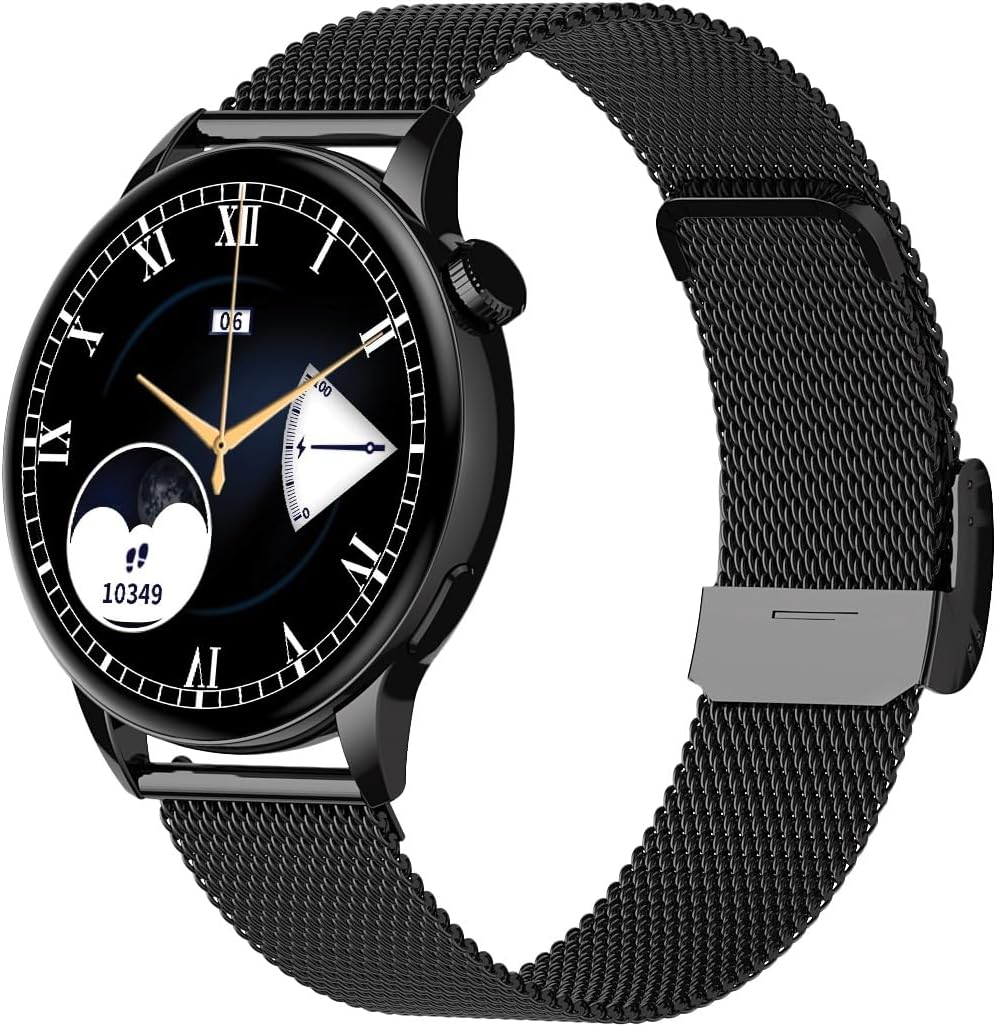
Image 1.1: Maxcom FW58 Vanad Pro Smartwatch, showcasing its elegant design with a black mesh strap and a classic watch face.
2. Suidhich
2.1. Pasgan-susbaint
Mus tòisich thu, dèan cinnteach gu bheil a h-uile rud anns a’ phacaid agad:
- Maxcom FW58 Vanad Pro Smartwatch
- Càball Cìsean Magnetic
- Strap Silicone a bharrachd
- Leabhar-làimhe cleachdaiche (an sgrìobhainn seo)
2.2. A’ cur cosgais air an uaireadair-smart
For optimal performance, fully charge your smartwatch before first use.
- Connect the magnetic charging cable to the charging contacts on the back of the smartwatch. Ensure the pins align correctly.
- Cuir ceann USB a’ chàball a-steach do inneal-atharrachaidh cumhachd USB àbhaisteach (5V/1A air a mholadh) no do phort USB coimpiutair.
- Seallaidh taisbeanadh an uaireadair inbhe a’ chosgais. Mar as trice bheir làn chosgais timcheall air 2 uair a thìde.

Dealbh 2.1: Cùl view of the Maxcom FW58 Smartwatch, highlighting the optical sensor for health monitoring and the magnetic charging contacts.
2.3. A’ paidhreachadh leis an fhòn-smart agad
To unlock all features, pair your smartwatch with the dedicated Maxcom smartwatch application on your smartphone.
- Download the official Maxcom smartwatch application from your smartphone's app store (e.g., Google Play Store or Apple App Store). Lorg airson "Maxcom Smartwatch" or refer to the QR code in the quick start guide if provided.
- Dèan cinnteach gu bheil Bluetooth air a chomasachadh air an fhòn-smart agad.
- Open the Maxcom app and follow the on-screen instructions to add a new device.
- Select "FW58" from the list of available devices. Confirm the pairing request on both your phone and the smartwatch.
3. A’ cleachdadh an uaireadair-smart
3.1. Seòladh Bunaiteach
The Maxcom FW58 features a responsive touchscreen and a side button/crown for navigation.
- Sgrion-touch: Sguab clì/deas, suas/sìos gus seòladh tro chlàran-taice agus feartan. Tap gus taghadh.
- Putan Taobh/Crùn: Press to wake the screen, return to the home screen, or access the app menu. Rotate the crown (if applicable) to scroll through lists or adjust settings.

Ìomhaigh 3.1: Taobh profile of the Maxcom FW58 Smartwatch, illustrating the physical crown and button for intuitive control and navigation.
3.2. Feartan conaltraidh
- A’ dèanamh/a’ faighinn ghairmean: Once paired, you can answer incoming calls directly from your smartwatch. You can also initiate calls from your watch's call log or contacts (synced via the app).
- Brathan: Receive real-time notifications for SMS messages, app alerts, emails, social media updates, and news directly on your wrist. Manage notification settings through the Maxcom app.
3.3. Sgrùdadh Slàinte
The smartwatch provides various health metrics to help you monitor your well-being.
- Ìre cridhe: Sgrùdadh ìre cridhe leantainneach no air iarrtas.
- Bruthadh-fala: Tomhais do bhruthadh-fala (airson fiosrachaidh a-mhàin, chan e inneal meidigeach a th’ ann).
- Ocsaidean fala (SpO2): Cùm sùil air ìrean sùghaidh ocsaidean san fhuil agad.
- Rianachd cadail: Bidh e a’ cumail sùil gu fèin-ghluasadach air na pàtrain cadail agad, a’ gabhail a-steach cadal domhainn, cadal aotrom, agus amannan dùisg.
3.4. Modhan Tracadh Gnìomhachd & Spòrs
Track your daily activity and specific workouts.
- Gnìomh làitheil: Records steps taken, calories burned, and distance traveled (mileage).
- Modhan spòrs: Select from various sports modes such as fitness, hiking, running, badminton, cycling, and football to track specific workout data.
3.5. Smachd Ciùil
Control music playback on your connected smartphone directly from your smartwatch. Play, pause, skip tracks, and adjust volume without needing to access your phone.
3.6. Gnàthachadh
Personalize your smartwatch experience.
- Coimhead air Faces: Choose from over 100 pre-installed watch face models or download more via the Maxcom app to match your style or mood.
- Stoidhle clàr-taice: Customize the layout and appearance of your smartwatch menu.
- Cur an àite strap: Easily change between the included mesh and silicone straps to suit different occasions or activities.

Image 3.2: A digital watch face on the Maxcom FW58 Smartwatch, showing steps and heart rate data.

Image 3.3: The Maxcom FW58 Smartwatch showcasing a dynamic and colorful digital watch face option.
4. Cumail suas
4.1. Cleaning the Smartwatch
Regular cleaning helps maintain the device's appearance and functionality.
- Sguab an sgrion agus a’ bhodhaig le clò bog, gun lint.
- Airson smùid stòlda, beagan dampnigh an clò le uisge. Seachain ceimigean cruaidh no stuthan sgrìobach a chleachdadh.
- Clean the sensor area on the back of the watch regularly to ensure accurate readings.
4.2. Cùram Bataraidh
Gus beatha bataraidh a leudachadh:
- Seachain teòthachd anabarrach.
- Na fàg an uaireadair gu tur gun chosgais airson ùine mhòr.
- Charge the device using only the provided charging cable.
4.3. Seasmhachd Uisge (IP67)
The Maxcom FW58 Vanad Pro Smartwatch is rated IP67, meaning it is protected against dust ingress and can withstand immersion in water up to 1 meter for up to 30 minutes. While it is suitable for daily use and splashes, it is not recommended for swimming, diving, or high-pressure water activities.
5. A ’dèanamh trioblaid
If you encounter issues with your smartwatch, try the following solutions:
| Trioblaid | Fuasgladh |
|---|---|
| Chan eil an uaireadair a’ tionndadh air | Ensure the watch is fully charged. Press and hold the side button for 5-10 seconds. |
| Chan urrainnear paidhir a dhèanamh le fòn cliste | Ensure Bluetooth is on. Restart both the watch and phone. Clear app cache/data. Try pairing again. |
| Leughaidhean slàinte neo-mhearachdach | Ensure the watch is worn snugly on your wrist. Clean the sensor area. Remain still during measurements. |
| Sanasan nach d’ fhuaireadh | Check app notification permissions on your phone. Ensure the watch is connected via Bluetooth. Verify notification settings within the Maxcom app. |
5.1. Ath-shuidheachadh Factaraidh
If problems persist, you may need to perform a factory reset. This will erase all data on the smartwatch and restore it to its original settings. Navigate to 'Settings' on your smartwatch, then look for 'System' or 'Reset' options.
6. Sònrachaidhean
| Feart | Mion-fhiosrachadh |
|---|---|
| Modail Àireamh | FW58 |
| Meud taisbeanaidh | 1.5 òirlich |
| Beatha bataraidh | 6-10 days (intensive use) |
| Cuideam | 46g |
| Meudan cùise | 44 x 38 x 10 mm |
| Meud strap | 255 x 20 mm |
| Frith-aghaidh uisge | IP67 (suas gu 1 meatair airson 30 mionaid) |
| Ceangalachd | Bluetooth |
| Strapan air an toirt a-steach | Mesh and Silicone |
7. Barantas agus Taic
7.1. Fiosrachadh Barantais
Maxcom products are manufactured to the highest quality standards. For detailed warranty terms and conditions, please refer to the warranty card included with your purchase or visit the official Maxcom weblàrach. Cùm dearbhadh ceannach airson tagraidhean barantais.
7.2. Taic teachdaiche
If you require further assistance or have questions not covered in this manual, please contact Maxcom customer support:
- Weblàrach: Visit the official Maxcom support website for FAQs, software updates, and contact forms.
- Post-d/Fòn: Refer to the contact information provided on the Maxcom weblàrach no pacaigeadh an toraidh agad.
Ask a question about this manual
Ask about setup, troubleshooting, compatibility, parts, safety, or missing instructions. Manuals+ will review the question and use this page’s manual context to help answer it.