
Seplos seplos BMS 3.0version C
Seplos BMS3.0 Smart BMS User Manual
Model: seplos BMS 3.0version C
1. Ro-ràdh
This manual provides essential information for the installation, operation, and maintenance of the Seplos BMS3.0 Smart Battery Management System. The Seplos BMS3.0 is designed for Lifepo4 and NCM lithium batteries, offering advanced communication capabilities and comprehensive protection features.
The specific model covered in this manual is the Seplos BMS 3.0version C 48V 100A 16S, which includes Bluetooth and an LCD display.
2. Fiosrachadh Sàbhailteachd
Always observe the following safety precautions to prevent injury or damage to the BMS and battery system:
- Ensure all connections are correct and secure before applying power. Incorrect wiring can cause severe damage.
- Do not attempt to disassemble or modify the BMS. Refer all servicing to qualified personnel.
- Operate the BMS within its specified voltage agus crìochan làithreach.
- Protect the BMS from moisture, dust, and extreme temperatures.
- Always use appropriate personal protective equipment (PPE) when working with batteries.
- In case of smoke, unusual odors, or excessive heat, immediately disconnect power and ventilate the area.
3. Feartan toraidh
The Seplos BMS3.0 offers a robust set of features for efficient battery management:
- Pròtacalan conaltraidh: Supports CANBUS and RS485 communication for broad inverter compatibility.
- Obrachadh Co-shìnte: Capable of supporting up to 16 units in parallel for large battery systems.
- Dìonan Coileanta: Includes individual over-voltage dìon, over-voltage protection, over-temperature protection, over-charge (discharge) protection, over-current protection, and short-circuit protection.
- Passive Balance: Ensures cell voltage equalization for extended battery life.
- Ceangal Bluetooth: Monitor real-time battery information via a smartphone application (Apple/Android).
- Taisbeanadh LCD: Provides direct visual feedback on battery status.
- PC Software Interface: Connect to a computer for advanced parameter settings and monitoring (BatteryStudio for BMS 3.0).
4. Co-phàirtean thairisview
The Seplos BMS3.0 package includes the following main components:
- 1 x Seplos Smart BMS (with CAN/RS485 module and temperature sensor)
- 1 x Càball Ceangail
- 1 x Taisbeanadh LCD
- Bluetooth Module (integrated)
- Adapter (optional, depending on specific package)
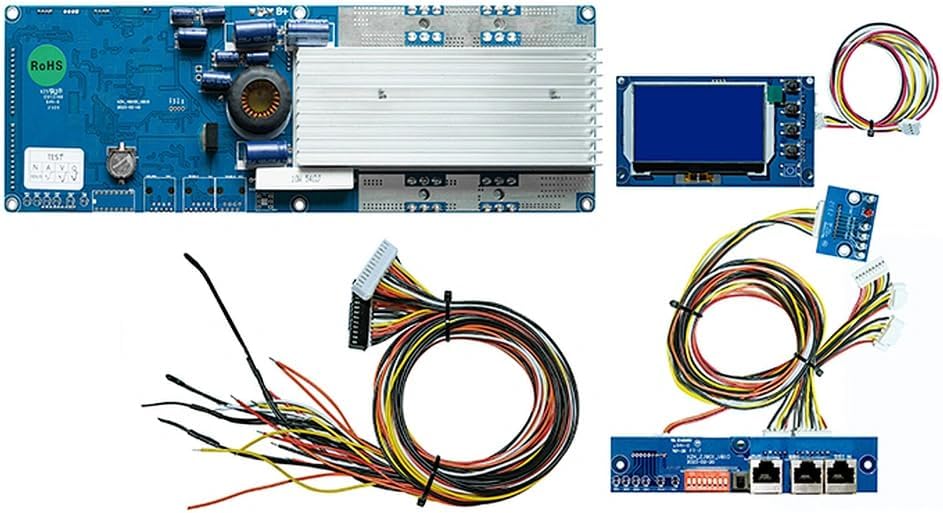
Figear 4.1: Os a chionnview of Seplos BMS3.0 components. This image displays the main BMS circuit board, the separate LCD screen, and various connecting cables, including balance wires and communication cables.

Figure 4.2: Detailed layout of Seplos BMS 3.0 Type C components. This image highlights the main BMS board, the split communication board, and the LCD display, illustrating how they connect.
4.1. BMS Board Connectors and Indicators

Figure 4.3: Labeled diagram of the Seplos BMS 3.0 board, detailing various ports and features.
| Chan eil. | Comh-phàirt | Tuairisgeul |
|---|---|---|
| 1 | RS485 port small board (Type B/C) | For RS485 communication with external devices. |
| 2 | CAN port small board (Type B/C) | For CAN communication with compatible inverters. |
| 3 | LED light board small board (Type B/C) | Solais comharran inbhe. |
| 4 | Reset button small board (Type B/C) | Used to reset the BMS. |
| 5 | Data cable A | Connects main BMS to communication board. |
| 6 | Data cable B | Connects main BMS to communication board. |
| 7 | Heating function (Customize) | Optional heating function connection. |
| 8 | External trip breaker | Connection for an external circuit breaker. |
| 9 | Tionndadh cumhachd taobh a-muigh | Connection for an external power switch. |
| 10 | Active balance (Customize) | Optional active balancing module connection. |
| 11 | Sgrion LCD | Port for connecting the LCD display. |
| 12 | P- terminals | Negative output terminal for load/charger. |
| 13 | B+ terminals | Positive input terminal from battery pack. |
| 14 | Aerosol fire system | Connection for an aerosol fire suppression system. |
| 15 | Bòrd BMS | The main Battery Management System circuit board. |
5. Setup agus Stàladh
Proper installation is crucial for the safe and effective operation of your Seplos BMS3.0. This section outlines the general steps for setting up the BMS with your battery system.
- Prepare Battery Pack: Ensure your 48V (51.2V) 16S Lifepo4 battery pack is assembled correctly and all cells are balanced.
- Ceangail Uèirichean Cothromachaidh: Carefully connect the balance wires from your battery cells to the corresponding ports on the BMS. Ensure the correct order and polarity. Refer to the BMS wiring diagram for your specific cell configuration.
- Connect Communication Board: For Type C BMS, connect the split communication board (containing CAN, RS485, LED, Reset ports) to the main BMS board using Data cables A and B (items 5 and 6 in Figure 4.3).
- Ceangail Taisbeanadh LCD: Plug the LCD display into the designated LCD screen port (item 11 in Figure 4.3) on the BMS.
- Connect Power Terminals: Connect the positive (B+) and negative (P-) terminals of the BMS to your battery pack and load/charger respectively. Ensure these connections are robust and capable of handling the rated current.
- External Connections (Optional): If using, connect the external power switch (item 9), external trip breaker (item 8), heating function (item 7), or aerosol fire system (item 14) to their respective ports.
- Cumhachd tùsail air adhart: Once all connections are verified, power on the BMS. Observe the LED indicators and LCD display for proper operation.
Note on BMS Versions:

Figure 5.1: Comparison of Seplos BMS 3.0 Type A, B, and C versions, highlighting differences in communication board integration. This image also shows the compatibility of BMS 3.0 with BatteryStudio software, and clarifies that BMS 2.0 and 3.0 cannot be used in parallel.
The Seplos BMS 3.0 comes in different types (A, B, C) based on the integration of communication ports. This manual focuses on Type C, which features split communication and light boards. Ensure you are using the correct software version; BMS 3.0 is compatible with BatteryStudio, while BMS 2.0 uses BatteryMonitor. BMS 2.0 and BMS 3.0 cannot be used in parallel.
6. Stiùireadh Obrachaidh
Once installed, the Seplos BMS3.0 provides various ways to monitor and manage your battery system.
6.1. Gnìomh taisbeanaidh LCD
The integrated LCD display provides real-time information about your battery pack, including voltage, current, temperature, and state of charge (SOC). Navigate through the display menus using the buttons adjacent to the screen to view crìochan eadar-dhealaichte.
6.2. Bluetooth Communication
The BMS includes a Bluetooth module, allowing you to monitor battery data directly from your smartphone. Download the official Seplos BMS application (compatible with Apple and Android systems) from your app store. Once installed, pair your phone with the BMS via Bluetooth to view real-time PACK data, individual cell voltages, temperature, and other critical parameters.

Figure 6.1: Screenshots of the Seplos BMS mobile application demonstrating real-time battery data monitoring via Bluetooth. The app supports both Apple and Android systems and can display information in English.
6.3. CANBUS and RS485 Communication
The Seplos BMS3.0 supports CANBUS and RS485 communication protocols, enabling seamless integration with a wide range of solar inverters and other energy management systems. The BMS has built-in protocols for many popular inverter brands, allowing for automatic matching or manual switching.
Compatible inverter brands include, but are not limited to:
- Growatt
- Glè mhath
- Gu ruige seo
- SMA
- Neach-fulang
- DEOCH
- Luxchumhachd
- Sermatec
- Renac
- TBB Power
- Solis
- Sionnach
- IMEON
- pylontech
- SRNE
- BLUESUN
- SAKO
- MEGAREVO
- FEUMAIDH
- SOROTEC
- Sumry
- SACOLAR
- GT
Figure 6.2: Visual representation of Seplos BMS compatibility with a wide range of inverter brands, indicating broad integration capabilities.
For detailed connection diagrams and configuration steps for specific inverters, refer to the Seplos official documentation or contact technical support.
6.4. PC Software Monitoring (BatteryStudio)
For advanced monitoring and parameter configuration, connect the BMS to a computer using the appropriate communication cable (e.g., USB to RS485 adapter). Use the BatteryStudio software, specifically designed for BMS 3.0, to access detailed battery data, adjust protection parameters, and perform firmware updates.
7. Cumail suas
Regular maintenance helps ensure the longevity and optimal performance of your Seplos BMS3.0:
- Sgrùdadh lèirsinneach: Periodically inspect the BMS and all connections for any signs of damage, corrosion, or loose wiring.
- Glaineachd: Keep the BMS free from dust and debris. Use a soft, dry cloth for cleaning. Do not use liquid cleaners.
- Ùrachaidhean firmware: Check the Seplos official website for any available firmware updates for your BMS model. Updates can improve performance and add new features.
- Suidheachaidhean Àrainneachdail: Ensure the BMS operates within its specified temperature and humidity ranges to prevent premature failure.
8. A ’dèanamh trioblaid
This section provides basic troubleshooting steps for common issues. For more complex problems, contact Seplos technical support.
| Trioblaid | Adhbhar a dh’fhaodadh a bhith ann | Fuasgladh |
|---|---|---|
| BMS not powering on | Loose power connections, battery voltage too low, internal fuse blown. | Check B+ and P- connections. Verify battery voltage. Consult technical support if fuse is suspected. |
| Taisbeanadh LCD nach eil ag obair | Loose LCD cable, faulty LCD. | Ensure LCD cable is securely connected to port 11. Replace LCD if necessary. |
| Duilgheadasan ceangail Bluetooth | App not installed, Bluetooth off on phone, interference. | Install Seplos app. Enable Bluetooth. Move closer to BMS. Restart BMS/phone. |
| Fàilligeadh conaltraidh inverter | Incorrect wiring, incompatible protocol, inverter settings. | Verify CAN/RS485 wiring. Check inverter compatibility list. Ensure inverter communication settings match BMS. |
| Thar-voltage/Under-voltagdìon-e air a bhrosnachadh | Battery cells out of balance, charger/load issue. | Thoir sùil air cealla fa leth voltages via app/LCD. Adjust charging/discharging parameters. Allow BMS to balance cells. |
9. Sònrachaidhean
| Paramadair | Luach |
|---|---|
| Ainm Modail | seplos BMS 3.0version C |
| Siostam bataraidh Voltage | 48V (51.2V ainmichte) |
| Rèiteachadh cealla | 16S (16 cells in series) |
| Sruth leantainneach as àirde | 100A (available in 50A, 150A, 200A versions) |
| Input Voltage | 48 Volt |
| Toradh Voltage | 48 bholt (DC) |
| Èifeachdas | 95% |
| Eadar-aghaidh Conaltraidh | CANBUS, RS485, Bluetooth |
| Obrachadh co-shìnte | Suas ri 16 aonadan |
| Co-phàirtean air an toirt a-steach | Smart BMS, connection cable, LCD screen, Bluetooth, adapter (optional) |
| Stòr cumhachd | Cumhachd bataraidh |
10. Barantas agus Taic
Information regarding specific warranty terms and conditions for the Seplos BMS3.0 is not provided in the product description. Please refer to the seller's (Seplos Store) policies on Amazon.com.be or contact Seplos directly for warranty details.
For technical support, inquiries, or assistance with installation and operation, please contact the Seplos customer service or visit their official website for resources and contact information.
Ask a question about this manual
Ask about setup, troubleshooting, compatibility, parts, safety, or missing instructions. Manuals+ will review the question and use this page’s manual context to help answer it.