
1. Ro-ràdh
Thank you for choosing the Baseus AeQur G10 TWS Earphones. This manual provides detailed instructions on how to set up, operate, maintain, and troubleshoot your new earphones. Please read this manual thoroughly before using the product to ensure optimal performance and longevity.
2. Pasgan-susbaint
Fosgail am bogsa gu faiceallach agus dèan cinnteach gu bheil na nithean uile a tha air an liostadh gu h-ìosal an làthair agus ann an deagh staid. Ma tha nithean sam bith a dhìth no millte, cuir fios chun neach-reic agad.
- Baseus AeQur G10 TWS Earphones (Left and Right)
- Cùis Cìse
- USB-A/USB-C Wireless Dongle
- Càball cosgais USB-C
- Iomadh Meud de Mholaidhean-cluaise
- Leabhar-làimhe cleachdaiche (an sgrìobhainn seo)

Image 2.1: Complete package contents of the Baseus AeQur G10 TWS Earphones.
3. Toradh thallview
Familiarize yourself with the components of your Baseus AeQur G10 TWS Earphones.
3.1 Fòn-cluaise
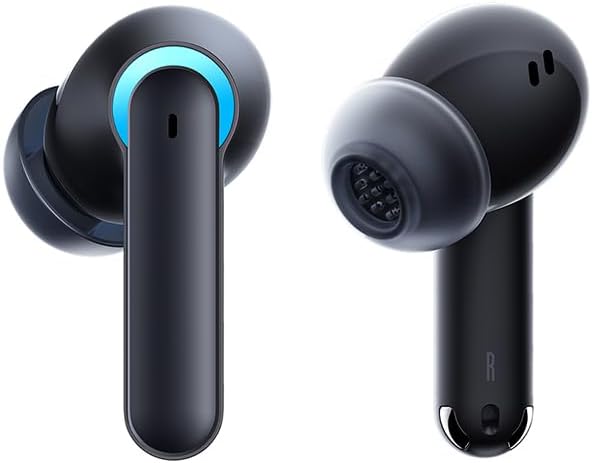
Image 3.1: Left and Right Baseus AeQur G10 Earphones. Each earphone features a touch control area, microphone, and charging contacts.
3.2 Cùis Cìsean

Image 3.2: Baseus AeQur G10 Earphones in their charging case with the lid open. The case has charging slots for each earphone and an LED indicator for battery status.
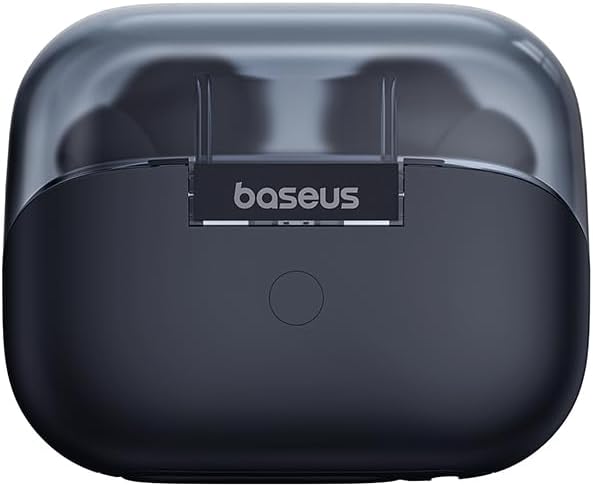
Dealbh 3.3: Cùl view of the Baseus AeQur G10 charging case, displaying the Baseus brand logo and a USB-C charging port (not explicitly visible but implied by common design).
3.3 USB-A/USB-C Wireless Dongle
The included wireless dongle allows for low-latency connection to various devices, including PCs, laptops, gaming consoles, and mobile devices.

Image 3.4: Compatibility diagram for the Baseus AeQur G10, illustrating connections to Type-C Androids & Tablets, Type-C/USB-A PCs & Laptops, PS5/PS4/Switch, Steam Deck, and VR devices.
4. Suidhich
4.1 Cìs tòiseachaidh
- Cuir an dà fhòn-cluaise a-steach don chùis cosgais.
- Connect the USB-C charging cable to the charging port on the case and the other end to a USB power source (e.g., computer USB port, wall adapter).
- The LED indicator on the case will show charging status. A full charge typically takes approximately 1.5 hours for the earphones and 2 hours for the case.
4.2 Paidhreachadh le innealan Bluetooth
- Dèan cinnteach gu bheil na fònaichean-cluaise anns a’ chùis cosgais agus gu bheil cosgais gu leòr anns a’ chùis.
- Open the charging case lid. The earphones will automatically enter pairing mode (indicated by a flashing LED on the earphones or case).
- Air an inneal agad (fòn cliste, tablet, laptop), cuir Bluetooth an gnìomh agus rannsaich airson innealan ùra.
- Select "Baseus AeQur G10" from the list of available devices.
- Once connected, the LED indicator will stop flashing, and you will hear a confirmation tone.
4.3 Connecting via USB Wireless Dongle
- Insert the USB-A or USB-C end of the wireless dongle into the corresponding port on your device (PC, laptop, gaming console).
- Ensure the earphones are in the charging case and the lid is open.
- The earphones will automatically attempt to connect to the dongle. The dongle's LED indicator will show connection status.
- Once connected, the LED on the dongle will become solid, and you will hear a confirmation tone from the earphones.
5. Stiùireadh Obrachaidh
5.1 Cumhachd air / dheth
- Cumhachd air: Fosgail mullach a’ chùis cosgais, no thoir na fònaichean-cluaise a-mach às a’ chùis. Tòisichidh iad air gu fèin-ghluasadach.
- Cumhachd dheth: Place the earphones back into the charging case and close the lid. They will power off automatically and begin charging.
5.2 A’ caitheamh nan cluasan-cluaise
- Identify the 'L' (left) and 'R' (right) markings on each earphone.
- Gently insert the earphones into your ear canals.
- Rotate them slightly to find a comfortable and secure fit. Choose the appropriate ear tip size for optimal sound quality and comfort.
5.3 Smachdan suathadh
The Baseus AeQur G10 earphones feature touch-sensitive controls on each earbud. The specific functions may vary slightly depending on the device and application.
| Gnìomh | Gnìomh |
|---|---|
| Tap singilte (clì/deas) | Cluich / Pause music, Answer / End call |
| Tap Dùbailte (L) | Rian roimhe |
| Tap Dùbailte (R) | An ath Rian |
| Trì-tap (Clì/Deas) | Cuir an gnìomh neach-cuideachaidh guth |
| Brùthadh Fada (Clì/Deas, 2 diogan) | Call a dhiùltadh |
| Brùthadh Fada (Clì/Deas, 3 diogan) | Toggle Gaming/Music Mode (if applicable) |
6. Cumail suas
6.1 Glanadh
- Cleachd clò bog, tioram, gun lint gus na fònaichean-cluaise agus a’ chùis cosgais a ghlanadh.
- For earwax or debris in the ear tips, gently remove the ear tips and clean them with a cotton swab lightly dampened with rubbing alcohol. Ensure they are completely dry before reattaching.
- Na cleachd innealan-glanaidh sgrìobach, fuasglaidhean, no spraeirean aerosol.
6.2 Stòradh
- Stòraich na fònaichean-cluaise anns a’ chùis cosgais aca an-còmhnaidh nuair nach eilear gan cleachdadh gus an dìon agus an cumail fo chasaid.
- Stòraich ann an àite fionnar, tioram, air falbh bho theodhachd anabarrach agus solas dìreach na grèine.
6.3 Cùram Bataraidh
- Charge the earphones and case regularly, even if not used frequently, to maintain battery health.
- Seachain na bataraidhean a dhì-luchdachadh gu tur airson ùine mhòr.
7. A ’dèanamh trioblaid
If you encounter issues with your Baseus AeQur G10 earphones, refer to the following common solutions:
7.1 Gun fhuaim no ceangal bho àm gu àm
- Ensure earphones are charged and properly connected to your device (Bluetooth or dongle).
- Thoir sùil air an ìre fuaime air na fònaichean-cluaise agus air an inneal ceangailte agad.
- Move closer to your device to avoid interference or range issues.
- Try disconnecting and re-connecting the earphones.
- For Bluetooth, forget the device on your phone and re-pair.
- For dongle, unplug and re-plug the dongle.
7.2 Fònaichean-cluaise gun a bhith a’ cur cosgais orra
- Dèan cinnteach gu bheil an càball cosgais ceangailte gu tèarainte ris a’ chùis agus ris an stòr cumhachd.
- Dearbhaich gu bheil an stòr cumhachd gnìomhach.
- Clean the charging contacts on both the earphones and inside the case with a dry cotton swab.
- Feuch càball cosgais no inneal-atharrachaidh cumhachd eadar-dhealaichte.
7.3 Only One Earphone Working
- Place both earphones back into the charging case, close the lid, wait a few seconds, then open the lid and take them out again.
- Dèan cinnteach gu bheil an dà chluas-cinn air an cosgais.
- Try resetting the earphones (refer to manufacturer's weblàrach-lìn airson stiùiridhean sònraichte airson ath-shuidheachadh ma tha feum orra).
8. Sònrachaidhean
Key technical specifications for the Baseus AeQur G10 TWS Earphones:
| Feart | Sònrachadh |
|---|---|
| Ainm Modail | A00055400111-00 |
| Brand | Baseus |
| Dath | Dubh |
| Suidheachadh cluais | Anns an Ear |
| Factor foirm | Anns an Ear |
| Teicneòlas ceangail | Wireless (Bluetooth) |
| Teicneòlas conaltraidh gun uèir | Bluetooth |
| Bataraidhean | Feumar 1 bataraidh lithium-ion (air a ghabhail a-steach) |
| Meudan toraidh | 10 x 5 x 1.27 cm |
| Cuideam nì | 220 g |
| Dèanadair | Baseus |
| Cleachdaidhean sònraichte | Siubhal |
9. Barantas agus Taic
Baseus products are designed and manufactured to the highest quality standards. For information regarding warranty coverage, technical support, or service, please refer to the warranty card included with your product or visit the official Baseus weblàrach. Cùm dearbhadh ceannach airson tagraidhean barantais.
Airson tuilleadh cuideachaidh, faodaidh tu fios a chuir gu taic luchd-cleachdaidh Baseus tron t-sianal oifigeil aca.