
Ro-ràdh
Tapadh leibh airson ceannachasing the Baseus S-09 Pro Series Car FM Transmitter. This device allows you to stream audio from your smartphone or other devices to your car's FM radio, and also provides fast charging capabilities. Please read this manual carefully before use to ensure proper operation and to maximize the product's lifespan.
Bathar seachadview
The Baseus S-09 Pro Series Car FM Transmitter is designed to enhance your in-car audio experience and provide convenient charging. Key features include:
- FM Transmitter Functionality: Broadcasts audio to your car's FM radio.
- Ceangal Bluetooth 5.3: For stable wireless audio streaming from compatible devices.
- Flash Drive Playback: Supports audio playback directly from a flash drive (up to 512GB).
- Cìs luath: Equipped with a USB-C port supporting PD 18W (Max) fast charging.
- Dual-Mic System: Provides premium sound quality and clear calls.
- Large LED Screen with Dual Display: Shows frequency band and battery voltage alternately.
- Puirt Cosgais Trì-fhillte: Offers multiple charging options.
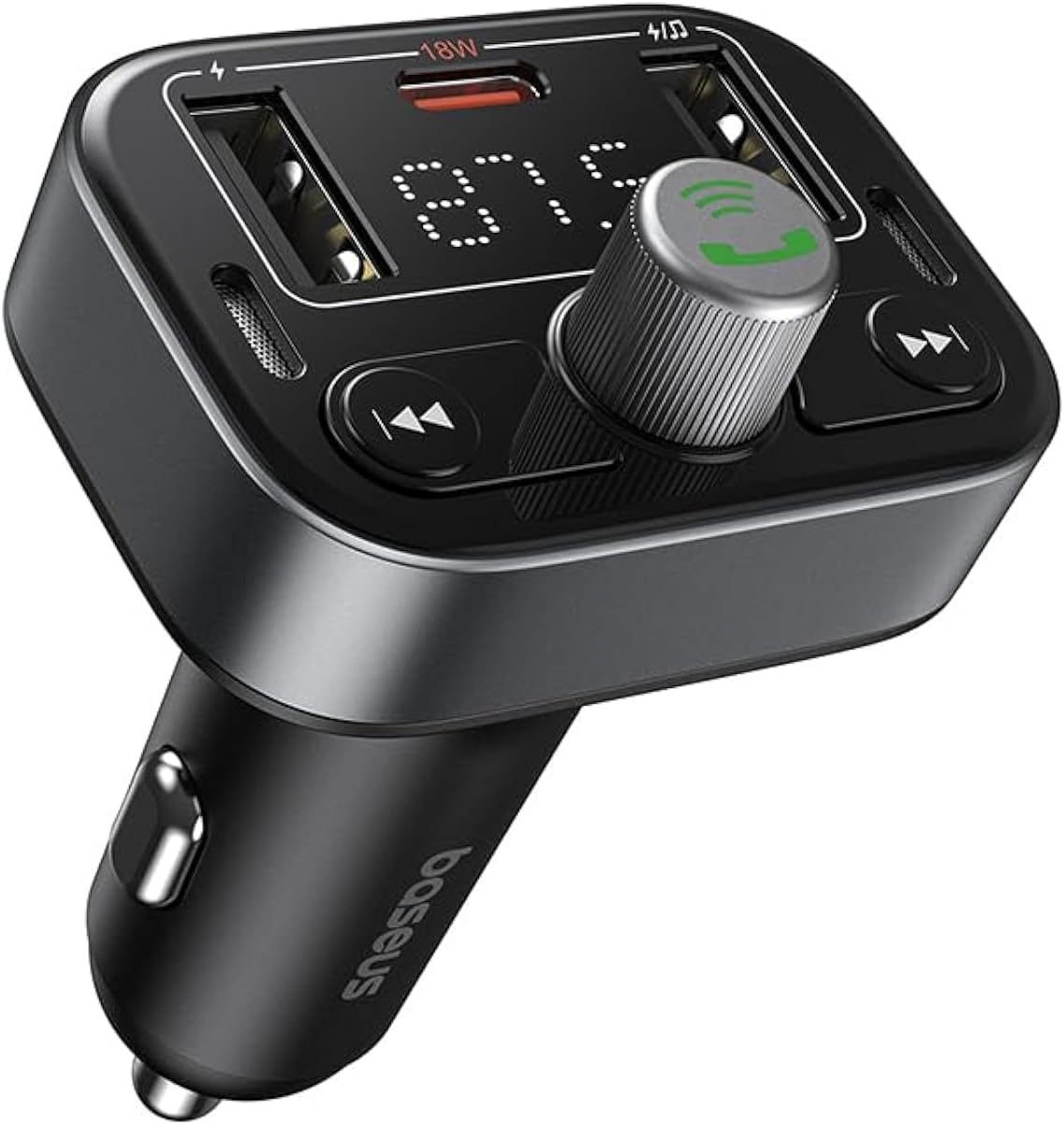
Figear 1: Aghaidh view of the Baseus S-09 Pro Series Car FM Transmitter, showing the display, control knob, and USB ports.
Susbaint pacaid
Thoir sùil air a’ phacaid airson nan nithean a leanas:
- Baseus S-09 Pro Series Car FM Transmitter
- Leabhar-stiùiridh (an sgrìobhainn seo)

Figure 2: The Baseus S-09 Pro Series Car FM Transmitter shown in its retail packaging.
Suidhich
- Insert into Car Cigarette Lighter Socket: Plug the Baseus S-09 Pro Series Car FM Transmitter firmly into your car's 12V/24V cigarette lighter socket. The device will power on automatically, and the LED display will light up.
- Tricead FM a thionndadh:
- On the FM Transmitter, press and hold the multi-function knob (the large central knob) until the FM frequency on the LED display starts flashing.
- Rotate the multi-function knob left or right to adjust the frequency. Choose an empty FM frequency (one with no radio station broadcasting) to minimize interference.
- On your car's FM radio, tune to the exact same empty frequency you selected on the transmitter.
- Once matched, the transmitter is ready to broadcast audio to your car stereo.
- Càraid Bluetooth:
- After the device powers on, it will automatically enter Bluetooth pairing mode. The Bluetooth icon on the display may flash.
- On your smartphone or Bluetooth-enabled device, open the Bluetooth settings and search for available devices.
- Select "Baseus S-09 Pro" (or similar name) from the list to connect. Once connected, the Bluetooth icon on the transmitter's display will stop flashing and remain solid.

Figure 3: Illustration showing connection options: via flash drive and Bluetooth 5.3 pairing with a smartphone.
Stiùireadh Obrachaidh
Ath-chluich Fuaim
- Fuaim Bluetooth: Once paired, play music or audio from your smartphone. The audio will be transmitted to your car's FM radio.
- Flash Drive Audio: Insert a USB flash drive (up to 512GB, formatted to FAT32) containing MP3 audio files into the designated USB port on the transmitter. The device will automatically detect and play the audio files.
- Putanan smachd:
- Knob ioma-ghnìomh: Rotate to adjust volume. Press once to play/pause.
- Putan an Trac Roimhe (◀◀): Brùth airson a dhol chun t-slighe roimhe.
- Putan an ath thrac (▶▶): Brùth airson a dhol chun ath cheum.
Glaodh gun làmhan
- Freagairt/Cuireadh Call: Press the multi-function knob once to answer an incoming call or end an ongoing call.
- Call a dhiùltadh: Press and hold the multi-function knob for 2 seconds to reject an incoming call.
- Deasaich an àireamh mu dheireadh: Brùth dà uair air a’ chnap ioma-ghnìomhach gus an àireamh mu dheireadh a chaidh a dhiailiú ath-dhìoladh.
- Switch Call to Phone: During a call, press and hold the multi-function knob for 2 seconds to switch the call between the transmitter and your phone.

Figure 4: The device highlighting its dual-mic system for premium sound quality during calls and music playback.
Innealan cosgais
- The transmitter features multiple USB ports for charging your devices.
- Port USB-C: Supports Power Delivery (PD) 18W (Max) fast charging. Use a compatible USB-C to USB-C or USB-C to Lightning cable for fast charging supported devices.
- Puirt USB-A: Provide standard charging for various devices.

Figure 5: The transmitter connected via its USB-C port to an iPhone for fast charging.
Fiosrachadh taisbeanaidh
- The large LED screen alternately displays the current FM frequency and the car battery voltage.
- Tricead FM: Indicates the frequency the transmitter is broadcasting on.
- Bataraidh Voltage: A’ sealltainn an fhìor-ùine voltage of your car's battery, allowing you to monitor its health.

Figure 6: The LED screen displaying both the FM frequency (87.5) and the car battery voltage (12.5V).
Cumail suas
- Keep the device dry. Do not expose it to moisture or extreme temperatures.
- Glan an inneal le clò bog, tioram. Na cleachd ceimigean cruaidh no innealan-glanaidh sgrìobach.
- Seachain a bhith a’ leigeil às no fo smachd an inneal gu buaidhean làidir.
- Bùth ann an àite fionnar, tioram nuair nach eilear ga chleachdadh.
Fuasgladh thrioblaidean
| Trioblaid | Adhbhar a dh’fhaodadh a bhith ann | Fuasgladh |
|---|---|---|
| Gun chumhachd/Dhùin an taisbeanadh | Not properly inserted into cigarette lighter; Car socket fuse blown. | Ensure firm connection. Check car's fuse box. |
| Càileachd claisneachd statach/droch | FM frequency interference; Volume too low. | Change to a different, empty FM frequency. Increase volume on both transmitter and car stereo. |
| Cha ghabh paidhir a dhèanamh air Bluetooth | Device not in pairing mode; Bluetooth disabled on phone. | Ensure transmitter is in pairing mode. Enable Bluetooth on your phone and search again. |
| Chan eil cosgais luath ag obair | Cable not compatible; Device does not support fast charging. | Use a certified fast-charging cable. Ensure your device supports PD 18W. |
Sònrachaidhean
- Ainm a' mhodail: S-09 Pro Series
- Àireamh Modail: C10762200113-00
- Eadar-aghaidh bathar-cruaidh: Bluetooth
- Innealan co-fhreagarrach: Car Stereo System, Smartphone, Tablet
- Feartan sònraichte: Inneal-sgaoilidh FM
- Cuir a-steach claisneachd: 3.5mm AUX
- Modh Toraidh Fuaim: Stereo
- Seòrsa toradh claisneachd: Rèidio FM, Bluetooth
- Voltage: 12 bholt (DC)
- Stòr cumhachd: Electric Corded
- Seòrsa gun uèir: Bluetooth
- Tionndadh Bluetooth: 5.3
- Media Type Supported: MP3 (from flash drive)
- Meud pacaid: 17 x 11.6 x 3.9 cm
- Cuideam nì: 80 gram
- Dath: Dubh
Barantas agus Taic
Baseus products typically come with a standard manufacturer's warranty. Please refer to the warranty card included in your product packaging or visit the official Baseus weblàrach-lìn airson teirmichean is cumhaichean barantais mionaideach.
For technical support, troubleshooting assistance, or warranty claims, please contact Baseus customer service through their official channels or the retailer from whom you purchased the product.
Gheibh thu barrachd fiosrachaidh agus taic air an Bùth Baseus air Amazon.


