
LEMNOI SG7
LEMNOI SG7 Educational Day/Night Alarm Clock for Children - User Manual
Modail: SG7
Ro-ràdh
This manual provides detailed instructions for the setup, operation, and maintenance of your LEMNOI SG7 Educational Day/Night Alarm Clock. Please read it thoroughly to ensure proper use and to maximize the product's features.
Fiosrachadh Sàbhailteachd
- Cùm an inneal air falbh bho uisge agus taiseachd.
- Na bi fosgailte do theodhachd anabarrach.
- Cleachd an càball USB-C a tha air a thoirt seachad a-mhàin airson cosgais.
- Cùm a-mach à ruigsinneachd chloinne bheaga gus casg a chur air cunnartan tachdadh bho phàirtean beaga.
- Na feuch ri an inneal a thoirt às a chèile no a chàradh thu fhèin. Cuir fios gu taic luchd-cleachdaidh ma thachras cùisean.
Susbaint pacaid
Thoir sùil air a’ phacaid airson nan nithean a leanas:
- LEMNOI SG7 Educational Day/Night Alarm Clock
- Càball cosgais USB-C
- Leabhar-làimhe cleachdaiche
Bathar seachadview
The LEMNOI SG7 is designed to assist children with sleep training and morning routines. It features:
- Day/Night Educational Icons: Green sun for wake-up, blue moon for sleep.
- Solas Oidhche LED 5-Dath: Soilleireachd a ghabhas atharrachadh.
- 7 Musical Alarm Options: Gentle wake-up sounds.
- Dual Alarms & Snooze Function: Customizable for weekdays and weekends.
- Digital Display with Temperature Monitor: 12/24 hour format, F/C conversion.
- Touch/Sound Activated Screen: Screen turns off after 20 seconds of inactivity.
- Bataraidh Lithium 2000mAh air a thogail a-steach: USB-C rechargeable.

Aghaidh view of the LEMNOI SG7 alarm clock, displaying time, temperature, and day/night icons.
Suidhich
1. Cosgais Tùsail
Before first use, fully charge the alarm clock. Connect the provided USB-C cable to the charging port on the back of the device and plug it into a compatible USB power adapter (not included).
- Lasaidh an solas comharra cosgais suas rè na cosgais.
- Mar as trice bheir làn chosgais timcheall air 3 uairean a thìde.
- The battery icon on the display will show charging status.
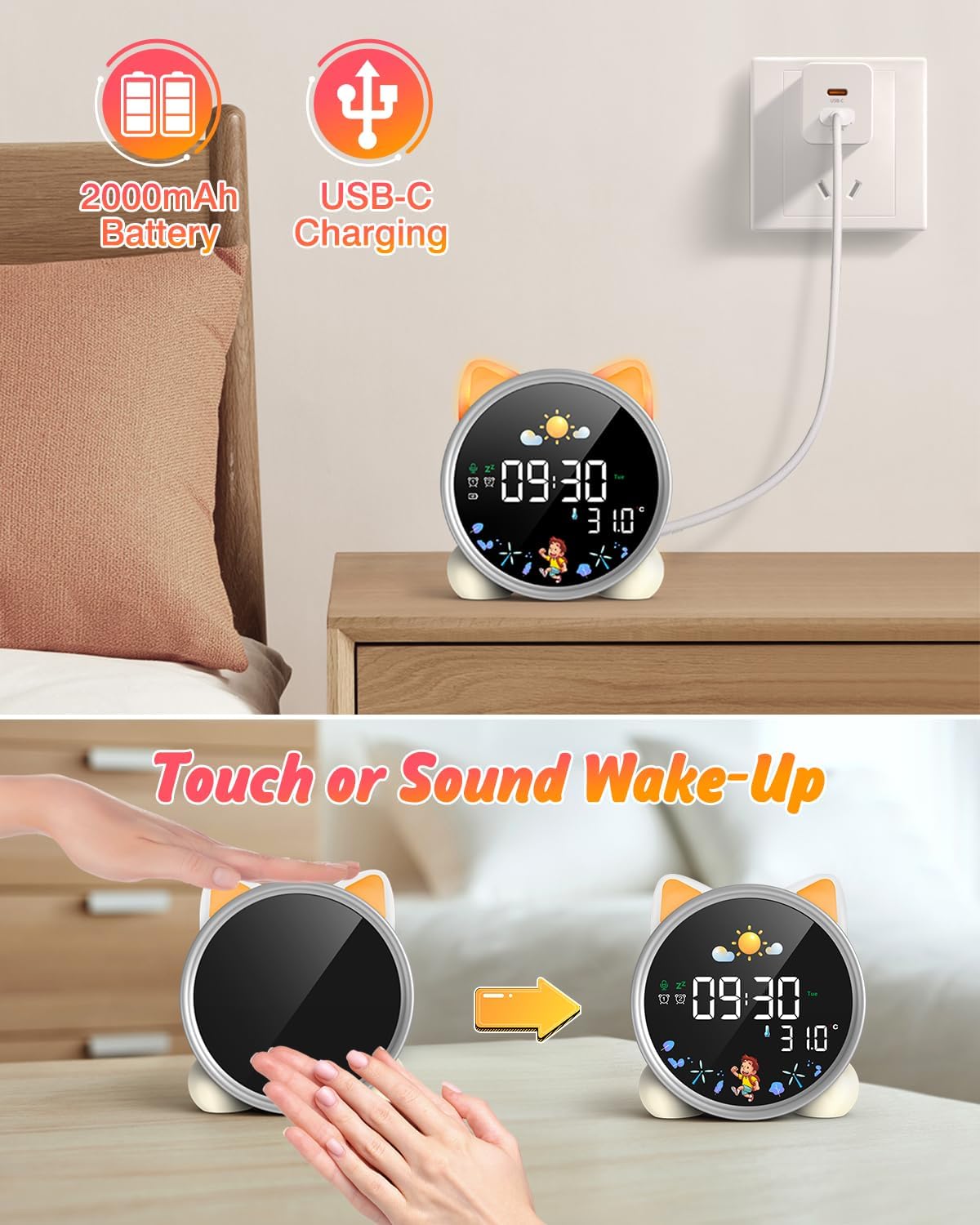
The alarm clock being charged via its USB-C port.
2. Cumhachd air / dheth
The device powers on automatically when connected to power. To manually power on/off or wake the screen:
- Sgrion Dùisg: Tap the device or make a sound near it. The screen will illuminate for 20 seconds.
- Cumhachd air / dheth: The device is designed to be always on for alarm functions.
Activating the screen by tapping the device.
Stiùireadh Obrachaidh
1. A 'suidheachadh Ùine agus Ceann-latha
The alarm clock supports 12/24 hour format and displays the day of the week. Specific buttons for setting are not detailed in the provided text, but typically involve a "Set" or "Mode" button.
- Refer to the physical manual for exact button functions (e.g., "SET" button).
- Brùth is cum sìos am putan “SET” gus modh suidheachadh ùine a ruighinn.
- Use "+" and "-" buttons to adjust hours, minutes, and other settings.
- Press "SET" again to confirm each setting and move to the next.
2. Day/Night Educational Mode
This feature uses color-changing lights and icons to signal wake-up and sleep times.
- Dùisg: Green light and sun icon appear to indicate it's time to wake up.
- Cadal: Blue light and moon icon appear to indicate it's time to sleep.

Day/Night mode with green sun for wake-up and blue moon for sleep.
3. Dual Alarms and Snooze Function
Set two independent alarms for different routines.
- A' suidheachadh rabhaidh: The dual alarms can be customized for any day from Monday to Sunday. Consult the full manual for specific steps to set Alarm 1 and Alarm 2.
- srann: When an alarm sounds, press the "SNOOZE" button on top for an additional 9 minutes of sleep. This can be repeated up to 3 times.

Illustration of the snooze function and dual alarm capability.
4. Night Light (5 Colors & Brightness Levels)
The alarm clock functions as a night light with 5 color options and adjustable brightness.
- Roghainnean dath: Yellow, Blue, Purple, White, and Gradient.
- Gile: 3 levels of brightness (0%, 30%, 70%, 100%) for the screen display. The night light itself also has adjustable brightness.
- Refer to the physical manual for instructions on cycling through colors and adjusting brightness.

The 5 available night light colors and screen brightness options.
5. Music and Sound Machine
The alarm clock offers 7 musical options for a gentle wake-up or soothing sleep environment.
- 7 musical options are available.
- Refer to the physical manual for instructions on selecting and setting music.

The 7 sound options available for the alarm clock.
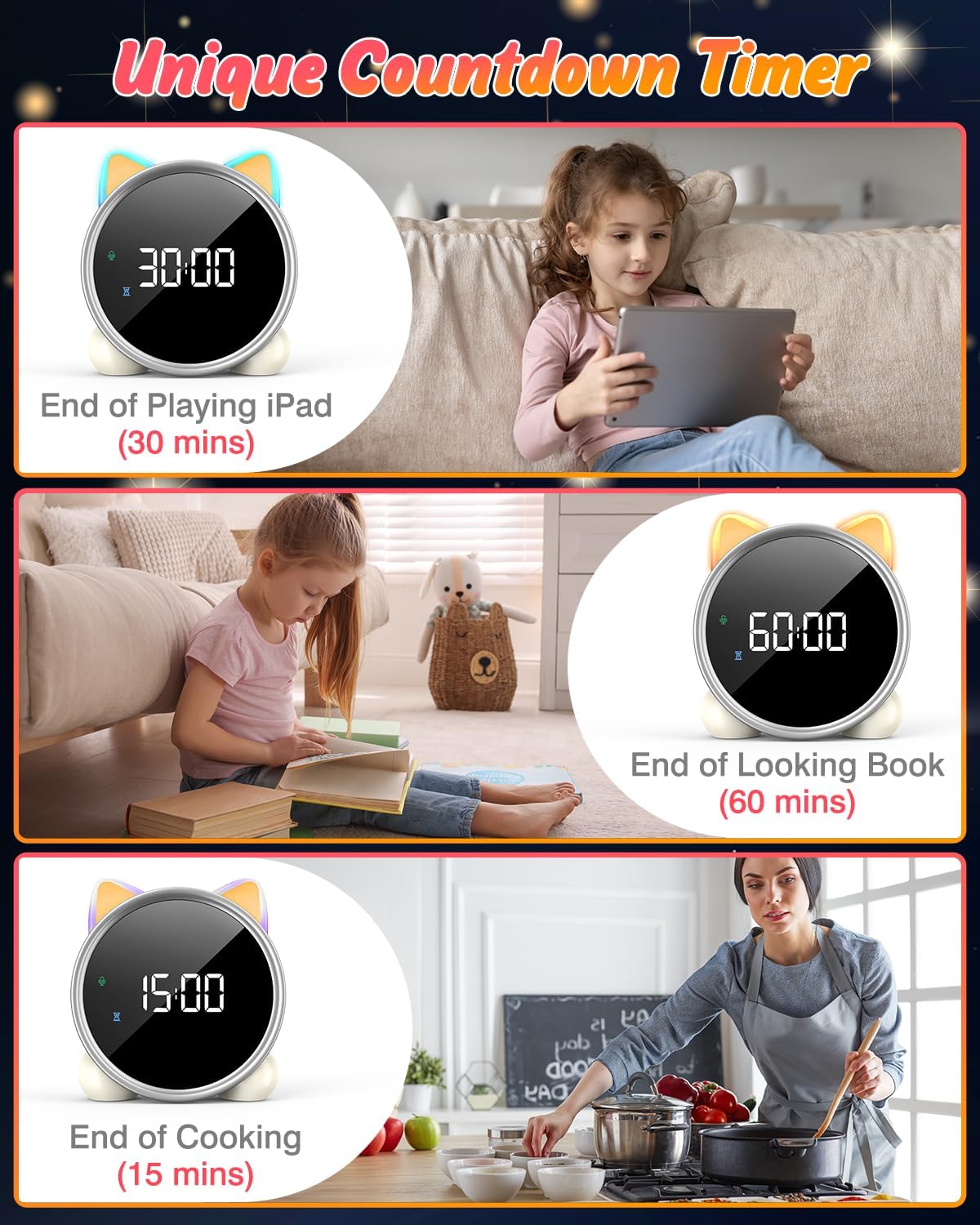
6. Uaireadair Cunntaidh Sìos
A unique countdown timer feature can be used for various activities.
- Useful for managing screen time, reading sessions, or cooking.
- Refer to the physical manual for instructions on setting the countdown timer.
Examples of the countdown timer in use for various activities.
7. Taisbeanadh teothachd
The alarm clock displays the ambient temperature and supports both Celsius and Fahrenheit units.
- Supports F/C temperature conversion.
- Refer to the physical manual for instructions on switching between units.
8. Screen Activation (Touch/Sound)
The screen can be activated by touch or sound and will automatically turn off after a period of inactivity to save power.
- Tap the device or make a sound to wake the screen.
- The screen will turn off after 20 seconds of no interaction.
Cumail suas
- Glanadh: Sguab an inneal le clò bog, tioram. Na cleachd innealan-glanaidh sgrìobach no fuasglaidhean.
- Stòradh: Bùth ann an àite fionnar, tioram nuair nach eilear ga chleachdadh airson amannan fada.
- Cùram Bataraidh: Gus beatha a’ bhataraidh a leudachadh, seachain a bhith ga leigeil às gu tur gu tric. Ath-lìon e nuair a nochdas comharra bataraidh ìosal.
Fuasgladh thrioblaidean
| Trioblaid | Adhbhar a dh’fhaodadh a bhith ann | Fuasgladh |
|---|---|---|
| Chan eil an sgrion a’ tionndadh air. | Bataraidh ìosal no tha an inneal dheth. | Charge the device using the USB-C cable. Tap the device or make a sound to activate the screen. |
| Bidh bataraidh a’ drèanadh gu sgiobalta. | Night light mode consumes more power. | It is recommended to keep the device plugged in when using night light mode for extended periods. Ensure the screen brightness is not set too high if battery life is a concern. |
| Difficulty setting time/alarms. | Incorrect button sequence or unfamiliarity with controls. | Refer to the "Operating Instructions" section and the detailed physical manual for precise button functions and sequences. |
| Screen remains on constantly. | Possible setting error or malfunction. | Ensure the screen auto-off feature is enabled (if applicable, check manual). If the issue persists, try a soft reset (if available, check manual) or contact customer support. |
Sònrachaidhean
- Brand: LEMNOI
- Àireamh Modail: SG7
- Dath: Ròs
- Meudan toraidh (L x W x H): 13.1 x 3.81 x 14.5 cm
- Stuth: Plastaig
- Feartan: Adjustable brightness, Snooze function
- Cuideam nì: 265 gram
- Seòrsa taisbeanaidh: Didseatach
- Stòr cumhachd: Battery Powered (Built-in 2000mAh Lithium Battery, USB-C charging)
- Seòrsa seòmar: Seòmar-cadail
- Cruth: Cat
- Cleachdadh a-staigh / a-muigh: A-staigh
Barantas agus Taic
For warranty information or technical support, please refer to the contact details provided with your purchase or visit the official LEMNOI weblàrach. Cùm dearbhadh ceannach airson tagraidhean barantais sam bith.
Ask a question about this manual
Ask about setup, troubleshooting, compatibility, parts, safety, or missing instructions. Manuals+ will review the question and use this page’s manual context to help answer it.