
Ro-ràdh
This manual provides detailed instructions for the setup, operation, and maintenance of your Zenwire USB-C Hub 10-in-1 Adapter. Please read this manual thoroughly before using the device to ensure optimal performance and longevity.

Image: The Zenwire USB-C Hub, a compact gray device, is shown connected to various cables and accessories, including HDMI, USB, Ethernet, and SD cards, illustrating its multi-functionality.
Bathar seachadview
The Zenwire USB-C Hub is a versatile 10-in-1 adapter designed to expand the connectivity of your USB-C enabled devices. It features a durable aluminum alloy shell for efficient heat dissipation.
Prìomh fheartan agus puirt:
- HDMI 2.1 Port: Supports resolutions up to 8K@30Hz or 4K@120Hz, with backward compatibility for lower resolutions.
- Taisbeanadh Port 1.4: Supports resolutions up to 8K@30Hz or 4K@120Hz, with backward compatibility for lower resolutions.
- Port Lìbhrigeadh Cumhachd USB-C (PD) 100W: Allows fast charging of your host device while using the hub, providing up to 100W power.
- 2x Port USB 3.0: Offers data transfer speeds up to 5 Gbps, 10 times faster than USB 2.0.
- Leughadair cairt SD: Supports SD cards up to 2TB.
- Leughadair Cairt MicroSD: Supports MicroSD cards up to 2TB.
- RJ-45 Gigabit Ethernet Port: Provides a stable wired internet connection with speeds up to 1000 Mbps.
- Jack claisneachd 3.5mm: Airson ceangal chluas-cinn, microfònan, no luchd-labhairt taobh a-muigh.
- USB-C 3.1 / Thunderbolt 3.0 Host Connection: Connects the hub to your laptop or compatible device.

Ìomhaigh: Mion-fhiosrachadh view of the Zenwire USB-C Hub, highlighting its 10 ports including 3.5mm audio, Type-C PD100W, DP1.6, HDMI2.1, Gigabit Ethernet, USB3.0 5Gbps, SD, and MicroSD slots.

Image: A close-up of the Zenwire USB-C Hub, emphasizing its aluminum alloy shell designed for effective heat dissipation, ensuring the device remains cool during operation.
Suidhich
- Ceangail ris an inneal aoigheachd: Plug the integrated USB-C cable of the Zenwire Hub into a compatible USB-C or Thunderbolt 3.0/4.0 port on your laptop, tablet, or smartphone. The hub is Plug & Play and typically requires no driver installation.
- Lìbhrigeadh Cumhachd (Roghainneil): If your host device requires charging or if you are connecting power-intensive peripherals, connect your original USB-C power adapter to the USB-C PD 100W port on the hub.
- Ceangail peripherals: Connect your desired devices (monitors, USB drives, Ethernet cable, SD/MicroSD cards, audio devices) to the corresponding ports on the hub.
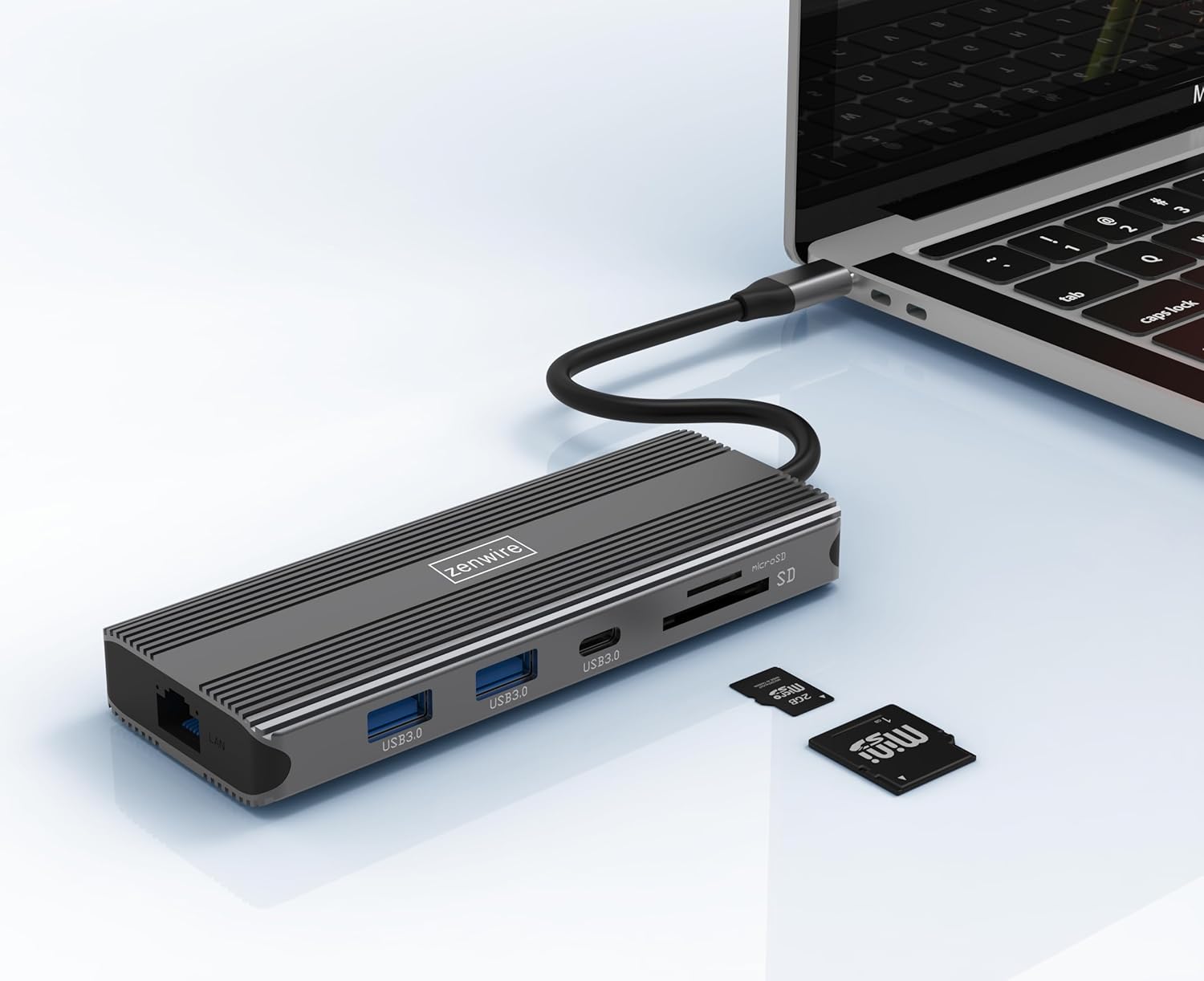
Image: The Zenwire USB-C Hub is shown connected to a laptop via its integrated USB-C cable, with SD and MicroSD cards placed nearby, illustrating a typical setup scenario.
Stiùireadh Obrachaidh
Ceangal Taisbeanaidh:
The hub supports connecting up to two external monitors simultaneously via its HDMI 2.1 and DisplayPort 1.4 interfaces. Both can display video in 4K@60Hz concurrently.
- Aon Sgrùdair: Connect your monitor to either the HDMI or DisplayPort.
- Dual Monitors: Connect one monitor to the HDMI port and another to the DisplayPort.

Image: A laptop is displayed connected to two larger external monitors, demonstrating the multi-display capability of the Zenwire USB-C Hub.
Multi-Display Modes (MacOS vs. Windows):
The behavior of multiple external displays can vary between operating systems.
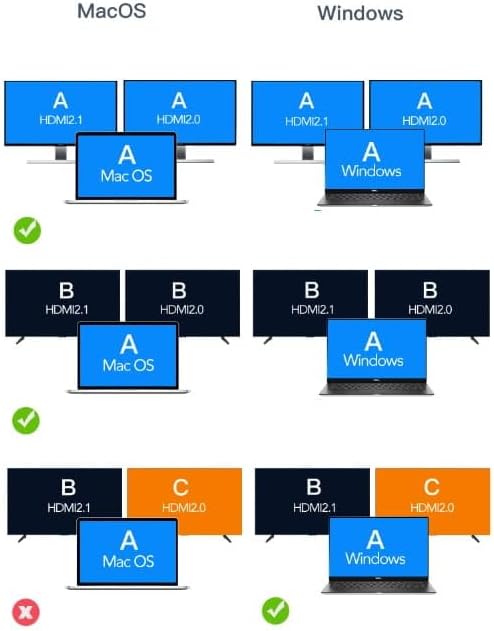
Image: A diagram illustrating different multi-display configurations for MacOS and Windows. It shows that MacOS typically supports extended desktop across two external monitors (A, B) and the laptop screen (A), while Windows can support extended desktop across three screens (A, B, C) or mirrored displays.
- MacOS: Typically supports extended desktop across two external monitors (A, B) and the laptop screen (A). Mirroring is also supported.
- Windows: Supports extended desktop across three screens (A, B, C) or mirrored displays, offering more flexibility for multi-monitor setups.
HDMI 2.1 and DisplayPort 1.4 Advanced Features:
These ports offer higher refresh rates and advanced features for an enhanced visual experience:
- Astaran Gluasaid Àrd: Up to 48 Gbps for HDMI 2.1, ensuring high data throughput.
- eARC (Sianal Tilleadh Fuaime Leasaichte): For higher audio quality and support for object-based audio formats like Dolby Atmos and DTS-X.
- VRR (ìre ùrachaidh caochlaideach): Useful for gaming, where refresh rates are not constant.
- ALLM (modh latency fèin-ghluasadach): Automatically detects content like games and switches the device to a low-latency mode.
- QMS (Quick Media Switching): The image on the screen changes immediately when switching between content.
- QFT (Quick Frame Transport): Reduces input lag further.
- HDR fiùghantach: Adjusts the image parameters during content transmission for higher quality visuals. Supports HDR 10 and 10+.
Ceangal claisneachd:
The 3.5mm audio jack allows connection of various audio devices:
- Micreofon
- Fòn-cluaise
- Headphones with integrated microphone
- Luchd-labhairt bhon taobh a-muigh
Cumail suas
- Glanadh: Cleachd clò bog, tioram airson an t-ionad a ghlanadh. Seachain innealan-glanaidh leaghaidh no stuthan sgrìobach.
- Stòradh: Stòraich am mòr-ionad ann an àite fionnar, tioram air falbh bho sholas dìreach na grèine agus teòthachd anabarrach.
- Làimhseachadh: Seachain an inneal a leigeil sìos no buaidh làidir a thoirt air.
- Sgaoileadh teas: The aluminum alloy shell is designed for effective heat dissipation. Ensure the hub is placed in a well-ventilated area during prolonged use.
Fuasgladh thrioblaidean
- Gun toradh taisbeanaidh:
- Dèan cinnteach gu bheil càball USB-C bhon mhòr-ionad ceangailte gu tèarainte ris an inneal aoigheachd agad.
- Verify that the HDMI/DisplayPort cable is firmly connected to both the hub and the monitor.
- Check your host device's display settings to ensure the external monitor is detected and configured correctly (e.g., extended, mirrored).
- Try a different HDMI/DisplayPort cable or monitor to rule out cable/monitor issues.
- Gun lìbhrigeadh cumhachd:
- Dèan cinnteach gu bheil an inneal-atharrachaidh cumhachd USB-C agad ceangailte ri port PD an ionaid agus gu bheil e ag obair ceart.
- Dearbhaich gu bheil an inneal aoigheachd agad a’ toirt taic do Lìbhrigeadh Cumhachd USB-C.
- Innealan USB nach deach aithneachadh:
- Reconnect the USB device to a different USB 3.0 port on the hub.
- Ensure the USB device is functioning correctly by connecting it directly to your host device.
- Some high-power USB devices may require external power if the hub's PD port is not utilized.
- Cùisean Ceangail Ethernet:
- Thoir sùil a bheil an càball Ethernet ceangailte gu tèarainte ris an ionad agus ris an router/modem agad.
- Dearbhaich roghainnean an lìonra air an inneal aoigheachd agad.
- Ensure your router/modem is working correctly.
- Cha deach cairt SD/MicroSD a lorg:
- Dèan cinnteach gu bheil a’ chairt air a cur a-steach gu tur san t-slot cheart.
- Check if the card is formatted correctly and readable by your operating system.
- Feuch cairt eadar-dhealaichte gus nach bi duilgheadasan cairt ann.
Sònrachaidhean
| Brand | Zenwire |
| Modail | Zenwire USB-C Hub |
| Ceangalachd | USB-C 3.1 / Thunderbolt 3.0 (Host) |
| Puirt |
|
| Luas gluasad dàta | USB 3.0: 5 Gbps; Ethernet: 1000 Mbps |
| Lìbhrigeadh cumhachd | Suas gu 100W |
| Stuth | Shell alùmanum alùmanum |
| Meudan (L x W x H) | 118 x 48 x 15 mm |
| Cuideam | 109 g |
| Fad Càball | Mu 15 cm |
| Co-fhreagarrachd siostam-obrachaidh | Windows 11/10/8/7, Apple macOS, Linux, Android, iPad Pro iOS (USB-C models) |

Ìomhaigh: Ceàrnach view of the Zenwire USB-C Hub, showcasing its compact design and the integrated USB-C host cable.
Barantas agus Taic
Zenwire products are designed for reliability and performance. For warranty information and technical support, please refer to the official Zenwire weblàrach no cuir fios chun neach-reic agad. Cùm do chuidhteas ceannach airson tagraidhean barantais.
For the latest software updates or driver information (if applicable), please visit the Zenwire support page. This device is designed to be Plug & Play, generally not requiring additional drivers.