
Ro-ràdh
The Acoustic Research Portable Outdoor Wireless Speaker with LED Flickering Flame Light is designed to provide high-quality audio and ambient lighting for various indoor and outdoor settings. This rechargeable speaker features multiple light modes, including a realistic flickering flame, and is built with an IPX5 water-resistant rating, making it suitable for outdoor use. It also includes built-in nature sounds for relaxation and can be stereo-paired with another compatible AR speaker for an enhanced audio experience.
Susbaint pacaid
- Acoustic Research Portable Outdoor Wireless Speaker (Model: AWSF9R)
- Càball cosgais USB
- Leabhar-làimhe cleachdaiche
Feartan toraidh
- 7 modhan solais: Soft White, Bright White, Flicker Flame, Soft Glow, Candlelight, Aurora. Separate controls for light and speaker.
- Ùine cluiche leudaichte: Suas ri 12 uair de chluich claisneachd air aon chosgais.
- Seasmhachd uisge: IPX5 rated for protection against splashing water.
- Fuaimean nàdair: Includes Forest, Waves, Running Stream, and Rain.
- Dealbhadh so-ghiùlain: Attractive lantern style with a handle for easy carrying or hanging.
- Ceangal Bluetooth: Sruthadh claisneachd gun uèir gun fhiosta bho innealan co-chòrdail.
- Càradh Stereo: Connect two AWSF9R speakers for true wireless stereo sound (second speaker sold separately).
Smachdan agus comharran

Figear 1: Speaker Control Panel. This image shows a close-up of the speaker's control buttons, including power, volume, track skip, light mode, and nature sound buttons, along with the DC charging port.
| Putan / Comharra | Gnìomh |
|---|---|
| Putan Cumhachd (⏻) | Press and hold to power the speaker ON or OFF. Press briefly to Play/Pause music. |
| Volume Down / An t-slighe roimhe (− / ⏮) | Brùth goirid gus an fhuaim a lùghdachadh. Brùth is cum sìos gus a dhol chun an trac roimhe. |
| Volume Up / An ath Rian (+ / ⏭) | Press briefly to increase volume. Press and hold to go to the next track. |
| Putan Modh Solais (💡) | Press to cycle through 7 light modes: Soft White, Bright White, Flicker Flame, Soft Glow, Candlelight, Aurora, and OFF. |
| Putan fuaim nàdair (♫) | Press to cycle through 4 nature sounds: Forest, Waves, Running Stream, Rain, and OFF. |
| Port cosgais DC | Connect the USB charging cable here to recharge the speaker's battery. |
| Comharra LED | Indicates charging status and Bluetooth pairing status. |
Suidhich
A luchdadh a-nuas an neach-labhairt
- Locate the DC charging port on the speaker's control panel.
- Connect the small end of the provided USB charging cable to the speaker's DC port.
- Ceangail ceann nas motha a’ chàball USB ri inneal-atharrachaidh cumhachd USB (nach eil air a ghabhail a-steach) no ri port USB coimpiutair.
- The LED indicator will illuminate to show charging status. Allow approximately 3-4 hours for a full charge. The indicator will change or turn off when charging is complete.
Thoir an aire: Fully charge the speaker before first use to maximize battery life.
Stiùireadh Obrachaidh
Cumhachd air / dheth
- To power ON, press and hold the ⏻ Power button for 2-3 seconds until you hear an audible prompt.
- To power OFF, press and hold the ⏻ Power button for 2-3 seconds until you hear an audible prompt.
Paidhir Bluetooth
- Ensure the speaker is powered ON and within 10 meters (33 feet) of your Bluetooth device (smartphone, tablet, etc.).
- The speaker will automatically enter Bluetooth pairing mode when powered on for the first time or if no device is connected. The LED indicator will flash, indicating it's ready to pair.
- Air an inneal Bluetooth agad, rach gu na roghainnean Bluetooth agus cuir Bluetooth an gnìomh.
- Lorg airson available devices and select "AR Speaker" (or similar name) from the list.
- Once paired, the LED indicator will stop flashing and remain solid, and you will hear a confirmation sound.
- Faodaidh tu a-nis ceòl a chluich bhon inneal agad tron neach-labhairt.
Thoir an aire: Feuchaidh an neach-labhairt gu fèin-ghluasadach ri ath-cheangal ris an inneal mu dheireadh a chaidh a chàradh nuair a thèid a thionndaidh air.
Controlling Light Modes
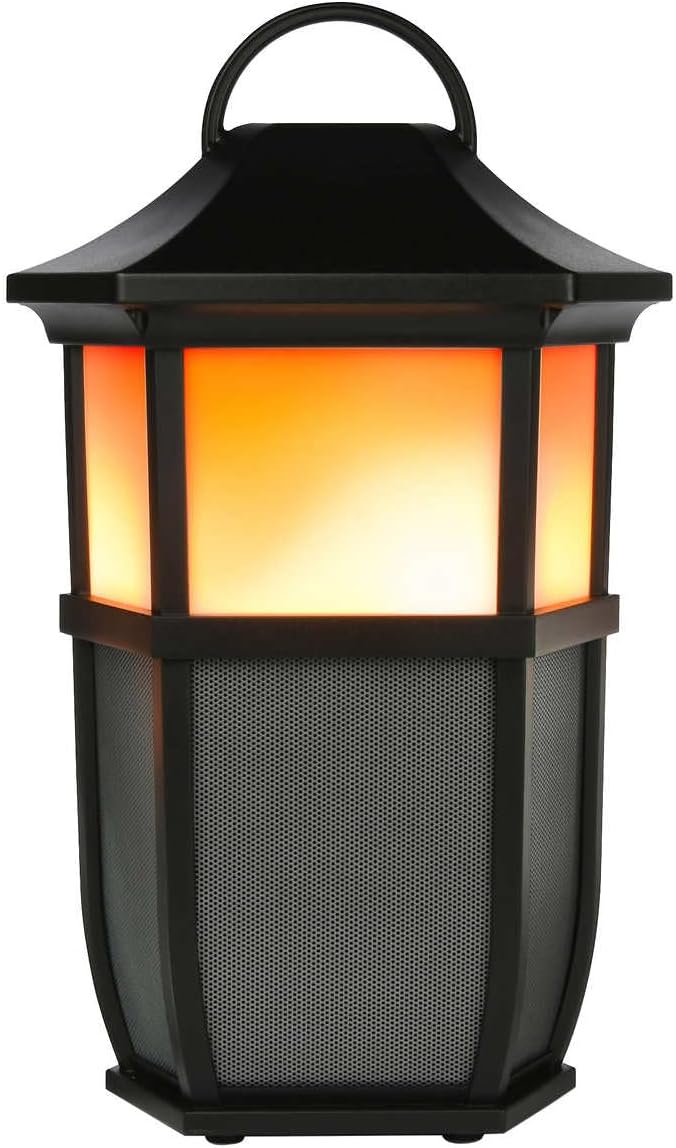

Figear 2: Speaker Light Modes. The left image shows the speaker with a warm, flickering flame light, while the right image shows it with a bright white light, demonstrating two of the available light modes.
Brùth an 💡 Light Mode button repeatedly to cycle through the 7 available light modes:
- Lasair Flicker
- Geal bog
- Geal geal
- Glow bog
- Solas coinnle
- Aurora
- Solas OFF
Playing Nature Sounds
Brùth an ♫ Nature Sound button repeatedly to cycle through the 4 built-in nature sounds:
- Coille
- Tonnan
- Running Stream
- Uisge
- Nature Sound OFF
Paidhir Stereo gun Uèir (TWS) (Roghainneil)
To achieve a true stereo sound experience, you can pair two Acoustic Research AWSF9R speakers together. (Second speaker sold separately).
- Ensure both speakers are powered ON and not connected to any Bluetooth device.
- Air aon neach-labhairt (is e seo am prìomh neach-labhairt agad), brùth is cum sìos am putan ⏻ Power button for 5 seconds until you hear a distinct pairing tone.
- The primary speaker will now search for the second speaker.
- Once connected, you will hear a confirmation tone, and the LED indicators on both speakers will change to indicate a successful TWS connection.
- Now, connect your Bluetooth device to the primary speaker as described in the "Bluetooth Pairing" section. Audio will play in stereo through both speakers.
Thoir an aire: TWS pairing only works with two identical AWSF9R speakers.
Cumail suas
- Glanadh: Cleachd clò bog, tioram gus taobh a-muigh an neach-labhairt a ghlanadh. Na cleachd innealan-glanaidh sgrìobach no fuasglaidhean.
- Taisbeanadh uisge: While IPX5 water-resistant, do not submerge the speaker in water. Ensure the charging port cover is securely closed when exposed to water.
- Stòradh: Stòraich an neach-labhairt ann an àite fionnar, tioram air falbh bho sholas dìreach na grèine agus teòthachd anabarrach nuair nach eilear ga chleachdadh airson ùine mhòr.
- Cùram Bataraidh: Gus beatha a’ bhataraidh a leudachadh, cuir làn-chasaid air an neach-labhairt co-dhiù aon uair gach trì mìosan, eadhon ged nach eilear ga chleachdadh gu cunbhalach.
Fuasgladh thrioblaidean
| Trioblaid | Fuasgladh comasach |
|---|---|
| Chan eil an neach-labhairt a’ dol air. | Ensure the battery is charged. Connect the speaker to a power source using the USB cable and allow it to charge for at least 30 minutes before attempting to power on again. |
| Cha ghabh paidhir le inneal Bluetooth. |
|
| Gun fhuaim no meud ìosal. |
|
| Light modes are not working. | Press the Light Mode button repeatedly to cycle through all modes. Ensure the speaker has sufficient battery charge. |
| Nature sounds are not working. | Press the Nature Sound button repeatedly to cycle through all sounds. |
Sònrachaidhean

Figear 3: Product Dimensions. This image illustrates the height (9.76 inches), width (7.2 inches), and depth (6.54 inches) of the speaker.
| Feart | Mion-fhiosrachadh |
|---|---|
| Ainm Modail | AWSF9R |
| Brand | Rannsachadh Fuaimneach |
| Seòrsa neach-labhairt | A-muigh, So-ghiùlain |
| Ceangalachd | Bluetooth (gun uèir) |
| Raon Bluetooth | Suas gu 10 meatairean (33 troighean) |
| Frith-aghaidh uisge | IPX5 (an aghaidh uisge) |
| Toradh cumhachd | 30 watt |
| Modh Toraidh Fuaim | Stereo (le paidhir TWS) |
| Beatha bataraidh | Suas gu 12 uairean |
| Stòr cumhachd | Cumhachd bataraidh |
| Meudan toraidh (D x W x H) | 6.54" x 7.2" x 9.76" |
| Cuideam nì | 5 Punnd |
| UPC | 044476151811 |
Barantas agus Taic
This Acoustic Research product comes with a Barantas cuibhrichte. For detailed warranty information, technical support, or service inquiries, please refer to the warranty card included with your product or visit the official Acoustic Research weblàrach. Cùm dearbhadh ceannach airson tagraidhean barantais.
For further assistance, you may contact Acoustic Research customer support through their official channels.