
Ro-ràdh
This manual provides essential instructions for the installation, operation, and maintenance of your Fermax Sup Milo Digital Intercom System. Please read this manual thoroughly before installation and use to ensure proper function and safety. Keep this manual for future reference.
The Fermax Sup Milo Digital Intercom System is designed to provide clear communication and enhanced security for residential and commercial premises. It integrates advanced technology with a robust design to offer reliable access control and communication solutions.
Fiosrachadh Sàbhailteachd
Always follow basic safety precautions to reduce the risk of fire, electric shock, and injury to persons. This product should only be installed and serviced by qualified personnel.
- Disconnect cumhachd mus stàladh no seirbheiseachadh.
- Na nochd an aonad gu uisge no taiseachd.
- Dèan cinnteach gu bheil a h-uile ceangal uèiridh tèarainte agus gu bheil iad a’ gèilleadh ri còdan dealain ionadail.
- Do not attempt to repair the unit yourself. Refer all servicing to qualified service personnel.
Susbaint pacaid
Dearbhaich gu bheil na pàirtean uile an làthair mus tòisich an stàladh. Mar as trice bidh am pasgan a’ gabhail a-steach:
- Fermax Sup Milo Digital Intercom Unit (Aluminum Plate)
- Stàladh bathar-cruaidh
- Connection cables (may vary by kit)
- Leabhar-làimhe cleachdaiche (an sgrìobhainn seo)
Note: Specific components may vary based on the purchased kit.
Stàladh agus stàladh
This section outlines the general steps for installing the Fermax Sup Milo Digital Intercom System. Professional installation is recommended.
1. Ullachadh Làraich
- Choose a suitable mounting location, typically near an entrance, at an accessible height.
- Dèan cinnteach gu bheil an uachdar còmhnard agus seasmhach.
- Verify access to necessary power and communication wiring.
2. A' cur suas an Aonaid
- Carefully remove the front panel of the intercom unit to access mounting holes.
- Position the unit and mark the drilling points on the wall.
- Drile tuill agus cuir acair balla iomchaidh a-steach ma tha sin riatanach.
- Secure the intercom unit to the wall using the provided mounting screws.
3. Ceangalaichean Uèir
Refer to the wiring diagram specific to your system configuration. General connections include:
- Solar cumhachd: Connect to a stable 100V power source. Ensure correct polarity.
- Communication Bus: Connect the digital bus lines to the indoor units and central control unit.
- Sgaoileadh Doras: Connect the door release mechanism (e.g., electric strike) to the designated terminals.
- Cuir-a-steach/Toraidhean Taice: Connect any additional devices such as external cameras or sensors as required.
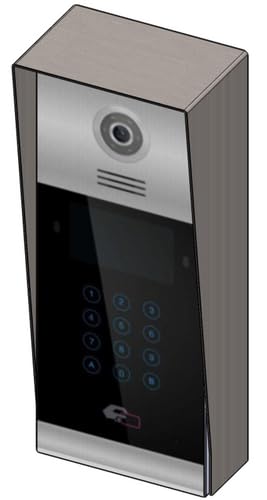 Dealbh 1: Aghaidh view of the Fermax Sup Milo Digital Intercom System, showing the aluminum plate and digital keypad. This image illustrates the exterior design of the main unit.
4. Cumhachdachadh is Rèiteachadh Tùsail
- Cho luath ‘s a bhios a h-uile uèirleadh deiseil agus tèarainte, ath-thòisich an cumhachd don t-siostam.
- The unit will perform a self-test. Observe any indicator lights or sounds.
- Follow the system's programming guide (usually provided separately or accessible via a master unit) to configure apartment numbers, access codes, and other settings.
Stiùireadh Obrachaidh
Making a Call from the Outdoor Panel
- To call an apartment: Enter the apartment number using the digital keypad.
- Press the "Call" button (often represented by a bell icon or similar).
- The indoor unit will ring. Once answered, communication can begin.
Receiving a Call and Opening the Door (Indoor Unit)
- When the indoor unit rings, press the "Answer" button to establish communication with the visitor.
- To open the door, press the "Door Release" button on your indoor unit.
- Fosglaidh an doras airson ùine ghoirid.
Using Access Codes
If configured, authorized users can enter a pre-programmed access code on the outdoor digital keypad to unlock the door without needing to call an indoor unit.
- Enter your personal access code using the digital keypad.
- Press the "Enter" or "Door Release" button.
- Fosglaidh an doras.
Cumail suas
Regular maintenance ensures the longevity and optimal performance of your Fermax intercom system.
Glanadh
- Glan taobh a-muigh an aonaid le bog, damp aodach.
- Do not use abrasive cleaners, solvents, or chemical sprays, as these can damage the finish and electronic components.
- Dèan cinnteach nach tèid leaghan a-steach do fhosglaidhean an aonaid.
Sgrùdaidhean
- Periodically check for any visible damage to the unit or wiring.
- Ensure all mounting screws are tight.
- Test the communication and door release functions regularly.
Ùrachaidhean bathar-bog
If applicable, consult your installer or Fermax support for information on firmware updates that may improve performance or add new features.
Fuasgladh thrioblaidean
Tha an earrann seo a’ dèiligeadh ri cùisean cumanta a dh’ fhaodadh tu a thighinn tarsainn orra. Airson duilgheadasan nas iom-fhillte, cuir fios gu taic theicnigeach.
| Trioblaid | Adhbhar a dh’fhaodadh a bhith ann | Fuasgladh |
|---|---|---|
| No communication with indoor unit. |
|
|
| Door release not working. |
|
|
| Meur-chlàr gun fhreagairt. |
|
|
Sònrachaidhean
Technical specifications for the Fermax Sup Milo Digital Intercom System (Model: 8424299951713).
- Modail: Fermax Sup Milo Digital Intercom System
- Àireamh Pàirt: 8424299951713
- Dèanadair: Fermax
- Meudan (Pasgan): Mu 0.1 x 0.1 x 0.1 cm
- Cuideam (Aonad): 108 gram
- Stuth: Metal, Plastic, Polycarbonate (Aluminum Plate)
- Stòr cumhachd: External Power Supply (100V)
- Voltage: 100V
- Dètage: 100W
- Bataraidhean a dhìth: Chan eil
- Dath: Multicolored (referring to internal components or subtle design elements, main plate is aluminum)
Fiosrachadh Barantais
Fermax products are manufactured to high-quality standards. For specific warranty terms and conditions, please refer to the warranty card included with your product or visit the official Fermax weblàrach. Cùm dearbhadh ceannach airson tagraidhean barantais.
Typically, warranty covers manufacturing defects for a specified period from the date of purchase. Damage due to improper installation, misuse, or unauthorized repairs is generally not covered.
Taic Luchd-cleachdaidh
If you require technical assistance, have questions about your product, or need to report a problem, please contact your local Fermax distributor or visit the official Fermax weblàrach-lìn airson goireasan taic.
Weblàrach: www.fermax.com
Feuch an dèan thu cinnteach gu bheil an àireamh modail agad (8424299951713) agus mion-fhiosrachadh a’ cheannaich deiseil nuair a chuireas tu fios chun taic.