
1. Ro-ràdh
Thank you for choosing the ARROWMAX SES PRO Electric Precision Screwdriver. This cordless tool is designed for precision tasks, featuring smart motion control and a comprehensive set of 34 magnetic bits. It is ideal for electronics, laptops, glasses, and other delicate applications. This manual provides essential information for safe operation, setup, maintenance, and troubleshooting to ensure optimal performance and longevity of your device.
2. Fiosrachadh Sàbhailteachd
Please read all safety warnings and instructions carefully before using this product. Failure to follow these instructions may result in electric shock, fire, and/or serious injury.
- Cùm an raon obrach glan agus air a dheagh shoillseachadh. Bidh raointean cluttered no dorcha a’ toirt cuireadh do thubaistean.
- Na obraich innealan cumhachd ann an àileachdan spreadhaidh, leithid làthaireachd lioftaichean lasanta, gasaichean no duslach. Bidh innealan cumhachd a’ cruthachadh sradagan a dh’ fhaodadh an duslach no an ceò a lasadh.
- Cùm clann agus luchd-amhairc air falbh fhad ‘s a bhios tu ag obair inneal cumhachd. Faodaidh buaireadh toirt ort smachd a chall.
- Seachain tòiseachadh gun fhiosta. Dèan cinnteach gu bheil an suidse dheth mus ceangail thu ris a’ phacaid bataraidh, mus tog thu no mus giùlain thu an inneal.
- Na gabh thairis air. Cùm bunait agus cothromachadh ceart fad na h-ùine. Leigidh seo le smachd nas fheàrr air an inneal cumhachd ann an suidheachaidhean ris nach robh dùil.
- Aodach ceart. Na cleachd aodach sgaoilte no seudaireachd. Cùm do fhalt agus d’ aodach air falbh bho phàirtean gluasadach. Faodar aodach sgaoilte, seudaireachd, no falt fada a ghlacadh ann am pàirtean gluasadach.
- Cleachd uidheamachd dìon pearsanta. Cleachd dìon sùla an-còmhnaidh. Lùghdaichidh uidheamachd dìon leithid masg duslach, brògan sàbhailteachd neo-shleamhnach, ad cruaidh, no dìon claisneachd a thèid a chleachdadh airson suidheachaidhean iomchaidh dochann pearsanta.
- Glèidh innealan cumhachd leisg a-mach à ruigsinneachd chloinne agus na leig le daoine air nach eil eòlach air an inneal cumhachd no an stiùireadh seo an inneal cumhachd obrachadh.
- Cumail suas innealan cumhachd. Thoir sùil airson mì-thaobhadh no ceangal de phàirtean gluasadach, briseadh phàirtean agus suidheachadh sam bith eile a dh’ fhaodadh buaidh a thoirt air gnìomhachd an inneil cumhachd. Ma thèid a mhilleadh, dèan càradh air an inneal cumhachd mus tèid a chleachdadh.
- Cleachd an inneal cumhachd, sgeadachadh agus pìosan innealan msaa a rèir an stiùiridh seo, a’ toirt aire do na suidheachaidhean obrach agus an obair a tha ri dhèanamh. Dh’ fhaodadh cleachdadh an inneal cumhachd airson obrachaidhean eadar-dhealaichte bhon fheadhainn a bhathar an dùil leantainn gu suidheachadh cunnartach.
- Ath-phàigheadh a-mhàin leis a 'charger a dh' ainmich an neach-dèanamh. Faodaidh charger a tha freagarrach airson aon sheòrsa de phasgan bataraidh cunnart teine a chruthachadh nuair a thèid a chleachdadh le pasgan bataraidh eile.
- Na cleachd an inneal mura tionndaidh an suidse air is dheth. Tha inneal cumhachd sam bith nach gabh smachd a chumail air leis an suidse cunnartach agus feumar a chàradh.
- Disconnect a ’phacaid bataraidh bhon inneal cumhachd mus dèan thu atharrachaidhean sam bith, ag atharrachadh accessories, no a’ stòradh innealan cumhachd. Bidh ceumannan sàbhailteachd dìon mar sin a ’lughdachadh cunnart tòiseachadh air an inneal cumhachd gun fhiosta.
3. Pasgan-susbaint
The ARROWMAX SES PRO Electric Precision Screwdriver package typically includes the following items:
- 1 x ARROWMAX SES PRO Electric Precision Screwdriver
- 1 x Magnetic Storage Case
- 34 x Magnetic Precision Bits (S2 Steel, 4mm)
- 1 x USB-A gu Càball Cìsean USB-C

Image: The ARROWMAX SES PRO Electric Precision Screwdriver, its magnetic bit case, and the included 34 precision bits.
4. Toradh thallview agus Co-phàirtean
Familiarize yourself with the main components of your ARROWMAX SES PRO screwdriver:

Image: Labeled diagram of the ARROWMAX SES PRO screwdriver's key components.
- Port cosgais Type-C: Located at the top for recharging the internal battery.
- Taisbeanadh Inbhe LED: An OLED screen showing battery level, torque setting, and operational status.
- Putan Cumhachd: Used to turn the device on/off and adjust torque settings.
- Corp Alùmanum Alloy: Togail làidir agus aotrom.
- Solais LED: A’ soillseachadh an àite-obrach airson faicsinneachd nas fheàrr.
- Bit Installation Port: Where precision bits are inserted.
5. Suidhich
5.1 A’ cur cosgais air an sgriùdair
- Locate the USB-C charging port at the top of the screwdriver.
- Connect the provided USB-A to USB-C charging cable to the screwdriver and a compatible USB-A power adapter (not included).
- The LED Status Display will indicate the charging progress. A full charge allows for tightening approximately 900 screws.
- Nota Cudromach: This electric screwdriver only supports USB-A to USB-C charging and is not compatible with USB-C PD (Power Delivery) chargers.

Ìomhaigh: Tharview of charging port, battery, torque adjustment, and OLED display.
5.2 Installing Precision Bits
- Select the appropriate precision bit from the magnetic storage case. The case features a pop-up design for easy access.
- Insert the bit firmly into the Bit Installation Port at the tip of the screwdriver. The magnetic holder will secure the bit in place.
- To remove a bit, simply pull it out.
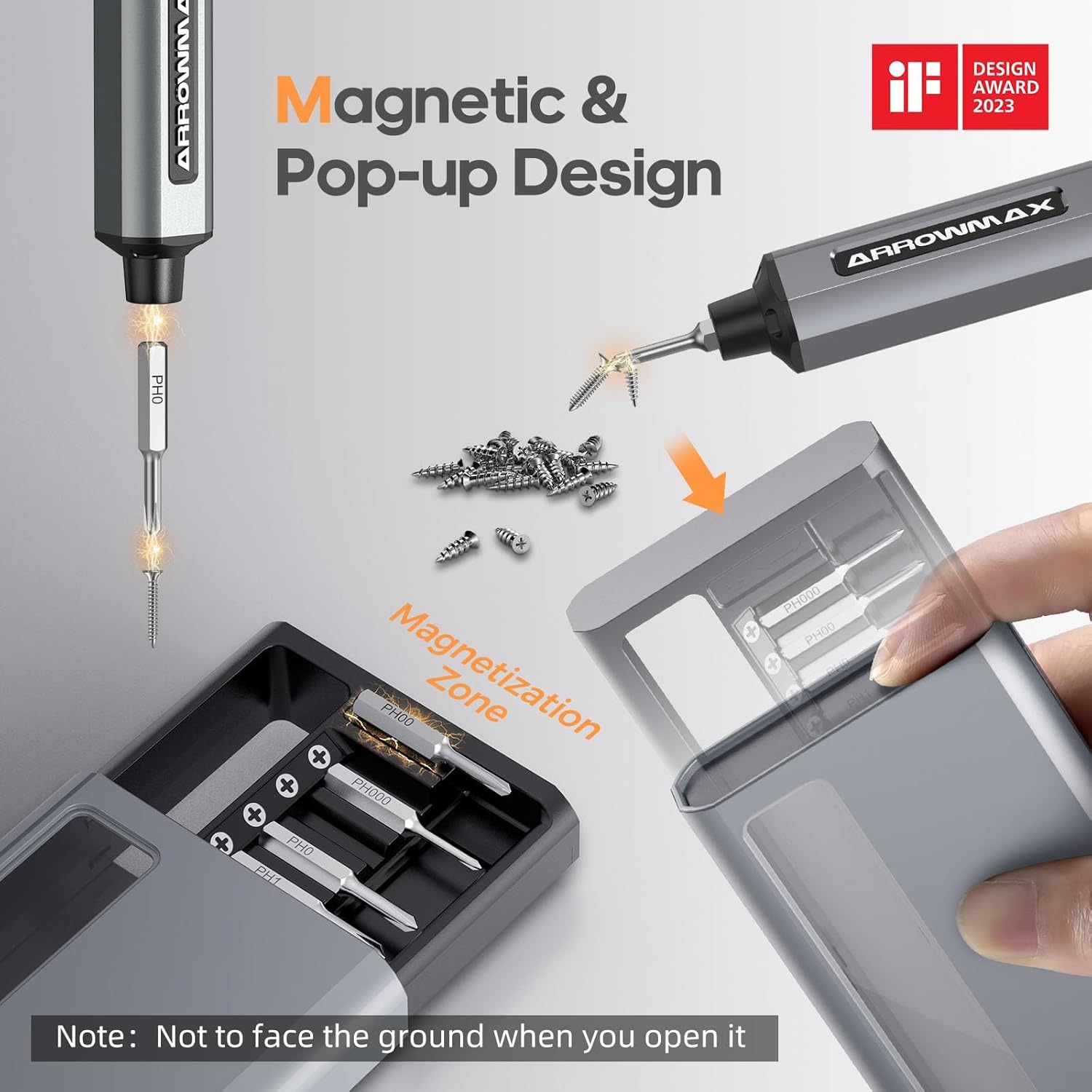
Image: Magnetic pop-up bit case design and bit magnetization zone.
6. Stiùireadh Obrachaidh
6.1 A’ cur cumhachd air/dheth
Press and hold the Power Button for a few seconds to turn the screwdriver on or off. The OLED screen will illuminate upon activation.
6.2 Atharrachadh Roghainnean an Torque
The SES PRO offers 5 adjustable torque levels, including an auto-sensing mode, to suit various tasks. The electric torque ranges from 0.049 N.m to 0.30-0.35 N.m, with a manual torque of 3 N.m.
- With the screwdriver powered on, press the Power Button three times continuously to cycle through the torque settings.
- The OLED screen will display the current torque level (e.g., 1, 2, 3, 4, A for Auto-Sensing).
- Select a lower torque for delicate items like glasses or small electronics, and higher torque for more robust applications.
- For screws that are too tight for the electric motor, the screwdriver can be used in manual mode by applying direct force.
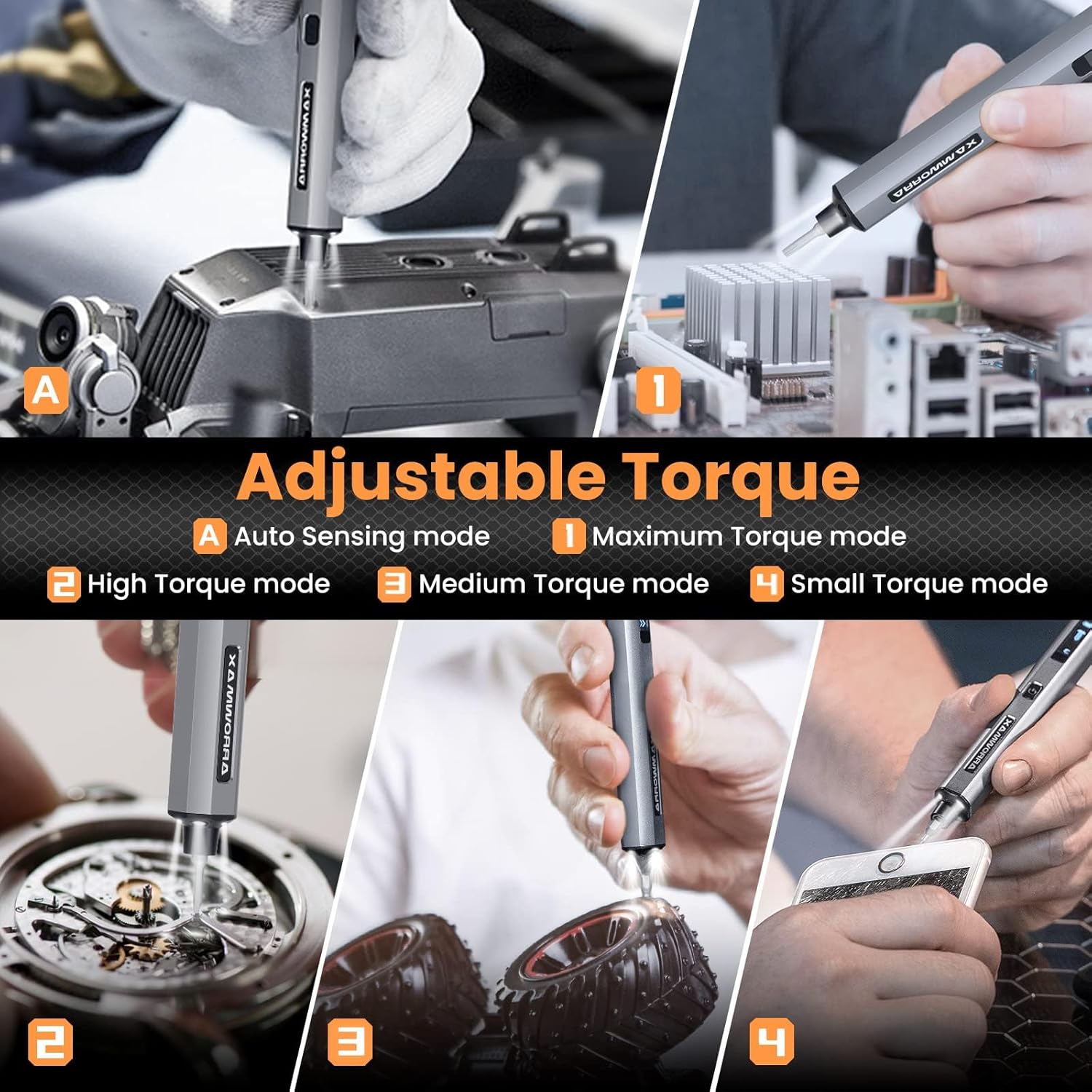
Image: Adjustable torque settings for various applications.
6.3 Body Sensory Dual-Mode (Forward/Reverse)
The SES PRO features a body sensory dual-mode for intuitive control of rotation direction.
- To drive a screw in (tighten), gently rotate your wrist in a clockwise direction while holding the screwdriver.
- To remove a screw (loosen), gently rotate your wrist in a counter-clockwise direction.
- The screwdriver's internal gyroscope detects your wrist movement and activates the motor accordingly.
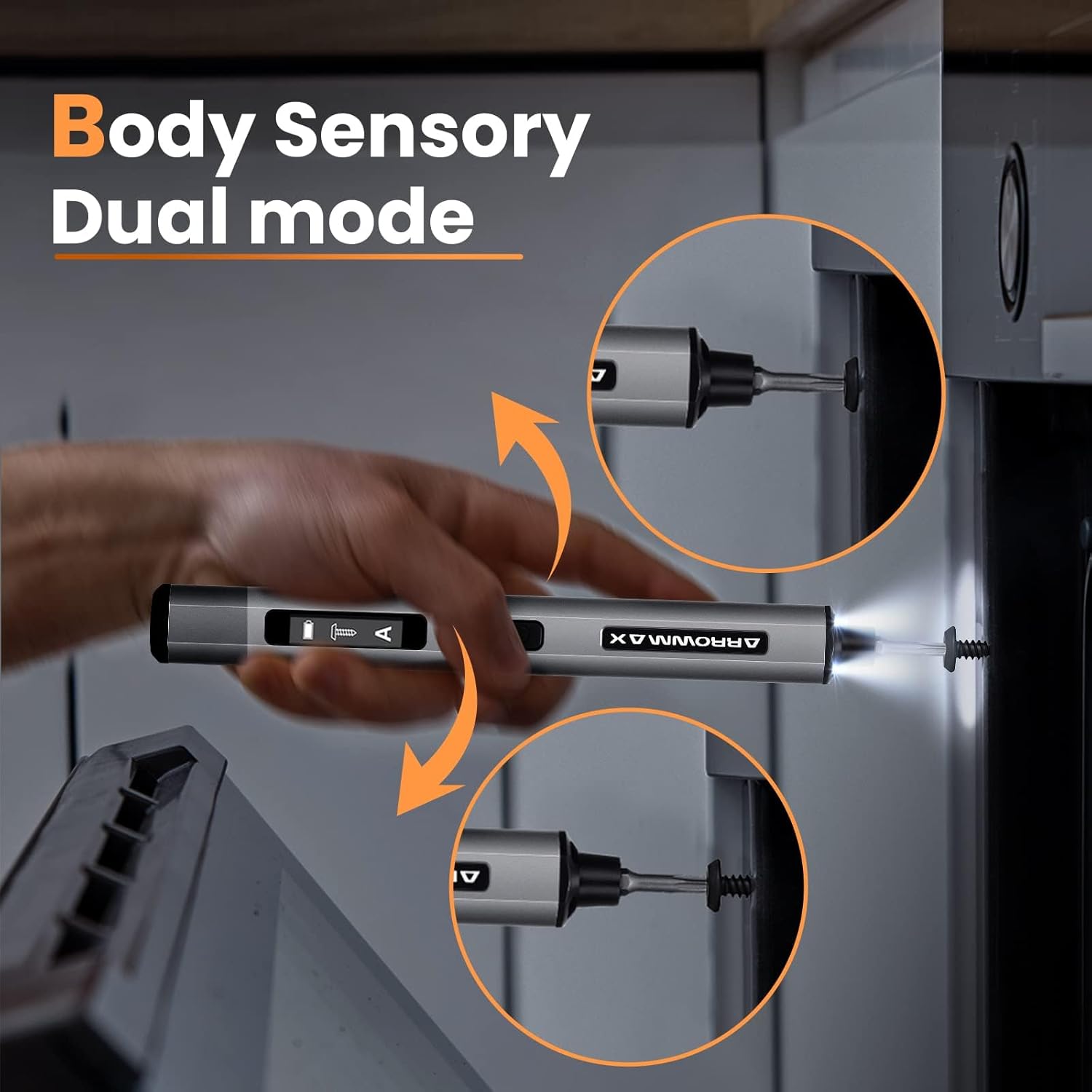
Image: Body sensory dual-mode in action for forward and reverse operation.
6.4 LED Work Lights
The integrated LED lights at the tip of the screwdriver automatically illuminate when the motor is active, providing clear visibility of your work area.
7. Cumail suas
7.1 Glanadh
- Wipe the screwdriver body with a soft, dry cloth. Do not use abrasive cleaners or solvents.
- Ensure the bit installation port is free of debris.
7.2 Cùram Bataraidh
- Gus beatha bataraidh a leudachadh, seachain a bhith ga leigeil ma sgaoil gu tur gu tric.
- Store the screwdriver in a cool, dry place when not in use.
- Ath-luchdaich am bataraidh bho àm gu àm ma thèid a stòradh airson ùine mhòr gus casg a chuir air sgaoileadh domhainn.

Image: The SES PRO's long-lasting battery capacity.
7.3 Bit Care
- Keep the precision bits clean and free of rust.
- Store bits securely in the magnetic case to prevent loss and damage.
8. A ’dèanamh trioblaid
If you encounter issues with your ARROWMAX SES PRO screwdriver, refer to the following common problems and solutions:
| Trioblaid | Adhbhar a dh’fhaodadh a bhith ann | Fuasgladh |
|---|---|---|
| Screwdriver does not turn on or respond. | Bataraidh ìosal; tha an inneal dheth. | Charge the screwdriver using the provided USB-A to USB-C cable. Ensure the power button is pressed to turn it on. |
| Chan eil an sgriùdair a’ cur cosgais. | Incorrect charger type; faulty cable/adapter. | Ensure you are using a USB-A to USB-C cable and a standard USB-A power adapter. USB-C PD chargers are not supported. Try a different cable or adapter. |
| Motor lacks power or cannot loosen/tighten screws. | Low battery; incorrect torque setting; screw is too tight for electric mode. | Charge the screwdriver. Increase the torque setting. For very tight screws, manually loosen or tighten them first, then use the electric mode. |
| Directional control (forward/reverse) is inconsistent. | Improper wrist movement; gyroscope calibration issue. | Ensure clear and deliberate wrist movements. If issues persist, try restarting the device. |
| Bits fall out or are not held securely. | Bit installation port is dirty; bit is not fully inserted. | Clean the bit installation port. Ensure the bit is pushed in firmly until it clicks or feels secure. |
9. Sònrachaidhean
Key technical specifications for the ARROWMAX SES PRO Electric Precision Screwdriver:
| Feart | Sònrachadh |
|---|---|
| Brand | ARROWMAX |
| Modail | SES PRO (AM-199913-G) |
| Luas | 200 rpm |
| Stòr cumhachd | Cumhachd bataraidh |
| Voltage | 3.7 bholt (DC) |
| Torc dealain | 0.049 N.m - 0.30-0.35 N.m (Adjustable) |
| Torc Làimhe | 3 Nmh |
| Seòrsa bataraidh | Li-ion (500mAh) |
| Port luchdadh a-nuas | USB-C (USB-A to USB-C charging only) |
| Cuideam nì | 13.7 unnsa |
| Meud pacaid | 7.48 x 3.43 x 1.73 òirleach |
| Feartan sònraichte | OLED Screen, Smart Motion Control, Ergonomic Design, LED Lights |
10. Barantas agus Taic
The manufacturer's warranty information for this product is not explicitly provided in the available data. For details regarding warranty coverage, duration, and terms, please refer to the documentation included with your purchase or contact the retailer where the product was acquired.
For technical support, product inquiries, or assistance with troubleshooting that is not covered in this manual, please visit the official ARROWMAX website or contact their customer service department. Contact information can typically be found on the product packaging or the manufacturer's official online channels.