
1. Ro-ràdh
The SHX SHXA700 Infrared Heating Panel is designed to provide efficient and comfortable heating for your living spaces. Featuring a modern, frameless design with a white carbon crystal surface, it seamlessly integrates into any room. This 700W panel offers WiFi connectivity, remote control operation, and a programmable thermostat for optimal energy saving and comfort. This manual provides essential information for the safe and effective use of your heating panel.

Figure 1: SHX SHXA700 700W WiFi Infrared Heating Panel, front view. A clean, white rectangular infrared heating panel, showcasing an dealbhadh minimalist aige.
2. Stiùireadh Sàbhailteachd
Leugh na stiùiridhean sàbhailteachd gu faiceallach mus stàlaich thu agus mus cleachd thu iad. Dh’ fhaodadh fàilligeadh ann a bhith a’ leantainn nan stiùiridhean seo clisgeadh dealain, teine no dochann pearsanta adhbhrachadh.
- Dèan cinnteach gu bheil an solar cumhachd voltagtha e a’ freagairt ris an leubail rangachaidh air an inneal.
- Do not operate the heater with a damaged cord or plug. If the cord is damaged, it must be replaced by the manufacturer, its service agent, or similarly qualified persons to avoid a hazard.
- Na còmhdaich an teasadair. Faodaidh còmhdach an teasadair cus teasachadh adhbhrachadh.
- Maintain a minimum distance of 100 cm from the front of the heater to any objects, and 20 cm from the sides and top to walls or other surfaces.
- This appliance is rated IP44, making it suitable for use in bathrooms. However, it must not be installed directly above a bath, shower, or swimming pool.
- Na cuir nithean sam bith a-steach do fhosglaidhean an teasadair.
- The heater is equipped with overheating protection. If the heater overheats, it will automatically shut off. Unplug the heater and allow it to cool down before restarting.
- Cùm clann is peataichean air falbh bhon teasadair fhad ’s a tha e ag obair.
- Thoir a-mach am pluga an-còmhnaidh mus tèid thu a ghlanadh no a chumail suas.
3. Pasgan-susbaint
Thoir am bogsa a-mach gu faiceallach agus dèan cinnteach gu bheil a h-uile rud ann agus gun mhilleadh. Ma tha rud sam bith a dhìth no air a mhilleadh, cuir fios chun neach-reic agad.
- Pannal Teas fo-dhearg
- Leabhar-làimhe cleachdaiche
- Smachd Iomallach
- Screws and Dowels for wall mounting
- Optional Feet for freestanding placement
4. Feartan toraidh
The SHX SHXA700 Infrared Heating Panel offers a range of features designed for convenience and efficiency:
- Toradh cumhachdach 700W: Provides effective heating for rooms up to 14 m².
- Integrated WiFi Functionality: Control your heater remotely via a smartphone app.
- Smachd air astar: Convenient operation with the included remote.
- Clàr-ama 24-uair: Program specific operating times for energy saving.
- Teirmeastat a ghabhas atharrachadh: Cùm suas teòthachd an t-seòmair a tha thu ag iarraidh.
- Dìon ro theth: Enhanced safety feature.
- Rangachadh IP44: Freagarrach airson a chleachdadh ann an damp àrainneachdan mar seòmraichean-ionnlaid.
- Dealbhadh Ùr-nodha: Frameless white carbon crystal surface for aesthetic integration.
- Taisbeanadh LCD: Clear display for settings and status.

Figure 2: SHX Infrared Heating Panel features. An infographic highlighting the main features of the SHX SHXA700 infrared heating panel, including WiFi connectivity, remote control, 24-hour timer, adjustable thermostat, and overheating protection. It also indicates suitability for up to 14m² rooms.
5. Setup agus Stàladh
The SHX SHXA700 heating panel can be installed either wall-mounted or freestanding using the optional feet.
5.1 Stàladh balla
- Choose a suitable location on a wall, ensuring sufficient clearance from other objects (refer to Safety Instructions).
- Mark the drilling points on the wall using the provided template or by measuring the panel's mounting holes.
- Drill holes and insert the provided dowels.
- Daingnich na camagan-sreap ris a’ bhalla a’ cleachdadh nan sgriothan a tha air an toirt seachad.
- Carefully hang the heating panel onto the mounting brackets, ensuring it is securely seated.
- Plug an sreang cumhachd a-steach gu ionad dealain iomchaidh.
5.2 Suidheachadh Neo-eisimeileach
- Attach the optional feet to the bottom of the heating panel using the provided screws.
- Place the panel on a stable, level surface, ensuring it is not easily tipped over.
- Ensure sufficient clearance from other objects (refer to Safety Instructions).
- Plug an sreang cumhachd a-steach gu ionad dealain iomchaidh.

Figure 3: SHX Infrared Heating Panel in various room settings. A collage of four images demonstrating the SHX infrared heating panel's versatile placement options in different rooms: a living room, a bedroom, a bathroom, and an office, illustrating its modern design integration.

Figure 4: SHX SHXA700 Infrared Heating Panel dimensions. A diagram illustrating the physical dimensions of the SHX SHXA700 infrared heating panel, showing its width (1200mm), height (500mm), and depth (45mm), along with its weight (2.9 kg).
6. Stiùireadh Obrachaidh
The heating panel can be operated using the integrated control panel on the back or the included remote control.
6.1 Pannal Smachd Os a chionnview
The control panel is located on the back of the unit and includes buttons for power, WiFi, temperature adjustment, timer, and an LCD display.
6.2 Gnìomh Bunaiteach
- Cumhachd air / dheth: Press the power button on the control panel or remote control to turn the heater on or off.
- Atharrachadh teòthachd: Use the '+' and '-' buttons to set your desired temperature. The LCD display will show the current and target temperatures.
- Gnìomh timer: Press the timer button to activate and set the 24-hour timer. Follow the on-screen prompts to program the desired operating duration.

Figure 5: SHX Infrared Heating Panel control panel and remote control. A close-up view of the heating panel's integrated control unit on the side, featuring power, WiFi, LCD display, 24-hour timer, and indicator light buttons, alongside the included remote control for easy operation.
7. WiFi Connectivity & App Control
The SHX SHXA700 heating panel features integrated WiFi, allowing for smart control via your smartphone.
- Luchdaich sìos an App: Download the "Tuya Smart" app from your smartphone's app store (available for iOS and Android).
- Clàraich/Log a-steach: Cruthaich cunntas no log a-steach don chunntas Tuya Smart a th’ agad mu thràth.
- Cuir inneal ris: Follow the in-app instructions to add your SHX heating panel. This typically involves putting the heater into pairing mode (refer to the app's guide for specific steps, usually by holding the WiFi button on the control panel).
- Ceangail ri WiFi: Select your home WiFi network and enter the password.
- Smachd: Once connected, you can control the heater's power, temperature, timer, and other settings directly from the app.
- Amalachadh dachaigh glic: The Tuya Smart app supports integration with voice assistants like Amazon Alexa and Google Home, allowing for voice control of your heating panel.

Figure 6: SHX Infrared Heating Panel WiFi and integrated timer features. An image showing the heating panel's WiFi symbol and a smartphone displaying the "Tuya Smart" app interface, along with logos for Alexa and Google Home, indicating smart home compatibility and a 24-hour timer function.
8. Cumail suas
Regular cleaning and maintenance will ensure the longevity and optimal performance of your heating panel.
- Glanadh: Always unplug the heater and allow it to cool completely before cleaning. Wipe the surface with a soft, damp clò. Na cleachd innealan-glanaidh sgrìobach, fuasglaidhean no ceimigean cruaidh, oir faodaidh iad sin milleadh a dhèanamh air an uachdar.
- Stòradh: Ma bhios tu a’ stòradh an teasadair airson ùine mhòr, dèan cinnteach gu bheil e glan agus tioram. Stòraich e ann an àite fionnar, tioram, mas fheàrr san phacaid thùsail aige.
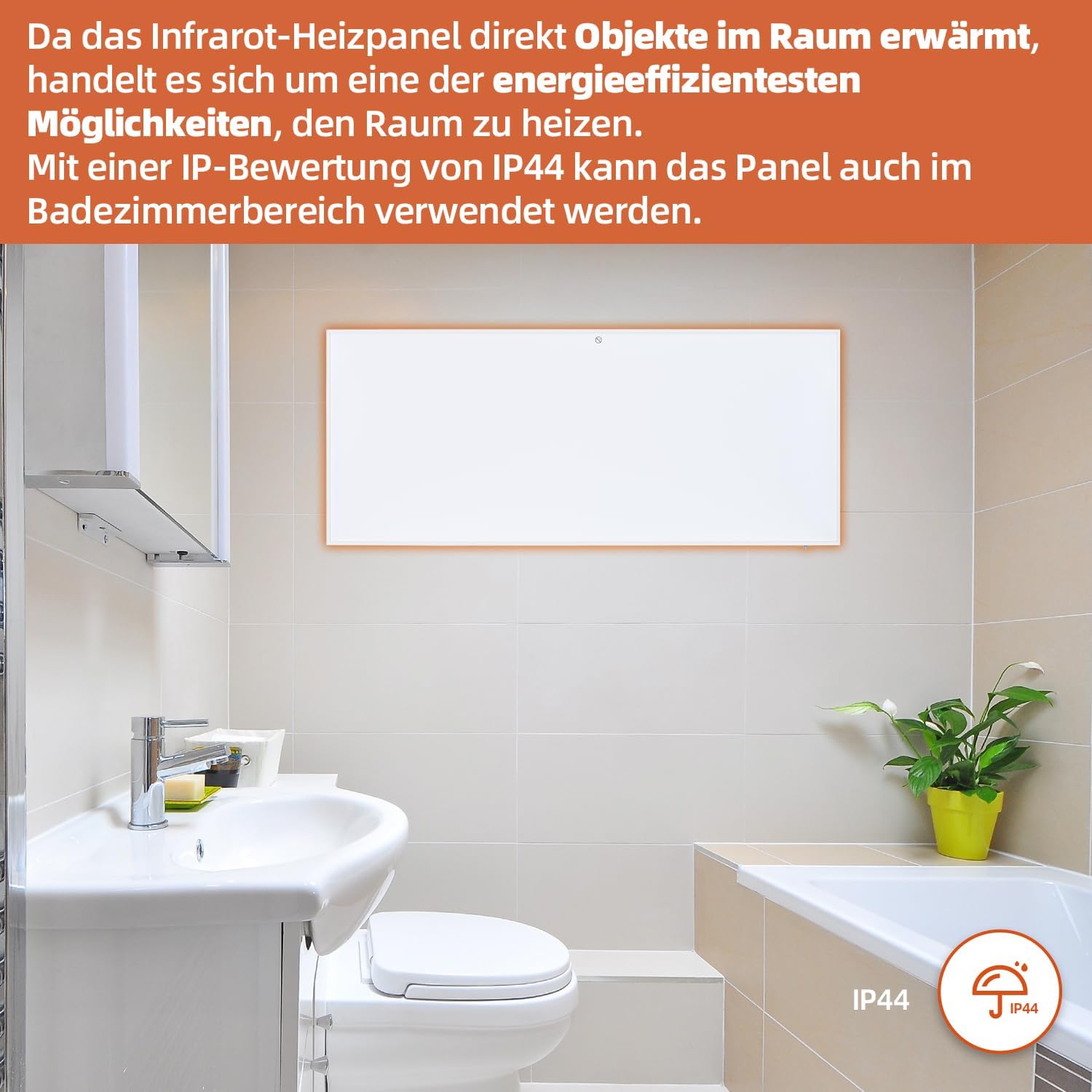
Figure 7: SHX Infrared Heating Panel with IP44 rating. The infrared heating panel mounted in a modern bathroom setting, emphasizing its IP44 water resistance rating, making it safe for use in damp àrainneachdan.
9. A ’dèanamh trioblaid
If you encounter any issues with your SHX heating panel, refer to the following common problems and solutions:
| Trioblaid | Adhbhar a dh’fhaodadh a bhith ann | Fuasgladh |
|---|---|---|
| Chan eil an teasadair a’ tionndadh air. | No power supply. Overheating protection activated. | Check if the power cord is securely plugged in and the outlet is functional. Unplug the heater, allow it to cool for 30 minutes, then plug it back in. |
| WiFi connection fails. | Incorrect WiFi password. Heater not in pairing mode. Router issues. | Ensure correct WiFi password. Put the heater into WiFi pairing mode (refer to app instructions). Restart your WiFi router. Ensure the heater is within WiFi range. |
| Smachd iomallach gun a bhith ag obair. | Batteries are dead or incorrectly inserted. Obstruction between remote and heater. | Replace the batteries in the remote control (requires 2 AAA batteries). Ensure there is a clear line of sight between the remote and the heater's receiver. |
| Chan eil an teasadair a’ teasachadh gu h-èifeachdach. | Temperature setting too low. Room size exceeds heater capacity. Drafts. | Increase the target temperature. Ensure the room size is within the recommended range (up to 14 m²). Seal any drafts in the room. |
10. Sònrachaidhean
| Sònrachadh | Luach |
|---|---|
| Brand | SHX |
| Modail Àireamh | SHXA700-WiFi |
| Dath | Geal |
| Meudan toraidh (L x W x H) | 120 x 50 x 4.5 cm |
| Cuideam | 2.9 cileagram |
| Cumhachd | 700 watt |
| Voltage | 220 bholt (AC) |
| Clas Èifeachdas Cumhachd | A gu G |
| Ìre fuaim | 1 Deicibeil |
| Feartan sònraichte | WiFi Compatible, Overheating Protection, Programmable Thermostat, Remote Control, Energy Efficient |
| Stòr cumhachd | Electric Corded |
| Modh teasachaidh | Radiantach |
| Cleachdadh air a mholadh | A-staigh, Dachaigh |
| Seòrsa stàladh | Wall Mount, Floor Mount (with optional feet) |
| Bataraidhean a dh ’fheumar airson iomallach | 2 bataraidh AAA |
| Dùthaich Tùs | Sìona |
11. Barantas agus Taic
The SHX SHXA700 Infrared Heating Panel comes with a Barantas 2-bliadhna bho cheann-latha a’ cheannaich. Cùm dearbhadh do cheannaich airson tagraidhean barantais.
For technical support, warranty claims, or any questions regarding your product, please contact your retailer or the manufacturer's customer service. Contact information can typically be found on the product packaging or the manufacturer's official weblàrach.