
CUPEISI YQ10S MAX
CUPEISI YQ10S MAX Android 15 Tablet User Manual
Model: YQ10S MAX | Brand: CUPEISI
1. Ro-ràdh
This manual provides detailed instructions for the setup, operation, maintenance, and troubleshooting of your CUPEISI YQ10S MAX Android 15 Tablet. Please read this manual thoroughly before using your device to ensure proper functionality and to maximize your user experience. Keep this manual for future reference.

Image 1.1: CUPEISI YQ10S MAX Android 15 Tablet with included accessories (keyboard, mouse, stylus, and protective case).
2. Pasgan-susbaint
Dearbhaich gu bheil na nithean gu lèir a tha air an liostadh gu h-ìosal an làthair anns a’ phacaid toraidh agad:
- CUPEISI YQ10S MAX Android 15 Tablet
- Meur-chlàr gun uèir
- Luchag Bluetooth
- Foldable Protective Cover
- Stylus
- Càball Type-C
- Charger
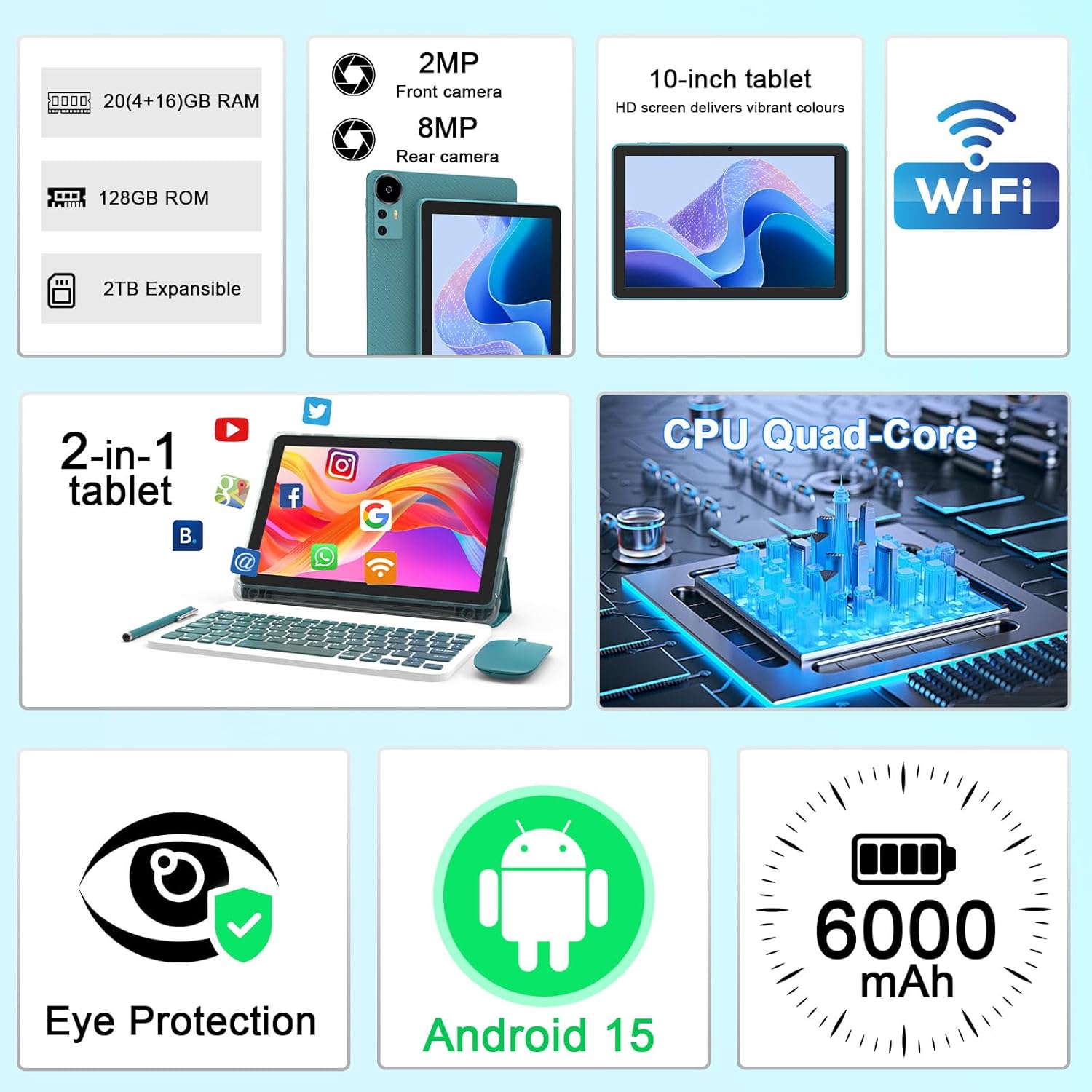
Dealbh 2.1: Thairisview of key features and included components.
3. Suidheachadh tòiseachaidh
3.1 A’ cur cumhachd air/dheth
- Gus cumhachd a thoirt air: Brùth is cum sìos am putan cumhachd a tha suidhichte air taobh an tablaid gus an las an scrion suas.
- Gus cumhachd a thoirt dheth: Press and hold the power button, then select 'Power off' from the options that appear on the screen.
- Gus ath-thòiseachadh: Press and hold the power button, then select 'Restart' from the options.
3.2 A’ cur cosgais air an tablaid
Before first use, fully charge the tablet. Use the provided Type-C cable and charger.
- Connect the Type-C cable to the tablet's charging port.
- Ceangail ceann eile a 'chàball ris an adapter cumhachd.
- Plug an adapter cumhachd a-steach do bhalla a-muigh.
- The battery icon on the screen will indicate charging status. A full charge typically takes several hours.

Image 3.1: Battery and charging information.
3.3 Connecting Accessories (Keyboard, Mouse, Stylus)
The tablet supports Bluetooth connectivity for the included keyboard and mouse.
- Dèan comas air Bluetooth: Rach gu Suidhichidhean > Innealan ceangailte > Bluetooth agus tionndaidh air.
- Pair Keyboard/Mouse: Put the keyboard or mouse into pairing mode (refer to their individual instructions if needed). Select the device name from the list of available Bluetooth devices on your tablet to pair.
- Stylus: The included stylus is typically passive and does not require pairing. It can be used directly on the screen for navigation or drawing.
Ceangal Wi-Fi 3.4
Connect your tablet to a Wi-Fi network for internet access.
- Rach gu Suidhichidhean > Lìonra & eadar-lìon > Wi-Fi.
- Cuir Wi-Fi air. Nì an tablet sganadh airson lìonraidhean a tha rim faighinn.
- Tagh an lìonra a tha thu ag iarraidh bhon liosta.
- Ma thèid iarraidh ort, cuir a-steach facal-faire an lìonraidh agus tap air Ceangail.
4. Obrachadh Bunaiteach
4.1 A’ seòladh Android 15
Your tablet runs on Android 15, offering an intuitive user interface. Swipe gestures, tap actions, and the navigation bar (Back, Home, Recents) are standard for interaction. The Google Mobile Services (GMS) certification ensures access to the Google Play Store and other Google applications.

Ìomhaigh 4.1: Feartan siostam obrachaidh Android 15.
4.2 Roghainnean taisbeanaidh
The 10.1-inch IPS display with 1280x800 resolution provides clear visuals. You can adjust display settings to suit your preferences:
- Gile: Adjust screen brightness from the quick settings panel or in Suidhichidhean > Taisbeanadh.
- Modh Leughaidh: Enable 'Reading Mode' in display settings to reduce blue light emission, which can enhance comfort during extended reading sessions.
- Meud Cló: Customize text size for better readability.

Image 4.2: Details of the 10.1-inch HD screen display.
4.3 Stiùireadh Stòraidh
The tablet features 128GB of internal storage and 20GB RAM (4GB physical + 16GB virtual expansion). Storage can be expanded up to 2TB using a microSD card (not included).
- Thoir sùil air stòradh: Rach gu Suidhichidhean > Stòradh gu view internal and external storage usage.
- Cuir a-steach Cairt MicroSD: Locate the microSD card slot on the tablet, insert the card gently until it clicks into place.

Image 4.3: Storage and RAM configuration.
4.4 Cleachdadh Camara
The tablet is equipped with an 8MP rear camera and a 2MP front camera.
- Fosgail an aplacaid camara: Tap air ìomhaigh a’ Chamara air an sgrìn dachaigh no air drathair an aplacaid agad.
- Atharraich camarathan: Cleachd ìomhaigh suidse a’ chamara gus gluasad eadar camarathan aghaidh is cùil.
- Glacadh Dealbhan/Bhideothan: Tap air a’ phutan còmhlaiche gus dealbh a thogail no clàradh bhidio a thòiseachadh/stad.

Image 4.4: Camera specifications and modes.
4.5 Ath-chluich ioma-mheadhain
The tablet supports Widevine L1, enabling high-definition streaming from platforms like Netflix, Hulu, YouTube, and Prime Video.
- Ensure a stable internet connection for optimal streaming quality.
- Download streaming apps from the Google Play Store.

Image 4.5: Widevine L1 support for multimedia streaming.
4.6 Ioma-ghnìomhachd
Android 15 enhances multitasking capabilities. Use the 'Recents' button to switch between open applications or utilize split-screen mode for running two apps simultaneously.
- Sgrion-roinnte: From the 'Recents' view, tap the app icon at the top of an app's card and select 'Split screen'. Choose a second app to open alongside it.
- The included keyboard and mouse facilitate a laptop-like experience for productivity tasks.

Image 4.6: Tablet used in 2-in-1 mode with keyboard and mouse.
5. Cùram agus Cumail suas
5.1 Glanadh
- Cleachd clò bog, gun lint gus an sgrion agus corp an tablaid a ghlanadh.
- Seachain ceimigean cruaidh, innealan-glanaidh sgrìobach, no spraeirean aerosol a chleachdadh.
- Dèan cinnteach gu bheil an tablet dheth agus gun a bhith a’ cleachdadh a’ phluga mus glan thu e.
5.2 Cùram Bataraidh
- Seachain an clàr a nochdadh do theodhachd anabarrach (teas no fuar).
- Do not leave the tablet fully discharged for extended periods.
- Use only the provided charger and cable to prevent damage to the battery.
5.3 Ùrachaidhean bathar-bog
- Thoir sùil gu cunbhalach airson ùrachaidhean bathar-bog agus stàlaich iad gus dèanamh cinnteach à coileanadh, tèarainteachd agus ruigsinneachd as fheàrr gu feartan ùra.
- Rach gu Suidhichidhean > Siostam > Ùrachadh siostam gus sùil a thoirt airson ùrachaidhean a tha rim faighinn.
6. A ’dèanamh trioblaid
Ma thachras tu ri duilgheadasan leis an tablet agad, thoir sùil air na duilgheadasan agus na fuasglaidhean cumanta a leanas:
6.1 Cùisean Cumhachd
- Cha tionndaidh an tablet air: Dèan cinnteach gu bheil am bataraidh air a luchdadh. Ceangail an charger agus feith beagan mhionaidean mus feuch thu ri a chumhachdachadh a-rithist.
- Tablet freezes: Brùth is cum sìos am putan cumhachd airson timcheall air 10-15 diogan gus ath-thòiseachadh a sparradh.
6.2 Duilgheadasan Ceangail
- Chan eil Wi-Fi a’ ceangal: Check if Wi-Fi is enabled in settings. Restart your router and the tablet. Ensure you are entering the correct password.
- Inneal Bluetooth gun a bhith a’ paidhreachadh: Ensure the Bluetooth accessory is in pairing mode and within range. Restart Bluetooth on the tablet and try pairing again.
6.3 Performance Lags
- Coileanadh slaodach: Close unused applications running in the background. Clear cache data for frequently used apps. Consider adding a microSD card for additional storage if internal storage is nearly full.
- Aplacaidean a’ tuiteam: Ensure apps are updated to their latest versions. Clear the app's cache and data (Suidhichidhean > Apps > [Ainm an Aplacaid] > Stòradh).
7. Sònrachaidhean Bathar
| Feart | Sònrachadh |
|---|---|
| Brand | CUPESI |
| Ainm Modail | CP31M (Item model number: YQ10S MAX) |
| Siostam-obrachaidh | Android 15 |
| Meud sgrion | 10.1 òirlich |
| Fuasgladh sgrion | 1280 x 800 piogsail (HD) |
| Pròiseasar | Ceithir-cridhe 2.0 GHz |
| RAM | 20GB (4GB corporra + leudachadh 16GB) |
| Stòradh a-staigh | 128 GB |
| Stòradh a ghabhas leudachadh | Up to 2TB with microSD card (not included) |
| Seòrsa gun uèir | 802.11ax (Wi-Fi 6.0, 2.4G/5G) |
| Bluetooth | BT 5.0 |
| Camara cùil | 8 BP |
| Camara aghaidh | 2 BP |
| Comas Bataraidh | 6000 mAh |
| Beatha bataraidh cuibheasach | 6-8 Uairean (a rèir cleachdadh) |
| Meudan (LxWxH) | 9.7 x 6.5 x 0.3 òirleach |
| Cuideam nì | 0.176 unnsa |
| Dath | NavyBlue |
8. Barantas agus Taic
For warranty information, please refer to the warranty card included in your product packaging or contact CUPEISI customer support directly. If you require technical assistance or have questions not covered in this manual, please reach out to our support team through the contact information provided with your purchase.
Ask a question about this manual
Ask about setup, troubleshooting, compatibility, parts, safety, or missing instructions. Manuals+ will review the question and use this page’s manual context to help answer it.