
MEGATEK CP27BR
MEGATEK Portable CD Player User Manual
Model: CP27BR
Ro-ràdh
Thank you for choosing the MEGATEK Portable CD Player. This device is designed to provide a versatile and high-quality audio experience, supporting various media formats and offering multiple connectivity options. Please read this manual carefully to ensure proper use and maintenance of your new CD player.

Image: The MEGATEK Portable CD Player, showcasing its compact design, integrated speakers, control buttons, and included accessories like headphones and USB-C charging cables.
Fiosrachadh Sàbhailteachd
Gus dèanamh cinnteach à obrachadh sàbhailte agus gus casg a chur air milleadh, feuch an lean thu na ceumannan rabhaidh a leanas:
- Na nochd an inneal gu fìor theodhachd, taiseachd no solas dìreach.
- Seachain a bhith a’ leigeil às no fo smachd an inneal gu buaidhean làidir.
- Na cuir às a chèile an inneal agus na feuch ri a chàradh thu fhèin. Thoir aire do luchd-obrach teisteanasach airson a h-uile seirbheis.
- Cleachd an càball cosgais a tha air a thoirt seachad agus inneal-atharrachaidh cumhachd co-chòrdail a-mhàin.
- Cùm an inneal air falbh bho uisge agus lioftaichean eile.
- Glan an inneal le clò bog, tioram. Na cleachd innealan-glanaidh sgrìobach no fuasglaidhean.
- Dh’fhaodadh èisteachd fad-ùine aig ìrean àrda fuaim milleadh a dhèanamh air an èisteachd. Atharraich an tomhas-lìonaidh gu ìre shàbhailte.
Susbaint pacaid
Dèan cinnteach gu bheil a h-uile nì anns a’ phacaid:
- MEGATEK Portable CD Player - Black
- Fòn-cluaise uèirleas
- Càball cosgais USB-C
- Leabhar-làimhe neach-cleachdaidh

Image: A visual representation of the package contents, including the CD player, headphones, USB-C cable, and user manual.
Bathar seachadview
Familiarize yourself with the various parts and controls of your MEGATEK Portable CD Player.
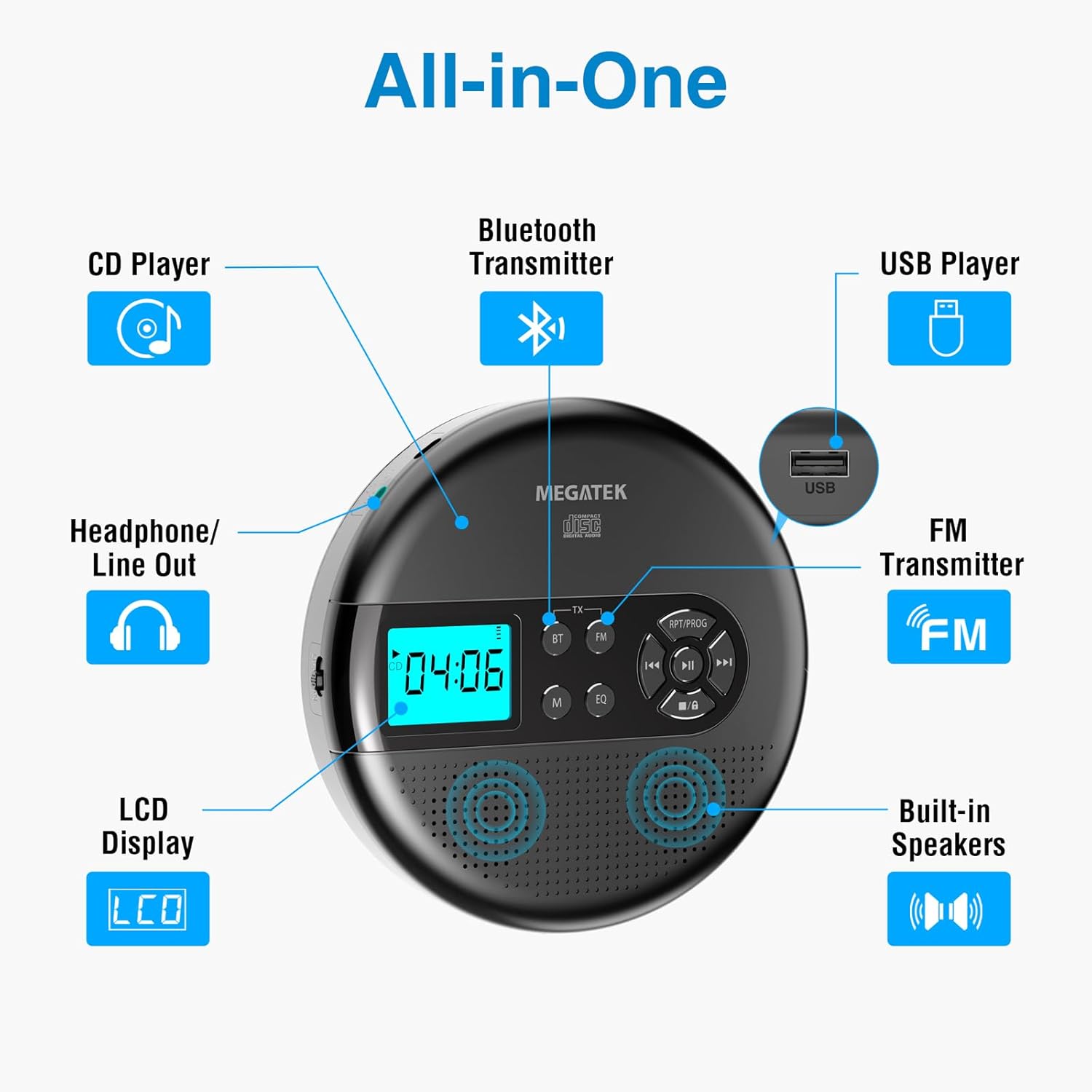
Image: An "All-in-One" diagram highlighting key features such as the CD Player, Bluetooth Transmitter, USB Player, FM Transmitter, Built-in Speakers, LCD Display, and Headphone/Line Out port.
Smachdan agus puirt:
- Taisbeanadh LCD: A’ sealltainn àireamh an òrain, an ùine, am modh, agus inbhe a’ bhataraidh.
- Putan Cluich/Pause: A ’tòiseachadh no a’ stad ath-chluich.
- Putanan Roimhe/Air Adhart: A’ leum thairis air slighean no a’ gluasad air adhart/air ais gu luath.
- Cuir stad air a ’phutan: A 'cur stad air ath-chluich.
- RPT/PROG Button: Controls repeat modes and programming tracks.
- Putan BT: Activates Bluetooth transmission mode.
- Putan FM: Activates FM transmission mode.
- Putan M (Modh): Switches between CD, USB, Bluetooth, and FM modes.
- Putan EQ: Bidh e a’ dol tro ro-shuidheachaidhean co-ionannachaidh.
- Smachd tomhas-lìonaidh: Atharraichidh seo ìre toraidh claisneachd.
- Port USB: Airson claisneachd a chluich files bho draibh USB.
- Port cosgais Type-C: Airson a’ bhataraidh a-staigh a ghearradh.
- 3.5mm Audio Out Jack: Airson ceangal chluas-cinn no luchd-labhairt taobh a-muigh.
- Luchd-labhairt Stereo a-staigh: Airson ath-chluich claisneachd dìreach.
Suidhich
A’ cur cosgais air a’ bhataraidh:
The device is equipped with a built-in 2000mAh rechargeable Li-ion battery. Before first use, fully charge the player.
- Connect the provided USB-C charging cable to the Type-C charging port on the player.
- Ceangail ceann eile a’ chàball USB-C ri inneal-atharrachaidh cumhachd USB (nach eil air a ghabhail a-steach) no ri port USB coimpiutair.
- The battery indicator on the LCD display will show charging status. A full charge provides up to 15 hours of playtime at medium volume.

Image: The portable CD player connected to a power source via its USB-C cable, resting on a nightstand next to a bed.
A’ cur CD a-steach:
- Locate the CD compartment latch/button on the side of the player and slide/press it to open the lid.
- Cuir an CD gu faiceallach air an spindle mheadhanach leis an taobh leubail suas.
- Brùth an CD sìos gu socair gus an cliog e na àite.
- Dùin còmhdach roinn an CD gu daingeann gus an glas e.

Image: The portable CD player with its lid open, showing a blue CD disc inserted into the compartment, ready for playback.
Stiùireadh Obrachaidh
Ath-chluich CD:
- Cuir a-steach CD mar a tha air a mhìneachadh san earrann Suidheachaidh.
- Brùth an Cluich / Stad putan gus tòiseachadh air ath-chluich.
- Cleachd an Roimhe/Air adhart buttons to navigate between tracks. Hold to fast-forward or rewind.
- Brùth an RPT/PROG button to cycle through repeat modes (repeat one, repeat all, random) or to program a custom playback order.
- Brùth an Stad putan gus crìoch a chur air ath-chluich.
- Adjust volume using the dedicated volume control.
Ath-chluich USB:
The player supports MP3, WMA, and WAV audio files bho draibh USB.
- Cuir draibh USB flash a-steach don phort USB.
- Brùth an M (Modh) putan gus atharrachadh gu modh USB.
- Cleachd an Cluich / Stad, Roimhe/Air adhart, agus RPT/PROG putanan mar a dhèanadh tu airson CD a chluich.
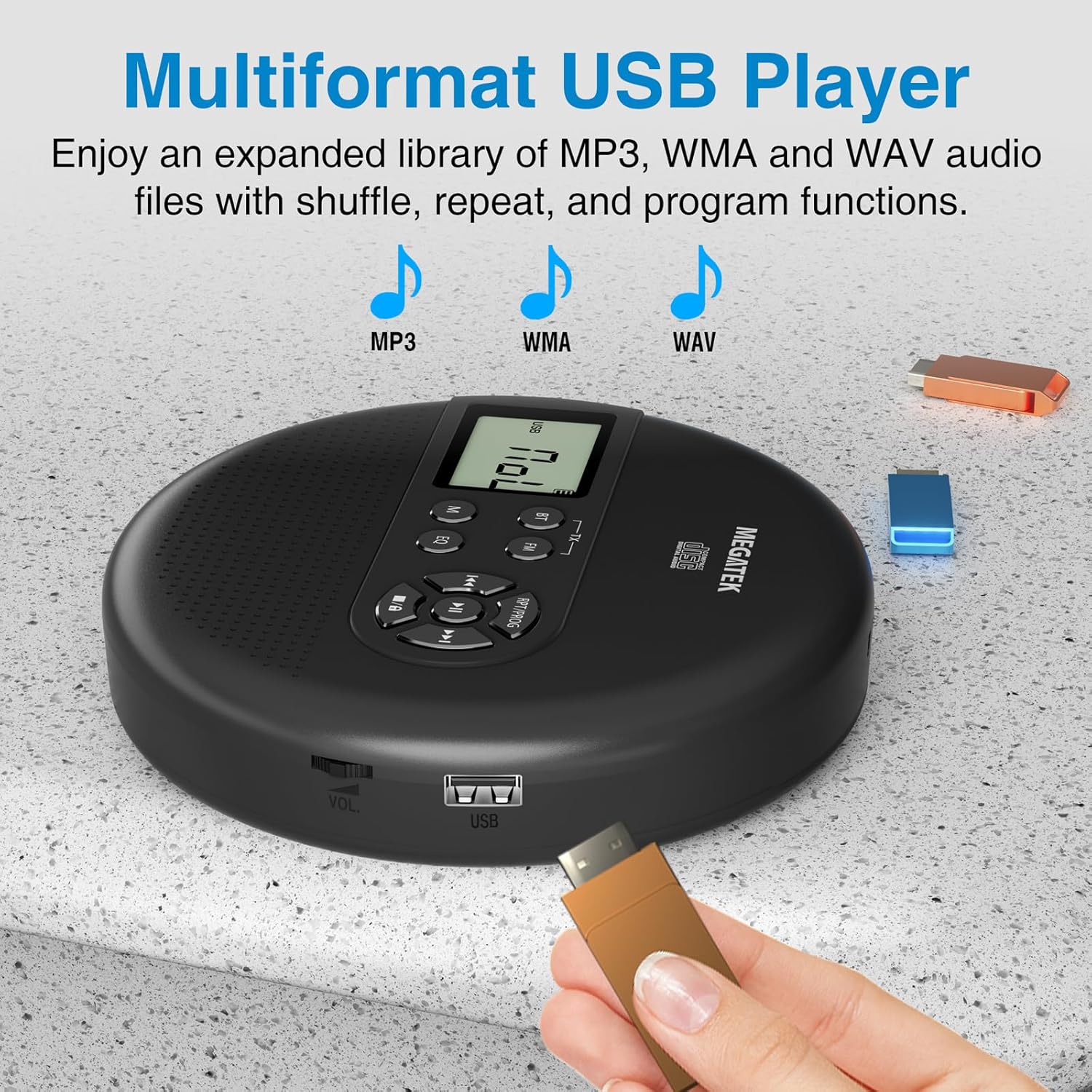
Image: The portable CD player with a USB flash drive inserted into its side port, illustrating its multi-format USB playback capability.
Tar-chuir Bluetooth:
Stream audio wirelessly to Bluetooth-enabled headphones or speakers. Note: This feature does not support connections to car stereo systems.
- Dèan cinnteach gu bheil na fònaichean-cluaise no an neach-labhairt Bluetooth agad ann am modh paidhreachaidh.
- On the CD player, press the BT button. The Bluetooth indicator on the display will flash.
- The player will automatically search for and connect to nearby Bluetooth devices. Once connected, the indicator will stop flashing.

Image: The portable CD player wirelessly transmitting audio to two external Bluetooth speakers, demonstrating its Bluetooth transmission capability.
Tar-chuir FM:
Transmit audio signals to nearby FM radios, including car FM stereos and home stereo systems.
- Brùth an FM button on the CD player. The display will show an FM frequency.
- Tune your FM radio (car stereo, home stereo) to the same frequency displayed on the CD player.
- Adjust the frequency on the CD player using the Roimhe/Air adhart buttons if interference occurs or to find a clearer channel.

Image: The portable CD player placed on a car dashboard, transmitting audio to the car's FM stereo system, indicated by an FM frequency on the car's display.
Using Headphones/External Speakers:
For private listening or connecting to wired audio systems:
- Plug the included wired headphones into the 3.5mm audio out jack.
- Alternatively, connect an audio cable (not included) from the 3.5mm audio out jack to the AUX input of external speakers or an audio system.
- The built-in speakers will automatically mute when headphones or external speakers are connected.

Image: A close-up of the portable CD player, visually representing sound waves emitting from its dual stereo speakers, emphasizing the built-in audio capability.
Cumail suas
- Glanadh: Use a soft, dry, lint-free cloth to clean the exterior of the player. For the CD lens, use a specialized CD lens cleaner. Do not use liquids or aerosol cleaners directly on the device.
- Stòradh: When not in use for extended periods, store the player in a cool, dry place, away from direct sunlight and extreme temperatures.
- Cùram Bataraidh: Gus beatha a’ bhataraidh a leudachadh, seachain a bhith ga leigeil às gu tur gu tric. Cuir cosgais air an inneal gu cunbhalach, eadhon ged nach eilear ga chleachdadh gu gnìomhach.
Fuasgladh thrioblaidean
| Trioblaid | Adhbhar a dh’fhaodadh a bhith ann | Fuasgladh |
|---|---|---|
| Chan eil an cluicheadair a’ tionndadh air. | Tha bataraidh air ìsleachadh. | Charge the player using the USB-C cable. |
| Gun fhuaim bho luchd-labhairt/cluais-fònaichean. | Volume is too low; headphones not fully plugged in; incorrect mode selected. | Increase volume; ensure headphones are securely connected; press the M (Modh) putan gus an stòr ceart a thaghadh. |
| CD a’ leum no gun a bhith a’ cluich. | CD is dirty, scratched, or inserted incorrectly; anti-skip function overwhelmed. | Clean the CD; ensure CD is properly seated; avoid strong vibrations. |
| Duilgheadasan ceangail Bluetooth. | Device not in pairing mode; too far from player; interference. | Ensure receiving device is in pairing mode; move closer to the player; restart both devices. |
| FM transmission static/poor quality. | Interference; incorrect frequency. | Adjust the FM frequency on the player and receiver to find a clear channel. |
Sònrachaidhean
| Feart | Mion-fhiosrachadh |
|---|---|
| Modail Àireamh | CP27BR |
| Meudan toraidh | 5.91 x 5.91 x 1.32 òirleach |
| Cuideam nì | 10.9 unnsa |
| Bataraidh | Bataraidh lithium-ion 2000mAh (ath-luchdaichte) |
| Ùine cluiche | Suas ri 15 uairean (aig ìre meadhanach) |
| Cruthan CD a tha air an taiceadh | CD, CD-R/RW, MP3 CD, Audio Book CD |
| Cruthan USB a tha air an taiceadh | MP3, WMA, WAV |
| Dìon an-aghaidh Skip | 60 diog |
| Ceangalachd | USB, Bluetooth Transmitter, FM Transmitter, 3.5mm Audio Out |
| Feartan sònraichte | Built-in Stereo Speakers, Resume Play, Shuffle, Repeat, Program Functions, 5 EQ Options |
Barantas agus Taic
MEGATEK offers comprehensive support for its products:
- Ath-chur 12-mìosan: In case of product defects or issues within 12 months of purchase.
- Taic Teicnigeach Fad-beatha: Assistance with product usage, troubleshooting, and general inquiries.
- Seirbheis teachdaiche 24/7: Available through Amazon buyer-seller messaging.
For any questions or problems, please contact MEGATEK customer service via the Amazon platform or refer to the contact information provided in the product packaging.
Image: A graphic detailing MEGATEK's customer support, including 12-month replacement, lifetime technical support, and 24/7 Amazon buyer-seller messaging, alongside an image of customer service representatives.
Ask a question about this manual
Ask about setup, troubleshooting, compatibility, parts, safety, or missing instructions. Manuals+ will review the question and use this page’s manual context to help answer it.