
Ro-ràdh
Thank you for choosing the ROCAM Digital Projection Alarm Clock, Model CR1024. This device combines a digital alarm clock with a 270° rotatable projection feature, FM radio, dual alarm settings, and a USB charging port. Please read this manual carefully to ensure proper use and to fully enjoy all its features.

Image: The ROCAM Digital Projection Alarm Clock displaying time, date, temperature, and humidity, positioned on a bedside table next to a cup of coffee and a notebook.
Feartan toraidh
- 270° Rotatable Projection: Project time onto your wall or ceiling with adjustable angle and focus.
- 5-Level Dimmable LED Display: Adjust the brightness of the main display to your preference.
- FM Radio & Sleep Timer: Enjoy your favorite radio stations and set a sleep timer for automatic shutdown.
- Dual Alarm with Weekend/Weekday Mode: Set two independent alarms with customizable schedules (Mon-Sun, Mon-Fri, Sat-Sun, One-Time).
- USB-C Power Input & USB-A Charging Output: Power the clock via USB-C and charge external devices like smartphones via USB-A.
- Cùl-taic Bataraidh: A’ cumail suas roghainnean ùine is rabhaidh nuair a bhios an cumhachd dhethtages (bataraidhean gun a bhith air an toirt a-steach).
- Taisbeanadh Teòthachd agus Taiseachd: Shows indoor temperature (°C/°F) and humidity.
- Gnìomh solais oidhche: Integrated night light for soft illumination.
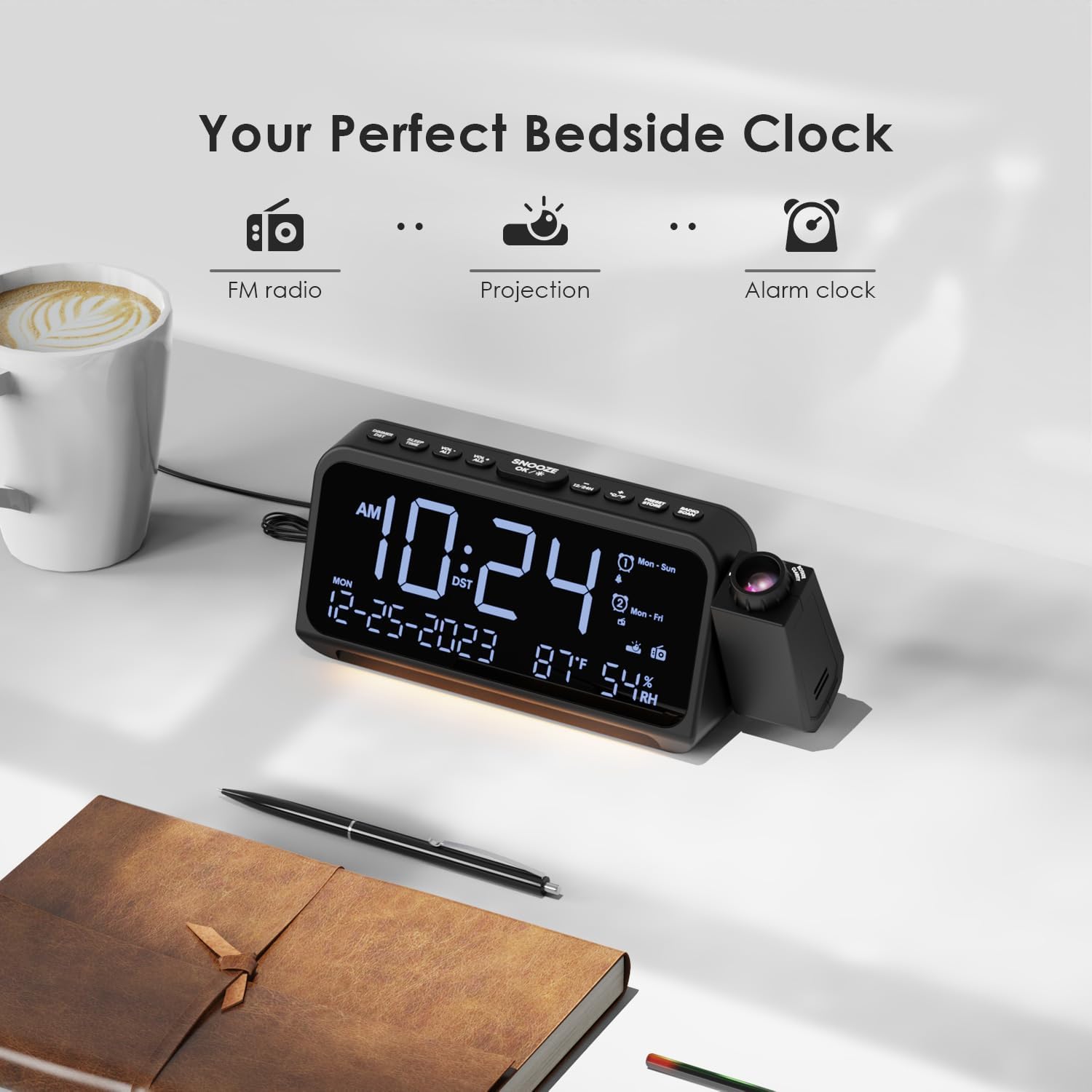
Image: Visual representation of the clock's main functions: FM radio, projection, and alarm clock.
Susbaint pacaid
Thoir sùil air a’ phacaid airson nan nithean a leanas:
- ROCAM Digital Projection Alarm Clock (CR1024)
- Càball cumhachd USB Type-C
- Adapter cumhachd
- Leabhar-làimhe cleachdaiche
Note: 1 CR2 battery is required for backup functionality and is not included in the package.

Image: The alarm clock, USB-C cable, power adapter, and user manual laid out, with product dimensions (20cm x 8.7cm x 3.81cm) and weight (240g) indicated.
Bathar seachadview
Putanan a’ Phannail as Àirde:
- SNOOZE/OK/*: Snooze alarm, confirm settings, or activate night light.
- VOL-/AL1: Decrease volume, set Alarm 1.
- VOL+/AL2: Increase volume, set Alarm 2.
- 12/24 h: Atharraich eadar cruth ùine 12-uair agus 24-uair.
- ° C / ° F: Gluais eadar taisbeanadh teòthachd Celsius agus Fahrenheit.
- PRESET/STORE: Save FM radio presets.
- RADIO/SCAN: Turn FM radio on/off, scan for stations.
- SET TIME: Enter time setting mode.
- SET ALARM: Cuir a-steach modh suidheachadh rabhaidh.
Side Panel & Rear:
- Lionsa teilgean: Projects time onto a surface.
- Cuibhle Fòcas: Bidh seo ag atharrachadh soilleireachd na h-ìomhaigh a thathar a’ proiseactadh.
- Cuairteachadh ro-mheasaidh: Allows 270° adjustment of the projection angle.
- Putan DIM: Adjusts projection brightness.
- Putan Cumhachd: Turns the projection on/off.
- Type-C Input (5V-2A): Prìomh cheangal cumhachd.
- USB-A Output (5V-1A): Airson innealan taobh a-muigh a ghearradh.
- Antenna FM: Leudaich airson gabhail rèidio nas fheàrr.
- Roinn Bataraidh: For CR2 backup batteries.

Ìomhaigh: Mion-fhiosrachadh view of the top control buttons and the projection unit, highlighting the dual alarm settings.

Image: The back of the alarm clock, illustrating the Type-C power input and the USB-A output port for charging other devices.
Suidhich
1. Ceangal cumhachd:
- Connect the provided USB Type-C cable to the Type-C input port on the back of the alarm clock.
- Cuir ceann eile a’ chàball USB a-steach don inneal-atharrachaidh cumhachd, agus an uairsin cuir an inneal-atharrachaidh a-steach do phuing-socaid àbhaisteach.
- Lasaidh an taisbeanadh suas, a’ comharrachadh gu bheil a’ ghleoc air.

Image: The alarm clock is shown connected to a wall outlet via its USB-C power cable and adapter.
2. Battery Backup Installation:
- Lorg roinn a’ bhataraidh aig bonn a’ chloca.
- Fosgail còmhdach na roinne.
- Insert 1 CR2 battery (not included) according to the polarity markings (+/-).
- Close the battery compartment cover. This battery will preserve time and alarm settings during a power outage.

Image: The bottom of the alarm clock with the battery compartment open, showing where to insert CR2 batteries.
Stiùireadh Obrachaidh
1. A’ suidheachadh an ama agus a’ cheann-latha:
- Brùth agus cùm an SEANN TIOMNAIDH button. The hour digits will start flashing.
- Cleachd VOL+ or VOL- putanan gus an uair atharrachadh. Brùth SEANN TIOMNAIDH a-rithist airson a dhearbhadh.
- Dèan a-rithist am pròiseas airson mionaidean, bliadhna, mìos agus latha.
- Brùth 12/24h to switch between 12-hour and 24-hour format.
- Brùth ° C / ° F to switch between Celsius and Fahrenheit for temperature display.
2. Setting Alarms (Alarm 1 & Alarm 2):
- Brùth agus cùm an SET ALARM button. The Alarm 1 icon and hour digits will flash.
- Cleachd VOL+ or VOL- to set the desired alarm hour. Press SET ALARM a dhearbhadh.
- Dèan a-rithist airson mionaidean.
- Select alarm mode (Mon-Sun, Mon-Fri, Sat-Sun, One-Time) using VOL+ or VOL-. Brùth SET ALARM a dhearbhadh.
- Choose alarm sound: buzzer or FM radio. Use VOL+ or VOL- a thaghadh. Brùth SET ALARM a dhearbhadh.
- To set Alarm 2, briefly press SET ALARM again and repeat the steps.
- To activate/deactivate an alarm, briefly press AL1 or AL2. The alarm icon will appear/disappear on the display.
Image: The clock display showing options for setting two alarms with different ringtone choices and day modes (Mon-Sun, Mon-Fri, Sat-Sun, One-Time).
3. Gnìomh Snooze:
Nuair a chluinneas tu inneal-rabhaidh, brùth air a’ phutan SNOOZE/OK/* button to temporarily silence it for 9 minutes. The alarm will sound again after the snooze period.
4. Display Brightness (Dimmer):
Brùth an SNOOZE/OK/* button repeatedly to cycle through 5 levels of display brightness (L-1 to L-5) or turn the display off.

Image: The clock display showing five different brightness levels (L-1 to L-5) for the main LED screen.
5. Projection Settings:
- Tionndaidh air / dheth: Brùth an Putan Cumhachd on the side of the projection unit to turn the projection on or off.
- Atharraich soilleireachd: Brùth an DIM button on the side of the projection unit to cycle through 5 levels of projection brightness.
- Atharraich ceàrn: Rotate the projection unit up to 270° to direct the time onto your desired surface (wall or ceiling).
- Atharraich fòcas: Rothaich an Cuibhle Fòcas on the projection unit to sharpen the projected image.

Image: The digital time '10:24' projected in red onto a dark wall, demonstrating the projection feature.

Image: The projection unit rotating 270 degrees, showing how the projected time can be adjusted for optimal viewing.

Image: The projected time showing five distinct brightness levels, from level 1 (dimmest) to level 5 (brightest).
6. Obrachadh Rèidio FM:
- Leudaich an antenna FM airson gabhail nas fheàrr.
- Brùth an RADIO/SCAN button to turn the FM radio on.
- Brùth agus cum RADIO/SCAN to automatically scan and save available stations.
- Cleachd VOL+ or VOL- to manually tune to a station or cycle through saved presets.
- Brùth PRESET/STORE to save the current station as a preset.
- Brùth RADIO/SCAN again to turn the FM radio off.

Image: The clock displaying an FM radio frequency (108.0 MHz) and options for a sleep timer (OFF, 15, 30, 60, 90 minutes).
7. Uaine cadail:
When the FM radio is on, press the SNOOZE/OK/* button repeatedly to set a sleep timer (15, 30, 60, 90 minutes, or OFF). The radio will automatically turn off after the selected duration.

Image: A hand pressing a button on the clock, with sleep timer options (P01, P06, P12, P15, P20) displayed, indicating timed radio playback.
8. USB Charging Output:
Connect your smartphone or other USB-powered device to the USB-A output port (5V-1A) on the back of the clock to charge it. Ensure the alarm clock is powered via its USB-C input.
Cumail suas
- Glanadh: Sguab an gleoc le clò bog, tioram. Na cleachd innealan-glanaidh sgrìobach no fuasglaidhean.
- Ath-nuadhachadh bataraidh: Ma chailleas an gleoc ùine rè briseadh cumhachdtage, replace the CR2 backup battery.
- Suidheachadh: Avoid placing the clock in direct sunlight, high temperatures, or high humidity.
Fuasgladh thrioblaidean
| Trioblaid | Fuasgladh |
|---|---|
| Tha taisbeanadh a’ chloca bàn. | Ensure the USB-C power cable is securely connected to both the clock and a working power outlet. Check if the display brightness is set to OFF. |
| Chan eil an inneal-rabhaidh a’ fuaimeachadh. | Verify that the alarm is activated (alarm icon visible). Check the alarm volume. Ensure the alarm mode (Mon-Sun, Mon-Fri, etc.) is correctly set for the current day. |
| Tha am pròiseact doilleir. | Rothaich an Cuibhle Fòcas on the projection unit until the image is clear. Ensure the projection surface is within optimal range. |
| Glacadh rèidio FM bochd. | Fully extend the FM antenna. Try repositioning the clock to improve signal. Perform an auto-scan to find stronger stations. |
| Chan eil port cosgais USB ag obair. | Ensure the alarm clock is powered by the USB-C input. Check the charging cable and the device being charged. |
Sònrachaidhean
- Àireamh Modail: CR1024
- Meudan: 20 x 3.81 x 8.7 cm (L x W x H)
- Cuideam: 240 g
- Cur a-steach cumhachd: USB Seòrsa-C, 5V-2A
- Toradh USB: USB Type-A, 5V-1A
- Cùl-taic Bataraidh: 1 x CR2 battery (not included)
- Raon Àireamhachd FM: 87.5 - 108 MHz
Barantas agus Taic
ROCAM products are designed for reliability and performance. This product comes with a standard manufacturer's warranty. For specific warranty details, please refer to the warranty card included in your package or contact ROCAM customer support.
If you encounter any issues or have questions regarding your ROCAM Digital Projection Alarm Clock, please contact our customer support team. Contact information can typically be found on our official weblàrach no air pacaigeadh an toraidh.