
Vorago BSP-500-V2
Leabhar-làimhe Cleachdaiche Labhraiche Bluetooth Vorago BSP-500-V2
Modail: BSP-500-V2
Marcas: Vorago
1. Toradh thallview
The Vorago BSP-500-V2 is a portable Bluetooth speaker designed for robust performance and durability. It features IPX5 water resistance, making it suitable for various environments, including outdoor adventures and parties. This manual provides detailed instructions for setting up, operating, and maintaining your speaker.
Prìomh fheartan:
- Ceangal Stereo gun Uèir (TWS): Connect two BSP-500-V2 speakers for an immersive stereo sound experience.
- Beatha bataraidh leudaichte: Enjoy up to 7 hours of music playback at 70% volume, thanks to its 2000 mAh battery.
- Cìs USB Type-C: Convenient and modern USB-C port for charging.
- Ceangal ioma-ghnèitheach: Supports Bluetooth for wireless streaming and a 3.5mm auxiliary input for wired connections.
- Seasmhachd uisge IPX5: Air a dhìon an aghaidh jets uisge ìosal-bhruthadh bho stiùireadh sam bith.
Susbaint a’ phacaid:
- Neach-labhairt Vorago BSP-500-V2 Bluetooth
- Càball Cìsean USB Type-C
- Càball claisneachd 3.5mm
- Leabhar-làimhe cleachdaiche (an sgrìobhainn seo)
Diagram toraidh:

Figear 1.1: Aghaidh view of the Vorago BSP-500-V2 Bluetooth speaker, showcasing its mesh grille and central Vorago logo.

Figear 1.2: Ceàrnach view of the speaker, highlighting its robust, rectangular design and integrated carrying strap.

Figear 1.3: Mullach view showing the control panel with power, volume down, play/pause, and volume up buttons.
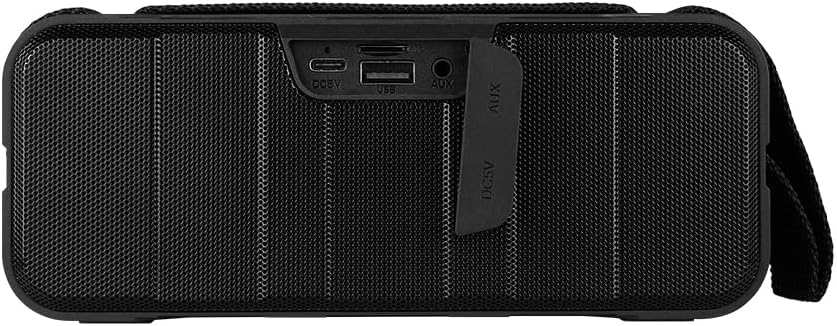
Figear 1.4: Cùl view of the speaker, showing the protective flap covering the input ports.

Figure 1.5: Close-up of the input ports, including DC 5V (USB-C), USB-A, and AUX (3.5mm) inputs, protected by a rubber cover.
2. Fiosrachadh Sàbhailteachd
- Na cuir an neach-labhairt fo theodhachd anabarrach (teas no fuar).
- Seachain a bhith a’ leigeil às no a’ toirt buaidh làidir air an neach-labhairt.
- Cùm an neach-labhairt air falbh bho sholas dìreach na grèine agus bho thùsan teas.
- Na dèan dì-sgaradh, càradh no atharrachadh air an neach-labhairt thu fhèin. Cuiridh seo am barantas às aonais buaidh.
- Ensure the port cover is securely closed when using the speaker near water to maintain IPX5 water resistance.
- Do not immerse the speaker in water. IPX5 rating protects against splashes and light rain, not submersion.
- Cleachd an càball cosgais a tha air a thoirt seachad no càball USB Seòrsa-C le teisteanas a-mhàin airson cosgais.
- Glan an neach-labhairt le clò bog, tioram. Na cleachd innealan-glanaidh sgrìobach no fuasglaidhean.
3. Suidhich
3.1 A’ cur cosgais air an neach-labhairt
- Open the protective rubber cover on the rear of the speaker to access the charging port.
- Connect the USB Type-C end of the charging cable to the speaker's DC 5V port.
- Ceangail ceann eile a’ chàball USB ri inneal-atharrachaidh cumhachd USB (nach eil air a ghabhail a-steach) no ri port USB coimpiutair.
- Lasaidh an solas comharra cosgais fhad ’s a bhios e a’ cur cosgais agus cuiridh e dheth e nuair a bhios e làn-chosgais.
- Once charging is complete, securely close the protective rubber cover to maintain water resistance.
3.2 A’ cur cumhachd air/dheth
- Gus cumhachd a thoirt air: Brùth agus cùm an Putan cumhachd on the top panel for approximately 3 seconds until you hear an audible prompt.
- Gus cumhachd a thoirt dheth: Brùth agus cùm an Putan cumhachd for approximately 3 seconds until you hear an audible prompt.
3.3 Pairing Bluetooth
- Dèan cinnteach gu bheil an neach-labhairt air. Thèid e a-steach gu modh paidhreachaidh Bluetooth gu fèin-ghluasadach, air a chomharrachadh le solas LED a’ priobadh.
- Air an inneal agad (fòn cliste, tablet, laptop), cuir Bluetooth an gnìomh agus rannsaich airson innealan a tha rim faighinn.
- Select "BSP-500-V2" from the list of found devices.
- Cho luath ‘s a bhios e air a chàradh gu soirbheachail, cuiridh an neach-labhairt a-mach dearbhadh claisneachd, agus stadaidh an solas LED a’ priobadh agus fuirichidh e seasmhach.
- Ath-cheanglaicheas an neach-labhairt gu fèin-ghluasadach ris an inneal mu dheireadh a chaidh a chàradh nuair a thèid a chuir air, ma tha an inneal taobh a-staigh ruigsinneachd agus ma tha Bluetooth air a chomasachadh.
Paidhreachadh 3.4 Stereo gun Uèir (TWS)
TWS allows you to connect two BSP-500-V2 speakers together for a true stereo sound experience.
- Ensure both BSP-500-V2 speakers are powered on and not connected to any other Bluetooth device.
- Air aon de na luchd-labhairt (is e seo am prìomh neach-labhairt), brùth dà uair air a’ phutan Putan Cluich / StadThèid an neach-labhairt a-steach do mhodh paidhreachaidh TWS.
- The two speakers will automatically search for and connect to each other. You will hear an audible confirmation once they are successfully paired.
- Once TWS is established, connect your device to the primary speaker via Bluetooth as described in Section 3.3.
- To disconnect TWS, double-press the Putan Cluich / Stad air gach neach-labhairt.
3.5 Ceangal Auxiliary (AUX).
For devices without Bluetooth, you can use the 3.5mm audio cable.
- Open the protective rubber cover on the rear of the speaker.
- Ceangail aon cheann den chàball claisneachd 3.5mm ri port AUX an neach-labhairt.
- Connect the other end of the cable to the audio output jack of your device.
- Bidh an neach-labhairt ag atharrachadh gu modh AUX gu fèin-ghluasadach.
- Once disconnected, securely close the protective rubber cover.
4. Stiùireadh Obrachaidh
4.1 Button Functions:
| Putan | Gnìomh (Brùth Goirid) | Gnìomh (Preas fada) |
|---|---|---|
| Putan cumhachd | Chan eil | Cumhachd air / dheth |
| Putan Volume Down | Lùghdachadh Meud | Rian roimhe |
| Putan Cluich / Stad | Cluich/Stad Ceòl, Freagair/Crìochnaich Gairm | Reject Call, Double-press for TWS Pairing |
| Putan Volume Up | Meudaich Meud | An ath Rian |
5. Cumail suas
- Glanadh: Use a soft, dry, lint-free cloth to clean the speaker's surface. For stubborn dirt, slightly dampnigh an clò le uisge. Na cleachd ceimigean cruaidh, fuasglaidhean glanaidh, no innealan-glanaidh làidir.
- Cùram an aghaidh uisge: Always ensure the rubber port cover on the back of the speaker is fully and securely sealed when using the speaker outdoors or near water. This maintains its IPX5 water resistance. After exposure to water, wipe the speaker dry before opening the port cover for charging or auxiliary connections.
- Stòradh: When not in use for extended periods, store the speaker in a cool, dry place, away from direct sunlight and extreme temperatures. It is recommended to charge the speaker fully before storing and to recharge it every few months to maintain battery health.
- Cùram Bataraidh: To prolong battery life, avoid fully discharging the battery frequently. Charge the speaker when the low battery indicator is active.
6. A ’dèanamh trioblaid
| Trioblaid | Adhbhar a dh’fhaodadh a bhith ann | Fuasgladh |
|---|---|---|
| Chan eil an neach-labhairt a’ dol air. | Bataraidh ìosal. | Charge the speaker fully using the provided USB Type-C cable. |
| Chan urrainnear paidhir a dhèanamh tro Bluetooth. | Speaker is not in pairing mode; Device's Bluetooth is off; Speaker is already connected to another device; Device is too far from speaker. | Ensure speaker is powered on and flashing (pairing mode). Turn on Bluetooth on your device. Disconnect from other devices. Move device closer to speaker (within 10 meters). |
| Gun fhuaim no meud ìosal. | Tha an tomhas-lìonaidh ro ìosal air an neach-labhairt no an inneal; Modh cuir a-steach ceàrr; Chan eil an neach-labhairt ceangailte. | Increase volume on both speaker and connected device. Ensure correct mode (Bluetooth or AUX) is active. Verify successful Bluetooth pairing or AUX cable connection. |
| Distort fuaim. | Fuaim ro àrd; Inneal ro fhada bhon neach-labhairt; Bacail. | Reduce volume on speaker and/or device. Move device closer to speaker. Avoid obstacles between speaker and device. |
| Dh’fhàillig paidhreachadh TWS. | Speakers are already paired to a device; Speakers are too far apart. | Ensure both speakers are disconnected from any Bluetooth devices. Place speakers close to each other during TWS pairing. |
7. Sònrachaidhean
| Feart | Mion-fhiosrachadh |
|---|---|
| Ainm Modail | BSP-500-V2 |
| Seòrsa neach-labhairt | Ioma-mheadhan |
| Feart sònraichte | Bluetooth |
| Cleachdadh air a mholadh | For music players |
| Innealan co-fhreagarrach | Laptop, Cluicheadair MP3, Fòn-làimhe, Clàr |
| Seòrsa Rianadair | Putan |
| Rèiteachadh Sianal Fuaim timcheall | 5.0 |
| Beatha bataraidh | 7 Uairean |
| Co-phàirtean air an toirt a-steach | Labhraiche |
| Meudan toraidh | 5D x 15W x 18H ceudameatairean |
| Cuideam toraidh | 1 Cileagram |
| Uisge-dhìonach | Tha (IPX5) |
| Comas Bataraidh | 2000 mAh |
| AmpSeòrsa lifier | Gnìomhach |
| Stòr cumhachd | Bataraidh |
| Freagairt Tricead | 180 Hz |
| Teicneòlas ceangail | Bluetooth |
| Modh Toraidh Fuaim | Stereo |
| Seòrsa stàladh | Sliabh clàr-bùird |
8. Barantas agus Taic
The Vorago BSP-500-V2 Bluetooth Speaker comes with a limited warranty. Please refer to the warranty card included with your product for specific terms and conditions, or visit the official Vorago weblàrach-lìn airson tuilleadh fiosrachaidh.
For technical support, troubleshooting assistance, or warranty claims, please contact Vorago customer service through their official channels. You can find more information and contact details on the Vorago Brand Store on Amazon no an oifigeach aca weblàrach.
Cùm dearbhadh do cheannach airson adhbharan barantais.