
Xnbada RC03RFB-YKQ
Xnbada RC03RFB Wireless 2.4G RF 4 Zone Smart Remote Control User Manual
Model: RC03RFB-YKQ | Brand: Xnbada
Ro-ràdh
The Xnbada RC03RFB is a wireless 2.4G RF 4-zone remote control designed for RGB, RGBW, and RGBCCT LED strip lights. It offers comprehensive control over color, brightness, and dynamic modes for multiple lighting zones. This manual provides detailed instructions for setup, operation, and maintenance of your remote control.
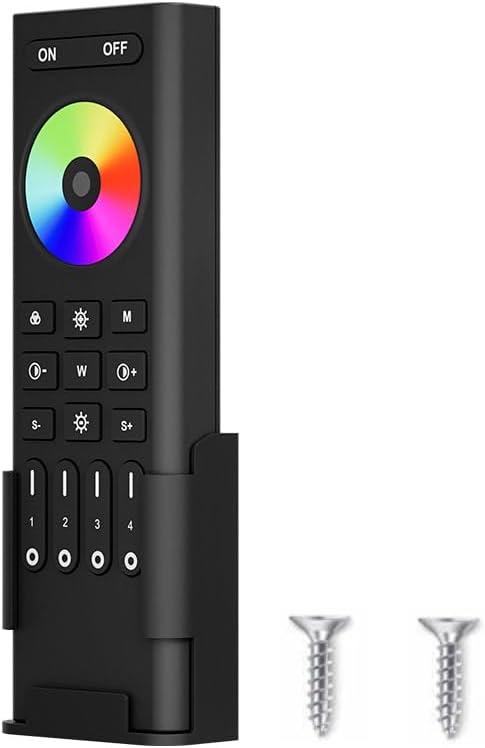
Image: Xnbada RC03RFB Smart Remote Control, showing the remote, its wall-mounted holder, and two small screws for installation.
Sònrachaidhean
| Feart | Tuairisgeul |
|---|---|
| Brand | Xnbada |
| Modail Àireamh | RC03RFB-YKQ |
| Seòrsa smachd | Wireless 2.4G RF |
| Supported LED Types | RGB, RGBW, RGBCCT |
| Sònaichean smachd | 4 Criosta |
| Astar smachd | Suas gu 30 meatairean (98 troighean) |
| Stòr cumhachd | 2 x Bataraidh AAA (gun a thoirt a-steach) |
| Meudan | 5.91 x 2.17 x 0.98 òirleach (140.1mm x 45.8mm x 17mm) |
| Stuth | Plastaig |
| Feartan sònraichte | Low power consumption, 16 million colors, fast communication rate, touch screen swipe for color, one-key 7 pure colors. |
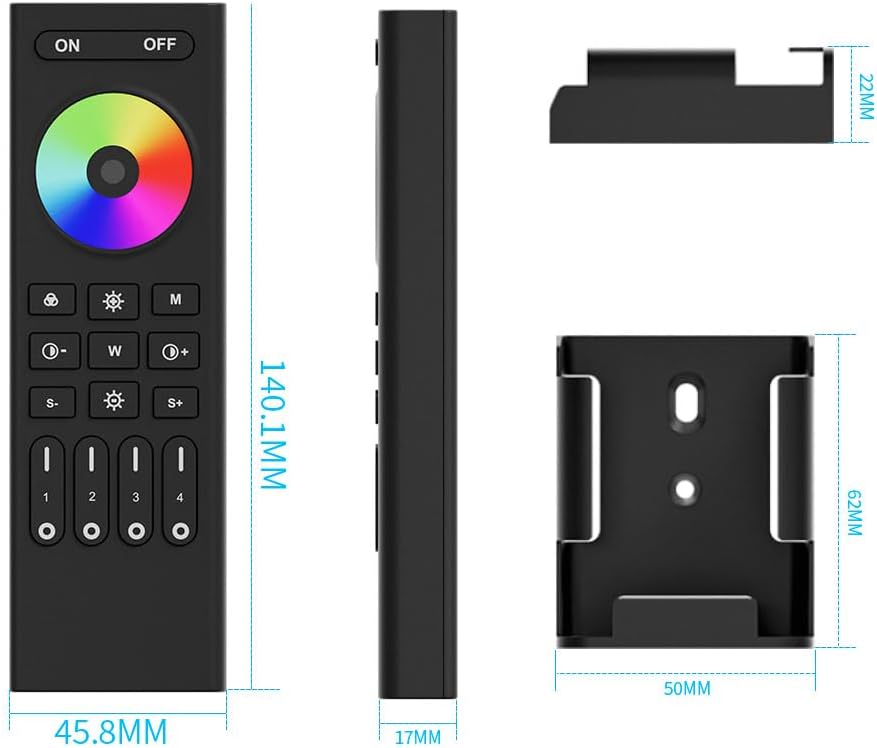
Image: Detailed dimensions of the RC03RFB remote control and its accompanying wall mount.
Bathar seachadview
The RC03RFB remote control features a user-friendly layout with a color touch ring and dedicated buttons for various functions. Understanding each button's purpose is key to effective control.

Image: A detailed diagram illustrating the function of each button on the RC03RFB remote control.
- Putanan AIR / OFF: Press to turn all linked devices ON or OFF.
- Cearcall dath: Touch the slider to select from 16 million colors.
- 7 Colors Switching Button: Short press to switch between pure colors (orange, yellow, green, cyan, blue, purple, red). Long press for gradual color changes.
- Brightness Adjustment Buttons (S-/S+): Press to dim or brighten the lights.
- Dynamic Modes Button (M): Press repeatedly to switch between various dynamic lighting modes.
- Color Temperature/Saturation Buttons (W, Sun icon):
- Under white light mode: Press 'W' to change white light to cold white, 'Sun icon' to warm white.
- Under color light mode: Press 'W' to reduce saturation, 'Sun icon' to add saturation.
- Putan Solas Geal: Press to get pure white light.
- Preset Brightness Buttons (30%, 60%, 100%): Quickly set brightness levels.
- Dynamic Mode Speed Buttons (S-/S+): Atharraich astar nam modhan fiùghantach.
- Zone ON/OFF/Night Light Mode Buttons (1-4): Control individual zones. Short press to turn zone ON/OFF. Long press for night light mode.
Suidhich
1. Stàladh bataraidh
The RC03RFB remote control requires two AAA batteries (not included). Ensure correct polarity when inserting the batteries.
2. Stàladh Wall Mount
The remote comes with a wall-mounted holder for convenient storage and access. Use the provided screws to secure the holder to a desired surface.

Image: The RC03RFB remote control shown with its wall mount and a view of its back, indicating the battery compartment.
3. Linking and Unlinking Instructions
The remote control operates using 2.4G RF technology and needs to be linked with compatible LED controllers. The light can only be working after linking with the remote.
Stiùireadh còd ceangail:
- Switch off the power to the LED light/controller. Wait for at least 10 seconds.
- Switch on the power to the LED light/controller.
- Within 3 seconds of switching on the light, short press the '1' button (or the desired zone button 1-4) on the remote control 3 times.
- The LED light should blink 3 times slowly, indicating successful linking.
Note: If linking fails (light does not blink slowly), please repeat the steps. A light that has already been linked cannot be linked again to the same remote/zone without unlinking first.
Stiùireadh còd dì-cheangail:
- Switch off the power to the LED light/controller. Wait for at least 10 seconds.
- Switch on the power to the LED light/controller.
- Within 3 seconds of switching on the light, short press the '1' button (or the desired zone button 1-4) on the remote control 5 times.
- The LED light should blink 10 times quickly, indicating successful unlinking.
Note: If unlinking fails (light does not blink quickly), please repeat the steps. Lights that have not been linked do not need to be unlinked.

Image: Visual guide for linking and unlinking the remote control with LED light strips.
Stiùireadh Obrachaidh
Smachd bunaiteach
- Cumhachd air / dheth: Brùth an ON button to turn on all linked devices. Press the AIRSON button to turn off all linked devices.
- Taghadh dath: Cleachd an Cearcall dath by touching and sliding your finger to select from 16 million colors.
- Atharrachadh soilleireachd: Cleachd an S- agus S+ buttons to decrease or increase brightness. You can also use the preset 30%, 60%, and 100% buttons.
- Solas Geal: Press the dedicated white light button to switch to pure white illumination.

Image: The remote control demonstrating its 16 million color changeable panel slide control feature.

Image: The remote control illustrating its color temperature and saturation adjustment capabilities.

Image: The remote control demonstrating brightness adjustment, including a night light mode.
Smachd Adhartach
- Modhan fiùghantach: Brùth an M button to cycle through various pre-programmed dynamic lighting effects. Adjust the speed of these modes using the S- agus S+ putanan.
- 4-Zone Group Control: The remote allows you to control up to four independent lighting zones. Use the dedicated buttons labeled 1, 2, 3 to select and control each zone individually. Each zone can control countless LED strip controllers.

Image: A visual representation of how the remote control can manage four separate lighting zones.

Image: Illustration of the simultaneous auto-transmission feature, where the remote signal can be relayed between controllers within 30 meters.
Luchd-riaghlaidh co-fhreagarrach
The RC03RFB remote control is designed to work with specific Xnbada LED controllers. Compatible models include: C03W, C03Z, C04Z, C04W, C05W, C05Z, WB5, LM052, LM053, LM051. Ensure your controller is compatible for proper functionality.
Image: A selection of compatible LED controllers (C01W, C02W, C03W, C04W, C05W, WB5, FUT037, C01Z, C02Z, C03Z, C04Z, C05Z, LM051, LM053) that can be used with the RC03RFB remote.
Cumail suas
- Glanadh: Cleachd clò bog, tioram airson an smachd iomallach a ghlanadh. Na cleachd innealan-glanaidh sgrìobach no fuasglaidhean.
- Ath-nuadhachadh bataraidh: Replace batteries when the remote's response becomes sluggish or it stops functioning. Ensure to use 2 new AAA batteries.
- Stòradh: Stòraich an smachd iomallach ann an àite fionnar, tioram air falbh bho sholas dìreach na grèine agus teòthachd anabarrach.
Fuasgladh thrioblaidean
| Trioblaid | Adhbhar a dh’fhaodadh a bhith ann | Fuasgladh |
|---|---|---|
| Iomallach gun a bhith a ’freagairt | Low or dead batteries; Not linked to controller; Out of range. | Replace batteries; Perform linking procedure (see Setup); Move closer to the controller (within 30m). |
| Lights not changing color/brightness | Incorrect mode selected; Controller incompatibility; Linking issue. | Ensure you are in the correct color/brightness mode; Verify controller model compatibility; Re-link the remote. |
| Linking procedure fails | Incorrect timing; Already linked; Power interruption during linking. | Ensure precise timing (within 3 seconds of power on); Unlink first if already linked; Ensure stable power supply during linking. |
| Inconsistent button response | Interference; Low battery. | Reduce potential interference sources (other 2.4G devices); Replace batteries. |
Video toradh
Video: An official demonstration of the Xnbada RGB RGBW RGBCCT Wireless Smart Remote in action, showcasing its various lighting control features and responsiveness.
Barantas agus Taic
For warranty information or technical support regarding your Xnbada RC03RFB remote control, please contact Xnbada customer service directly. Refer to the product packaging or the official Xnbada weblàrach airson fiosrachadh conaltraidh.
Xnbada aims to provide innovative home lighting and smart home solutions. For further assistance, visit the official Xnbada Store on Amazon: Xnbada Store.