
Ro-ràdh
Thank you for choosing the AWEI H26 Smart Watch. This device is designed to enhance your daily life with its multi-functional capabilities, including fitness tracking, communication features, and health monitoring. This manual provides essential information for setting up, operating, maintaining, and troubleshooting your smart watch to ensure optimal performance and longevity.
Suidhich
1. A’ cur cosgais air an uaireadair snasail
Before first use, fully charge your AWEI H26 Smart Watch. The watch is equipped with a 260mAh battery. A full charge typically takes 2-3 hours.
- Ceangail an càball cosgais magnetach ris na puingean cosgais air cùl an uaireadair.
- Cuir ceann USB a’ chàball a-steach do inneal-atharrachaidh cumhachd USB àbhaisteach (5V/1A air a mholadh) no do phort USB coimpiutair.
- Seallaidh taisbeanadh an uaireadair comharra cosgais.

Image: The AWEI H26 Smart Watch screen showing a battery charging icon, indicating magnetic charging in progress. The text on the image mentions "22-Day Standby Time Easy Magnetic Charging" and that usage time can last for 3 to 4 days per charge.
2. A’ paidhreachadh leis an fhòn-smart agad
The AWEI H26 Smart Watch is compatible with both Android and iOS smartphones. To unlock its full potential, you need to pair it with your phone via Bluetooth.
- Luchdaich sìos an App: Lorg airson the official AWEI H26 companion app in your phone's app store (Google Play Store for Android or Apple App Store for iOS) and install it.
- Dèan comas air Bluetooth: Dèan cinnteach gu bheil Bluetooth air a chomasachadh air an fhòn-smart agad.
- Fosgail an App: Launch the installed app on your phone and follow the on-screen instructions to create an account or log in.
- Cuir inneal ris: Within the app, navigate to the 'Add Device' or 'Pair Device' section. The app will search for available Bluetooth devices.
- Tagh an uaireadair agad: Select 'H26' from the list of found devices. Confirm the pairing request on both your phone and the watch if prompted.
- Suidheachadh coileanta: Follow any remaining prompts in the app to complete the initial setup, including granting necessary permissions for notifications, health data, etc.
Stiùireadh Obrachaidh
1. Seòladh Bunaiteach
The AWEI H26 Smart Watch features a 1.95-inch touchscreen and physical buttons for navigation.
- Sgrion-touch: Sguab clì/deas, suas/sìos gus seòladh tro chlàran-taice agus feartan. Tap gus nì a thaghadh.
- Putan(an) Taobh: Typically, one button serves as a power on/off, back, or home button. Refer to the on-screen prompts for specific functions.

Image: A close-up of the AWEI H26 Smart Watch, showcasing its 1.95-inch HD TFT display. The watch face shows time, date, battery level, and activity tracking icons. The image text highlights "1.95" HD TFT Watch Face Adapt to Different Light Intensities" and its 86.6% screen-to-body ratio for better operating and reading experience in various light conditions.
2. Prìomh fheartan
- Freagair/Dèan gairmean: Once paired with your smartphone, the H26 allows you to answer and make calls directly from your wrist using its one-touch Bluetooth calling feature.
- Modhan ioma-spòrs: The watch supports over 100 sports modes, including running, walking, climbing, cycling, hiking, basketball, badminton, football, yoga, and more. Select a mode before starting your activity to track exercise time, calories burned, and other relevant metrics.

Image: A person wearing the AWEI H26 Smart Watch during an outdoor activity. The watch face displays time, date, and icons for steps, heart rate, and calories burned. The image text states "100+ Sports Modes Create Your Exclusive Sports Style" and mentions heart rate monitoring, calorie consumption, and exercise duration tracking.
- Sgrùdadh Slàinte: The H26 provides all-day monitoring for heart rate, blood pressure, blood oxygen, and sleep patterns. This data helps you maintain a healthy balance and provides insights into your well-being.

Image: A close-up of the AWEI H26 Smart Watch displaying a heart rate graph with a current reading of 108 BPM. The image text highlights "Healthy Living Golden Partner" and mentions all-day heart-rate, blood-pressure, blood-oxygen, and sleep monitoring.
- Aghaidhean faire gnàthaichte: Personalize your watch with a variety of cloud-based watch faces available through the app. You can also upload your own photos to create unique watch faces.
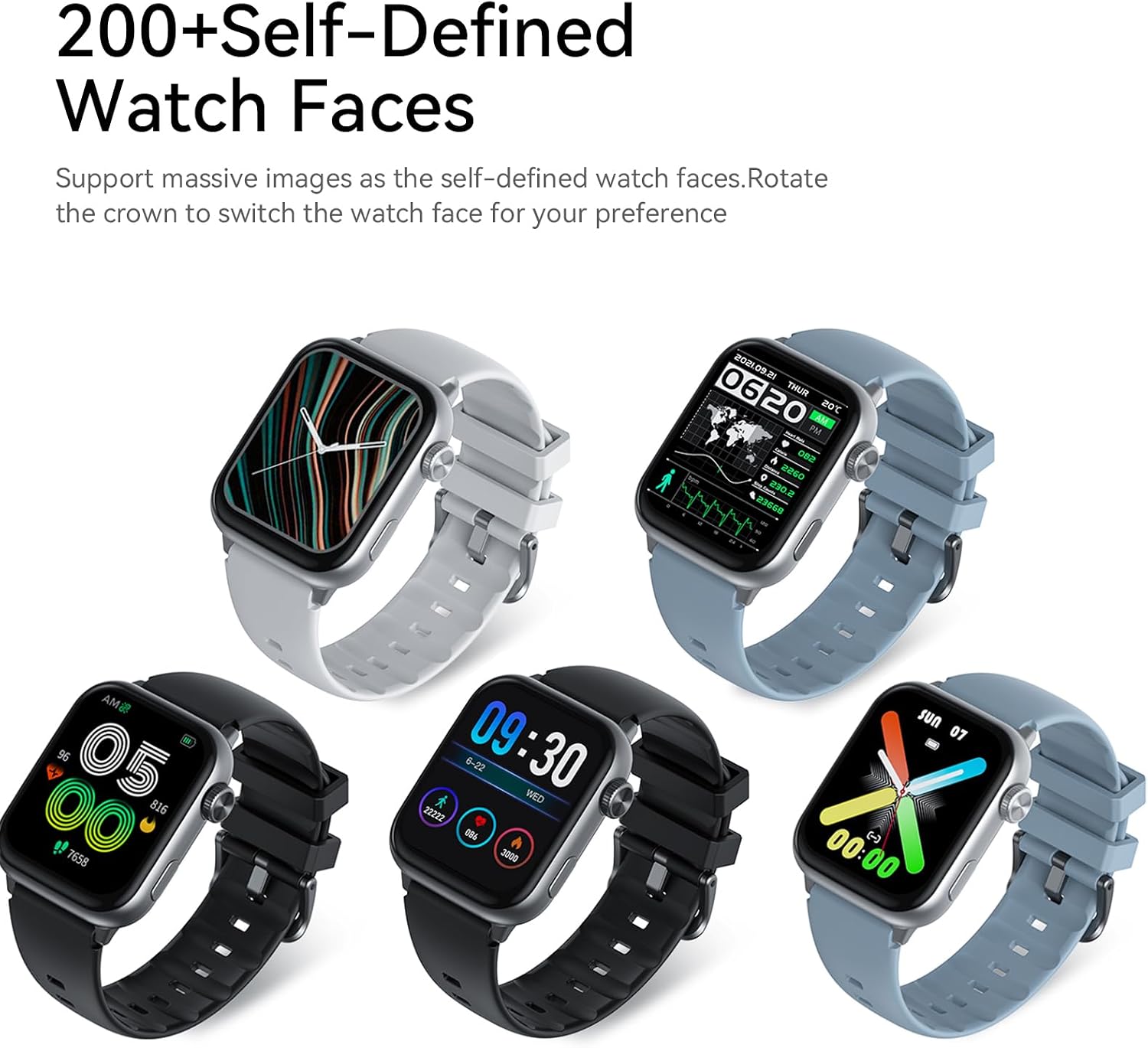
Image: Five AWEI H26 Smart Watches in various colors, each displaying a different customizable watch face. The image text indicates "200+ Self-Defined Watch Faces" and the ability to rotate the crown to switch watch faces.
- Feartan Eile: The watch includes features such as female physiological cycle tracking, wrist flip screen activation, time display, sedentary reminders, remote photography control, music control, and alarm clock.
Cumail suas
1. Glanadh an Uaireadair Smart agad
Regular cleaning helps maintain the appearance and functionality of your watch.
- Sguab an sgrion agus corp an uaireadair le clò bog, gun lint.
- Airson salachar stòlda, beagan dampnigh an clò le uisge. Seachain ceimigean cruaidh no stuthan sgrìobach a chleachdadh.
- Glan na ceanglaichean cosgais bho àm gu àm gus dèanamh cinnteach gu bheil ceangal math ann.
2. Stiùiridhean airson Dìon-uisge
The AWEI H26 Smart Watch has an IP67 waterproof rating, meaning it is resistant to dust and can withstand immersion in water up to 1 meter for 30 minutes. This makes it suitable for daily activities like hand washing, face washing, and sweating during exercise.

Image: The AWEI H26 Smart Watch with water splashing around it, illustrating its water resistance. The image text prominently displays "IP67 Waterproof Rate Fearless of Rain & Sweat" and clarifies that it is waterproof and dustproof.
Cudromach:
- Na cleachd an uaireadair ann an uisge teth, saunas no seòmraichean-smùide.
- Seachain an uaireadair a chleachdadh ann an uisge na mara, oir faodaidh salann an inneal a chreimeadh.
- The waterproof rating is not permanent and may decrease over time with normal wear and tear.
- Do not intentionally submerge the watch for extended periods or beyond the specified depth.
Fuasgladh thrioblaidean
If you encounter issues with your AWEI H26 Smart Watch, try the following solutions:
- Uaireadair nach eil a’ tionndadh air: Dèan cinnteach gu bheil an uaireadair làn-luchdaichte. Ceangail e ris an charger agus feith beagan mhionaidean mus feuch thu ri a chumhachdachadh air.
- Chan urrainnear paidhir a dhèanamh leis a’ fòn:
- Dèan cinnteach gu bheil Bluetooth air a chomasachadh air an fhòn agad agus gu bheil an uaireadair taobh a-staigh ruigsinneachd.
- Ath-thòisich an dà chuid am fòn agad agus an uaireadair.
- Dèan cinnteach a bheil an aplacaid air ùrachadh chun dreach as ùire.
- Dìochuimhnich an inneal ann an roghainnean Bluetooth an fhòn agad agus feuch ri paidhreachadh a-rithist tron aplacaid.
- Dàta slàinte neo-mhearachdach: Dèan cinnteach gu bheil an uaireadair air a chaitheamh gu teann air do chaol-dùirn, gun a bhith ro theann no ro sgaoilte. Glan am mothachair air cùl an uaireadair.
- Fiosan nach deach fhaighinn: Check app permissions on your phone to ensure the watch app has access to notifications. Verify that notifications are enabled within the watch app settings.
- Beatha bataraidh goirid: Reduce screen brightness, disable unnecessary features, and limit frequent heart rate monitoring if not needed.
If the problem persists, please refer to the support section for further assistance.
Sònrachaidhean
| Feart | Mion-fhiosrachadh |
|---|---|
| Ainm Modail | H26 |
| Brand | Awei |
| Meud sgrion | 1.95 òirlich |
| Seòrsa Taisbeanaidh | Didseatach |
| Siostam-obrachaidh | Android, iOS |
| Teicneòlas ceangail | Bluetooth |
| Comas Bataraidh | 260 mìleamp Uairean |
| Ùine cosgais bataraidh | 2-3 uairean |
| Ìre dìon-uisge | IP67 (1 Meter for 30 Minutes) |
| Cur a-steach eadar-aghaidh daonna | Putanan, Sgrion-suathaidh |
| Feartan sònraichte | 100+ Sports Modes, One-touch Bluetooth Calling, Health Monitoring |
| Seòrsa Stuth Còmhlan | sileaconach |
| Seòrsa Stuth Cùise | Stàilinn nach meirg |
| Meatairean air an Tomhais | Lorgaire gnìomhachd |
| GPS | Tro fòn 'smart' |
Barantas agus Taic
Fiosrachadh Barantais
The AWEI H26 Smart Watch comes with a Barantas cuibhrichte 1-bliadhna from the date of purchase. This warranty covers manufacturing defects under normal use. It does not cover damage caused by misuse, accidents, unauthorized modifications, or failure to follow the instructions in this manual.
Taic Luchd-cleachdaidh
If you have any questions, require technical assistance, or experience issues not covered in the troubleshooting section, please do not hesitate to contact our customer support team. We are committed to providing assistance and will respond to your inquiries within 24 hours.
Please refer to your purchase documentation or the official Awei weblàrach-lìn airson fiosrachadh conaltraidh sònraichte.