
VIRAN C21pro
VIRAN C21pro Military Smart Watch User Manual
Modail: C21pro
1. Ro-ràdh
This manual provides comprehensive instructions for the VIRAN C21pro Military Smart Watch. It covers setup, operation, maintenance, and troubleshooting to ensure optimal performance and user experience. Please read this manual thoroughly before using your device.

Dealbh 1: Aghaidh view of the VIRAN C21pro Military Smart Watch, displaying a digital watch face with health and activity metrics.
2. Stiùirich rèiteachaidh
2.1 Fosgladh a’ bhogsa agus a’ chiad chosgais
Upon receiving your VIRAN C21pro Smart Watch, carefully unbox the device and its accessories. Before first use, ensure the watch is fully charged.
- Ceangail an càball cosgais ris a’ phort cosgais air cùl an uaireadair.
- Cuir ceann USB a’ chàball a-steach do inneal-atharrachaidh cumhachd USB àbhaisteach (nach eil air a ghabhail a-steach) no do phort USB coimpiutair.
- Seallaidh taisbeanadh an uaireadair inbhe a’ chosgais. Mar as trice bheir làn chosgais timcheall air 2 uair a thìde.

Image 2: The VIRAN C21pro Smart Watch displaying a charging icon, indicating its 410mAh battery capacity and long standby time.
2.2 Stàladh is Paidhreachadh Aplacaidean
To unlock the full functionality of your smart watch, download and install the companion application on your smartphone.
- Scan the QR code provided in the watch's packaging or search for the official VIRAN app in your smartphone's app store (compatible with Android 6.0/iOS 9.0 and above).
- Fosgail an aplacaid agus lean an stiùireadh air-sgrion gus cunntas a chruthachadh no log a-steach.
- Dèan comas air Bluetooth air an fhòn-smart agad.
- In the app, navigate to the device pairing section and select your VIRAN C21pro Smart Watch from the list of available devices.
- Dearbhaich an t-iarrtas paidhreachaidh air an uaireadair agus am fòn cliste agad.

Image 3: The VIRAN C21pro Smart Watch screen showing various application icons, including a voice assistant, indicating its smart features.
3. Stiùireadh Obrachaidh
3.1 Seòladh Bunaiteach
- Sgrion-suathaidh: Sguab clì, deas, suas no sìos gus seòladh tro chlàran-taice agus feartan. Tap gus taghadh.
- Putanan Taobh: The watch features multiple side buttons. Typically, one button serves as a power/home button, while others may be customizable for quick access to sports modes or other functions. Refer to the on-screen prompts for specific button assignments.
- Crùn: Rotate the crown to scroll through lists or adjust settings. Press the crown to return to the watch face or confirm selections.
Video 1: A demonstration of the VIRAN C21pro Smart Watch's user interface, showcasing touch screen navigation and various app icons. This video illustrates the ease of interaction with the device's features.
3.2 Gnìomhachd Ghairm Bluetooth
The VIRAN C21pro supports Bluetooth calling, allowing you to answer or dial calls directly from your wrist.
- Ensure your watch is paired and connected to your smartphone via Bluetooth.
- Nuair a thig gairm a-steach, nochdaidh an uaireadair ID an neach-fòn. Tap air an ìomhaigh uaine gus freagairt no air an ìomhaigh dhearg gus a dhiùltadh.
- To dial a call, navigate to the "Telephone" or "Dialpad" app on your watch and enter the number, or select a contact from your synced phonebook.

Image 4: The VIRAN C21pro Smart Watch displaying an incoming call interface, demonstrating its Bluetooth call feature.
3.3 Sgrùdadh Slàinte
The watch continuously monitors various health metrics.
- Ìre cridhe: Access the heart rate monitor from the main menu to view dàta ìre cridhe fìor-ùine.
- Bruthadh-fala: Use the blood pressure monitoring feature for periodic readings. For accurate results, remain still during measurement.
- Ocsaidean fala (SpO2): Tomhais ìrean sùghaidh ocsaidean san fhuil agad.
- Rianachd cadail: The watch automatically tracks your sleep patterns, providing data on sleep duration and quality.

Image 5: A composite image showing the VIRAN C21pro Smart Watch displaying heart rate, blood pressure, and blood oxygen levels, highlighting its comprehensive health monitoring capabilities.
3.4 Modhan Spòrs
The watch offers over 100 sport modes to track your physical activities.
- Navigate to the "Sport" menu to select your desired activity (e.g., walking, running, cycling, swimming).
- The watch will record data such as steps, distance, calories burned, and heart rate during your workout.
- Review your workout data in the companion app for detailed analysis.

Image 6: A visual representation of the VIRAN C21pro Smart Watch's multiple sport modes, including icons for various activities like running, cycling, and swimming, alongside tracked metrics.
4. Cumail suas
4.1 Glanadh an Uaireadair agad
- Glan an uaireadair agus an strap agad gu cunbhalach gus casg a chur air irioslachd craicinn agus gus am bi e ag obair.
- Sguab an uaireadair le clò bog,amp, clò gun lint. Seachain ceimigean cruaidh no stuthan sgrìobach.
- Airson an strap, cleachd siabann tlàth is uisge, an uair sin nigh gu mionaideach agus tiormaich gu tur mus cuir thu ort e.
4.2 Seasmhachd uisge
The VIRAN C21pro has a 5ATM IP68 waterproof rating, allowing submersion up to 50 meters. It is suitable for swimming and showering. However, avoid hot water, steam, or prolonged exposure to high-velocity water.
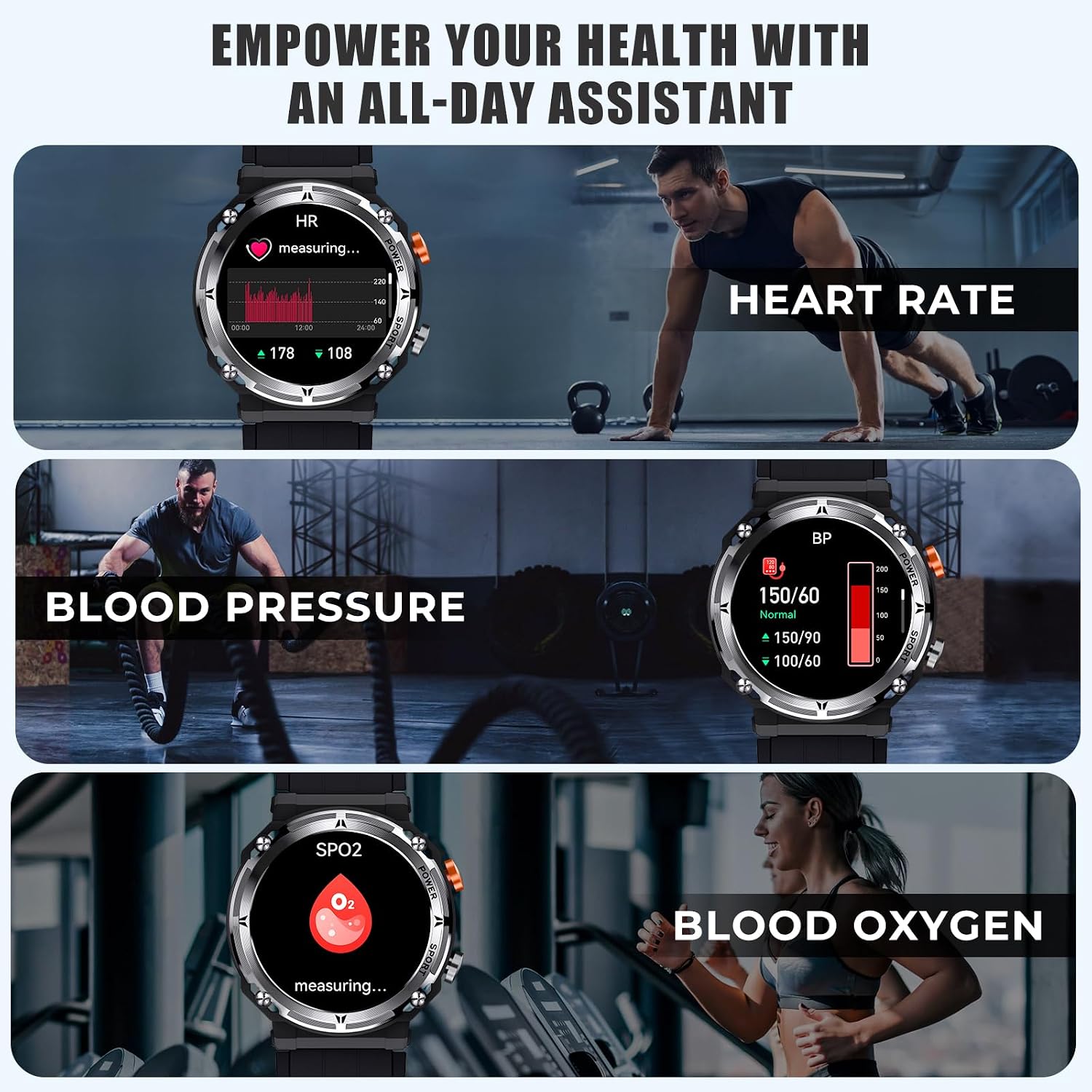
Image 7: The VIRAN C21pro Smart Watch being worn by a swimmer, illustrating its 5ATM IP68 waterproof rating and suitability for water activities.
Video 2: A demonstration of the VIRAN C21pro Smart Watch's durability, including water submersion and impact resistance tests. This video highlights the watch's military-grade toughness and waterproof capabilities.
5. A ’dèanamh trioblaid
| Cùis | Adhbhar a dh’fhaodadh a bhith ann | Fuasgladh |
|---|---|---|
| Coimhead gun a bhith a 'tionndadh air | Low battery, software glitch | Charge the watch for at least 30 minutes. If still unresponsive, perform a hard reset by pressing and holding the power button for 10-15 seconds. |
| Cha ghabh paidhir leis a' fòn | Bluetooth dheth, duilgheadas leis an aplacaid, chan eil an uaireadair ri lorg | Ensure Bluetooth is enabled on your phone and the watch. Restart both devices. Reinstall the companion app. Make sure the watch is in pairing mode. |
| Dàta slàinte mì-chruinn | Improper fit, sensor obstruction, movement during measurement | Ensure the watch is worn snugly on your wrist, one finger-width above the wrist bone. Clean the sensor on the back of the watch. Remain still during measurements. |
| Beatha bataraidh goirid | Frequent use of power-intensive features, high screen brightness | Reduce screen brightness. Limit continuous heart rate monitoring. Turn off unnecessary notifications. Disable "Always-On Display" if active. |
6. Sònrachaidhean
- Modail: C21pro
- Taisbeanadh: 1.39 Inches HD, 360*360 resolution
- Comas bataraidh: 410mAh Lithium Ion
- Beatha bataraidh: 5-7 làithean (cleachdadh làitheil), 40 latha (feitheimh)
- Ìre dìon-uisge: 5ATM IP68 (up to 50 meters)
- Ceangal: Bluetooth 5.2
- Co-chòrdalachd: Android 6.0 / iOS 9.0 agus gu h-àrd
- Comas stòraidh cuimhne: 128 MB
- Feartan sònraichte: Activity Tracker, Blood Pressure Monitor, Heart Rate Monitor, Blood Oxygen Monitor, Sleep Monitor, 100+ Sport Modes, Bluetooth Call, AI Voice Assistant
- Cuideam nì: 110 gram (3.88 unnsa)
- Dèanadair: VIRAN
7. Fiosrachadh Barantais
The VIRAN C21pro Military Smart Watch comes with a Barantas 1-bliadhna bho cheann-latha a’ cheannaich. Tha am barantas seo a’ còmhdach lochdan saothrachaidh agus mì-ghnìomhachd fo chleachdadh àbhaisteach. Chan eil e a’ còmhdach milleadh air adhbhrachadh le droch chleachdadh, tubaistean, atharrachaidhean gun chead, no caitheamh is deòir àbhaisteach.
Feuch an glèidh thu an dearbhadh ceannach agad airson tagraidhean barantais.
8. Taic teachdaiche
For any inquiries, technical assistance, or warranty claims, please contact VIRAN customer support:
- Taic air-loidhne: Visit the official VIRAN store on Amazon: VIRAN Amazon Store
- Uairean seirbheis: 24/7 online customer service is available.
Ask a question about this manual
Ask about setup, troubleshooting, compatibility, parts, safety, or missing instructions. Manuals+ will review the question and use this page’s manual context to help answer it.