
1. Ro-ràdh
Tapadh leibh airson ceannachasing the CANYON BSP-8 Bluetooth Speaker. This manual provides essential information for the safe and efficient use of your device. Please read it thoroughly before operation and retain it for future reference.
Prìomh fheartan:
- Toradh Fuaime 10W: A’ lìbhrigeadh fuaim shoilleir is chumhachdach.
- Bluetooth 5.2: For stable and energy-efficient wireless connection up to 10 meters.
- Solas-cùil RGB: Integrated lighting for enhanced ambiance.
- Fìor Stereo gun uèir (TWS): Connect two BSP-8 speakers for a full stereo sound experience.
- Ioma roghainnean ath-chluich: Supports Bluetooth, AUX, USB, and MicroSD card inputs.
- Dealbhadh so-ghiùlain: Compact size with a convenient hanger for easy transport.
- Beatha bataraidh fada: Suas ri 3 uair a thìde de chluich air aon chosgais.
2. Fiosrachadh Sàbhailteachd
- Na cuir an neach-labhairt fo theodhachd anabarrach, solas dìreach na grèine, no taiseachd àrd.
- Seachain a bhith a’ leigeil às no a’ toirt buaidh làidir air an neach-labhairt.
- Do not disassemble or attempt to repair the speaker yourself. Contact qualified service personnel.
- Cùm an neach-labhairt air falbh bho uisge agus lionntan eile. Chan eil e dìonach bho uisge.
- Cleachd an càball cosgais a tha air a thoirt seachad no càball Seòrsa-C le teisteanas a-mhàin airson cosgais.
- Cuir às don bhataraidh agus don neach-labhairt a rèir riaghailtean ionadail.
3. Pasgan-susbaint
- CANYON BSP-8 Bluetooth Speaker
- Càball Cìsean USB Type-C
- Leabhar-làimhe cleachdaiche
4. Toradh thallview
Dèan eòlas ort fhèin air pàirtean agus smachdan an neach-labhairt.
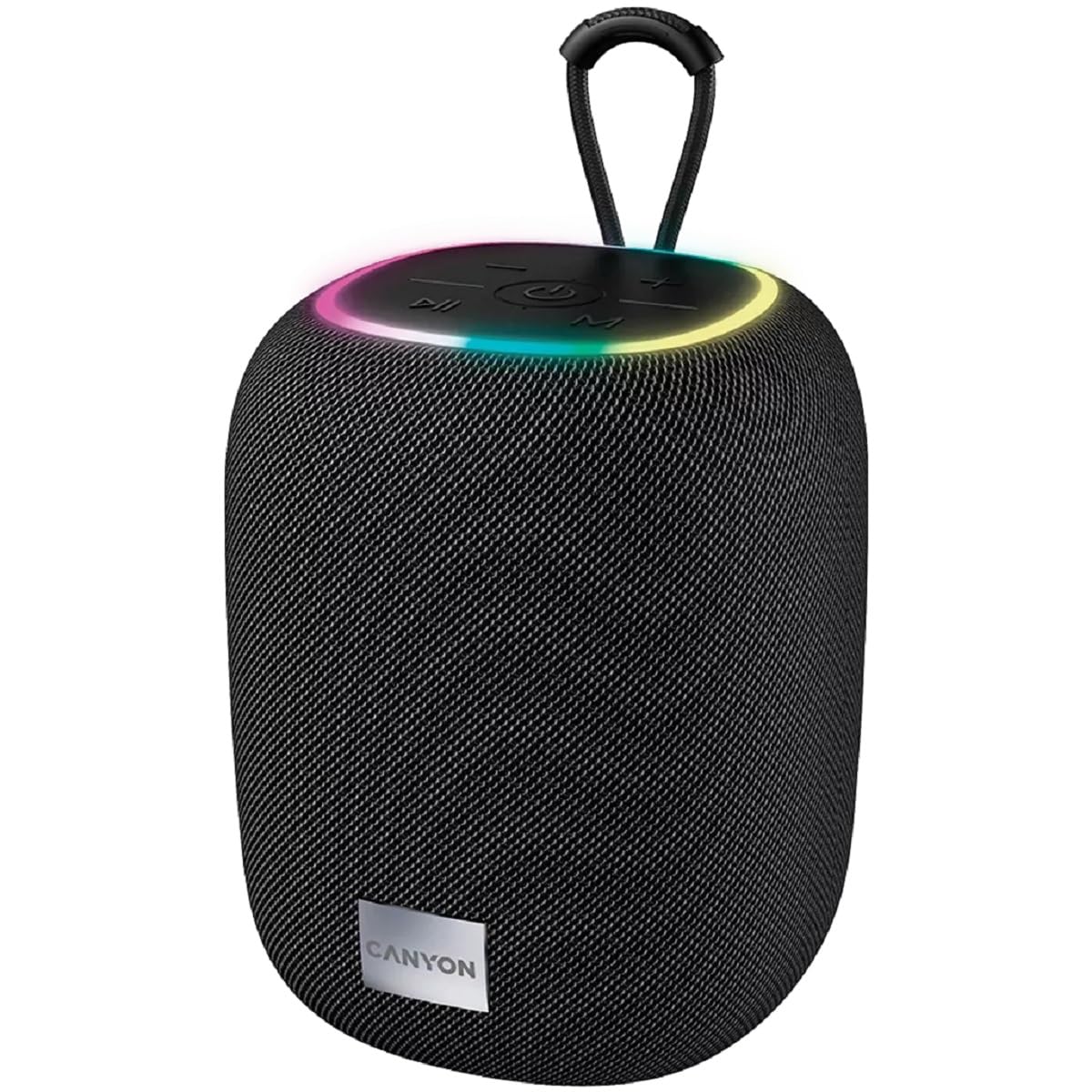
Ìomhaigh 1: Mullach view of the CANYON BSP-8 speaker, showing the control buttons, RGB backlight, and integrated hanger.
Putanan Smachd (Pannal as Àirde):
- Putan Cumhachd: Brùth is cum sìos gus a thionndadh air/dheth. Brùth goirid gus cluich/stad.
- Putan Lùghdachadh Meud / An Trac Roimhe: Brùth goirid airson an tomhas-lìonaidh a lùghdachadh. Brùth fada airson an trac roimhe.
- Putan Meud-thomhais / An ath-òran: Brùth goirid airson an tomhas-lìonaidh a thogail. Brùth fada airson an ath thrac.
- Putan Modh (M): Brùth goirid gus atharrachadh eadar modhan Bluetooth, AUX, USB, agus MicroSD.

Dealbh 2: Cùl view of the CANYON BSP-8 speaker, illustrating the various input ports including AUX, USB, TF (MicroSD) card slot, and DC5V Type-C charging port.
Input Ports (Rear Panel):
- Port AUX: Airson innealan claisneachd taobh a-muigh a cheangal tro chàball claisneachd 3.5mm.
- Port USB: Airson cluich fuaime bho dhràibh USB flash.
- TF Card Slot (MicroSD): Airson claisneachd a chluich bho chairt MicroSD.
- DC5V (Type-C) Port: Airson neach-labhairt a luchdadh a-nuas.
5. Suidhich
5.1 A’ cur cosgais air an neach-labhairt
- Connect the provided USB Type-C cable to the DC5V port on the speaker.
- Ceangail ceann eile a’ chàball ri inneal-atharrachaidh cumhachd USB (thathar a’ moladh 5V/1A) no port USB coimpiutair.
- Lasaidh an solas comharra cosgais. Cuiridh e dheth no atharraichidh e dath aon uair ‘s gu bheil e làn-chosgais.
Nota: Airson beatha bataraidh as fheàrr, cuir làn-luchdachadh air an neach-labhairt mus cleachd thu e an toiseach.

Image 3: Illustration showing the 1800 mAh battery capacity and up to 3 hours of playtime for the CANYON BSP-8 speaker.
5.2 A’ cur cumhachd air/dheth
- Gus cumhachd a thoirt air: Press and hold the Power button for approximately 3 seconds. You will hear an audible prompt.
- Gus cumhachd a thoirt dheth: Press and hold the Power button for approximately 3 seconds. You will hear an audible prompt.
5.3 Pairing Bluetooth
- Cuir an neach-labhairt air. Thèid e a-steach gu modh paidhreachaidh Bluetooth gu fèin-ghluasadach, air a chomharrachadh le solas LED a’ priobadh.
- Cuir Bluetooth an gnìomh air an inneal gluasadach agad (fòn cliste, tablet, coimpiutair).
- Lorg airson available Bluetooth devices and select "CANYON BSP-8" from the list.
- Once paired, the LED light will stop flashing, and you will hear a confirmation sound.
Nota: Ath-cheanglaicheas an neach-labhairt gu fèin-ghluasadach ris an inneal mu dheireadh a chaidh a cheangal ri chèile ma tha e taobh a-staigh ruigsinneachd agus ma tha Bluetooth air a chomasachadh.

Image 4: Illustration highlighting the stable and energy-efficient Bluetooth 5.2 connection with an operating range of up to 10 meters.
Paidhreachadh 5.4 Stereo gun Uèir (TWS)
To connect two CANYON BSP-8 speakers for a stereo sound experience:
- Ensure both BSP-8 speakers are powered on and not connected to any Bluetooth device.
- On one speaker (this will be the primary speaker), double-press the Power button. It will enter TWS pairing mode.
- Nì an dà neach-labhairt sgrùdadh air a chèile agus ceanglaidh iad ri chèile gu fèin-ghluasadach. Cluinnidh tu fuaim dearbhaidh aon uair ‘s gu bheil iad ceangailte.
- Cho luath ‘s a bhios TWS air a stèidheachadh, ceangail an inneal gluasadach agad ris a’ phrìomh neach-labhairt tro Bluetooth mar a tha air a mhìneachadh ann an earrann 5.3.
Note: TWS mode only works with two identical CANYON BSP-8 speakers.
6. Stiùireadh Obrachaidh
6.1 A’ cluich claisneachd
- Modh Bluetooth: Às dèidh paidhreachadh soirbheachail, cluichidh claisneachd bhon inneal ceangailte agad tron neach-labhairt.
- Modh AUX: Connect a 3.5mm audio cable from your external audio device to the AUX port on the speaker. Press the 'M' button to switch to AUX mode.
- Modh USB: Insert a USB flash drive into the USB port. The speaker will automatically switch to USB mode and begin playing audio files. If not, press the 'M' button.
- Modh cairt MicroSD: Insert a MicroSD card into the TF card slot. The speaker will automatically switch to MicroSD mode and begin playing audio files. If not, press the 'M' button.
6.2 Smachd Playback
- Cluich / Stad: Goirid brùth air a 'phutan Power.
- Meud suas: Brùth goirid air a’ phutan Meudaich an Toirt (+).
- Meud sìos: Brùth goirid air a’ phutan Lùghdaich an Toirt (-).
- An ath cheum: Brùth fada air a’ phutan Meudaich an Toirt (+).
- Rian roimhe: Brùth fada air a’ phutan Lùghdaich an Toirt (-).
Solas-cùil 6.3 RGB
The speaker features an integrated RGB backlight on the top panel. The backlight activates automatically when the speaker is powered on. There are no specific controls for changing the RGB pattern or turning it off/on independently of the speaker's power state.