
1. Stiùireadh Sàbhailteachd Cudromach
Leugh agus tuig a h-uile stiùireadh sàbhailteachd mus cleachd thu an toradh seo. Dh’ fhaodadh fàilligeadh ann a bhith a’ leantainn nan stiùiridhean seo clisgeadh dealain, teine no dochann dona adhbhrachadh.
- Na cuir an inneal fo theodhachd anabarrach, solas dìreach na grèine, no taiseachd àrd.
- Keep the device away from water and other liquids. If it gets wet, turn it off immediately and allow it to dry completely before reuse.
- Na feuch ri an inneal a thoirt às a chèile, a chàradh no atharrachadh. Thoir aire do luchd-obrach teisteanasach airson a h-uile seirbheiseachadh.
- Use only specified charging methods (USB-C, solar, hand crank).
- Cùm a-mach à ruigsinn chloinne.
- Cuir às do bataraidhean a rèir riaghailtean ionadail.
2. Toradh thallview
The FosPower Emergency Weather Radio Model A6 is a versatile device designed for emergency preparedness and outdoor activities. It features multiple power sources, radio reception, lighting, and a power bank function.
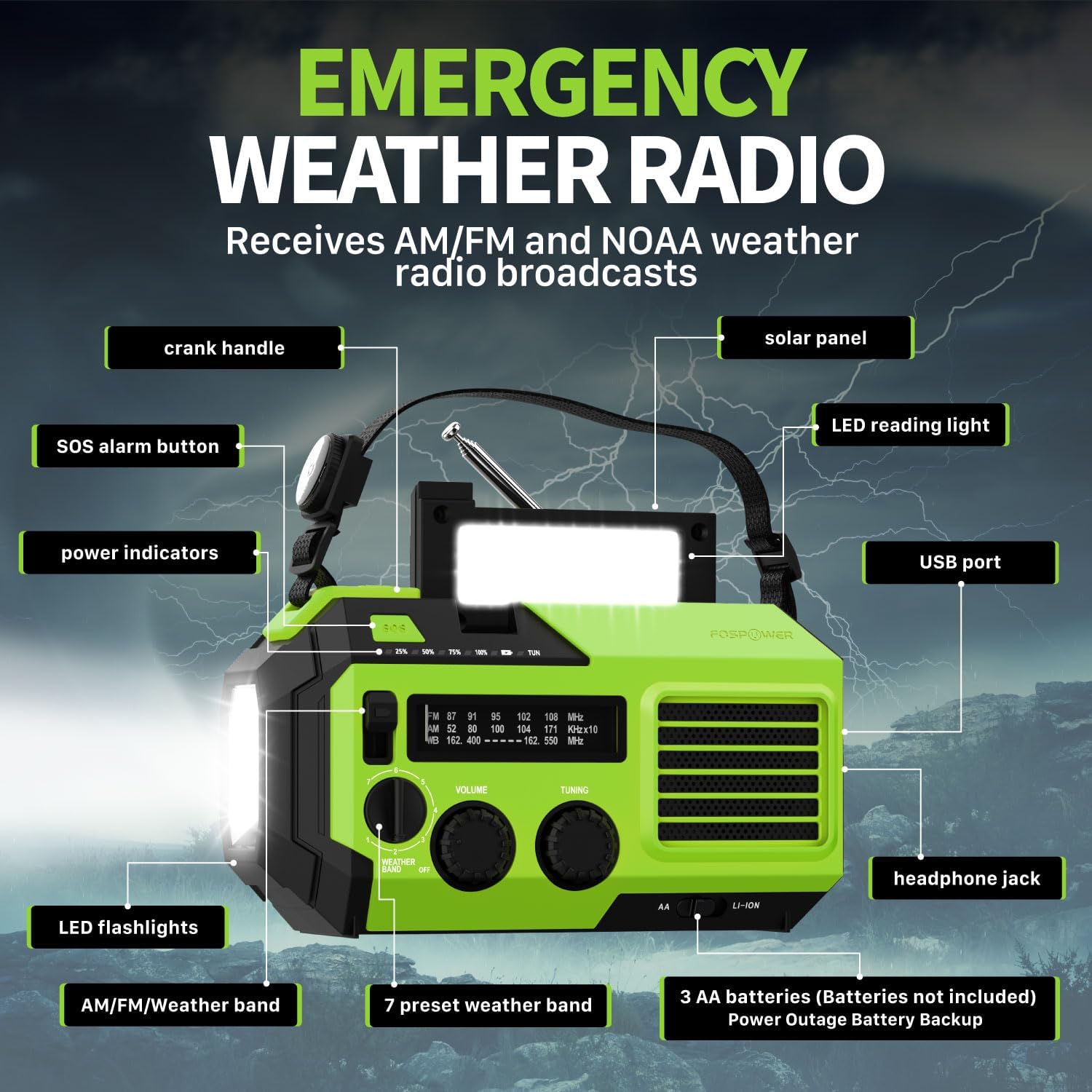
Dealbh 2.1: Aghaidh view of the FosPower Emergency Weather Radio with key components labeled, including the crank handle, solar panel, SOS alarm button, power indicators, LED reading light, USB port, LED flashlights, AM/FM/Weather band selector, volume and tuning knobs, and headphone jack.
Prìomh fheartan:
- NOAA/AM/FM Radio: Access local weather information and emergency hazard alerts, as well as standard AM/FM broadcasts.
- 19240mWh (5200mAh) Power Bank: Charge USB devices during power outages or in outdoor settings.
- Ioma stòran cumhachd: Recharge via USB-C cable, solar panel, or hand crank. Can also be powered by AA batteries (not included).
- Alarm SOS: Activates a loud siren and flashing light for emergency signaling.
- Solais Amalaichte: Features a powerful flashlight and a reading light.
- Seasmhachd uisge IPX3: A’ toirt dìon an aghaidh uisge a’ frasadh.
3. Suidhich
3.1 Cìs tòiseachaidh
Before first use, fully charge the internal battery using the provided USB-C cable. Connect the USB-C cable to the radio's USB-C port and the other end to a USB power adapter (not included) or a computer USB port. The power indicators will illuminate to show charging progress.
3.2 AA Battery Installation (Optional)
The radio can also operate on 3 AA batteries (not included) as a backup power source. Open the battery compartment cover on the back of the radio and insert 3 AA batteries, ensuring correct polarity. Close the cover securely.

Dealbh 3.1: Cùl view of the radio highlighting the solar panel, hand-crank, AA battery compartment, and USB charging port, illustrating the multiple power sources.
4. Stiùireadh Obrachaidh
4.1 Obrachadh Rèidio
- Cumhachd air / dheth: Rotate the 'VOLUME' knob clockwise to turn the radio on and adjust the volume. Rotate counter-clockwise until it clicks to turn off.
- Taghadh Còmhlan: Use the 'WEATHER BAND' switch to select between AM, FM, or WB (Weather Band).
- gleusadh: Rotate the 'TUNING' knob to scan for radio stations. Extend the telescopic antenna for improved reception, especially for FM and WB.
- Còmhlan Aimsir NOAA: When WB is selected, the radio will receive NOAA weather alerts. The radio supports 7 preset weather bands.
- Seabhag Jack: For private listening, connect 3.5mm headphones to the headphone jack.
4.2 Flashlight and Reading Light

Image 4.1: The radio demonstrating its high-power flashlight and cool-tone reading lamp feartan.
- Flashlight: Press the flashlight button located on the front of the radio to turn the flashlight on or off.
- Solas leughaidh: Lift the solar panel to reveal the LED reading light. Press the reading light button to turn it on or off.
4.3 SOS Alarm
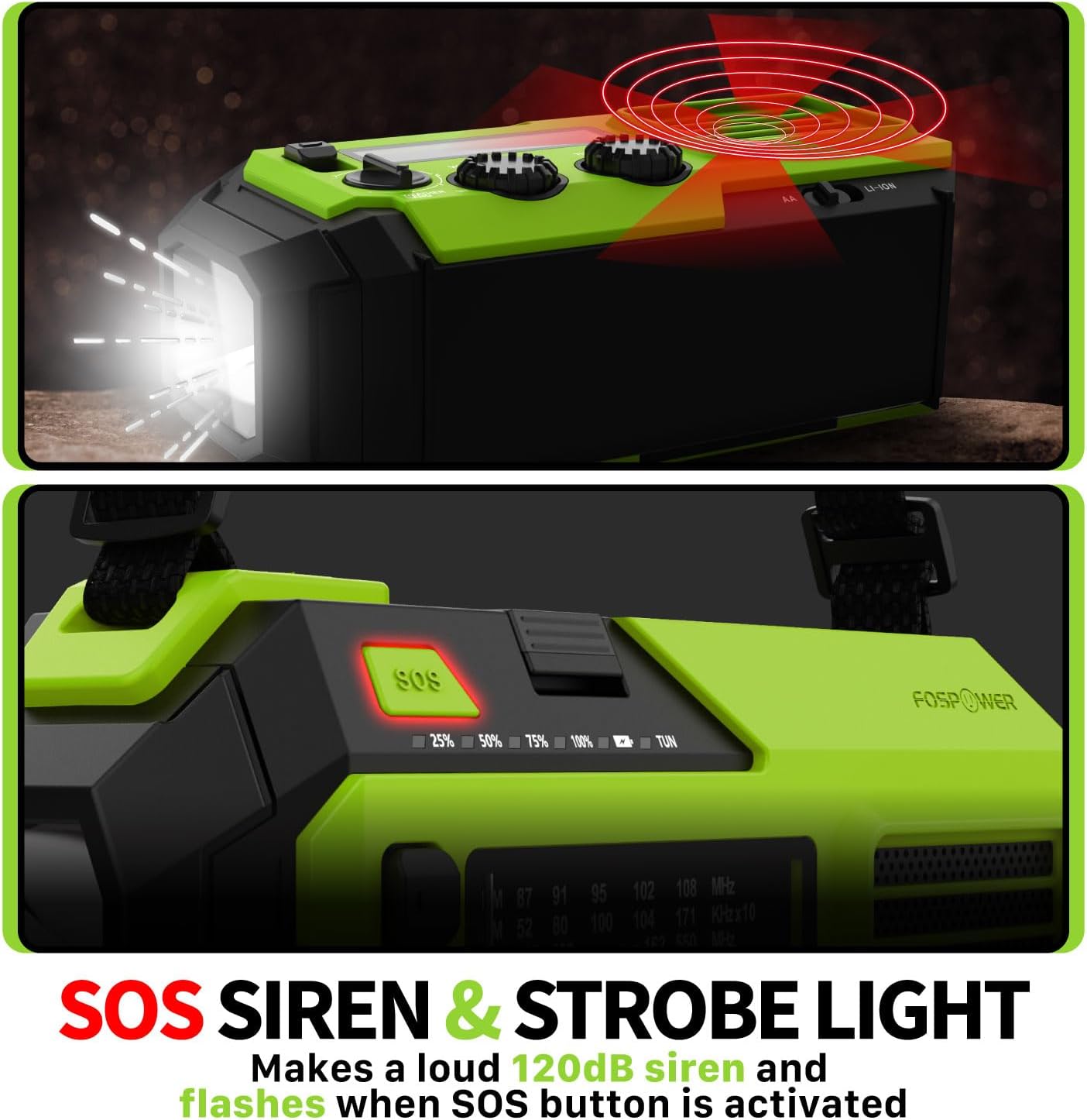
Image 4.2: Close-up of the radio's SOS button and an illustration of the siren and strobe light being activated.
In an emergency, press and hold the 'SOS' button to activate a loud 120dB siren and a flashing strobe light. Press the 'SOS' button again to deactivate.
4.4 Charging External Devices (Power Bank)

Image 4.3: The radio connected via USB to a smartphone, demonstrating its power bank capability for charging small electronics.
Connect your USB-powered device (e.g., smartphone, tablet) to the radio's USB-A output port using your device's charging cable. The radio's internal battery will begin charging your device.
4.5 A’ cur cosgais air an Rèidio
- Cìs USB-C: Connect the provided USB-C cable to the radio's USB-C input port and a USB power source. This is the most efficient charging method.
- Solar cosgais: Place the radio with the solar panel facing direct sunlight. The solar panel charges the internal battery, primarily for maintaining charge or slow charging in emergencies.
- A’ cosg crank làimhe: Rotate the hand crank clockwise or counter-clockwise at a steady pace (approximately 130-150 RPM) for 3-5 minutes to generate power for short-term use or to initiate charging.
5. Cumail suas
- Glanadh: Sguab an rèidio le clò bog, tioram. Na cleachd innealan-glanaidh sgrìobach no fuasglaidhean.
- Stòradh: Store the radio in a cool, dry place away from direct sunlight when not in use for extended periods. For optimal battery health, fully charge the internal battery every 3-6 months.
- Cùram Bataraidh: Ma tha thu a’ cleachdadh bataraidhean AA, thoir air falbh iad mura tèid an rèidio a chleachdadh airson ùine mhòr gus casg a chur air aodion.
6. A ’dèanamh trioblaid
| Trioblaid | Adhbhar a dh’fhaodadh a bhith ann | Fuasgladh |
|---|---|---|
| Chan eil an rèidio a’ tionndadh air. | Internal battery is depleted; AA batteries are depleted or incorrectly installed. | Charge the internal battery via USB-C or hand crank. Check and replace AA batteries if used. |
| Fàilteachas rèidio bochd. | Antenna gun a bhith air a shìneadh a-mach; raon comharra lag; bacadh. | Fully extend the telescopic antenna. Adjust radio position. Try tuning to a stronger station. |
| Inneal taobh a-muigh gun a bhith a’ cur cosgais. | Radio's internal battery is low; incorrect cable; device not compatible. | Ensure the radio's internal battery is sufficiently charged. Use a functional USB charging cable. Verify device compatibility. |
| Hand crank is stiff or not generating power. | Mechanism obstruction; improper cranking speed. | Ensure no obstructions. Crank at a steady, moderate pace (130-150 RPM). |
7. Sònrachaidhean
| Feart | Mion-fhiosrachadh |
|---|---|
| Modail Àireamh | FOSPWB-2419 |
| Meudan toraidh | 6.76 x 3.52 x 2.59 òirleach |
| Cuideam nì | 1.08 not |
| Bataraidh a-staigh | 19240mWh (5200mAh) |
| External Battery Support | Bataraidhean 3 x AA (gun a thoirt a-steach) |
| Còmhlan-rèidio | AM, FM, Còmhlan-sìde NOAA (WB) |
| Dòighean cosgais | USB-C, Solar, Hand Crank |
| Feartan sònraichte | Built-In Flashlight, Reading Light, SOS Alarm, Power Bank |
| Frith-aghaidh uisge | IPX3 |
8. Barantas agus Taic
FosPower provides a limited lifetime warranty for this product. For warranty claims, technical assistance, or customer service inquiries, please contact FosPower's USA-based customer support team. Refer to the official FosPower weblàrach-lìn no na sgrìobhainnean ceannach agad airson fiosrachadh conaltraidh.