
THOMSON B206
THOMSON Sound Bar B206 User Manual
Modail: B206
Ro-ràdh
Tapadh leibh airson ceannachasing the THOMSON Sound Bar B206. This sound bar is designed to enhance your audio experience for television, music, and gaming, featuring multiple connectivity options and two wireless microphones for karaoke. This manual provides essential information for safe and efficient use of your device. Please read it thoroughly before operation and retain it for future reference.
Fiosrachadh Sàbhailteachd
- Na cuir an inneal fosgailte do uisge, taiseachd no teòthachd anabarrach.
- Ensure proper ventilation around the sound bar to prevent overheating.
- Na fosgail an casing; cuir a h-uile seirbheiseachadh gu luchd-obrach teisteanasach.
- Cleachd dìreach an adapter cumhachd a chaidh a thoirt seachad.
- Cùm an inneal air falbh bho raointean magnetach làidir.
- Avoid placing heavy objects on the sound bar.
Susbaint pacaid
Dèan cinnteach gu bheil na nithean gu lèir a tha air an liostadh gu h-ìosal air an toirt a-steach don phacaid agad:
- THOMSON Sound Bar (B206) x 1
- Smachd Iomallach x 1
- Micreofon gun uèir x 2
- Adaptor cumhachd x 1
- Càball claisneachd x 1
- Coaxial Cable x 1
- Optical Fiber Cable x 1
- Wall Mounting Kit x 1 (includes padlocks, gel column, screws)
- Leabhar-làimhe cleachdaiche x 1

Figear 1: Goireasan a tha air an toirt a-steach
This image displays the complete set of items provided with your THOMSON Sound Bar B206, including the sound bar unit, remote control, two wireless microphones, power adapter, user manual, audio cable, coaxial cable, optical fiber cable, and wall mounting kit components.
Bathar seachadview
Sound Bar Components
The THOMSON Sound Bar B206 features a sleek design with integrated controls and various input ports for versatile connectivity.

Figure 2: Sound Bar, Microphones, and Remote
This image shows the main sound bar unit, two wireless microphones, and the remote control, providing a complete view of the primary components.
Internal Speaker Design
The sound bar is equipped with four large dual drive units, delivering a maximum output power of 200 Watts for HiFi sound quality, including dual bass and clear mid-range frequencies for a 3D surround sound effect.

Figure 3: Internal Speaker Structure
This diagram illustrates the internal construction of the sound bar's speakers, emphasizing the dual drive units responsible for audio output, alongside the Bluetooth connectivity symbol.
Rear Panel Connections and Remote Control
The rear panel provides various input options, while the remote control offers full command over the sound bar's functions.

Figure 4: Rear Panel Ports and Remote Control
This image details the connectivity options on the sound bar's rear panel, including the power switch, HDMI ARC, power input, subwoofer output, coaxial, optical, and AUX inputs. The accompanying remote control is also shown, indicating various function buttons.
Suidhich
1. Roghainnean Suidheachaidh
The THOMSON Sound Bar B206 can be placed on a desktop or mounted on a wall. A wall mounting kit is included for convenient installation.
- Suidheachadh deasg: Place the sound bar on a stable, flat surface in front of your TV.
- Stàladh balla: Use the provided wall mounting kit (padlocks, gel column, screws) to securely attach the sound bar to a wall below your TV. Ensure the wall material can support the weight of the sound bar.
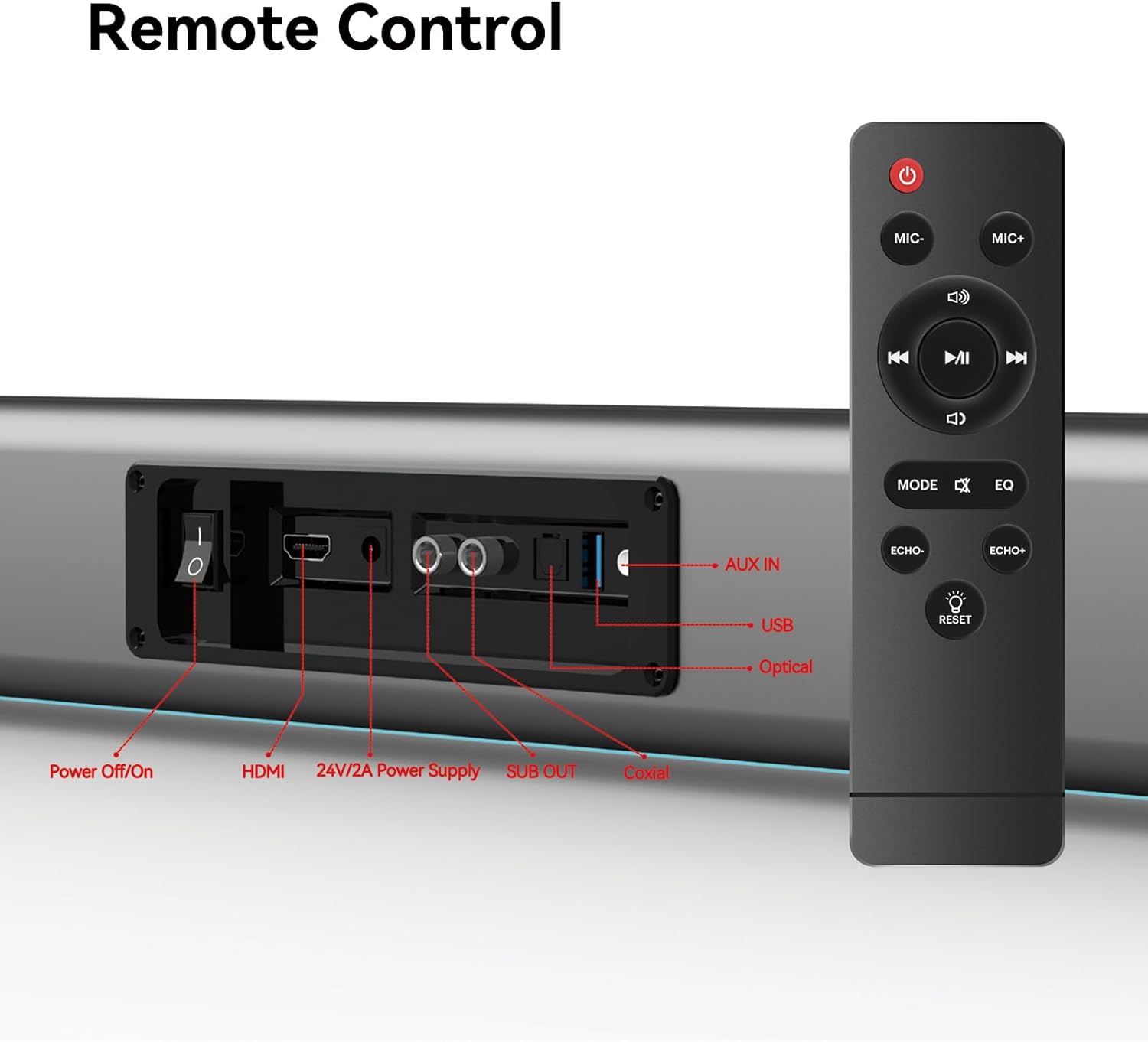
Figure 5: Placement Options (Wall Mount and Desktop)
This image illustrates the versatility of the sound bar's placement, showing it both mounted on a wall beneath a television and resting on a media console, highlighting the included wall mount kit for an elegant setup.
2. A ’ceangal ri cumhachd
- Connect the power adapter to the "24V/2A Power Supply" port on the sound bar's rear panel.
- Plug an adapter cumhachd a-steach do bhalla a-muigh.
3. Ceanglaichean claisneachd
Choose one of the following methods to connect the sound bar to your audio source (e.g., TV, smartphone, tablet, laptop):
- HDMI ARC:
Connect an HDMI cable (not included) from the HDMI ARC port on your TV to the HDMI port on the sound bar. Ensure your TV's HDMI ARC function is enabled in its settings.
- Optical:
Connect the provided optical fiber cable from your TV's optical output to the "Optical" port on the sound bar. Select "Optical" as the input source on the sound bar.
- AUX (3.5mm Audio Jack):
Connect the provided audio cable from your device's headphone jack or audio output to the "AUX IN" port on the sound bar. Select "AUX" as the input source.
- Co-èigneachail:
Connect the provided coaxial cable from your TV's coaxial output to the "Coaxial" port on the sound bar. Select "Coaxial" as the input source.
- USB:
Cuir a-steach draibh USB anns a bheil claisneachd files into the "USB" port. The sound bar will automatically switch to USB mode and begin playback.
- Bluetooth:
Refer to the "Bluetooth Pairing" section under Operating Instructions for detailed steps.
Stiùireadh Obrachaidh
1. Cumhachd air / dheth
Brùth an Cumhachd Off / On button on the sound bar's rear panel or the Cumhachd putan air an smachd iomallach gus an aonad a thionndadh air no dheth.
2. Input Source Taghadh
Brùth an MODE button on the remote control to cycle through available input sources: HDMI ARC, Optical, AUX, Coaxial, USB, and Bluetooth. The LED display on the sound bar will indicate the currently selected mode.
3. Smachd tomhas-lìonaidh
Cleachd an Meud + agus Leabhar - buttons on the remote control or the physical controls on the right side of the sound bar to adjust the volume. The sound bar supports 8 levels of bass and treble adjustment.
4. Modhan EQ
The sound bar offers 5 Equalizer (EQ) modes to optimize audio for different content types. Press the EQ button on the remote control to switch between modes:
- Modh Fiolm: Enhances cinematic sound effects and dialogue.
- Modh Ciùil: A’ leasachadh claisneachd airson ath-chluich ciùil.
- Modh Naidheachd: Clarifies spoken dialogue for news and talk shows.
- Additional modes may be available for specific audio profiles.

Figure 6: EQ Modes
This image illustrates the three primary equalizer modes (News, Movie, Music) available on the sound bar, demonstrating how each mode is tailored for different audio experiences.
5. Càraid Bluetooth
- Turn on the sound bar and select Bluetooth mode using the MODE button on the remote. The LED display will show "BT" and flash, indicating pairing mode.
- Air an inneal agad (fòn cliste, tablet, msaa.), cuir Bluetooth an gnìomh agus rannsaich airson innealan a tha rim faighinn.
- Select "THOMSON B206" from the list. Once connected, the sound bar's LED display will stop flashing.
6. Wireless Microphones
The sound bar comes with two wireless microphones for karaoke or vocal use.
- Ensure the microphones have fresh batteries (AAA, not included).
- Turn on the microphones. They should automatically pair with the sound bar.
- Cleachd an MIC + agus MIC- buttons on the remote to adjust microphone volume.
- Cleachd an ECHO+ agus ECHO- buttons to adjust the echo effect.

Figure 7: Karaoke Functionality
This image depicts two individuals enjoying a karaoke session, utilizing the THOMSON sound bar and its wireless microphones connected to a large display, showcasing the product's entertainment capabilities.
Fuasgladh thrioblaidean
| Trioblaid | Adhbhar a dh’fhaodadh a bhith ann | Fuasgladh |
|---|---|---|
| Gun chumhachd | Càball cumhachd gun cheangal; Socaid cumhachd gun obrachadh. | Ensure power cable is securely connected. Check if the power outlet is working. |
| Gun fhuaim | Stòr cuir-a-steach ceàrr air a thaghadh; Fuaim ro ìosal; Càbaill gun cheangal ceart. | Select the correct input source (HDMI, Optical, AUX, etc.). Increase volume. Check all audio cable connections. |
| Dh'fhàillig am paidhir Bluetooth | Chan eil am bàr-fuaime ann am modh càraideachaidh; Inneal ro fhada air falbh; Bluetooth air a dhì-cheadachadh air an inneal. | Ensure sound bar is in Bluetooth mode and flashing. Move device closer. Enable Bluetooth on your device. |
| Microfònan nach eil ag obair | Microphone batteries low/dead; Microphones not turned on. | Replace microphone batteries. Ensure microphones are switched on. |
| Volume jumps too much with one press | This can be a characteristic of the sound bar's volume control sensitivity. | Adjust volume carefully. Consider using the TV's volume control if connected via HDMI ARC, as it may offer finer adjustments. |
Sònrachaidhean
| Feart | Mion-fhiosrachadh |
|---|---|
| Ainm Modail | THOMSON Sound Bar B206 |
| Seòrsa neach-labhairt | Bàr-fuaim |
| Neach-labhairt cumhachd toraidh as àirde | 200 watt |
| Rèiteachadh Sianal Fuaim timcheall | 2.0 |
| Teicneòlas ceangail | Auxiliary, Bluetooth, Coaxial, HDMI ARC, Optical, USB |
| Teicneòlas conaltraidh gun uèir | Bluetooth |
| Modh smachd | iomallach |
| Meudan toraidh | 37"D x 3.35"W x 2.9"H |
| Cuideam nì | 8.63 not |
| Stuth | Plastaig |
| Stòr cumhachd | Electric Corded |
| Feart sònraichte | Microfònan gun uèir |
Cumail suas
- Glanadh: Cleachd clò bog, tioram gus uachdar a’ bhàr-fuaime a ghlanadh. Na cleachd innealan-glanaidh leaghaidh no stuthan sgrìobach.
- Stòradh: Nuair nach eilear ga chleachdadh airson ùine mhòr, stòraich am bàr-fuaime ann an àite fionnar, tioram, air falbh bho sholas dìreach na grèine agus teòthachd anabarrach.
- Cùram microfòn: Remove batteries from the wireless microphones if they will not be used for a long time to prevent leakage.
Barantas agus Taic
THOMSON products are designed and manufactured to the highest quality standards. For warranty information and customer support, please refer to the warranty card included in your package or visit the official THOMSON weblàrach. Cùm do chuidhteas ceannach mar dhearbhadh ceannach.
Fiosrachadh Gèilleadh
This device complies with relevant regulations for electronic equipment. Any changes or modifications not expressly approved by the manufacturer could void the user's authority to operate the equipment.
Ask a question about this manual
Ask about setup, troubleshooting, compatibility, parts, safety, or missing instructions. Manuals+ will review the question and use this page’s manual context to help answer it.