
1. Ro-ràdh
Thank you for choosing the SPLITSKY NZFS Kids Alarm Clock. This device combines an alarm clock, white noise sleep aid, and an 8-mode RGB night light, designed to assist with sleep and wake-up routines for children and adults. Please read this manual thoroughly to understand its features and ensure proper operation.
Fiosrachadh Sàbhailteachd:
- Cùm an inneal air falbh bho uisge agus àrainneachdan àrd taiseachd.
- Na feuch ris an inneal a thoirt às a chèile no a chàradh thu fhèin.
- Use only the provided USB-C power cable or a certified equivalent.
- Dèan cinnteach gu bheil fionnarachadh ceart timcheall an inneal.
2. Pasgan-susbaint
Dèan cinnteach gu bheil a h-uile rud anns a’ phacaid agad:
- SPLITSKY NZFS Kids Alarm Clock
- 1.2M (4.7 inch) USB-C Power Cable
- Leabhar-làimhe cleachdaiche (an sgrìobhainn seo)
- 1 x CR2032 Lithium Ion Battery (pre-installed for memory backup)
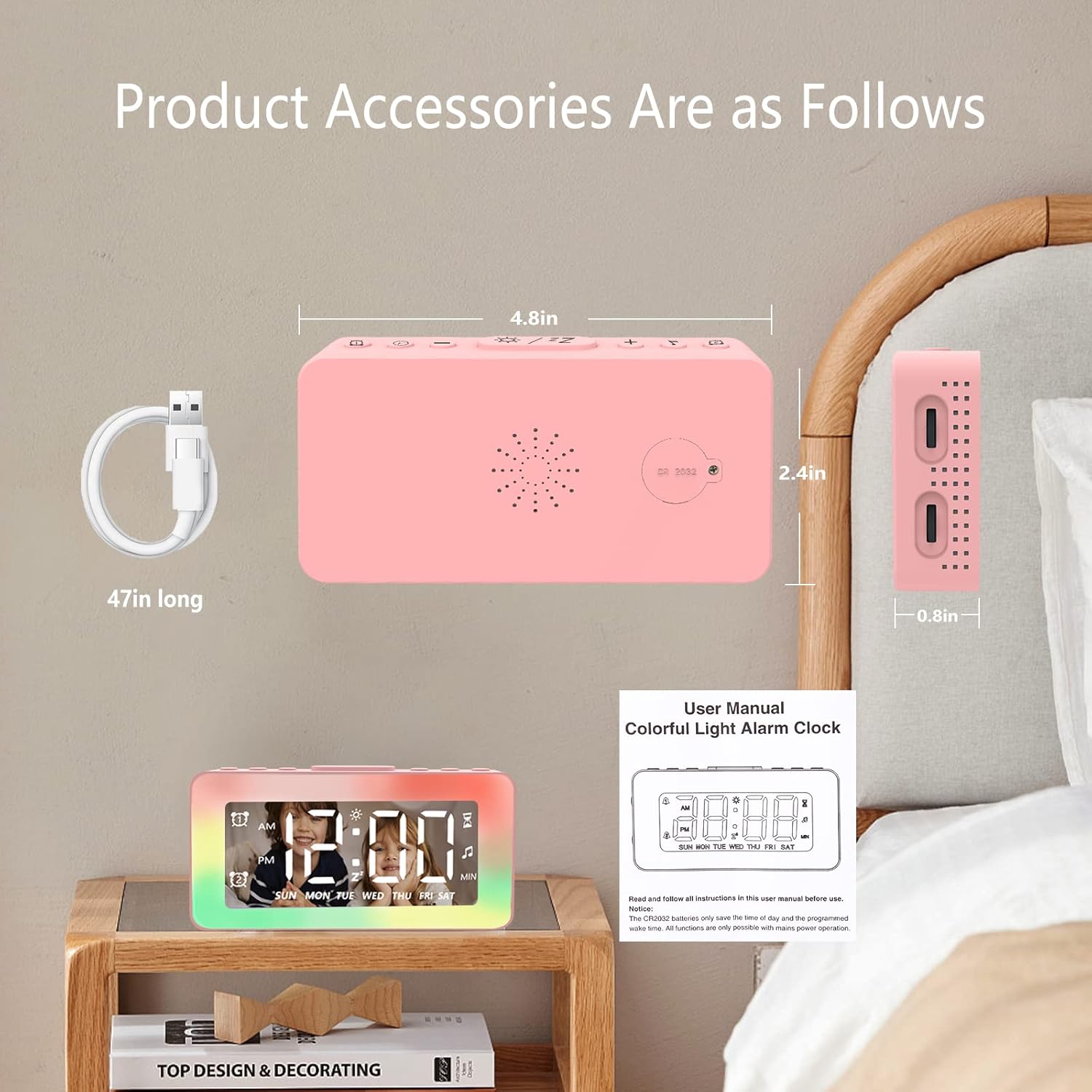
Image: The SPLITSKY NZFS Kids Alarm Clock, a USB-C power cable, and the user manual are included in the package.
3. Toradh thallview
Familiarize yourself with the buttons and ports on your alarm clock:

Ìomhaigh: Mion-fhiosrachadh view of the alarm clock's top buttons and side ports, including Alarm 1, Time Setting, Light Minus/Settings, Snooze/Light Mode Switch, Light Plus/Setup, Music Switch, Alarm 2, Volume Setting, Time Brightness Setting, USB Output Charging Port, and Type-C Input Interface.
- Putan Alarm 1: Set and activate Alarm 1.
- Putan suidheachadh ùine: Atharraich an ùine làithreach.
- Light Minus / Settings Button: Decrease light brightness or navigate settings.
- Snooze / Light Mode Switch Button: Activate snooze, or cycle through light modes.
- Light Plus / Setup Button: Increase light brightness or confirm settings.
- Music Switch Button: Cycle through white noise sounds.
- Putan Alarm 2: Set and activate Alarm 2.
- Volume Setting Wheel (Side): Adjust alarm and white noise volume.
- Time Brightness Setting Wheel (Side): Atharraich soilleireachd taisbeanaidh.
- USB Output Charging Port (Side): Charge external devices.
- Type-C Input Interface (Side): Connect power cable to the alarm clock.
4. Suidhich
4.1 Ceangal cumhachd
- Connect the provided USB-C power cable to the Type-C Input Interface on the side of the alarm clock.
- Cuir ceann eile a’ chàball USB-C a-steach do inneal-atharrachaidh cumhachd USB co-chòrdail (nach eil air a ghabhail a-steach) no do phort USB.
- Lasaidh an taisbeanadh, a’ comharrachadh gu bheil a’ ghleoc air.

Image: The SPLITSKY NZFS Kids Alarm Clock is shown powered on and connected via its USB-C port, also demonstrating its capability to charge a smartphone.
4.2 Battery Installation (Memory Backup)
The alarm clock includes a pre-installed CR2032 battery. This battery serves as a memory backup to retain time and alarm settings during a power outage or when the main power is disconnected. It does not power the clock for regular operation.
- If the battery needs replacement, locate the battery compartment on the back of the unit.
- Cleachd screwdriver beag gus an roinn fhosgladh.
- Cuir bataraidh CR2032 ùr na àite, a’ dèanamh cinnteach à polarity ceart.
- Dùin an roinn gu sàbhailte.
5. Stiùireadh Obrachaidh
5.1 Setting the Time (12H/24H Format)
- Brùth agus cùm an Putan suidheachadh ùine until the hour digits begin to flash.
- Cleachd an Light Minus / Settings Button (sìos) no Light Plus / Setup Button (up) to adjust the hour.
- Brùth an Putan suidheachadh ùine again to move to minute adjustment. Adjust minutes using the Light Minus/Plus buttons.
- Brùth an Putan suidheachadh ùine a third time to select 12-hour or 24-hour format. Adjust using the Light Minus/Plus buttons.
- Brùth an Putan suidheachadh ùine a-rithist gus dearbhadh agus modh suidheachadh ùine fhàgail.
5.2 Setting Alarms (Dual Alarm, Daily/Weekday/Weekend Mode)
Tha an gleoc a’ toirt taic do dhà inneal-rabhaidh neo-eisimeileach (Alarm 1 agus Alarm 2).
- Brùth agus cùm an Alarm 1 Putan (airson Alarm 1) no Alarm 2 Putan (for Alarm 2) until the alarm hour digits flash.
- Cleachd an Light Minus / Settings Button or Light Plus / Setup Button gus an uair a rèiteachadh.
- Press the respective Alarm Button again to move to minute adjustment. Adjust minutes using the Light Minus/Plus buttons.
- Press the respective Alarm Button again to select the alarm mode:
- Modh làitheil: Bidh an inneal-rabhaidh a’ fuaimeachadh a h-uile latha.
- Weekday Mode: Bidh an inneal-rabhaidh a’ fuaimeachadh Diluain gu Dihaoine.
- Modh deireadh-sheachdain: Alarm sounds Saturday and Sunday.
- Press the respective Alarm Button once more to confirm and exit alarm setting mode.
- Gus inneal-rabhaidh a chomasachadh/a dhì-chomasachadh, brùth goirid air a’ phutan Alarm 1 Putan or Alarm 2 PutanNochdaidh/fhalbhaidh ìomhaigh rabhaidh air an taisbeanadh.
5.3 Gnìomh Snooze
When an alarm sounds, tap the Snooze / Light Mode Switch Button on top to activate snooze. The alarm will pause for 9 minutes and then sound again. This can be repeated multiple times.
5.4 Night Light (8 Modes RGB, 10-level dimming)
The alarm clock features 6 solid color lights and 2 ambient colorful lights.
- Brùth goirid air an Snooze / Light Mode Switch Button to turn on the night light and cycle through the 8 color modes.
- To adjust the brightness (10 levels), use the Light Minus / Settings Button or Light Plus / Setup Button while the night light is active.
- To turn off the night light, continue pressing the Snooze / Light Mode Switch Button gus an tionndaidh an solas dheth.

Image: Multiple SPLITSKY NZFS Kids Alarm Clocks are shown, each displaying a different color from the 8 available RGB night light modes.
5.5 White Noise Sleep Aid (8 Sounds)
The clock offers 8 soothing sounds to aid sleep.
- Brùth goirid air an Putan Switch Music to turn on the white noise and cycle through the available sounds.
- To adjust the volume (16 levels), use the Volume Setting Wheel on the side of the clock.
- To turn off the white noise, continue pressing the Putan Switch Music until the sound stops.

Image: The SPLITSKY NZFS Kids Alarm Clock is displayed on a bedside table, with icons illustrating the various white noise options such as rain, cicadas, piano, bonfire, waves, birdsong, and church bells.
5.6 Sleep Timer (10-120 minutes)
The sleep timer allows you to set a duration for the white noise and/or night light to play before automatically turning off.
- While white noise or night light is active, press and hold the Putan Switch Music (for white noise timer) or Snooze / Light Mode Switch Button (for light timer).
- Cleachd an Light Minus / Settings Button or Light Plus / Setup Button to select the desired timer duration (10, 20, 30, 60, 90, 120 minutes).
- Press the respective button again to confirm the timer setting. The timer icon will appear on the display.
5.7 Taisbeanadh soilleireachd atharrachadh
Adjust the brightness of the LED time display using the Time Brightness Setting Wheel on the side of the clock.
5.8 Port USB Charging
The USB output charging port on the side of the alarm clock can be used to charge other small electronic devices, such as smartphones. Connect your device's charging cable to this port.
6. Cumail suas
6.1 Glanadh
- Dèan cinnteach gu bheil an inneal gun phlug mus tèid a ghlanadh.
- Sguab an uachdar le clò bog, tioram.
- Na cleachd innealan-glanaidh sgrìobach, fuasglaidhean, no spraeirean ceimigeach.
6.2 Stòradh
When not in use for extended periods, store the alarm clock in a cool, dry place, away from direct sunlight and extreme temperatures.
7. A ’dèanamh trioblaid
If you encounter issues with your SPLITSKY NZFS Kids Alarm Clock, refer to the table below for common problems and solutions.
| Trioblaid | Adhbhar a dh’fhaodadh a bhith ann | Fuasgladh |
|---|---|---|
| Tha taisbeanadh a’ chloca dheth no dorcha. | Not connected to power; Time brightness set too low. | Ensure USB-C cable is securely connected to a power source. Adjust the Time Brightness Setting Wheel. |
| Chan eil an inneal-rabhaidh a’ fuaimeachadh. | Alarm not activated; Alarm volume too low. | Check if the alarm icon is displayed. If not, short press the respective Alarm Button to activate. Adjust the Volume Setting Wheel. |
| Time/settings reset after power disconnection. | CR2032 backup battery is depleted or missing. | Replace the CR2032 battery in the battery compartment. |
| Night light or white noise not working. | Function not activated; Sleep timer active. | Brùth goirid air an Snooze / Light Mode Switch Button or Putan Switch Music to activate. Check if a sleep timer is set. |
8. Sònrachaidhean
| Feart | Mion-fhiosrachadh |
|---|---|
| Brand | SPLITSKY |
| Modail Àireamh | NZFS |
| Seòrsa Taisbeanaidh | LED didseatach |
| Meudan toraidh | 3.17"L x 3.17"À (mu 8.05 cm L x 8.05 cm À) |
| Cuideam nì | 8.1 unnsa (timcheall air 230 gram) |
| Stòr cumhachd | Corded Electric (USB-C), Battery Powered (CR2032 for memory) |
| Modhan solais oidhche | 8 (6 solid colors, 2 ambient colorful) with 10-level dimming |
| Fuaimean White Noise | 8 fuaimean socair |
| Tonan Alarm | 7 wake-up alarm tones with 16-level volume control |
| Feartan rabhaidh | Dual Alarm, Daily/Weekday/Weekend modes, 9-minute Snooze |
| Gnìomh timer | 10-120 minute sleep timer for sounds and lights |
| Ceangalachd | USB-C Input, USB-A Output (for charging external devices) |
| Stuth | Styrene Butadiene Acrylonitrile |
9. Barantas agus Taic
9.1 Fiosrachadh Barantais
Please refer to the warranty information provided at the time of purchase or contact your retailer for details regarding the product warranty. Keep your proof of purchase for any warranty claims.
9.2 Taic teachdaiche
For technical assistance, troubleshooting beyond this manual, or general inquiries, please contact the seller through the platform where you purchased the product. Provide your order number and a detailed description of the issue for prompt support.