
1. Ro-ràdh
This manual provides detailed instructions for the installation, operation, and maintenance of your Rosewill CMG5 1000W Modular Power Supply. Please read this manual thoroughly before installation and retain it for future reference.
The Rosewill CMG5 1000W is a fully modular 80 PLUS Gold certified power supply designed for personal computers. It is compatible with ATX 3.0 & 3.1 standards and features a native 600W PCIe 5.0 / Gen 5 12+4 Pin 12V-2x6 cable, supporting modern high-performance graphics cards.
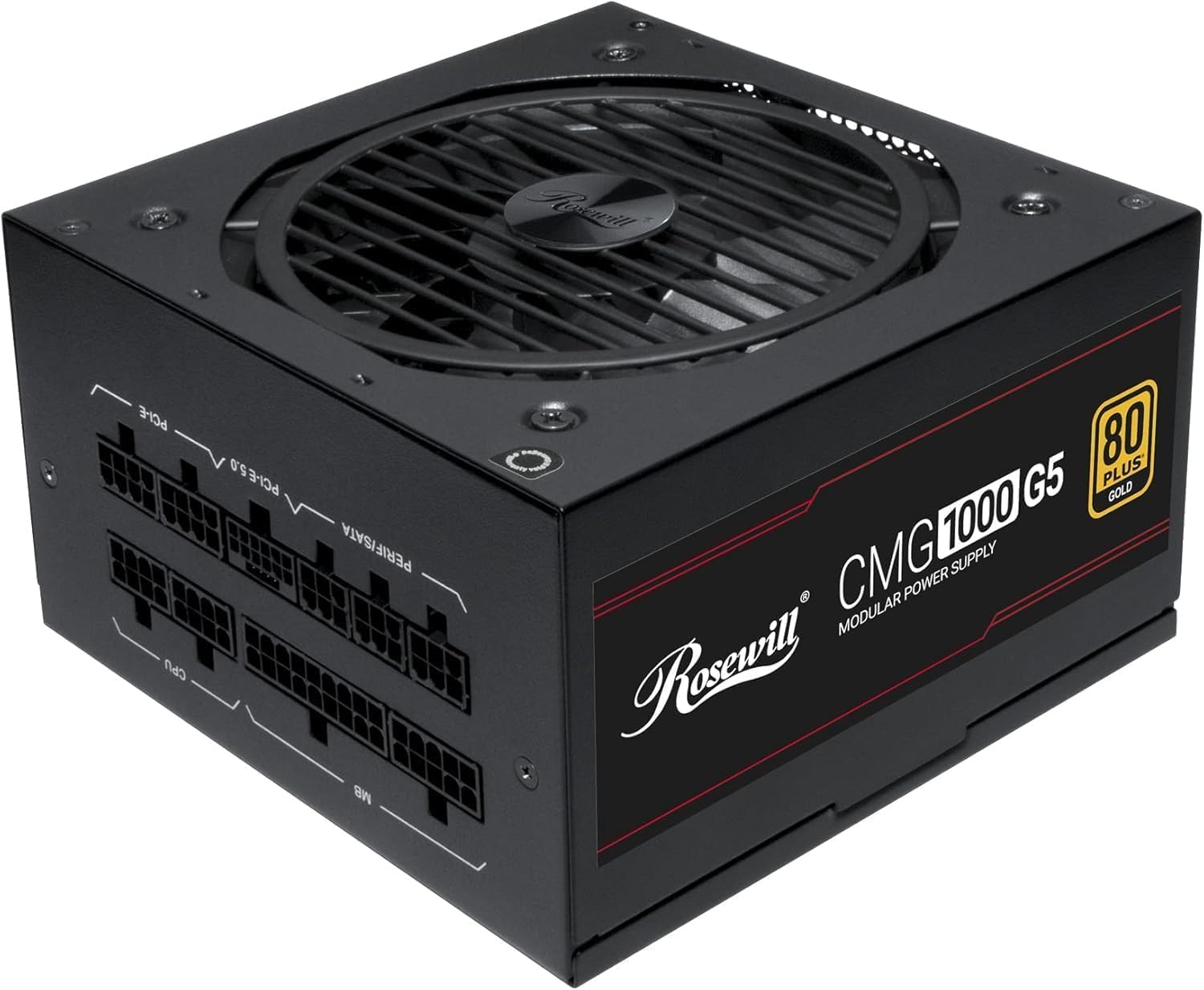
Ìomhaigh: Aghaidh view of the Rosewill CMG5 1000W Modular Power Supply, showing the fan grille and branding.
2. Fiosrachadh Sàbhailteachd
WARNING: Improper installation or use can lead to serious injury or equipment damage. Always follow these safety guidelines:
- Dèan cinnteach gu bheil an solar cumhachd air a dhì-cheangal bhon t-socaid cumhachd AC mus tèid a stàladh no a làimhseachadh.
- Na fosgail an aonad solarachaidh cumhachd. Fuaim àrdtages are present inside, and there are no user-serviceable parts.
- Install the power supply in a well-ventilated area. Do not block any ventilation openings.
- Use only the modular cables provided with this power supply. Using incompatible cables can damage the PSU and connected components.
- Ensure all cable connections are secure and fully seated to prevent electrical shorts or overheating.
- Seachain a bhith a’ nochdadh an t-solair cumhachd do taiseachd no teòthachd anabarrach.
- If the power supply emits smoke, unusual odors, or loud noises, immediately disconnect it from the AC power and contact support.
3. Pasgan-susbaint
Dèan cinnteach gu bheil a h-uile rud anns a’ phacaid agad:
- Rosewill CMG5 1000W Modular Power Supply Unit
- Corda cumhachd AC
- Modular Cable Set (see below for details)
- Sgriubha stàladh
- Leabhar-làimhe cleachdaiche (an sgrìobhainn seo)

Image: Rear panel of the Rosewill CMG5 1000W Power Supply showing the modular cable connection ports labeled for MB, CPU, PERIF/SATA, PCI-E 5.0, and PCI-E.
Seata Càball Modúlach:

Image: Diagram illustrating the types and lengths of modular cables included with the Rosewill CMG5 1000W Power Supply, including 24-pin Motherboard, 12+4-pin PCIe 5.0, 4+4-pin CPU, 6+2-pin PCIe, SATA, and 4-pin Molex connectors.
- 1x 24-pin Motherboard Cable (600mm)
- 1x 12+4-pin PCIe 5.0 Cable (600mm)
- 2x 4+4-pin CPU Cables (700mm each)
- 4x 6+2-pin PCIe Cables (500mm each, with two connectors per cable)
- 2x SATA Cables (500mm, with four SATA connectors per cable)
- 1x 4-pin Molex Cable (500mm, with four Molex connectors)
4. Setup agus Stàladh
Follow these steps to install your Rosewill CMG5 1000W Power Supply:
- Ullaich an siostam agad:
- Turn off your computer and disconnect the AC power cord from the wall outlet.
- Fosgail cùis a’ choimpiutair agad.
- If replacing an existing power supply, disconnect all cables from the old PSU and remove it from the case.
- Install the Power Supply:
- Carefully place the new Rosewill CMG5 1000W PSU into the power supply bay of your computer case.
- Secure the PSU to the case using the provided mounting screws. Ensure the fan is facing the correct direction for optimal airflow (typically facing down if there's a bottom vent, or up if not).
- Ceangail Càbaill Modúlach:
- Identify the necessary cables for your components (Motherboard, CPU, PCIe, SATA, Molex). Refer to the "Package Contents" section for cable types.
- Connect the required modular cables to the corresponding ports on the power supply unit. Ensure they click firmly into place.
- Connect the other end of each cable to your motherboard, CPU, graphics card(s), storage drives, and other peripherals. Pay close attention to the orientation of each connector.
- For PCIe 5.0 graphics cards, use the dedicated 12+4-pin PCIe 5.0 cable. Ensure it is fully inserted into both the PSU and the graphics card.
- Sgrùdaidhean deireannach:
- Double-check all cable connections to ensure they are secure. Loose connections can cause system instability or damage.
- Organize cables to improve airflow within the case.
- Dùin do chùis coimpiutair.
- Cumhachd air:
- Ceangail an sreang cumhachd AC ris an t-solar cumhachd agus an uairsin gu ionad balla.
- Flip the main power switch on the back of the PSU to the "ON" position.
- Cumhachd air a ' choimpiutair agad.

Ìomhaigh: Cùl view of the Rosewill CMG5 1000W Power Supply, showing the AC power input, main power switch, and an "ECO" mode switch.
5. Stiùireadh Obrachaidh
The Rosewill CMG5 1000W Power Supply is designed for reliable and efficient operation.
Eco Silent Mode:
- The power supply features an "ECO" mode switch located on the rear panel.
- When the ECO mode is ON, the 120mm Fluid Dynamic Bearing (FDB) fan will operate in a semi-fanless mode. The fan will remain off under low to moderate loads, providing silent operation. It will automatically spin up when the load increases to maintain optimal temperatures.
- When the ECO mode is AIRSON, the fan will operate continuously, adjusting its speed based on the internal temperature and load.
- Choose the mode that best suits your preference for noise levels and cooling performance.
Power Excursion Capabilities:
This power supply is designed to handle power excursions up to 235% and GPU power excursions up to 300%, ensuring stable power delivery during peak demands from high-performance components.
6. Cumail suas
Nì cumail suas ceart cinnteach gum mair an solar cumhachd agad fad-beatha agus gum bi e ag obair gu math.
- Glanadh: Periodically clean the exterior of the power supply and its fan grille to prevent dust buildup. Use compressed air to gently clear dust from the fan blades and internal components. Ensure the PSU is powered off and unplugged before cleaning.
- Riaghladh càbaill: Ensure cables are not obstructing airflow within your computer case. Re-route or tie cables as needed to maintain good ventilation.
- Suidheachaidhean Àrainneachdail: Operate the power supply in a clean, dry environment with adequate ventilation. Avoid extreme temperatures and humidity.
7. A ’dèanamh trioblaid
Ma thachras tu ri duilgheadasan leis an t-solar cumhachd agad, thoir sùil air na duilgheadasan agus na fuasglaidhean cumanta a leanas:
| Trioblaid | Adhbhar a dh’fhaodadh a bhith ann | Fuasgladh |
|---|---|---|
| Chan eil an coimpiutair a’ dol air. |
|
|
| Bidh an siostam a’ tuiteam no ag ath-thòiseachadh air thuaiream. |
|
|
| Fuaimean neo-àbhaisteach bhon PSU. |
|
|
| Cables appear melted or discolored. |
|
|
8. Sònrachaidhean
| Feart | Mion-fhiosrachadh |
|---|---|
| Ainm Modail | CMG1000G5 |
| Brand | Ròswill |
| Toradh Wattage | 1000 watt |
| Factor foirm | ATX |
| Modh fuarachaidh | Air (120mm FDB Fan) |
| Meudan nì (L x W x H) | 11.4 x 9 x 4.6 òirleach (289.56 x 228.6 x 116.84 mm) |
| Cuideam nì | 6.3 punnd (2.86 kg) |
| Dealbhadh solar cumhachd | Modular làn |
| Teisteanas Èifeachdais | 80 PLUS Òr |
| Input Voltage | 100-240 volts AC |
| Tricead cuir a-steach | 50-60 Hz |
| Ceangalaichean | ATX, PCIe (including 12V-2x6 for PCIe 5.0) |
| Inbhe ATX | ATX 3.0 & 3.1 Compatible |
| Capacitors | 100% Japanese Electrolytic Capacitors |
| Dìon | OCP, OPP, OTP, OVP, SCP, UCP (Over Current, Over Power, Over Temperature, Over Voltage, Short Circuit, Under Current Protection) |

Ìomhaigh: Taobh view of the Rosewill CMG5 1000W Power Supply, displaying the electrical specifications label including AC input, DC output voltages, and total output power.
9. Barantas agus Taic
Fiosrachadh Barantais:
The Rosewill CMG5 1000W Power Supply comes with a Barantas an neach-dèanamh 5-bliadhnaTha am barantas seo a’ còmhdach lochdan ann an stuthan agus obair-ciùird fo chleachdadh àbhaisteach. Cùm dearbhadh do cheannach airson tagraidhean barantais.
For detailed warranty terms and conditions, please refer to the official Rosewill weblàrach-lìn no cuir fios chun t-seirbheis teachdaiche aca.
Taic teachdaiche:
If you have any questions, require technical assistance, or need to initiate a warranty claim, please contact Rosewill customer support:
- Weblàrach: Visit the official Rosewill weblàrach airson goireasan taic, ceistean cumanta, agus fiosrachadh conaltraidh.
- Post-d/Fòn: Refer to the Rosewill weblàrach-lìn airson am fiosrachadh conaltraidh as ùire.
When contacting support, please have your product model (CMG1000G5) and proof of purchase readily available.