
Ro-ràdh
Thank you for choosing the Technics EAH-AZ60M2 Wireless in-Ear Noise-Cancelling Headphones. This manual provides essential information for the proper setup, operation, and maintenance of your new headphones. Please read this manual thoroughly before use to ensure optimal performance and longevity of the product.

Image: The Technics EAH-AZ60M2 wireless in-ear headphones, shown alongside their compact black charging case.
Dè th' anns a' Bhocsa
Upon opening the packaging, please verify that all the following components are included:
- Technics EAH-AZ60M2 Wireless In-Ear Noise-Cancelling Headphones (Left and Right earbuds)
- Cùis Cìse
- Càball cosgais USB-C
- Multiple sizes of Earpieces (7 pairs)
- Leabhar-làimhe cleachdaiche (an sgrìobhainn seo)
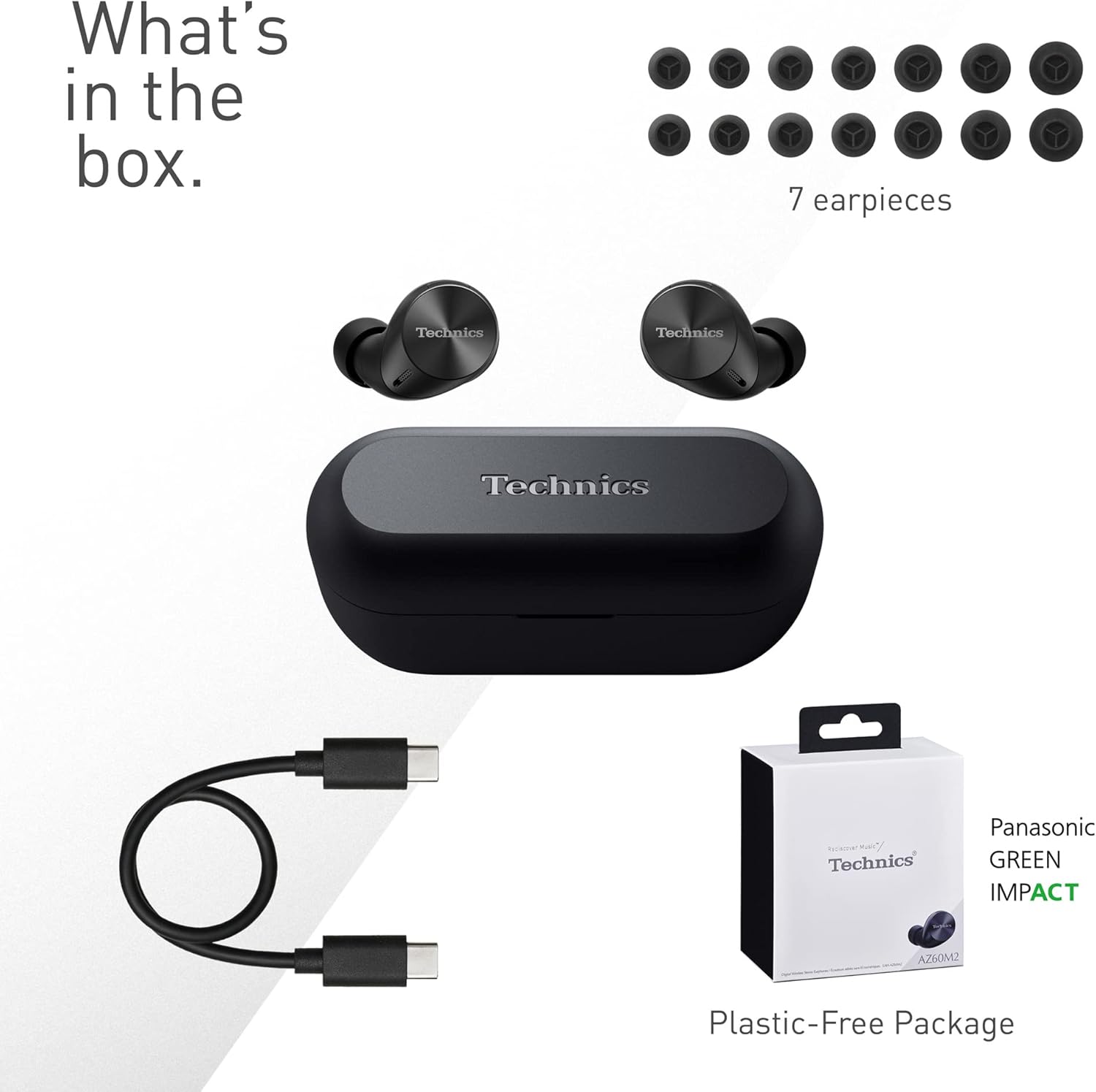
Image: A visual representation of the items included in the product packaging: the two earbuds, the charging case, a USB-C charging cable, and a selection of seven different earpiece sizes.
Suidhich
Cìs tòiseachaidh
Mus cleachd thu an toiseach iad, cuir làn-chosgais air na fònaichean-cluaise agus air a’ chùis cosgais.
- Cuir an dà earbuds a-steach don chùis cosgais.
- Connect the USB-C charging cable to the charging port on the case and to a USB power source.
- The indicator lights on the case will show charging status. A full charge typically takes approximately 2.5 hours for the case and earbuds.
A 'càradh le inneal
The EAH-AZ60M2 headphones use Bluetooth for wireless connection.
- Fosgail a’ chùis cosgais leis na fònaichean-cluaise a-staigh. Thèid na fònaichean-cluaise a-steach don mhodh paidhreachaidh gu fèin-ghluasadach.
- Air an inneal agad (fòn cliste, tablet, PC), cuir Bluetooth an gnìomh agus rannsaich airson innealan a tha rim faighinn.
- Select "EAH-AZ60M2" from the list of found devices.
- Once connected, a confirmation sound will play from the headphones.
App Technics Audio Connect
For enhanced control and customization, download the "Technics Audio Connect" app from your device's app store (Google Play for Android 6.0+ or App Store for iOS 12+). The app allows you to:
- Thoir sùil air ìrean bataraidh.
- Select EQ sound modes.
- Atharraich ìrean cuir às do fhuaim.
- Customize touch sensor functions.
- Dèan ùrachaidhean firmware.
Stiùireadh Obrachaidh
A 'caitheamh na fònaichean-cluaise
Select the earpieces that provide the most comfortable and secure fit for optimal sound quality and noise cancellation. The app can assist in finding the best fit. Insert the earbuds gently into your ears and rotate them slightly to ensure a snug seal.

Image: A person wearing the Technics EAH-AZ60M2 headphones, illustrating their comfortable, low-profile design. The image also displays the wide range of eartip sizes available for a customized fit.
Smachdan suathaidh
The headphones feature touch-sensitive panels on each earbud for controlling playback, calls, and noise modes. Functions can be customized via the Technics Audio Connect App.
| Gnìomh | Earbud clì | Earbud ceart |
|---|---|---|
| Tap singilte | Cluich/Pause, Freagair Call | Cluich/Pause, Freagair Call |
| Tap dùbailte | Thoir gnogag air adhart | Tomhais Suas |
| Tap trì-fhillte | Thoir leum air an t-slighe air ais | Meud Sìos |
| Clò fada | Toggle Noise Cancelling/Ambient Mode | Neach-taic Guth |
Modhan smachd fuaim
The EAH-AZ60M2 features Dual Hybrid Active Noise Cancelling for immersive listening and Ambient Sound Modes for situational awareness.
- Cur às do fhuaim gnìomhach (ANC): A’ lughdachadh fuaim bhon taobh a-muigh airson èisteachd fhòcasach.
- Natural Ambient Mode: Allows you to hear surrounding sounds naturally.
- Attention Mode: Focuses on human voices, making it easier to hear announcements or conversations without removing the headphones.
Toggle between these modes by long-pressing the left earbud's touch sensor, or adjust settings precisely using the Technics Audio Connect App.

Image: A close-up of a single Technics EAH-AZ60M2 earbud, highlighting its key audio features including Hi-Res Audio Wireless support, LDAC compatibility, 8mm drivers, and Noise Cancelling capabilities.
Ceangal ioma-phuing
The headphones support multipoint connection, allowing simultaneous pairing with up to three devices (e.g., a smartphone, tablet, and PC). This enables seamless switching between audio sources without re-pairing.
- To switch audio, simply play content on the desired device. The headphones will automatically connect to the active audio source.
- Note: LDAC playback is not possible when connected to three devices simultaneously.

Image: A person sitting at a desk, demonstrating the smart 3-device switching feature of the Technics EAH-AZ60M2 headphones, with connection lines illustrating simultaneous pairing to a smartphone, tablet, and laptop.
Making and Receiving Calls (JustMyVoice Technology)
The EAH-AZ60M2 incorporates JustMyVoice Technology, utilizing 8 separate microphones and advanced wind noise reduction to isolate and amplify your speech while minimizing background noise during calls.
- Call Freagairt: Tap singilte air aon chuid de chluais-fòn.
- Call crìochnachaidh: Tap aon uair air aon de na cluais-fònaichean rè gairm.
- Call a dhiùltadh: Brùth fada air aon de na cluais-fònaichean.
- Single Earphone Use: You can use one earbud independently while the other is charging or stored.

Image: A person outdoors, demonstrating the JustMyVoice Technology feature of the Technics EAH-AZ60M2 headphones, with visual cues indicating sound pickup and voice isolation.
Beatha bataraidh agus cosgais
The EAH-AZ60M2 headphones offer extended listening times with the included charging case.
- Beatha bataraidh Earbud: Up to 7 hours of playback with Active Noise Cancelling (ANC) enabled.
- Total Playback with Case: Up to 24 hours of total playback time with multiple charges from the case.
- Cìs luath: A 15-minute quick charge provides approximately 70 minutes of playback.
Cìsean gun uèir Qi
The charging case supports Qi wireless charging. Simply place the case on a compatible Qi wireless charger (sold separately) to charge.

Image: An illustration depicting the battery life of the Technics EAH-AZ60M2 headphones, showing 7 hours of listening time for the earbuds and an additional 24 hours of backup with the charging case.
Cumail suas
Glanadh
- Regularly clean the earbuds, especially the earpieces and mesh grilles, with a soft, dry, lint-free cloth.
- Remove earpieces and clean them with mild soap and water if necessary, ensuring they are completely dry before reattaching.
- Glan na ceanglaichean cosgais air an dà chuid na fònaichean-cluaise agus taobh a-staigh a’ chùis le swab cotain tioram.
- Na cleachd innealan-glanaidh sgrìobach, deoch làidir no fuasglaidhean.
Frith-aghaidh uisge
The EAH-AZ60M2 earbuds are IPX4 water resistant, meaning they are protected against splashing water from any direction. This makes them suitable for light rain or intensive workouts.
- Chan eil a ’chùis chìsean an aghaidh uisge.
- Na cuir na cluasan-cluaise ann an uisge.
- Ensure earbuds are dry before placing them back into the charging case.
Stòradh
Nuair nach eilear gan cleachdadh, stòraich na fònaichean-cluaise anns a’ chùis cosgais aca gus an dìon agus an cumail fo chasaid. Stòraich ann an àite fionnar, tioram air falbh bho sholas dìreach na grèine agus teòthachd anabarrach.
Fuasgladh thrioblaidean
| Trioblaid | Adhbhar a dh’fhaodadh a bhith ann | Fuasgladh |
|---|---|---|
| Gun fhuaim bho chluas-cinn. | Headphones not paired or connected. Low battery. Volume too low. | Ensure headphones are paired and connected to your device. Charge headphones. Increase volume on both headphones and device. |
| Cannot pair headphones. | Headphones not in pairing mode. Device Bluetooth off. Interference. | Ensure earbuds are in the case and lid is open to enter pairing mode. Turn device Bluetooth off and on. Move closer to device. Forget device and re-pair. |
| Chan eil cuir às do fhuaim èifeachdach. | Poor earbud fit. ANC mode not active. | Try different earpiece sizes for a better seal. Ensure ANC is enabled via touch control or app. |
| Tha càileachd a’ ghairm bochd. | Environmental noise. Single earbud use. | Ensure both earbuds are used for optimal call quality. Move to a quieter environment. |
| Chan eil fònaichean-cluaise a’ cur cosgais. | Poor contact. Faulty cable/charger. | Ensure earbuds are correctly seated in the case. Clean charging contacts. Try a different USB-C cable or power source. |
For further assistance, refer to the Technics Audio Connect App or visit the official Technics support weblàrach.
Sònrachaidhean
| Feart | Mion-fhiosrachadh |
|---|---|
| Ainm Modail | EAH-AZ60M2 |
| Àireamh Modail Nì | EAH-AZ60M2EK |
| Brand | Teicnigeach |
| Dath | Dubh |
| Teicneòlas ceangail | Wireless (Bluetooth) |
| Factor foirm | In-Earrach |
| Smachd fuaim | Active Noise Cancellation (Dual Hybrid) |
| Meud driver | 8mm |
| Micreofon | 8 (for JustMyVoice Technology) |
| Ceangal ioma-phuing | Suas gu 3 innealan |
| Frith-aghaidh uisge | IPX4 (cluais a-mhàin) |
| Beatha Bataraidh nam Fònaichean-cluaise (ANC Air) | Suas gu 7 uairean |
| Total Battery Life with Case | Suas gu 24 uairean |
| Bataraidh cùis cosgais | 24 Hours average life |
| A 'cur cosgais | USB-C, Cosgais gun Uèir Qi |
| Cuideam Nì (Cluais-fòn) | 7 gram (timcheall air 0.247 unnsa) |
| A 'giùlan cuideam cùise | 28 gram |
| Meudan toraidh | 1.1 x 0.91 x 1.02 òirleach (cluais-fòn) |
Barantas agus Taic
For information regarding warranty coverage, terms, and conditions, please refer to the warranty card included with your product or visit the official Technics weblàrach.
For technical support, product registration, or frequently asked questions, please visit the Technics support page or contact their customer service.
- Technics Official Weblàrach: www.technics.com
- App Connect Audio Technics: Ri fhaighinn air Google Play Store agus Apple App Store.