
1. Ro-ràdh
This manual provides essential information for the installation, operation, and maintenance of the Cisco Catalyst 9800-L Copper Uplink Wireless LAN Controller (Model C9800-L-C-K9). Please read this manual thoroughly before using the device to ensure proper functionality and safety.
2. Fiosrachadh Sàbhailteachd Cudromach
Lean na ceumannan sàbhailteachd a leanas gus casg a chur air dochann agus milleadh air an inneal:
- Dèan cinnteach gu bheil an inneal air a stàladh ann an àite le deagh fhionnarachadh gus casg a chur air cus teasachadh.
- Use only the power supply specified for this device.
- Na nochd an inneal gu taiseachd no fìor theodhachd.
- Dì-cheangail an cumhachd mus dèan thu obair-chàraidh no glanadh sam bith.
- Thoir iomradh air a h-uile seirbheis gu luchd-seirbheis le teisteanas.
3. Pasgan-susbaint
Dèan cinnteach gu bheil a h-uile nì anns a’ phacaid:
- Cisco Catalyst 9800-L Wireless LAN Controller
- CD (anns a bheil sgrìobhainnean no bathar-bog)
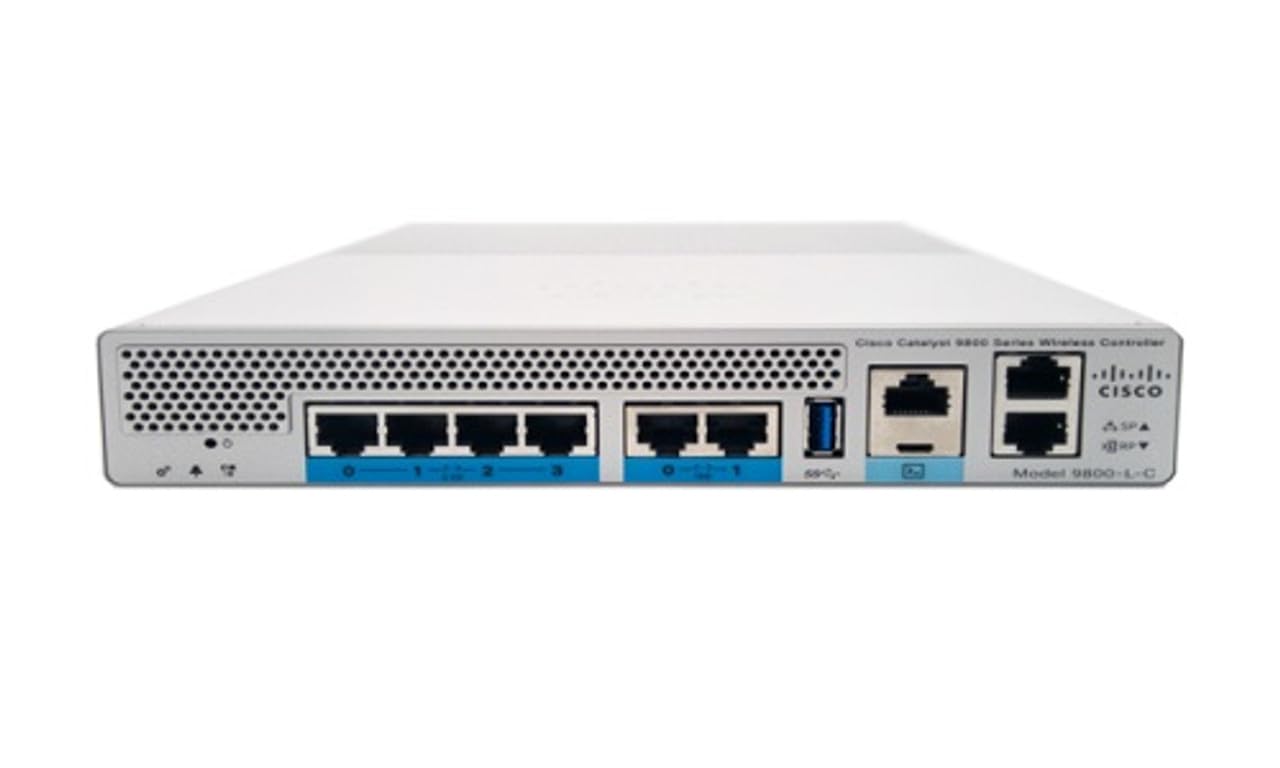
Figear 1: Aghaidh view of the Cisco Catalyst 9800-L Wireless LAN Controller. This image shows the compact design and port layout of the device.
4. Toradh thallview
The Cisco Catalyst 9800-L is a compact, fixed-configuration wireless LAN controller designed for small to medium-sized deployments. It provides centralized control for Cisco Aironet access points, offering robust wireless network management capabilities.
Prìomh fheartan:
- Managed, Layer 2.5 (Wireless Controller) functionality
- Copper uplink interfaces
- RJ45 interface type
- 11 ports for connectivity
- Designed for desktop environments
5. Suidhich
5.1 Unpacking agus Sgrùdadh
- Thoir an rianadair a-mach às a phacaid gu faiceallach.
- Inspect the device for any signs of physical damage. If damage is found, contact your supplier immediately.
5.2 Stàladh Corporra
- Place the controller on a stable, flat surface, such as a desktop.
- Ensure adequate clearance around the device for proper airflow and ventilation.
5.3 Ceangal cumhachd
- Connect the power cord to the power input on the rear of the controller.
- Plug the other end of the power cord into a grounded electrical outlet (220 Volts).
5.4 Ceangal lìonra
- Connect Ethernet cables from your network infrastructure to the RJ45 uplink ports on the controller.
- Connect access points to the appropriate downlink ports as required by your network design.
5.5 Ruigsinneachd Rèiteachaidh Tùsail
- Refer to the included CD or Cisco's official documentation for detailed instructions on initial console access and software configuration.
- Typically, this involves connecting a console cable to the device and using a terminal emulator.
6. Ag Obrachadh an Smachdair
6.1 Gnìomh Bunaiteach
Once powered on and initially configured, the controller will begin managing connected access points. Monitor the status indicators on the device for operational status.
6.2 Access Point Management
The Cisco Catalyst 9800-L automatically discovers and provisions Cisco Aironet access points. Use the controller's management interface (CLI or GUI) to configure wireless networks, security policies, and guest access.
6.3 Rèiteachadh lìonra
Detailed network configuration, including VLANs, QoS, and routing, is performed through the controller's operating system. Consult Cisco's official documentation for advanced configuration guides.
7. Stiùireadh cumail suas
- Ùrachaidhean firmware: Regularly check for and apply the latest firmware updates from Cisco to ensure optimal performance and security.
- Glanadh: Keep the device clean and free of dust. Use a soft, dry cloth for cleaning. Do not use liquid or aerosol cleaners.
- Suidheachaidhean Àrainneachdail: Ensure the operating environment remains within specified temperature and humidity ranges to prevent hardware failure.
- Rèiteachadh cùl-taice: Periodically back up your controller's configuration to prevent data loss.
8. A ’dèanamh trioblaid
Tha an earrann seo a’ dèiligeadh ri cùisean cumanta a dh’ fhaodadh tu a thighinn tarsainn orra:
| Trioblaid | Adhbhar a dh’fhaodadh a bhith ann | Fuasgladh |
|---|---|---|
| Chan eil an rianadair a’ cur cumhachd air | Power cable disconnected; Power outlet failure | Check power cable connections; Test power outlet with another device. |
| Access points not connecting | Incorrect network configuration; APs not discovered | Verify network settings on the controller; Ensure APs are on the same network segment or reachable via IP. |
| Slow wireless performance | Interference; Overloaded channels; Outdated firmware | Perform a site survey to identify interference; Optimize channel selection; Update controller and AP firmware. |
9. Sònrachaidhean Teicnigeach
| Sònrachadh | Mion-fhiosrachadh |
|---|---|
| Brand | Cisco |
| Modail Àireamh | C9800-L-C-K9 |
| Àireamh de phuirt | 11 |
| Eadar-aghaidh | RJ 45 |
| Seòrsa Switch | Managed, Layer 2.5 (Wireless Controller) |
| Àrd-ùrlar | Zeta |
| Seòrsa Stuth Cùise | Copar |
| Voltage | 220 Volt |
| Innealan co-fhreagarrach | Deasg |
| Dath | Gorm |
| Cuideam nì | 3.09 cileagram |
| UPC | 657768416101 |
| ASIN | B0C3FQPCY4 |
10. Fiosrachadh Barantais
This Cisco Catalyst 9800-L Wireless LAN Controller (Renewed) comes with a Barantas cuibhrichte 90 latha. For specific terms and conditions, please refer to the warranty documentation provided with your purchase or contact your reseller.
11. Taic teachdaiche
For technical assistance, troubleshooting, or further inquiries regarding your Cisco Catalyst 9800-L Wireless LAN Controller, please visit the official Cisco support website or contact your authorized Cisco reseller. Ensure you have your model number (C9800-L-C-K9) and serial number available when seeking support.