
Ro-ràdh
This manual provides detailed instructions for the installation, operation, and maintenance of your Strong SRT 7040 Digital Satellite HD Receiver. Please read this manual carefully before using the device to ensure proper functionality and to prevent damage.

Image: The Strong SRT 7040 DTT Tuner and its retail packaging.
The Strong SRT 7040 is a Full HD digital satellite receiver designed for Free-To-Air (FTA) channels. It features a USB port for multimedia playback and software updates, and supports Dolby Audio for enhanced sound quality.
1. Suidhich
1.1 A’ dì-phapadh
Thoir a h-uile pàirt a-mach às a’ phacaid gu faiceallach. Dèan cinnteach gu bheil na nithean a leanas an làthair:
- Strong SRT 7040 DTT Tuner
- Smachd Iomallach (le 2 bataraidh AAA)
- Adapter cumhachd
- Leabhar-làimhe cleachdaiche
1.2 A ’ceangal an inneal
Follow these steps to connect your SRT 7040 receiver:
- Teachd a-steach saideal: Connect your satellite dish cable to the SAT IN port air cùl a’ ghlacadair.
- Video Output (HDMI): Ceangail càball HDMI bhon HDMI port air a’ ghlacadair ri cuir a-steach HDMI air an telebhisean agad.
- Video Output (SCART): Alternatively, for older televisions, connect a SCART cable from the TBh SCART port on the receiver to the SCART input on your television.
- Audio Output (Digital): For digital audio, connect a coaxial cable from the COAXIAL S/PDIF port to your digital audio amplosgadair.
- Audio Output (Analog): For analog audio, connect RCA cables from the AUDIO R/L ports to your audio Hi-Fi amplosgadair.
- Inneal USB: If desired, connect a USB storage device to the USB port for multimedia playback or software updates.
- Cumhachd: Ceangail an inneal cumhachd ris an 12V === 1.5A input on the receiver, then plug the adapter into a wall outlet.

Image: Rear panel connections of the Strong SRT 7040 DTT Tuner, showing SAT IN, HDMI, TV SCART, COAXIAL S/PDIF, AUDIO R/L, USB, and Power input.
1.3 First-Time Installation and Channel Scan
Upon first power-on, the receiver will guide you through an initial setup wizard. Follow the on-screen prompts to select your language, country, and perform an automatic channel scan. This process will detect and store all available satellite channels.
2. Stiùireadh Obrachaidh
2.1 Smachd Iomallach thairisview
The included remote control allows you to access all functions of the SRT 7040. Insert the two AAA batteries into the remote control, ensuring correct polarity.

Image: The remote control for the Strong SRT 7040 DTT Tuner, showing buttons for power, numbers, volume, channel, menu, and special functions.
2.2 Gnìomhan Bunaiteach
- Cumhachd: Brùth an CUMHACHD button to turn the receiver on or off (standby mode).
- Taghadh seanail: Cleachd an CH+ / CH- buttons to change channels sequentially, or use the numeric keypad to enter a channel number directly.
- Smachd tomhas-lìonaidh: Cleachd an VOL+ / VOL- putanan gus meud an fhuaim atharrachadh.
- Balbh: Brùth an Mute putan gus an claisneachd a chur dheth airson ùine.
2.3 Stiùireadh Clàr
Brùth an MENU am putan gus faighinn chun phrìomh chlàr-taice. Cleachd na saighdean (UP, DOWN, CLÌ, DEAS) to navigate through options and OK to confirm selections. Press Exit to return to the previous screen or live TV.
2.4 Feartan sònraichte
- Luchd-ama: The receiver supports programming timers for recording or switching to specific channels at scheduled times. Access this feature via the menu.
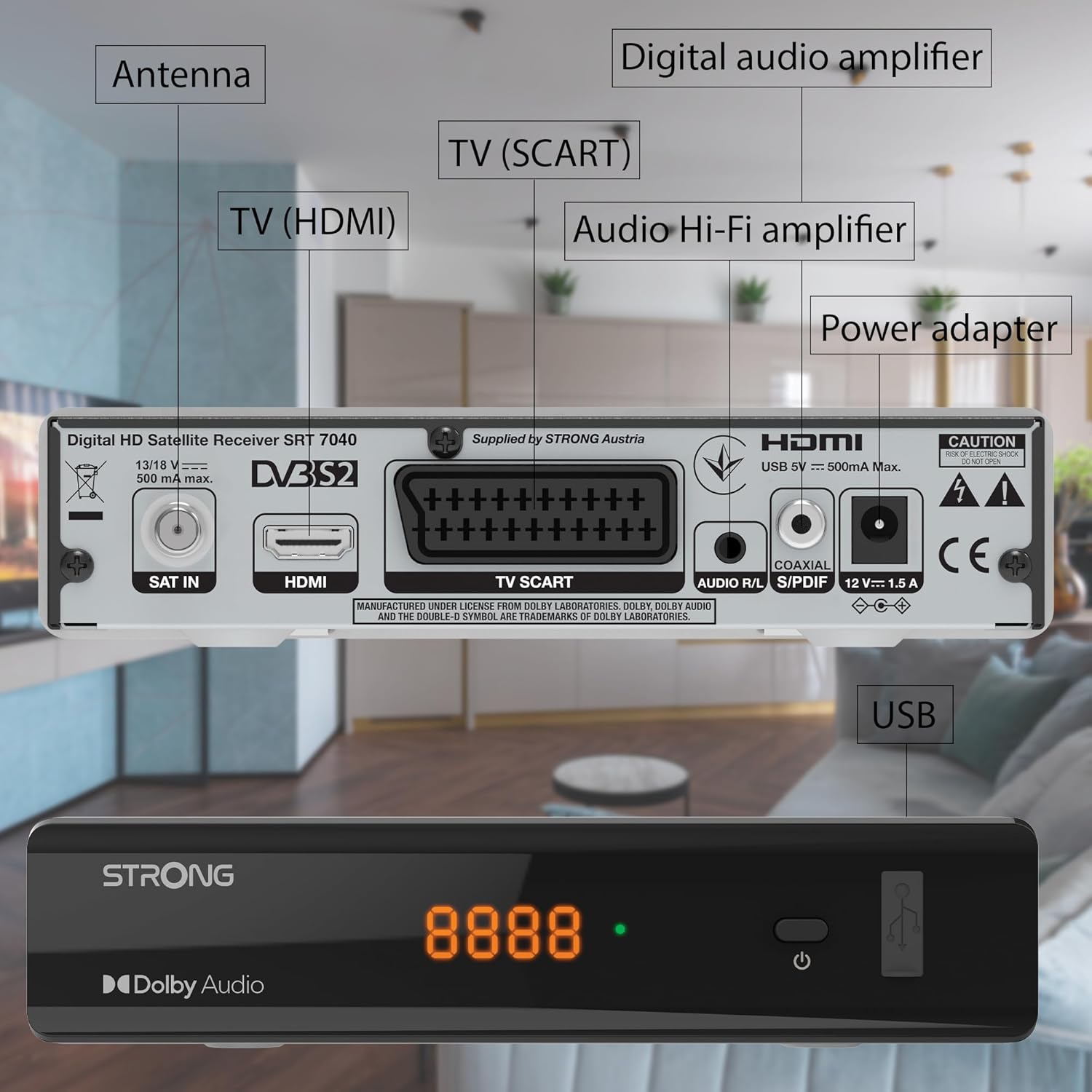
Image: The Strong SRT 7040 DTT Tuner displaying a timer icon, indicating its scheduling capabilities.
- Liostaichean as fheàrr leotha: Create customized lists of your preferred channels for quick access.
- Fo-thiotalan: Enable or disable subtitles for compatible broadcasts using the SUB putan air an iomall.
- Stiùireadh Prògram Eileagtronaigeach (EPG): Brùth an EPG putan gu view program information for upcoming broadcasts.
- Fuaim Dolby: The receiver supports Dolby Audio for a high-quality sound experience.

Image: The Strong SRT 7040 DTT Tuner with the Dolby Audio logo, illustrating its sound processing capability.
3. Cumail suas
3.1 Glanadh
To clean the receiver, disconnect it from the power supply. Use a soft, dry cloth to wipe the exterior. Do not use liquid cleaners, aerosols, or abrasive materials, as these can damage the finish or internal components.
3.2 Ùrachaidhean bathar-bog
Thoir sùil bho àm gu àm air an neach-dèanamh website for available software updates. Updates can improve performance, add new features, or resolve issues. Software updates are typically performed via the USB port following specific instructions provided with the update file.
3.3 Fiosrachadh Sàbhailteachd
- Na fosgail an glacadair casing. Chan eil pàirtean sam bith a dh’ fhaodas an neach-cleachdaidh a chàradh a-staigh. Thoir aire do luchd-obrach teisteanasach airson a h-uile seòrsa seirbheiseachaidh.
- Keep the receiver away from direct sunlight, heat sources, and moisture.
- Dèan cinnteach gu bheil fionnarachadh iomchaidh timcheall an inneil gus casg a chur air cus teasachadh.
- Na cleachd ach an adapter cumhachd a chaidh a thoirt seachad.
4. A ’dèanamh trioblaid
If you encounter problems with your SRT 7040, consult the following table before contacting support.
| Trioblaid | Adhbhar a dh’fhaodadh a bhith ann | Fuasgladh |
|---|---|---|
| Gun chumhachd | Power adapter not connected; Power outlet faulty | Check power adapter connection; Try a different power outlet |
| Gun chomharradh / Sgrion dubh | Satellite cable loose or disconnected; Incorrect input selected on TV; Satellite dish alignment issue | Check SAT IN cable connection; Ensure TV is on correct HDMI/SCART input; Perform a channel scan; Consult a professional for dish alignment if necessary |
| Chan eil smachd iomallach ag obair | Bataraidhean air an leigeil ma sgaoil no air an cur a-steach gu ceàrr; Bacadh eadar an inneal iomallach agus an glacadair | Replace batteries; Ensure correct polarity; Remove any obstructions; Point remote directly at receiver |
| Càileachd droch dhealbh | Weak satellite signal; Incorrect display settings | Check satellite signal strength in menu; Adjust TV display settings; Ensure Full HD content is being broadcast |
5. Sònrachaidhean
The following are the technical specifications for the Strong SRT 7040 Digital Satellite HD Receiver:
- Modail: SRT 7040 (SAT FTA Full HD)
- Brand: Làidir
- Meudan: 3.39 x 6.46 x 1.38 òirleach (8.6 x 16.4 x 3.5 cm)
- Cuideam nì: 9.2 unnsa (260 gram)
- Dath: Dubh
- Teicneòlas ceangail: USB
- Voltage: 100 - 240 V
- Tricead: 50 - 60 Hz
- Caitheamh cumhachd: 18 kWh (operational, typical)
- Raon Teòthachd Obrach: 0ºC gu 40ºC
- Taiseachd coimeasach: 10% - 95%
- Bataraidhean: 2 bataraidh AAA (air an toirt a-steach airson smachd iomallach)
- Sònrachadh air a choileanadh: DVB-S2
- Air a ghabhail a-steach: Wally Receiver
6. Barantas agus Taic
For warranty information and technical support, please refer to the warranty card included in your product packaging or visit the official Strong weblàrach. Cùm do chuidhteas ceannach mar dhearbhadh ceannach airson tagraidhean barantais.
For further assistance, you may contact Strong customer service through the contact details provided on their official weblàrach.