
1. Ro-ràdh
This manual provides detailed instructions for the installation, operation, and maintenance of your TP-Link Deco X50-Outdoor AX3000 Whole Home Mesh WiFi 6 Unit. The Deco X50-Outdoor is designed to extend your mesh WiFi network to outdoor and indoor spaces, providing robust and stable wireless connectivity. Please read this manual thoroughly before using the device to ensure proper setup and optimal performance.
2. Fiosrachadh Sàbhailteachd
Lean na ceumannan sàbhailteachd bunaiteach seo an-còmhnaidh gus cunnart teine, clisgeadh dealain agus leòn a lughdachadh:
- Na cuir a-mach an inneal seo gu uisge no taiseachd.
- Na feuch ris an inneal a thoirt às a chèile, a chàradh no atharrachadh.
- Cleachd dìreach an inneal-atharrachaidh cumhachd a tha air a thoirt seachad leis an inneal.
- Ensure the device is installed in a stable location to prevent it from falling.
- Cùm an inneal air falbh bho stòran teas agus solas dìreach.
- For outdoor installation, ensure all cable connections are properly sealed to prevent water ingress.
3. Pasgan-susbaint
Dèan cinnteach gu bheil na nithean a leanas anns a’ phacaid agad:
- 1 x TP-Link Deco X50-Outdoor Unit
- 1 x Adaptor Cumhachd
- Càball 1 x Ethernet
- Mounting Kit (includes mounting bracket, screws, and wall plugs)
- Stiùireadh stàlaidh luath

Image: The retail packaging for the TP-Link Deco X50-Outdoor unit, showing the device and its key features.
4. Toradh thallview
The Deco X50-Outdoor is a cylindrical, white unit designed for both outdoor and indoor use. It features an IP65 rating for waterproof and dustproof protection, making it suitable for various weather conditions.
4.1 Cruth inneal

Ìomhaigh: Aghaidh view of the TP-Link Deco X50-Outdoor unit, showcasing its sleek, cylindrical design and 'deco outdoor' branding.

Image: The bottom of the Deco X50-Outdoor unit, revealing the port cover and the attachment point for the mounting bracket.
4.2 Puirt agus Putanan
Under the protective cover at the bottom of the unit, you will find the following:
- Port PoE: Used for Power over Ethernet (PoE) connection, providing both power and data through a single Ethernet cable.
- LAN Ports (2): For connecting wired devices or for backhaul connection to other Deco units.
- Port cumhachd: For connecting the included power adapter when not using PoE.
- Putan Ath-shuidheachadh: A small button to reset the device to factory settings.

Ìomhaigh: Sealladh dlùth view of the PoE and AC power supply ports located at the base of the Deco X50-Outdoor unit, with labels indicating their functions.
5. Suidhich
Follow these steps to set up your Deco X50-Outdoor unit. It is recommended to use the TP-Link Deco app for a guided setup process.
5.1 Download the Deco App
- Scan the QR code in the Quick Installation Guide or search for "TP-Link Deco" in the App Store or Google Play.
- Luchdaich sìos agus stàlaich an app Deco air do fòn cliste no tablet.
5.2 Stàladh Corporra
The Deco X50-Outdoor can be mounted on a pole, wall, or placed on a tabletop.
- Tagh àite: Select a location that provides optimal WiFi coverage and is within range of your existing Deco network (if extending). For outdoor use, ensure it's protected from direct impact and accessible for power/Ethernet.
- Stàladh:
- Mount Pole: Use the provided straps to secure the mounting bracket to a pole.
- Mount Wall: Drill holes, insert wall plugs, and screw the mounting bracket to the wall.
- Clàr: Simply place the unit on a flat, stable surface.
- Ceangal cumhachd:
- A’ cleachdadh an inneal-atharrachaidh cumhachd: Connect the provided power adapter to the power port and plug it into an electrical outlet.
- A 'cleachdadh PoE: Connect an Ethernet cable from a PoE-enabled switch or injector to the PoE port on the Deco unit.
- Connect to Existing Network (Optional): If you are using the Deco X50-Outdoor as a satellite unit, it will connect wirelessly to your main Deco unit. For a wired backhaul, connect an Ethernet cable from one of the LAN ports to your main Deco unit or network switch.

Image: The Deco X50-Outdoor unit securely mounted on an outdoor pole, demonstrating a typical installation scenario.
5.3 Suidheachadh le stiùireadh aplacaid
- Fosgail an aplacaid Deco agus log a-steach leis an ID TP-Link agad. Mura h-eil fear agad, cruthaich cunntas.
- Tap the "+" icon in the top right corner to add a new Deco unit.
- Select your Deco model (X50-Outdoor) and follow the on-screen instructions to complete the setup. The app will guide you through connecting the unit and integrating it into your existing Deco mesh network.
6. Obrachadh
Once set up, your Deco X50-Outdoor unit will automatically integrate into your mesh network, providing seamless WiFi coverage. You can manage your network using the TP-Link Deco app.
6.1 Deco App Features
The Deco app allows you to:
- View innealan ceangailte agus an staid.
- Stèidhich lìonra aoighean.
- Manage parental controls.
- Thoir prìomhachas do dh’innealan airson an coileanadh as fheàrr (QoS).
- Access HomeShield Security features.
- Ùraich an firmware.
- Monitor network health and usage.
6.2 Inbhe Comharra LED
The LED on your Deco unit indicates its status:
- Uaine cruaidh: Deco is working properly.
- Uaine Pulsing: Tha Deco a’ tòiseachadh.
- Dearg cruaidh: Tha duilgheadas aig Deco (m.e., gun cheangal eadar-lìn).
- A 'bualadh dearg: Tha Deco air a dhì-cheangal bhon phrìomh aonad Deco.
- Gorm soladach: Tha Deco deiseil airson a rèiteachadh.
- A 'bualadh gorm: Deco is pairing via Bluetooth.
7. Cumail suas
Regular maintenance ensures the longevity and optimal performance of your Deco X50-Outdoor unit.
7.1 Ùrachaidhean Firmware
Keep your Deco's firmware updated to benefit from the latest features, security enhancements, and bug fixes. You can check for and install updates via the Deco app.
7.2 Glanadh
Wipe the device with a soft, dry cloth. Do not use liquid cleaners or chemical sprays.
7.3 Beachdachaidhean Àrainneachdail
Despite its outdoor rating, avoid placing the unit in locations where it is constantly submerged in water or exposed to extreme physical impact.
8. A ’dèanamh trioblaid
If you encounter issues with your Deco X50-Outdoor, try the following solutions:
8.1 Gun Cheangal Eadar-lìn
- Check the LED status. If solid red, ensure your main Deco unit has an internet connection.
- Verify that the Ethernet cable (if used) is securely connected.
- Restart your modem, main Deco unit, and then the X50-Outdoor unit.
8.2 Deco X50-Outdoor Disconnected
- Ensure the unit is within range of your main Deco or another satellite Deco.
- Thoir sùil air a 'cheangal cumhachd.
- Try relocating the unit to a closer position to the main Deco.
8.3 Astar WiFi Mall
- Ensure the unit is placed in an open area, free from obstructions.
- Thoir sùil airson ùrachaidhean firmware.
- Use the Deco app to run a network optimization test.
8.4 Ath-shuidheachadh Factaraidh
If issues persist, you may need to perform a factory reset. With the Deco unit powered on, use a pin to press and hold the Reset button until the LED turns solid red (approximately 1 second), then release. The unit will restart with factory default settings.
9. Sònrachaidhean
Technical details for the TP-Link Deco X50-Outdoor unit:
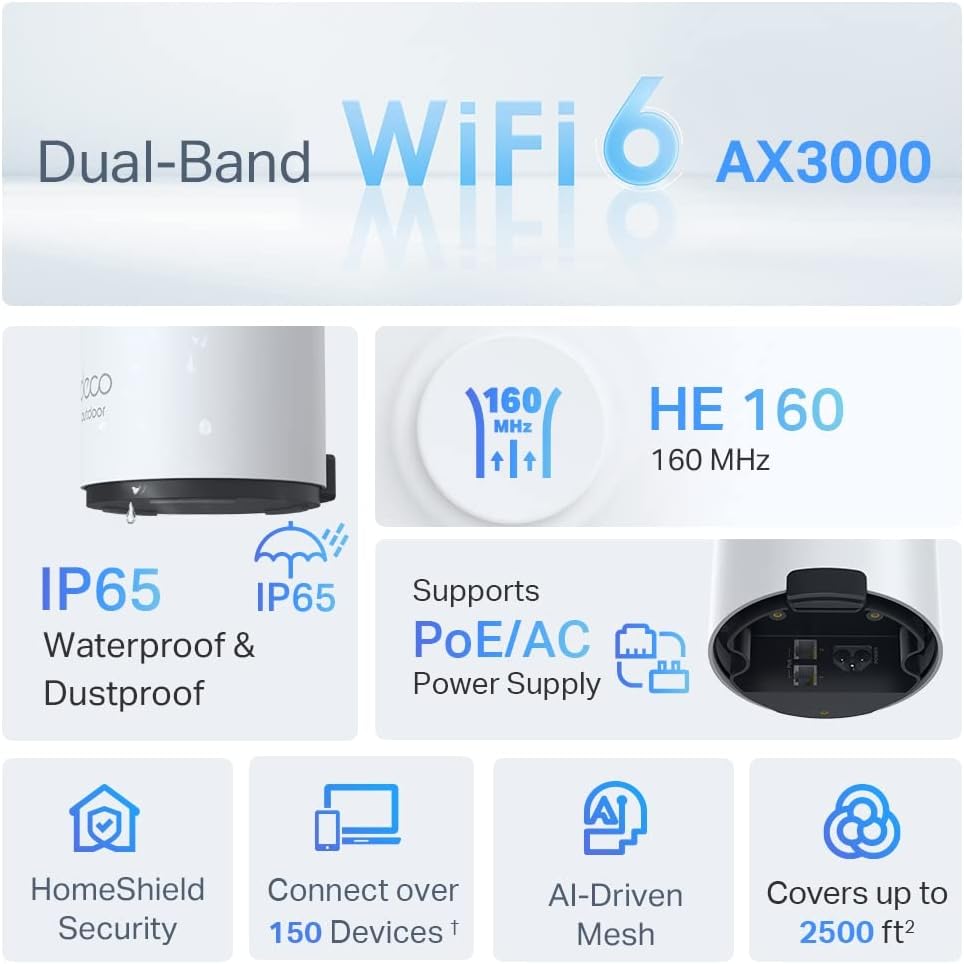
Image: An infographic highlighting key features of the Deco X50-Outdoor, including Dual-Band WiFi 6, AX3000 speeds, IP65 rating, PoE/AC power support, HomeShield Security, support for over 150 devices, AI-Driven Mesh, and up to 2500 sq ft coverage.
| Feart | Mion-fhiosrachadh |
|---|---|
| Ainm Modail | AX3000 Outdoor Whole Home Mesh WiFi 6 Unit |
| Inbhe gun uèir | Wi-Fi 6 (802.11ax) |
| Clas Còmhlan Tricead | Dà-chòmhlan |
| Ìre gluasad dàta | Suas ri 2402 Mbps (5 GHz) + 574 Mbps (2.4 GHz) |
| Raon ceangail | Up to 2000 Square Feet (per unit) |
| Puirt | 2 x Gigabit Ethernet Ports (Auto-sensing WAN/LAN) |
| Solar cumhachd | PoE (802.3at) or AC Power Adapter (240V AC) |
| Cur an aghaidh na h-aimsire | IP65 (Uisge-dhìonach & Duslach-dhìonach) |
| Pròtacal Tèarainteachd | WPA, WPA2, WPA3 |
| Modh smachd | TP-Link Deco App |
| Cuideam nì | 0.9 cileagram |
10. Barantas agus Taic
Airson fiosrachadh barantais agus taic theicnigeach, thoir sùil air làrach-lìn oifigeil TP-Link. weblàrach-lìn no cuir fios chun t-seirbheis teachdaiche aca.
- Oifigeil TP-Link Weblàrach: www.tp-link.com
- Taic Teicnigeach: Visit the support section on the TP-Link weblàrach-lìn airson Ceistean Cumanta, stiùireadh fuasgladh cheistean, agus fiosrachadh conaltraidh.