
1. Ro-ràdh
This manual provides instructions for the installation, operation, and maintenance of your NETGEAR GS305P 5-Port PoE Gigabit Ethernet Unmanaged Switch. This device is designed to expand your network connectivity with both standard Gigabit Ethernet and Power over Ethernet (PoE+) capabilities, ideal for small office or home network environments.
2. Pasgan-susbaint
Dèan cinnteach gu bheil na nithean a leanas anns a’ phacaid agad:
- NETGEAR GS305P 5-Port PoE Gigabit Ethernet Unmanaged Switch (GS305Pv3)
- Adapter cumhachd
- Kit Wallmount
- Stiùireadh stàlaidh luath

Image: The NETGEAR GS305P switch, power adapter, and power cord as typically found in the package.
3. Toradh thallview
The NETGEAR GS305P is an unmanaged switch featuring 5 Gigabit Ethernet ports, with 4 of these ports supporting PoE+ (Power over Ethernet Plus). It provides a total power budget of 63W for connected PoE devices. The switch is designed for plug-and-play operation, requiring no software installation or configuration.
Bhidio: Thar-shealladhview of the NETGEAR 5-Port PoE Switch, demonstrating its features and ease of use.
Pannal aghaidh

Image: Front panel of the GS305P switch, highlighting the 5 Gigabit Ethernet ports and LED indicators for power, PoE Max, link/activity, and PoE fault.
- Cumhachd LED: A’ nochdadh suidheachadh cumhachd.
- PoE Max LED: Illuminates when PoE power consumption is near maximum capacity.
- Link/Activity LEDs (Ports 1-5): Green for 1000Mbps link, Yellow for 10/100Mbps link. Blinks to indicate activity.
- PoE Status LEDs (Ports 1-4): Green for PoE powered, Yellow for PoE fault.
- Puirt Ethernet (1-5): RJ-45 ports for network connections. Ports 1-4 support PoE+.
4. Setup agus Stàladh
The NETGEAR GS305P switch is designed for simple plug-and-play installation. No software configuration is required.
4.1 A’ ceangal an suidse
- Connect the power adapter to the switch's power input and then plug the power adapter into an electrical outlet. The Power LED on the switch will illuminate.
- Ceangail an router no am modem agad ri gin de na 5 puirt Gigabit Ethernet air an suidse le bhith a’ cleachdadh càball Ethernet.
- Connect your network devices (computers, printers, network storage) to the remaining Gigabit Ethernet ports. For PoE-powered devices (e.g., IP cameras, wireless access points), connect them to ports 1-4.

Image: A diagram illustrating the plug-and-play nature of the unmanaged switch, connecting various devices like WiFi Access Points, IP Cameras, Computers, and NAS.
4.2 Roghainnean sreap
The GS305P switch can be placed on a desktop or mounted on a wall. A wallmount kit is included for secure installation.
- Suidheachadh deasg: Dèan cinnteach gu bheil an suidse air a chur air uachdar rèidh, seasmhach le fionnarachadh iomchaidh.
- Mount Wall: Use the provided wallmount kit to secure the switch to a wall. Refer to the quick installation guide for detailed steps on wall mounting.
5. Ag Obrachadh an Suidse
Once connected, the switch operates automatically. The LEDs provide visual feedback on the network status.
- Cumhachd air: The Power LED will be green when the switch is receiving power.
- Network Activity: The Link/Activity LEDs will light up when a device is connected and blink to indicate data transmission.
- Cumhachd PoE: For PoE-powered devices, the PoE Status LED will be green when power is being supplied. If a PoE fault occurs, the LED will turn yellow.
- Obrachadh sàmhach: The fanless design ensures quiet operation, making it suitable for noise-sensitive environments.
6. Cumail suas
To ensure optimal performance and longevity of your switch, follow these maintenance guidelines:
- Glanadh: Cleachd clò bog, tioram gus taobh a-muigh an t-suidse a ghlanadh. Na cleachd innealan-glanaidh leaghaidh no aerosol.
- Fionnarachadh: Dèan cinnteach nach tèid na fosglaidhean fionnarachaidh a bhacadh gus casg a chuir air cus teasachadh.
- Àrainneachd: Operate the switch within its specified temperature and humidity ranges. Avoid direct sunlight or extreme temperatures.
- Riaghladh càbaill: Keep network cables organized to prevent strain on ports and improve airflow.
7. A ’dèanamh trioblaid
If you encounter issues with your NETGEAR GS305P switch, refer to the following common troubleshooting steps:
- Gun chumhachd: Ensure the power adapter is securely connected to the switch and a working electrical outlet. Check the Power LED.
- Gun Cheangal/Gnìomhachd: Verify that Ethernet cables are properly connected to both the switch and the connected device. Try a different cable or port. Check the Link/Activity LED.
- Inneal PoE gun a bhith a’ tionndadh air: Ensure the device is PoE-compatible and connected to one of the PoE+ ports (1-4). Check the PoE Status LED for the port; a yellow light indicates a fault. Verify the total power budget (63W) is not exceeded by all connected PoE devices.
- Astar lìonra slaodach: Ensure all connected devices and cables support Gigabit Ethernet for optimal performance. Check for excessive network traffic.
8. Sònrachaidhean
Key technical specifications for the NETGEAR GS305P switch:
| Feart | Tuairisgeul |
|---|---|
| Modail | GS305P (GS305Pv3) |
| Àireamh de phuirt | 5 puirt Gigabit Ethernet |
| Puirt PoE+ | 4 (Puirt 1-4) |
| Buidseat Cumhachd PoE iomlan | 63W |
| Ìre gluasad dàta | 1000 Mbps (Gigabit) |
| Seòrsa Switch | Gun riaghladh |
| Stuth cùise | Meatailt |
| Meudan (L x W x H) | 9.5" x 6.7" x 3.4" (approximate, from product data) |
| Voltage | 240 Volts (Power adapter input) |
| Àrainneachd Obrachaidh | Designed for indoor use in U.S. & CA. |
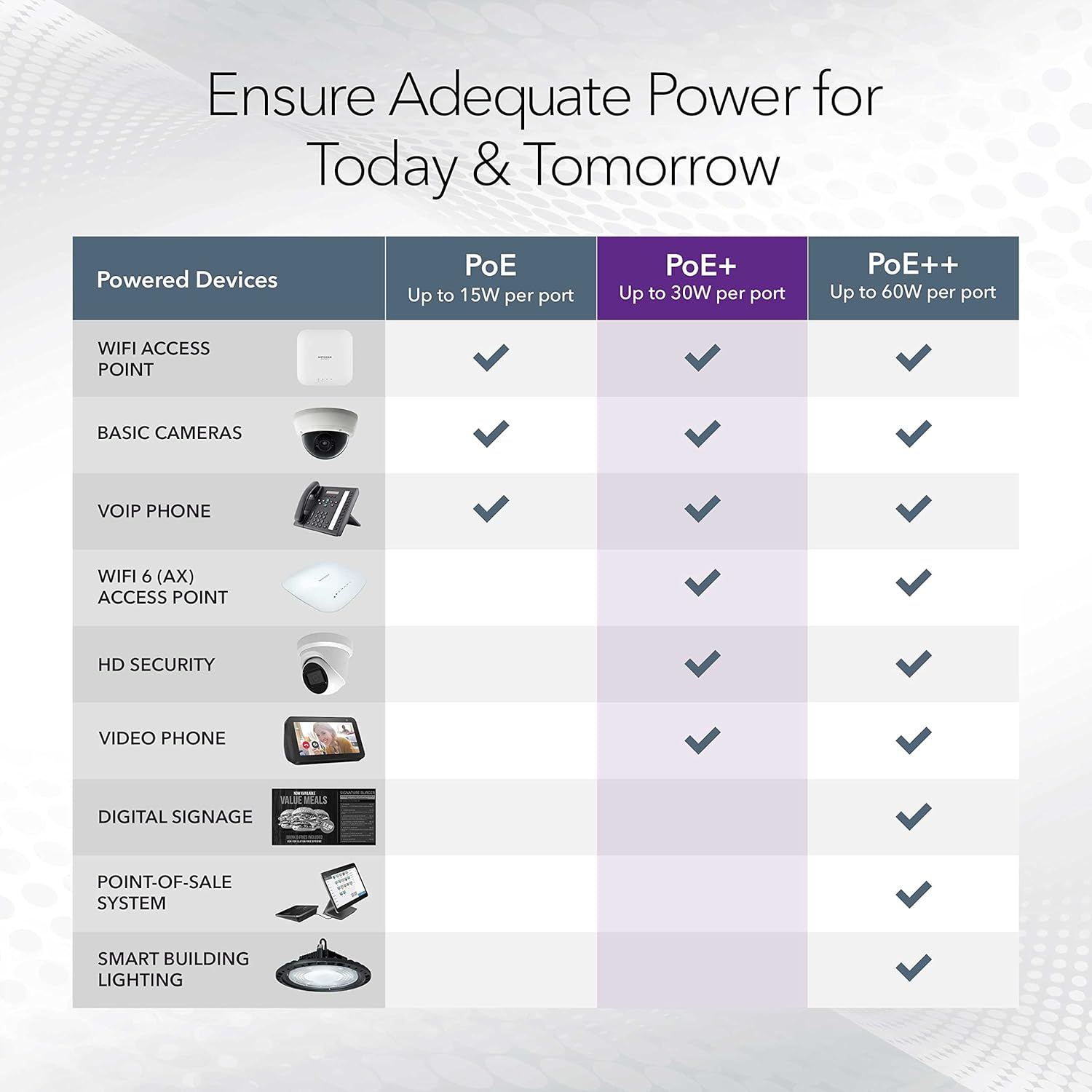
Image: A table illustrating the power capabilities of PoE, PoE+, and PoE++ for different powered devices.
9. Barantas agus Taic
9.1 Fiosrachadh Barantais
The NETGEAR GS305P switch comes with an industry-leading Barantas bathar-cruaidh cuibhrichte 3-bliadhna. Please retain your proof of purchase for warranty claims. For full warranty terms and conditions, refer to the official NETGEAR weblàrach-lìn no na sgrìobhainnean a tha air an toirt a-steach leis an toradh agad.
9.2 Taic Teicnigeach
For technical assistance, product registration, or to access additional resources, visit the official NETGEAR support website. You can find FAQs, firmware updates, and community forums there.
Taic NETGEAR Weblàrach: www.netgear.com/support