
1. Fiosrachadh Sàbhailteachd Cudromach
Leugh na stiùiridhean sàbhailteachd gu lèir gu faiceallach mus cleachd thu an toradh seo. Dh’fhaodadh fàilligeadh ann a bhith a’ leantainn nan stiùiridhean seo dochann no milleadh adhbhrachadh.
- Suidheachadh: Avoid placing the camera in unstable locations or within reach of children or pets.
- Cumhachd: Use only the provided AC adapter and power cable. Disconnect power before moving the device.
- Àrainneachd: Keep the camera away from high humidity, dust, and extreme temperatures. This product is not waterproof.
- Cumail suas: Do not attempt to disassemble or repair the camera yourself. Contact customer support for any issues.

Image: General safety guidelines for camera usage.
2. Pasgan-susbaint
Dèan cinnteach gu bheil a h-uile rud air a ghabhail a-steach sa phacaid agad:
- Galayou G2 Camera Unit
- Adaptor AC
- Càball cumhachd
- Pasgan Suidheachaidh (sgriuban, acairean)
- Japanese Instruction Manual

Image: The Galayou G2 camera and a smartphone displaying its live feed.
3. Stiùirich rèiteachaidh
3.1 Suidheachadh tùsail
- Cumhachd air: Connect the camera to power using the provided AC adapter and cable. The indicator light will turn red.
- Luchdaich sìos an aplacaid: Download the dedicated 'blurams' app from the App Store (iOS) or Google Play Store (Android).
- Ceadan App: Ensure Bluetooth and Location permissions are enabled for the 'blurams' app in your smartphone settings.
- Ath-shuidhich a’ Chamara: Press and hold the reset button on the camera until you hear a beep sound. The indicator light will flash red and blue alternately, indicating it's ready for network connection.
- Cuir inneal ris san aplacaid: Open the 'blurams' app, tap 'Add Device' or the '+' icon. Select your camera model (G2 or similar D1 model) and choose 'Wi-Fi connection via Bluetooth'.
- Ceangal Wi-Fi: Enter your 2.4GHz Wi-Fi network name and password. The camera only supports 2.4GHz Wi-Fi.
- Sgan còd QR: The app will display a QR code. Hold your smartphone in front of the camera lens to scan the QR code. You will hear a beep sound from the camera upon successful scan.
- Dearbhadh ceangail: The camera will announce 'Connection successful' and then 'Connecting to network'. Once connected, the indicator light will turn solid blue.
3.2 Video Guide: Bluetooth Wi-Fi Connection
Video: This video demonstrates the Bluetooth-assisted Wi-Fi connection method for the D1 camera, which is similar to the G2 model. It shows the steps from app permissions to successful network connection.
3.3 Video Guide: Camera Setup Method
Video: This video provides a general guide on how to set up a Skyworth pet camera, which can be used as a reference for the Galayou G2's setup process.
4. Stiùireadh Obrachaidh
4.1 Beò View agus Smachd Pan/Tilt
Once connected, you can access the live feed through the 'blurams' app. The camera offers a 355° horizontal rotation and 52° vertical rotation for comprehensive coverage.
- Pan/Tilt: Cleachd na smachdan stiùiridh san aplacaid gus atharrachadh a dhèanamh air astar air camara viewceàrn ing.
- Zoom didseatach: The camera supports 4x digital zoom to view mion-fhiosrachadh.

Image: The camera's pan and tilt capabilities, offering a wide field of view.
4.2 Càileachd Bhidio agus Sealladh Oidhche
The G2 camera features 2K high-resolution video (1440p) and a 3-megapixel CMOS sensor for clear images. It also provides advanced night vision capabilities.
- Rùn 2K: Enjoy clear and detailed video footage.
- Modhan lèirsinn oidhche: The camera supports three night vision modes: Smart Night Vision (auto-switches between color and black & white based on motion), Color Night Vision (always color), and Infrared Night Vision (always black & white).
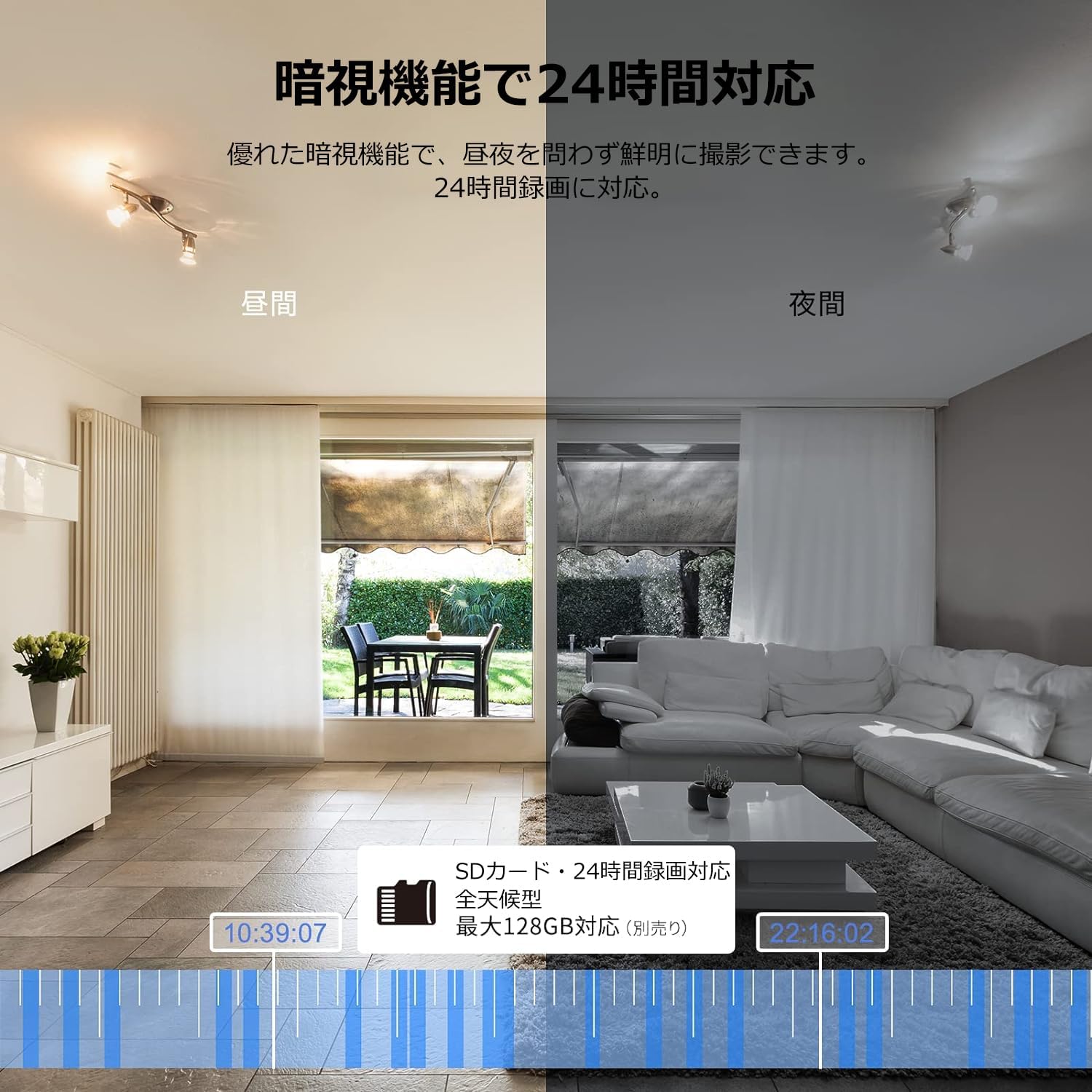
Image: Comparison of day and night vision, demonstrating the camera's ability to record clearly in low light.
4.3 Fuaim Dà-shligheach
Equipped with a microphone and speaker, the camera allows for real-time two-way communication.
- Speak and Listen: Talk to family members or pets through the app, and hear their responses.
- Lùghdachadh fuaim: The two-way audio features noise reduction for clearer sound.

Image: The camera's two-way audio feature, allowing interaction with pets.
4.4 Motion Detection & Automatic Tracking
The camera can detect motion and automatically track subjects within its field of view.
- Rabhadh Gluasad: Faigh fiosan sa bhad air an fhòn-smart agad nuair a lorgar gluasad.
- Tracadh fèin-ghluasadach: The camera will follow detected movement, keeping the subject in frame.
- Dearbhadh Daonna: Advanced AI can differentiate between humans and other moving objects, reducing false alarms.
- Gnìomh rabhaidh: Trigger an alarm sound from the camera via the app to deter intruders.

Image: Motion detection and alarm features, showing alerts on a smartphone.
4.5 Clàradh agus Stòradh
The camera supports both local and cloud storage options for continuous recording.
- Cairt MicroSD: Supports up to 128GB microSD cards (sold separately) for 24-hour continuous recording with automatic overwriting.
- Stòradh Cloud: Optional paid cloud storage service is available for extended recording and backup.
- Compression bhidio: Utilizes H.264 and H.265 compression formats for efficient storage.


Images: MicroSD card recording and cloud storage options.
4.6 Modh prìobhaideachd
Activate privacy mode to physically cover the camera lens, ensuring your privacy when needed.
- One-Tap Activation: Easily turn off the lens via the app.
- Physical Cover: The camera physically rotates its lens downwards, blocking the view.

Image: Privacy mode icon.
4.7 Amalachadh Alexa
The Galayou G2 is Alexa-certified, allowing for voice control and viewing the camera feed on compatible Alexa devices.
- Òrdughan gutha: Cleachd òrdughan gutha gu view the camera feed on an Echo Show or other Alexa-enabled screen.

Image: Alexa integration with the Galayou G2 camera.
4.8 Multi-Camera Support & Sharing
The app supports adding multiple cameras and sharing access with family members.
- Ioma camara: Monitor different areas of your home by adding several cameras to the app.
- Roinn Teaghlaich: Share camera access with up to 4 family members simultaneously.

Image: Family sharing and multi-camera viewing.
4.9 Video Guide: Product Features
Video: This video showcases various features of a Skyworth pet camera, including its monitoring capabilities, which are comparable to the Galayou G2.
4.10 Video Guide: Blurams 300万画素 見守りカメラ
Video: This video highlights the features of a Blurams 3-megapixel monitoring camera, demonstrating functionalities similar to the Galayou G2.
4.11 Video Guide: JUFLSKY 300万画素 360°PTZ機 (Preview)
Bhidio: Ro-ràdh goiridview taisbeanadh bhidioasing a 300-megapixel 360° PTZ camera, similar in functionality to the G2.
5. A ’dèanamh trioblaid
- Cha ghabh ceangal ri Wi-Fi:
- Dèan cinnteach gu bheil an lìonra Wi-Fi agad 2.4GHz. Chan eil an camara a’ toirt taic do lìonraidhean 5GHz.
- Thoir sùil air ceartachd facal-faire Wi-Fi.
- Gluais an camara nas fhaisge air an router Wi-Fi agad.
- Perform a factory reset on the camera and try the setup process again.
- No Live Feed:
- Thoir sùil air a’ cheangal eadar-lìn agad.
- Ensure the camera is powered on and the indicator light is solid blue.
- Ath-thòisich an aplacaid agus/no am fòn cliste agad.
- Dearbhadh gluasad nach eil ag obair:
- Dearbhaich gu bheil lorg gluasad air a chomasachadh ann an roghainnean an aplacaid.
- Atharraich cugallachd lorg gluasad.
- Dèan cinnteach nach eil bacadh sam bith ann a chuireas bacadh air a’ chamara view.
- Càileachd bhidio truagh:
- Check your internet speed. A stable connection is required for optimal streaming.
- Dèan cinnteach gu bheil lionsa a’ chamara glan.
- Adjust the video quality settings in the app (e.g., from SD to 2K).
6. Sònrachaidhean
| Feart | Sònrachadh |
|---|---|
| Ainm Modail | G2 |
| Seòrsa stàladh | Tabletop and Ceiling Mount |
| Fuasgladh glacadh bhidio | 1440p (2K) |
| Dath | Automatic Tracking Camera |
| Co-phàirtean air an toirt a-steach | Camera body, AC adapter, Japanese instruction manual, mounting set, power cable |
| Teicneòlas conaltraidh gun uèir | Wi-Fi (2.4GHz a-mhàin) |
| Fuasgladh bhidio èifeachdach | 2 Megapixels (300万画素) |
| Raon de View | 95 ceum |
| Raon Lèirsinn Oidhche | 7 meatairean |
| Ìre frèam | 15 fps |
| Stuth | Plastaig |
| Meudan toraidh (LxWxH) | 7.2 x 7.2 x 10.9 cm |
| Ìre an aghaidh uisge | Gun uisge-dhìonach |
| Stòr Solais | Fo-dhearg |
| Cleachdadh air a mholadh | Tèarainteachd a-staigh |
| Cleachdadh a-staigh / a-muigh | A-staigh |
| Innealan co-fhreagarrach | Fòn-làimhe, Clàr, Deasg, Laptop |
| Stòr cumhachd | Electric Corded |
| Seòrsa Rianadair | App |
7. Barantas agus Taic
The Galayou G2 camera comes with a manufacturer's warranty and customer support.
- Barantas: 1-year manufacturer's warranty.
- Taic Teicnigeach: For any issues or questions, please contact GALAYOU customer support through the app or visit the official GALAYOU store on Amazon.