
1. Ro-ràdh
Thank you for choosing the AgfaPhoto Powerstation PPS 600 Pro. This portable power bank is designed to provide reliable power for various devices during outdoor activities, travel, and emergency situations. This manual provides essential information for safe operation, setup, maintenance, and troubleshooting. Please read it thoroughly before using the product.
2. Stiùireadh Sàbhailteachd
- Na dèan dì-chruinneachadh, càradh agus atharrachadh air an aonad. Dh’fhaodadh ath-chruinneachadh ceàrr teine no dochann adhbhrachadh.
- Do not expose the unit to fire or extreme temperatures (above 60°C / 140°F).
- Na cleachd no na stòraich an aonad ann an seòmar-ionnlaid no ann an àite a tha fosgailte do uisge no taiseachd.
- Na leig leis an aonad a bhith air a leigeil sìos, air a bhualadh, agus na cuir e fo bhuaidhean làidir.
- Cùm a-mach à ruigsinn chloinne.
- Cleachd na goireasan agus na càbaill cosgais a thathar a’ moladh a-mhàin.
- Dèan cinnteach gu bheil fionnarachadh ceart ann fhad ’s a tha thu ga chleachdadh agus ga luchdachadh gus casg a chuir air cus teasachadh.
- In case of leakage from the battery, avoid contact with skin and eyes. Rinse affected areas with water and seek medical attention.
3. Pasgan-susbaint
Dèan cinnteach gu bheil a h-uile nì anns a’ bhogsa:
- AgfaPhoto Powerstation PPS 600 Pro
- Power Cord (for AC charging)
- Inneal-atharrachaidh airson solais toitean càr
- Leabhar-làimhe cleachdaiche
4. Toradh thallview
Familiarize yourself with the ports, buttons, and display of your Powerstation PPS 600 Pro.

Image: Front panel of the AgfaPhoto Powerstation PPS 600 Pro, showing the LCD screen, DC output, USB-A ports, USB-C port, and AC output switch.
The unit features a clear LCD display that shows battery level, input power, and output power. Various ports are available for charging different devices simultaneously.
- Taisbeanadh LCD: Shows battery status, input/output wattage, agus comharran mearachd.
- Toradh DC: For devices requiring DC power.
- Puirt USB-A: Airson fònaichean sgairteil, tablaidean agus innealan eile le cumhachd USB a ghearradh.
- Port USB-C: Airson innealan co-chòrdail ri cosgais luath.
- Toradh AC: Standard wall outlet for appliances.
- Port a-steach: For charging the power station itself.
5. Suidhich
5.1 Cìs tòiseachaidh
Before first use, fully charge your AgfaPhoto Powerstation PPS 600 Pro. This ensures optimal battery performance and longevity.
- Connect the provided power cord to the AC input port on the power station.
- Cuir ceann eile a’ chorda cumhachd a-steach do socaid balla àbhaisteach.
- The LCD display will show the charging status. The unit is fully charged when the battery indicator shows 100%.
Charging can also be done via a solar panel (sold separately) or a car cigarette lighter adapter.

Image: Illustration of the three charging methods for the power station: via car cigarette lighter, AC wall adapter, and solar panel.
6. Stiùireadh Obrachaidh
6.1 A’ cur cumhachd air/dheth
- To turn on the unit, press and hold the main power button for a few seconds. The LCD display will illuminate.
- To turn off the unit, press and hold the main power button again until the display turns off.
6.2 A’ cur cosgais air innealan taobh a-muigh
The Powerstation PPS 600 Pro offers multiple output options:
- Toradh USB: Connect your USB-powered devices (smartphones, tablets, drones, cameras) to the USB-A or USB-C ports. The unit will automatically detect and begin charging.
- Toradh AC: For devices requiring standard wall power (laptops, mini-refrigerators, LED TVs), press the AC ON/OFF button to activate the AC outlet. Plug your device into the AC outlet. Remember to turn off the AC output when not in use to conserve battery.
- Toradh DC: For 12V DC devices, connect them to the DC output port.

Image: The AgfaPhoto Powerstation PPS 600 Pro connected and charging a laptop, demonstrating its use for portable electronics.

Image: The power station in use during a power outage, providing light and charging a smartphone, highlighting its emergency backup capability.
7. Cumail suas
7.1 Stòradh
- Store the power station in a cool, dry place, away from direct sunlight and heat sources.
- Airson stòradh fad-ùine, cuir cosgais air an aonad gu timcheall air 50-80% gach 3-6 mìosan gus slàinte a’ bhataraidh a chumail suas.
- Avoid storing in environments with high humidity or extreme temperatures.
7.2 Glanadh
- Cleachd clò bog, tioram gus taobh a-muigh an aonaid a ghlanadh.
- Na cleachd luchd-glanaidh sgudail no solventan.
- Dèan cinnteach gu bheil a h-uile port saor bho dhuslach is sprùilleach.
8. A ’dèanamh trioblaid
If you encounter issues with your Powerstation PPS 600 Pro, refer to the following common problems and solutions:
| Trioblaid | Adhbhar a dh’fhaodadh a bhith ann | Fuasgladh |
|---|---|---|
| Chan eil an aonad a’ tionndadh air | Tha am bataraidh air a dhì-luchdachadh gu tur. | Charge the unit using the AC adapter. |
| No output from AC port | AC output not activated. Device exceeds power limit. | Brùth am putan AC ON/OFF. Thoir sùil air dè an ìre a th’ aig an inneal.tage against unit specifications. |
| Slow charging of external devices | Device requires higher current. Cable issue. | Ensure you are using the correct USB port (e.g., USB-C PD). Try a different cable. |
| Tha an aonad a’ teasachadh cus | Poor ventilation. Excessive load. | Ensure vents are clear. Reduce the number or power of connected devices. Allow unit to cool down. |
Ma mhaireas an duilgheadas, cuir fios gu taic luchd-cleachdaidh.
9. Sònrachaidhean
Technical details for the AgfaPhoto Powerstation PPS 600 Pro:
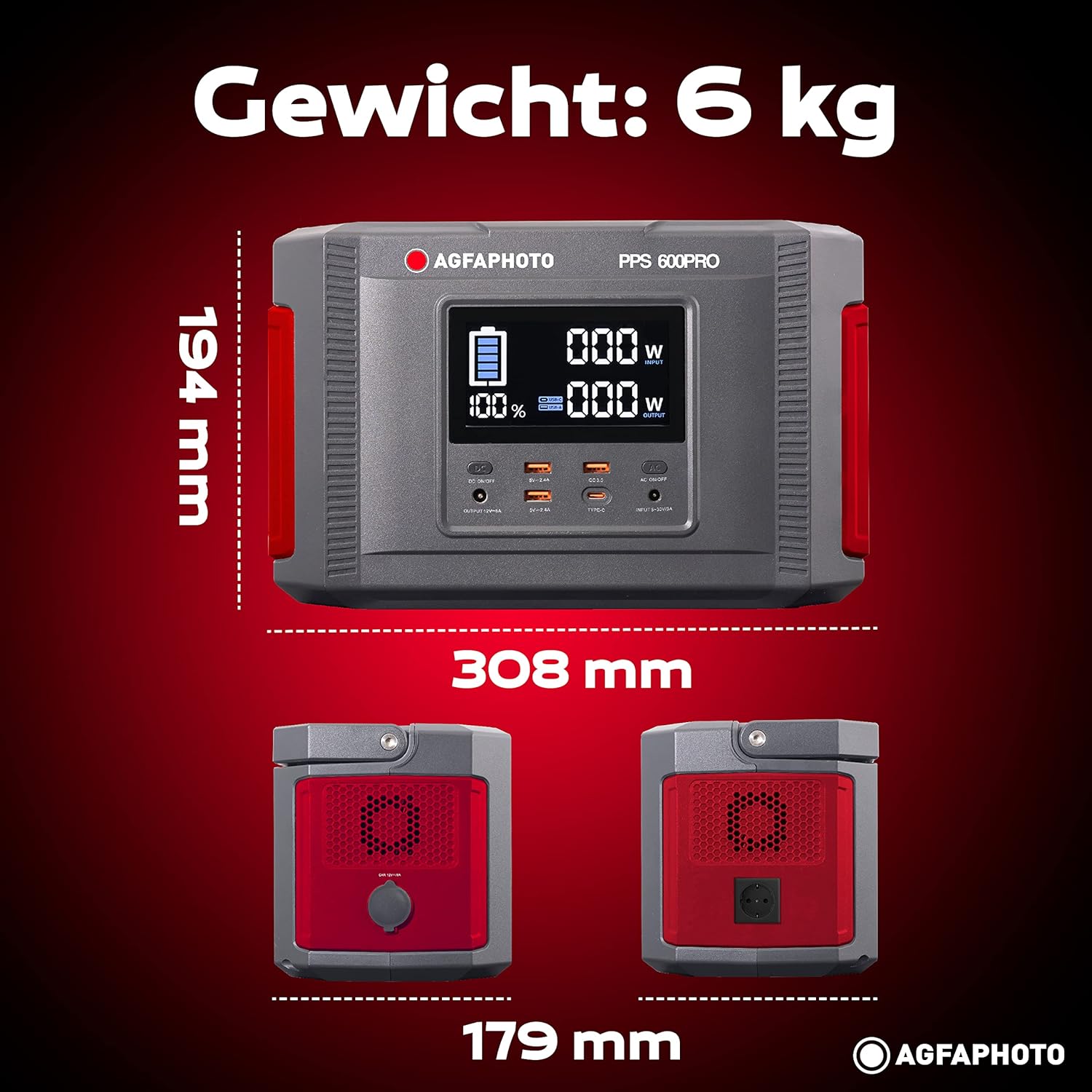
Image: Visual representation of the AgfaPhoto Powerstation PPS 600 Pro's dimensions (308 x 179 x 194 mm) and weight (6 kg).
| Feart | Sònrachadh |
|---|---|
| Brand | AgfaPhoto |
| Modail Àireamh | 717-854742 (PPS600) |
| Comas Bataraidh | 644 Wh |
| Cumhachd Toraidh (Leantainneach) | 600 W |
| Cumhachd toraidh (as àirde) | 1000 W |
| Voltage | 220 Volt |
| Cuideam nì | 6.1 cileagram |
| Meudan (L x W x H) | 308 x 179 x 194 mm |
| Stòr cumhachd | Battery Powered (Solaire, électricité) |
| Cleachdaidhean Molta | Mobile phones, cameras, laptops, tablets |
| Co-phàirtean air an toirt a-steach | Power cord, USB ports, LCD screen, car cigarette lighter adapter |
| Feart sònraichte | Dealbhadh compact |
10. Barantas agus Taic
AgfaPhoto products are manufactured to high-quality standards and are covered by a manufacturer's warranty. For specific warranty terms and conditions, please refer to the warranty card included with your product or visit the official AgfaPhoto weblàrach.
For technical support, troubleshooting assistance, or spare parts inquiries, please contact AgfaPhoto customer service. Contact details can typically be found on the product packaging or the official brand weblàrach.