
1. Ro-ràdh
Tapadh leibh airson ceannachasing the Lanix LX240 V7 23.8-inch Full HD Monitor. This manual provides essential information for the safe and efficient use of your new monitor. Please read it thoroughly before installation and keep it for future reference.
2. Fiosrachadh Sàbhailteachd
Lean na ceumannan sàbhailteachd a leanas gus casg a chur air milleadh air an sgrìn agus gus sàbhailteachd an neach-cleachdaidh a dhèanamh cinnteach:
- Na cuir am monitor fo uisge no taiseachd gus teine no clisgeadh dealain a sheachnadh.
- Na fosgail am monitor casing. Chan eil pàirtean sam bith a dh’ fhaodas an neach-cleachdaidh a chàradh a-staigh. Thoir aire do luchd-obrach teisteanasach airson a h-uile seòrsa seirbheiseachaidh.
- Cuir am monitor air uachdar seasmhach, còmhnard gus casg a chur air tuiteam.
- Dèan cinnteach gu bheil fionnarachadh ceart ann timcheall air an sgrìn. Na cuir bacadh air fosglaidhean fionnarachaidh.
- Cleachd an inneal-atharrachaidh cumhachd a tha air a thoirt seachad leis a’ mhonatair a-mhàin.
- Dì-cheangail am pluga cumhachd bhon t-socaid mura tèid am monitor a chleachdadh airson ùine mhòr.
3. Pasgan-susbaint
Dèan cinnteach gu bheil a h-uile nì an làthair agus ann an deagh staid nuair a dh’fhosglas tu am pasgan:
- Lanix LX240 V7 Monitor
- Adapter cumhachd
- Càball HDMI
- Leabhar-làimhe cleachdaiche (an sgrìobhainn seo)

Image: Lanix LX240 V7 Monitor packaging box, showing the monitor model and key features.
4. Suidhich
4.1 A’ cur an t-Seasaimh ri chèile
Lean na ceumannan seo gus an stand a cheangal ris a’ mhonatair agad:
- Thoir am monitor a-mach às a phacaid gu faiceallach, ga dhìon.
- Attach the stand base to the stand neck. Secure with screws if provided.
- Align the assembled stand with the mounting slot on the back of the monitor.
- Gently push the stand into the slot until it clicks into place or secure with screws.

Ìomhaigh: Cùl view of the Lanix LX240 V7 monitor, showing the stand attachment point and port area.
4.2 A’ ceangal an monitor
Connect the monitor to your computer using the appropriate cables:
- Ceangal cumhachd: Connect the power adapter to the monitor's power input, then plug the adapter into a power outlet.
- Ceangal bhidio:
- HDMI: Ceangail aon cheann den chàball HDMI ris a’ phort HDMI air an sgrìn agad agus an ceann eile ris a’ phort HDMI air a’ choimpiutair agad.
- VGA: Connect one end of the VGA cable to the VGA port on your monitor and the other end to the VGA port on your computer.
- Ceangal claisneachd (ma tha sin iomchaidh): The monitor has integrated speakers. If using HDMI, audio will transmit automatically. For VGA, ensure your computer's audio output is configured correctly.
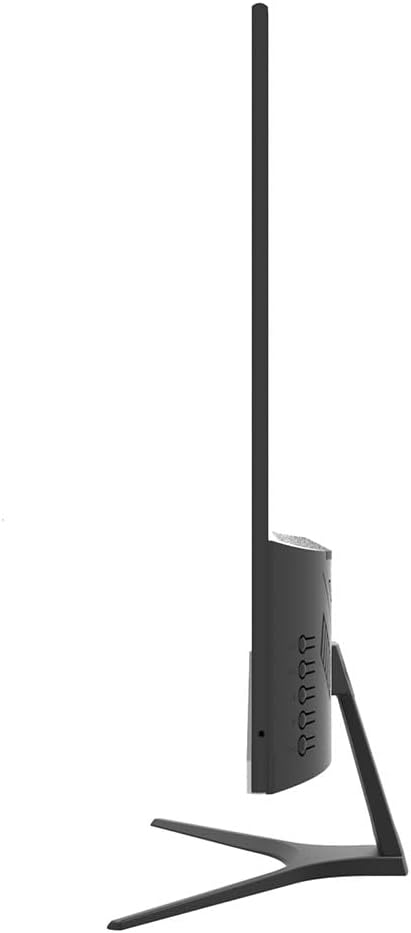
Ìomhaigh: Taobh view of the Lanix LX240 V7 monitor, illustrating the location of input ports and control buttons.
5. Stiùireadh Obrachaidh
5.1 A’ cur cumhachd air/dheth
Brùth am putan cumhachd a tha air an sgrìn gus a thionndadh air no dheth. Lasaidh an solas comharra cumhachd nuair a bhios an sgrìn air.
5.2 Taghadh Stòr Ion-chuir
If you have multiple devices connected, you may need to manually select the input source:
- Press the "Input" or "Source" button on the monitor (refer to the side view image for button locations).
- Use the navigation buttons to select between HDMI and VGA inputs.
- Press the "Menu" or "OK" button to confirm your selection.
5.3 Clàr-taice Taisbeanaidh Air-sgrion (OSD)
The OSD menu allows you to adjust various monitor settings:
- Press the "Menu" button to open the OSD.
- Use the navigation buttons (usually up/down or left/right arrows) to browse through menu options such as Brightness, Contrast, Color Settings, Aspect Ratio, etc.
- Press "Menu" or "OK" again to enter a sub-menu or confirm a setting.
- Press the "Exit" or "Menu" button repeatedly to close the OSD.

Ìomhaigh: Aghaidh view of the Lanix LX240 V7 monitor, showcasing its display area and slim bezels.
6. Cumail suas
Nì cumail suas ceart cinnteach gum mair an monitor agad fad-beatha:
- Glanadh an sgrion: Sguab an sgrion gu socair le clò bog, gun lint. Airson comharran stòlda, dampen the cloth slightly with water or a specialized screen cleaner. Never spray liquid directly onto the screen.
- A’ glanadh an Casing: Cleachd clò bog, tioram gus an monitor a sguabadh às.asing. Seachain innealan-glanaidh sgrìobach no fuasglaidhean.
- Stòradh: Ma bhios tu a’ stòradh an monitor airson ùine mhòr, dì-cheangail na càbaill uile agus stòraich e ann an àite fionnar, tioram, mas fheàrr san phacaid thùsail aige.
7. A ’dèanamh trioblaid
Thoir sùil air a’ chlàr a leanas airson cùisean cumanta agus na fuasglaidhean aca:
| Trioblaid | Adhbhar a dh’fhaodadh a bhith ann | Fuasgladh |
|---|---|---|
| Gun ìomhaigh air an sgrion | Monitor not powered on; Incorrect input source; Loose video cable. | Ensure power cable is connected and monitor is turned on. Select correct input source (HDMI/VGA). Check video cable connections. |
| Dealbh ro dhorcha/ro shoilleir | Roghainnean soilleireachd/eadar-dhealachaidh ceàrr. | Atharraich roghainnean Soilleireachd is Iomsgaradh tron chlàr-taice OSD. |
| Gun fhuaim bho luchd-labhairt | Audio settings incorrect; Volume too low. | Check monitor's volume settings in OSD. Ensure computer's audio output is set to the monitor (for HDMI) or external speakers (for VGA). |
| Ìomhaigh a’ priobadh no neo-sheasmhach | Loose video cable; Incorrect refresh rate. | Ensure video cable is securely connected. Check your computer's display settings for the correct refresh rate (60Hz). |
8. Sònrachaidhean
| Ainm Modail | LX240 V7 |
| Meud sgrion | 23.8 òirleach (23.6 òirleach ann an da-rìribh) |
| Seòrsa pannal | LED |
| Fuasgladh | 1920 x 1080 (làn HD) |
| Co-mheas taobh | 1.78:1 (16:9) |
| Ìre Ath-nuadhachaidh | 60 Hz |
| Àm Freagairt | 5 milliseconds |
| Gile | 250 cd / m² |
| Co-mheas coimeas | 3000:1 |
| Viewann an Ceàrn | 178 ceum |
| Ceangalachd | 1 x HDMI, 1 x VGA |
| Luchd-labhairt togte | Tha |
| Caitheamh cumhachd | 22 watt |
| Meudan (H x W x D) | Approx. 21cm x 25cm x 5cm (screen only, based on image) |
| Cuideam | 2.71 cileagram |
Ìomhaigh: Aghaidh view of the Lanix LX240 V7 monitor with height, width, and depth measurements indicated.
9. Barantas & Taic
Fiosrachadh Barantais: The Lanix LX240 V7 monitor comes with a 1-year manufacturer's warranty. This warranty covers defects in materials and workmanship under normal use. It does not cover damage caused by misuse, accidents, unauthorized modifications, or external causes.
Taic teachdaiche: For technical assistance, warranty claims, or service inquiries, please contact Lanix customer support. Refer to the official Lanix weblàrach-lìn no na sgrìobhainnean ceannach agad airson fiosrachadh conaltraidh.