
1. Ro-ràdh
Welcome to your new Genmitsu LC-50 PLUS 10W Laser Engraver. This manual provides essential information for the safe and efficient operation, assembly, usage, and maintenance of your device. Please read this manual thoroughly before operating the machine to ensure proper function and safety.
2. Fiosrachadh Sàbhailteachd
Operating a laser engraver involves potential hazards. Adhere strictly to the following safety guidelines to prevent injury or damage.
- Dìon sùla: Always wear appropriate laser safety goggles (OD4+ or higher) when the laser is active. Never look directly at the laser beam.
- Fionnarachadh: Operate the machine in a well-ventilated area to dissipate smoke and fumes produced during engraving/cutting.
- Cunnart teine: Laser processing can ignite flammable materials. Keep a fire extinguisher nearby and never leave the machine unattended during operation.
- Co-fhreagarrachd stuthan: Only engrave or cut materials approved for laser processing. Avoid reflective, transparent, or unknown materials.
- Clann is Peataichean: Cùm clann is peataichean air falbh bhon raon obrachaidh.
- Stad èiginn: Familiarize yourself with the location and function of the Emergency Stop button.
- Laser Shield Protection: The device includes a laser shield for added safety. Ensure it is properly installed before use.

3. Toradh thallview
The Genmitsu LC-50 PLUS is a high-performance 10W compressed spot laser engraver and cutter, designed for precision and efficiency. Key features include:
- 10W Compressed Spot Laser Head: Provides high power and a fine laser spot for detailed engraving and efficient cutting.
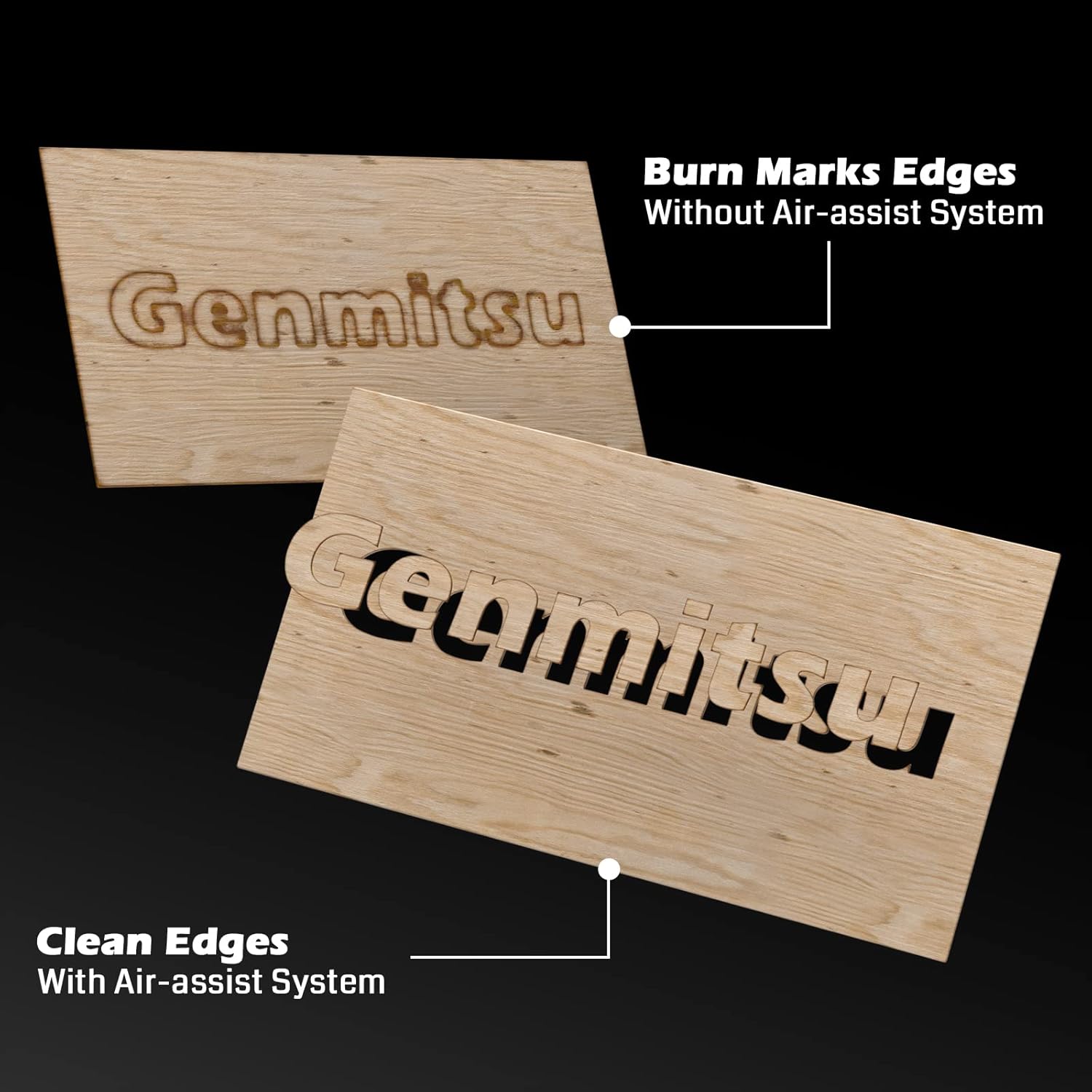
- Integrated Air Assist System: Enhances cutting performance by blowing away smoke and debris, resulting in cleaner cuts and increased efficiency.
- Linear Rails: Ensures higher stability and precision for consistent engraving and cutting results.
- X & Y-axis Tensioner: Allows for precise adjustment of timing belt tension, contributing to more accurate engraving.
- Switches crìochan: Installed on both X and Y axes to prevent the laser module from colliding with boundaries, ensuring safe movement.
- Putan stad èiginn: Provides an immediate shutdown mechanism for safety.
- Raised Footpads: Optional accessories to increase working height for larger or cylindrical objects.


4. Co-chruinneachadh agus Setup
Follow these steps to assemble and set up your Genmitsu LC-50 PLUS laser engraver.
4.1 Fosgladh a’ bhogsa agus a’ chiad chruinneachadh
- Fosgail na pàirtean uile gu faiceallach agus dèan cinnteach gu bheil iad an aghaidh an liosta pacaidh.
- Assemble the main frame according to the included quick start guide or detailed assembly instructions.
- Stàlaich am modúl laser air a’ gantry.
- Connect all cables securely, ensuring proper orientation.
4.2 X & Y-axis Tensioner Adjustment
The X & Y-axis tensioner design allows for precise adjustment of the timing belts, which is crucial for engraving accuracy. Refer to the detailed instructions video for visual guidance.
- Locate the M5 screws on the side of the X and Y axes.
- Loosen the No.1 screw slightly.
- Adjust the No.2 screw to achieve the desired belt tension. The belt should be taut but not overly tight.
- Tighten the No.1 screw to secure the tensioner.

4.3 Installing Raised Footpads (Optional)
If you need to engrave larger or cylindrical objects, install the Z-axis raised footpads to increase the working height by 35mm. The secure locking foot design allows for stable mounting.
5. Stiùireadh Obrachaidh
Tha an t-earrann seo a’ mìneachadh nan ceumannan bunaiteach airson an inneal-grealaidh laser agad obrachadh.
5.1 Software and Connection
- Install compatible laser control software (e.g., LightBurn, LaserGRBL) on your computer.
- Connect the engraver to your computer via USB.
- Ensure the necessary drivers are installed and the software recognizes the device.
5.2 Ullachadh agus Suidheachadh Stuthan
- Place the material to be engraved or cut securely on the working surface.
- Ensure the material is flat and properly aligned.
5.3 Fòcasadh an Lasair
Proper laser focus is critical for optimal engraving and cutting results. Follow the manufacturer's specific instructions for focusing the laser module.
5.4 Using the Air Assist System
The integrated Air Assist System significantly improves cutting quality by clearing smoke and debris from the laser's path. Ensure the air pump is connected and activated for cutting operations, especially on materials like wood and acrylic.
5.5 Starting an Engraving/Cutting Job
- Luchdaich suas do dhealbhadh file into the laser control software.
- Set appropriate parameters (power, speed, passes) for your material.
- Cleachd an Teine deuchainn feature to confirm the laser's exact position before starting the job.
- Initiate the job and monitor the process closely.
5.6 Stuthan Co-chòrdail
The Genmitsu LC-50 PLUS is capable of engraving and cutting a wide range of materials, including but not limited to:
- Wood (e.g., basswood plywood up to 10mm)
- Acrylic (up to 5mm)
- Metal (for engraving/marking)
- Leathar
- Stuth
- Pàipear / cairt-bhòrd
- Rubair
- Glainne (airson gràbhaladh)

6. Cumail suas
Bidh cumail suas cunbhalach a’ dèanamh cinnteach gum mair an inneal-greanta laser agad fad-beatha agus gum bi e ag obair gu math.
- Clean the Laser Lens: Periodically clean the laser lens with a specialized lens cleaning solution and cloth to maintain laser power and focus.
- Clean Linear Rails: Keep the linear rails free from dust and debris. Lubricate them occasionally with appropriate lubricant as recommended by the manufacturer.
- Thoir sùil air criosan: Inspect the timing belts for wear and tear. Ensure they are properly tensioned (refer to Section 4.2).
- Glan sprùilleach: Regularly remove any accumulated debris from the working area and around the laser module.
7. A ’dèanamh trioblaid
Tha an earrann seo a’ dèiligeadh ri cùisean cumanta a dh’ fhaodadh tu a thighinn tarsainn orra agus na fuasglaidhean a dh’ fhaodadh a bhith ann dhaibh.
| Trioblaid | Adhbhar a dh’fhaodadh a bhith ann | Fuasgladh |
|---|---|---|
| Laser gun losgadh | Loose cable connection, software settings, laser module issue | Check all connections, verify software settings (power, enable laser), inspect laser module. |
| Poor engraving/cutting quality | Incorrect focus, wrong parameters, dirty lens, loose belts | Adjust laser focus, optimize power/speed settings, clean laser lens, check belt tension. |
| Machine not moving or erratic movement | Loose motor cables, software connection issue, limit switch triggered | Check motor connections, restart software/computer, ensure no obstructions are triggering limit switches. |
| Air assist not working | Air pump not connected, hose blocked, pump malfunction | Verify air pump connection and power, check air hose for kinks or blockages. |
8. Sònrachaidhean Teicnigeach
| Feart | Mion-fhiosrachadh |
|---|---|
| Modail Àireamh | LC50 Plus |
| Cumhachd laser | 10W Compressed Spot Optical Power |
| Raon gràbhalaidh | 500mm x 400mm |
| Max Engraving Speed | Suas ri 20000mm/min |
| Cutting Capacity (Basswood Plywood) | Up to 10mm (single pass) |
| Cutting Capacity (Acrylic) | Up to 5mm (single pass) |
| Stuth frèam | Alloy làn alùmanaim |
| Siostam gluasaid | Linear Guide Design |
| Meudan toraidh | 75 x 23.5 x 18.5 cm |
| Cuideam nì | 8.37 kg |
9. Barantas agus Taic
Airson fiosrachadh barantais, taic theicnigeach, no ceistean seirbheis, thoir sùil air làrach-lìn oifigeil Genmitsu weblàrach-lìn no cuir fios chun t-seirbheis teachdaiche aca gu dìreach. Cùm do chuidhteas ceannach mar dhearbhadh ceannach.