
Ro-ràdh
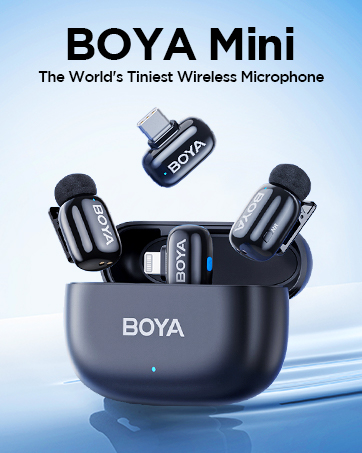
The BOYA BY-XM6-S1 Mini is an ultracompact and easy-to-use 2.4GHz wireless microphone system designed for capturing broadcast-quality sound. It is ideal for content creation, vlogging, mobile journalism, and more, offering exceptional audio performance for DSLR, mirrorless, and video cameras, as well as smartphones, tablets, and computers.
Dè th' anns a' Bhocsa
- 1 x BY-XM6 TX Mini Transmitter
- 1 x Glacadair BY-XM6 RX
- 2 x Càball Cìsean USB-C
- 1 x Fur windshield airson microfòn togte
- 1 x 3.5mm TRS gu càball toraidh TRS airson camarathan
- 1 x 3.5mm TRS gu càball toraidh TRRS airson fònaichean sgairteil
- 1 x Pouch Portable

Bathar seachadview
Transmitter (BY-XM6 TX Mini)
The ultracompact clip-on transmitter features a high-quality built-in omnidirectional microphone. It also includes a MIC IN jack for connecting an external lavalier microphone (included). Controls include a Power/Mute button and +/-/Pair buttons for easy operation.
Receiver (BY-XM6 RX)
The dual-channel receiver is equipped with a 3.5mm headphone jack for real-time monitoring and a 3.5mm TRS output jack for connecting to recording devices. It features an easy-to-use OLED display to show vital information such as audio input level, output volume, mute status, and battery level. Controls include Power/Mute, +/-/SET, and - buttons.


Suidhich
A 'ceangal ri camara
- Attach the BY-XM6 RX Receiver to your camera's hot shoe mount.
- Connect the 3.5mm TRS to TRS output cable from the receiver's output jack to your camera's microphone input.
- Power on both the transmitter and receiver. They should automatically pair.
- Clip the BY-XM6 TX Mini Transmitter to the speaker's clothing, ensuring the built-in microphone (or external lavalier mic) is positioned correctly.
- Monitor audio levels via the receiver's OLED display and your camera's audio meters.
Connecting to Smartphones/Tablets
- Connect the 3.5mm TRS to TRRS output cable from the receiver's output jack to your smartphone or tablet's 3.5mm audio jack.
- For devices without a 3.5mm jack (e.g., newer iPhones, Android phones with USB-C only), a compatible adapter (3.5mm-TRS-to-Lightning or 3.5mm-TRS-to-Type-C) is required and sold separately.
- Power on both the transmitter and receiver. They should automatically pair.
- Clip the BY-XM6 TX Mini Transmitter to the speaker's clothing, ensuring the built-in microphone (or external lavalier mic) is positioned correctly.
- Monitor audio levels through the receiver's OLED display and your device's audio recording app.

Paidhir na h-innealan
The transmitter (TX) and receiver (RX) are pre-paired at the factory. If re-pairing is needed:
- Power on both the TX Mini Transmitter and RX Receiver.
- On the TX Mini, long-press the '+' and '-' buttons simultaneously for 3 seconds to enter pairing mode.
- The pairing indicator on both devices will flash, then turn solid blue once successfully paired.

Stiùireadh Obrachaidh
Cumhachd air / dheth
Long-press the Power/Mute button on both the transmitter and receiver to power them on or off.
Smachd tomhas-lìonaidh
Use the '+' and '-' buttons on the receiver to adjust the audio output volume. The OLED display will show the current volume level.
Sgrùdadh fìor-ùine
Plug headphones into the 3.5mm headphone jack on the receiver to monitor your audio in real-time, ensuring optimal sound quality during recording.
Mono/Stereo Output
The receiver supports selectable mono/stereo output modes. Use the SET button to switch between these modes based on your recording needs. Mono mode combines all audio into a single channel, while stereo mode separates audio into left and right channels.
Beatha bataraidh
The transmitter provides approximately 4.5 hours of battery life, while the receiver offers approximately 7 hours. Both units can be charged via USB-C. The charging case (if applicable to your kit) can recharge the units multiple times.
Cumail suas
- Keep the devices clean and free from dust and moisture. Use a soft, dry cloth for cleaning.
- Seachain na h-innealan a nochdadh do theodhachd anabarrach no do sholas dìreach na grèine.
- Store the microphone system in its portable pouch when not in use to prevent damage.
- Ensure all cables are properly connected and not strained to prevent wear and tear.
Fuasgladh thrioblaidean
Gun Fhuaim/Meud Ìosal
- Check if both the transmitter and receiver are powered on and properly paired.
- Ensure the microphone is not muted on the transmitter.
- Adjust the output volume on the receiver using the '+' button.
- Verify that the audio cable is securely connected to both the receiver and your recording device.
- Check your camera/smartphone's audio input settings and volume levels.
Interference/Poor Sound Quality
- Ensure there are no obstacles between the transmitter and receiver that could block the 2.4GHz signal.
- Maintain a clear line of sight between the transmitter and receiver for optimal performance.
- Avoid using the system near other 2.4GHz wireless devices that might cause interference.
- Use the fur windshield on the built-in microphone to reduce wind noise when recording outdoors.
Sònrachaidhean
| Feart | Sònrachadh |
|---|---|
| Seòrsa tar-chuir | Tricead didseatach 2.4GHz |
| Raon Obrachaidh | Suas gu 328 troigh (100m) (gun bhacadh) |
| Pàtran Polar | Omndirectional |
| Freagairt Tricead | 35Hz-18KHz |
| SPL as àirde | 120dB SPL |
| Cugallachd | -39dB |
| SNR | > 77dB |
| Riatanasan cumhachd | Bataraidh Li-ion togte no USB-C DC 5V |
| Built-in Battery Life (TX) | Mu thuairmeas. 4.5 uairean |
| Built-in Battery Life (RX) | Mu thuairmeas. 7 uairean |
| Ceangal toraidh claisneachd | 3.5mm Headphone Jack; 3.5mm TRS Output Jack |
| Cuideam (TX) | Mu thuairmse. 14.5g (0.5oz) |
| Dimensions (TX) | 46x23.92x15mm |
| Innealan co-fhreagarrach | Smartphone, Personal Computer, Camera |
Barantas agus Taic
For warranty information, technical support, and further assistance, please refer to the documentation included with your product or visit the official BOYA weblàrach. Faodaidh tu tadhal air an làrach cuideachd Bùth BOYA air Amazon.