
Sharp 32FG6EA
Sharp 32FG6EA 32-inch HD Android TV User Manual
Model: 32FG6EA
1. Ro-ràdh
This manual provides essential information for the proper setup, operation, and maintenance of your Sharp 32FG6EA 32-inch HD Android TV. The Sharp 32FG6EA offers a wide range of connection options and features the Android TV operating system, providing a modern and intuitive television experience. It functions as an all-in-one entertainment hub, integrating Google Assistant for a smarter viewing experience. Users can quickly access entertainment, control smart devices, and obtain on-screen information using voice commands.
2. Fiosrachadh Sàbhailteachd
Leugh a h-uile stiùireadh sàbhailteachd gu faiceallach mus cleachd thu an telebhisean. Cùm an leabhar-làimhe seo airson fiosrachadh san àm ri teachd.
- Solar cumhachd: Dèan cinnteach gu bheil an telebhisean ceangailte ri stòr cumhachd leis an tomhas-lìonaidh chearttage. Na cuir cus cus air na socaidean cumhachd.
- Fionnarachadh: Na cuir bacadh air fosglaidhean fionnarachaidh. Fàg àite gu leòr timcheall air an telebhisean airson sruth-adhair ceart gus casg a chur air cus teasachadh.
- Uisge agus Taiseachd: Do not expose the TV to rain, moisture, or excessive humidity. Avoid placing objects filled with liquids on or near the TV.
- Glanadh: Unplug the TV before cleaning. Use a soft, dry cloth. Do not use liquid cleaners or aerosol sprays.
- Suidheachadh: Cuir an telebhisean air uachdar seasmhach, rèidh. Ma tha thu ga chur air a’ bhalla, dèan cinnteach gu bheil am balla-suidheachaidh air a stàladh gu tèarainte agus gun urrainn dha cuideam an telebhisean a ghiùlan.
- Seirbheis: Na feuch ri seirbheis a thoirt don telebhisean thu fhèin. Thoir aire do luchd-obrach seirbheis teisteanasach airson a h-uile seirbheis.
3. Pasgan-susbaint
Dèan cinnteach gu bheil a h-uile nì anns a’ phacaid:
- Sharp 32FG6EA 32-inch HD Android TV
- Smachd Iomallach (le 2 bataraidh AAA)
- Stand Type Base
- Leabhar-làimhe stiùiridh
- Càball cumhachd
4. Suidhich
4.1 A’ dì-phapadh
Carefully remove the TV and all accessories from the packaging. Retain the packaging materials for future transport or servicing.
4.2 A 'ceangal an Stand
If you are not wall-mounting the TV, attach the included stand base:
- Cuir scrion an telebhisean leis an sgrion sìos air uachdar bog, còmhnard gus casg a chur air milleadh.
- Cuir bonn an t-seasamh còmhla ris na tuill-sreap aig bonn an Tbh.
- Daingnich an stand leis na sgriothan a tha air an toirt seachad. Dèan cinnteach gu bheil an stand ceangailte gu daingeann.
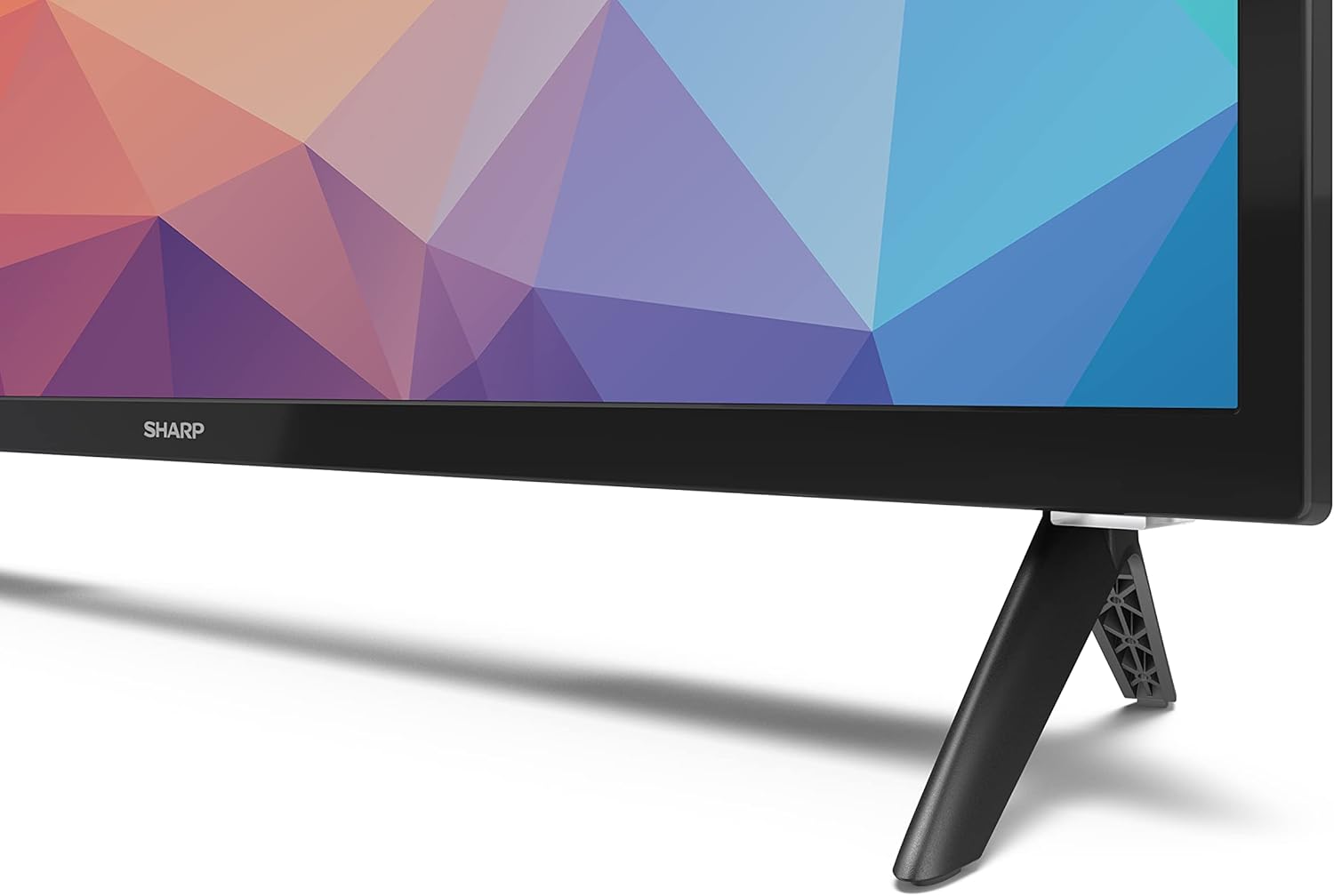
Image: Close-up of the TV stand attachment.
4.3 Stàladh balla
The Sharp 32FG6EA supports VESA wall mounts with dimensions of 75 x 75 mm. Wall mount hardware is not included. Follow the instructions provided with your wall mount kit.
4.4 A’ ceangal innealan taobh a-muigh
Your TV features multiple ports for connecting various devices:
- HDMI: Connect Blu-ray players, game consoles, or set-top boxes to the 2 HDMI ports.
- USB: Connect USB storage devices for media playback to the 2 USB ports.
- Antenna/Càball: Ceangail antenna no stòr Tbh càball airson seanalan craolaidh.
- Ethernet: Airson ceangal eadar-lìn uèirleas.
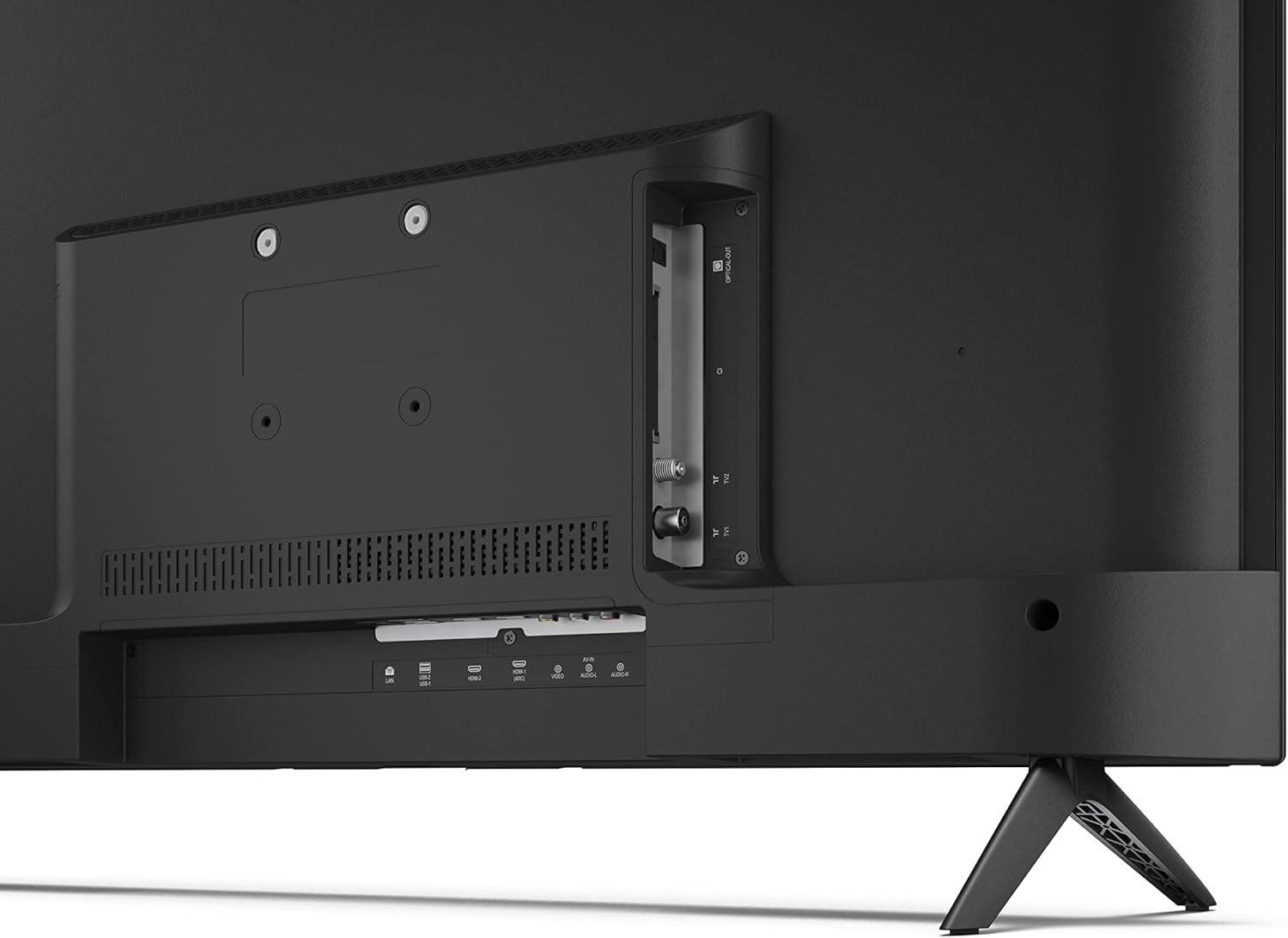
Ìomhaigh: Cùl view of the TV with connection ports.
4.5 Ceangal cumhachd
After connecting all necessary devices, plug the power cable into the TV and then into a wall outlet.
4.6 Draoidh Suidheachaidh Tùsail
Nuair a thèid an telebhisean a chur air an toiseach, stiùiridh e thu tro phròiseas rèiteachaidh tùsail. Tha seo a’ gabhail a-steach:
- Taghadh cànain.
- Ceangal lìonra (Wi-Fi no Ethernet).
- Google account sign-in (required for full Android TV features).
- Scanadh sianal.
5. Obrachadh
5.1 Smachd Iomallach thairisview
Leigidh an smachd iomallach a tha air a ghabhail a-steach leat feartan an telebhisean a sheòladh. Cuir an dà bataraidh AAA a-steach don smachd iomallach mus cleachd thu e.
- Putan Cumhachd: Tionndaidh an telebhisean air no dheth.
- Pad Treòrachaidh (D-Pad) & Putan Ceart gu leòr: Seòl tro na clàran-bìdh agus dearbhaich taghaidhean.
- Putan air ais: Tilleadh chun sgrion roimhe.
- Putan Dachaigh: A’ faighinn cothrom air scrion dachaigh Android TV.
- Meud suas/sìos: Ag atharrachadh an ìre fuaim.
- Sianal Suas/Sìos: Ag atharrachadh seanalan Tbh.
- Putan Neach-cuideachaidh Google: A’ cur smachd gutha an gnìomh.
- Putanan Ath-ghoirid an aplacaid: Putanan sònraichte airson seirbheisean sruthadh mòr-chòrdte leithid Netflix, Prime Video, agus YouTube.
5.2 Android TV Interface Navigation
The Android TV home screen provides access to your installed apps, recommended content, and settings. Use the directional pad on your remote to navigate through the interface.
5.3 Neach-taic Google
Brùth air a’ phutan Google Assistant air an smachd iomallach agad agus bruidhinn a-steach don mhaicreafòn gus:
- Lorg airson filmichean, taisbeanaidhean, no fiosrachadh.
- Smachd a chumail air innealan dachaigh snasail.
- Fosgail aplacaidean.
- Atharraich roghainnean an telebhisean.
5.4 Chromecast air a thogail a-steach
The TV includes Chromecast built-in, allowing you to cast content from compatible apps on your smartphone, tablet, or computer directly to the TV screen.
5.5 Ceangal Bluetooth
Connect Bluetooth devices such as headphones or speakers to your TV for a personalized audio experience. Navigate to the TV's settings menu to pair new Bluetooth devices.
5.6 Roghainnean claisneachd
The TV supports Dolby Audio with 2 x 6 W RMS speakers. You can adjust audio settings, including sound modes and equalizer, through the TV's settings menu.
6. Cumail suas
6.1 Glanadh an telebhisean
Gus scrion agus caibineat an telebhisean a ghlanadh:
- Unplug an sreang cumhachd bho ar-a-mach a 'bhalla.
- Use a soft, lint-free cloth to gently wipe the screen and surfaces.
- Airson comharran stòlda, beagan dampnigh an clò le uisge no le inneal-glanaidh sgrion sònraichte (cuir air a’ chlò, chan ann gu dìreach air an sgrion).
- Na cleachd innealan-glanaidh sgrìobach, cèir, no fuasglaidhean.
6.2 Ùrachaidhean bathar-bog
Your Android TV may receive periodic software updates to improve performance and add new features. Ensure your TV is connected to the internet to receive these updates. You can check for updates manually in the TV's settings menu.
7. A ’dèanamh trioblaid
Ma thachras tu ri duilgheadasan leis an telebhisean agad, thoir sùil air na duilgheadasan agus na fuasglaidhean cumanta a leanas:
- Gun chumhachd: Dèan cinnteach gu bheil an càball cumhachd ceangailte gu tèarainte ris an telebhisean agus ri socaid balla a tha ag obair. Feuch socaid eadar-dhealaichte.
- Gun Dealbh/Fuaim: Check that the correct input source is selected. Verify all cables (HDMI, antenna) are properly connected.
- Smachd air astar nach eil ag obair: Check the batteries and ensure they are inserted correctly. Point the remote directly at the TV's IR sensor.
- Droch Chàileachd Dealbh: Check antenna/cable connections. Adjust picture settings in the TV menu. For streaming content, ensure a stable internet connection.
- Gun cheangal eadar-lìn: Verify Wi-Fi password or Ethernet cable connection. Restart your router and the TV.
- Apps Not Working: Dèan cinnteach gu bheil bathar-bog an telebhisean ùraichte. Feuch ri tasgadan an aplacaid a ghlanadh no an aplacaid ath-shuidheachadh.
If problems persist, consult the Sharp support weblàrach-lìn no cuir fios gu seirbheis teachdaiche.
8. Sònrachaidhean
| Feart | Sònrachadh |
|---|---|
| Modail Àireamh | 32FG6EA |
| Brand | biorach |
| Meud sgrion | 32 òirleach (81 cm trastanach) |
| Teicneòlas taisbeanadh | LED |
| Fuasgladh | 720p (1366 x 768 piogsail) |
| Co-mheas taobh | 16:9 |
| Ìre Ath-nuadhachaidh | 50 Hz |
| Siostam-obrachaidh | Android TV 11 |
| Feartan sònraichte | Android TV, Google Assistant, Chromecast built-in |
| Toradh Fuaim | 2 x 6 W RMS, Dolby Audio |
| puirt HDMI | 2 |
| Puirt USB | 2 |
| Ceangalachd | Wi-Fi, Bluetooth, Ethernet |
| Srath balla VESA | 75 x 75 mm |
| Meudan le seasamh (W x H x D) | 731 x 486 x 177 mm |
| Meudan gun sheasamh (W x H x D) | 731 x 433 x 68 mm |
| Meudan toraidh (D x W x H) | 16 x 73 x 46.4 cm (approximate, with stand) |
| Cuideam | 3.9 kg |
| Clas Èifeachdas Cumhachd | E |

Image: TV dimensions diagram.

Image: Energy Label. For more details, visit Stòr-dàta EPREL.
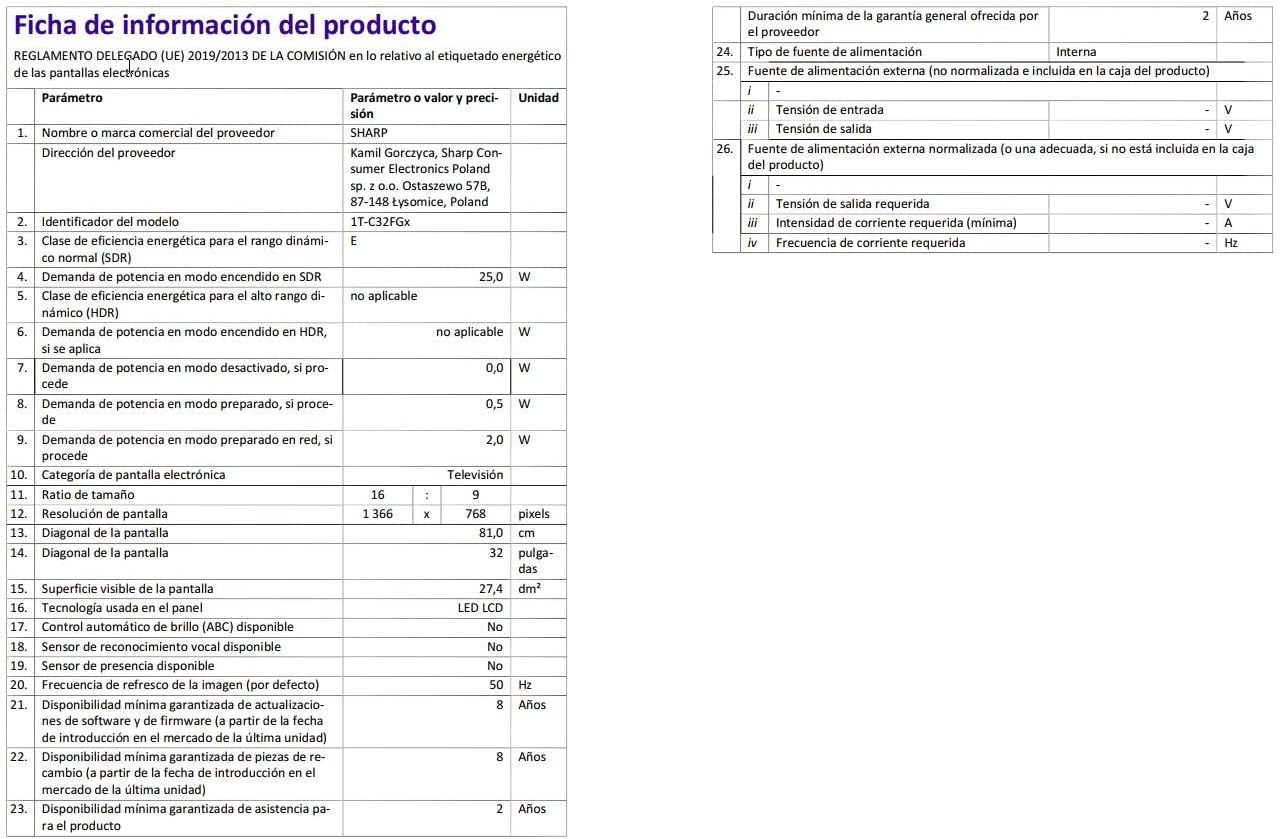
Image: Detailed product information sheet.
9. Barantas agus Taic
The Sharp 32FG6EA television comes with a minimum general warranty duration of 2 years from the provider.
For technical support, warranty claims, or further assistance, please refer to the contact information provided with your purchase documentation or visit the official Sharp support weblàrach-lìn airson do sgìre.
Ask a question about this manual
Ask about setup, troubleshooting, compatibility, parts, safety, or missing instructions. Manuals+ will review the question and use this page’s manual context to help answer it.