
ORIA Bluetooth Receiver 5.0 User Manual
Model: Bluetooth Receiver 5.0
1. Ro-ràdh
The ORIA Bluetooth Receiver 5.0 is a versatile audio adapter designed to add Bluetooth functionality to non-Bluetooth devices. It supports both receiving (RX) and transmitting (TX) modes, allowing you to wirelessly stream audio from your smartphone to a car stereo or speaker, or from your TV to Bluetooth headphones. Featuring Bluetooth 5.0 technology and CVC noise reduction, it provides stable connections and clear audio quality for music and hands-free calls.
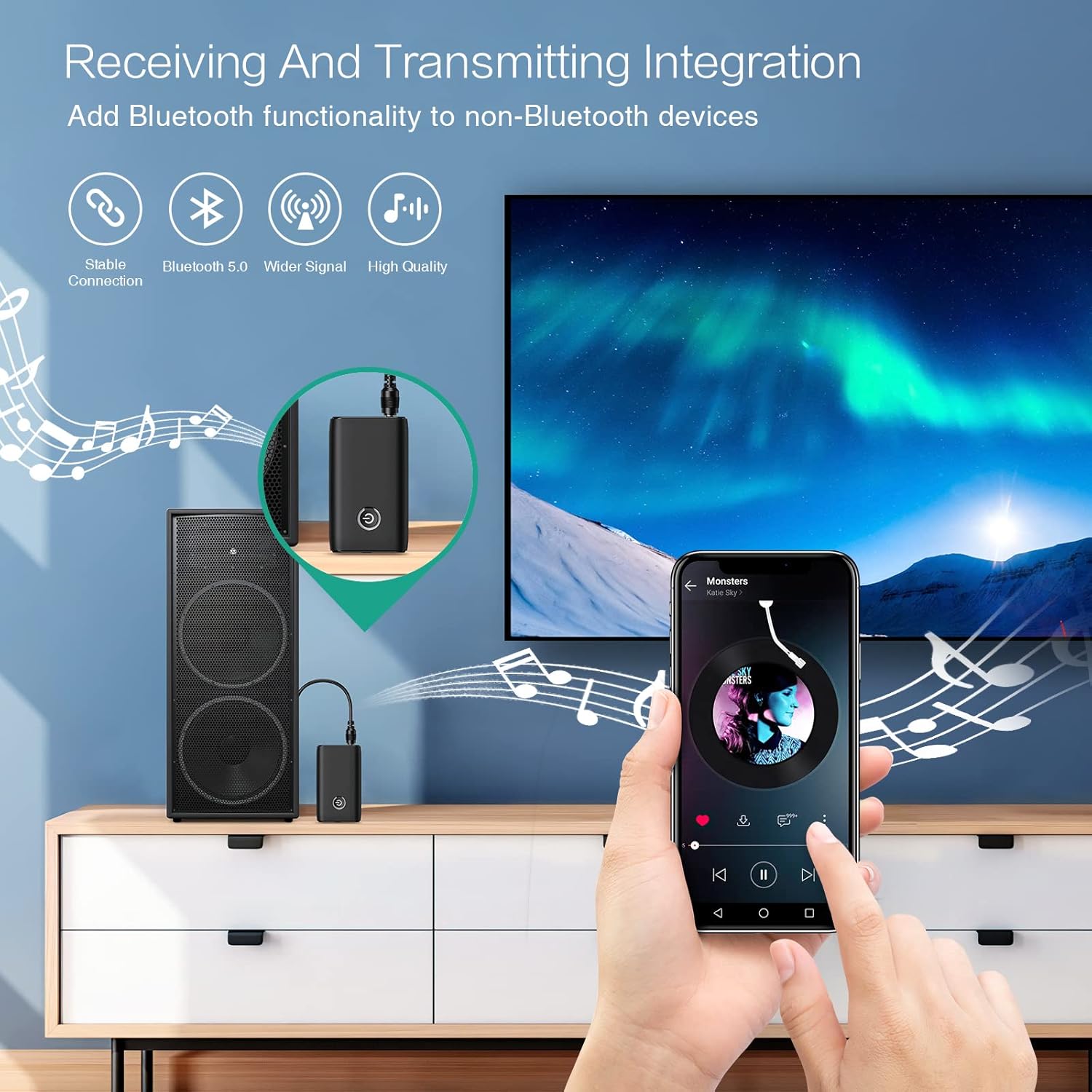
Figure 1.1: The ORIA Bluetooth Receiver 5.0 integrating with various audio systems, showcasing its dual receiving and transmitting functions.
2. Pasgan-susbaint
Thoir sùil air a’ phacaid airson nan nithean a leanas:
- ORIA Bluetooth Receiver 5.0 Unit
- Càball claisneachd 3.5mm
- Càball Cosgais USB (Seòrsa-C)
- Leabhar-làimhe cleachdaiche

Figure 2.1: All items included in the ORIA Bluetooth Receiver 5.0 package.
3. Toradh thallview
Familiarize yourself with the device's components and indicators:

Figure 3.1: Detailed diagram of the ORIA Bluetooth Receiver 5.0, highlighting its ports, buttons, and LED indicator meanings.
- Port claisneachd 3.5mm: Connects to audio input/output devices.
- Port Cìsean Micro USB: Airson an inneal a luchdadh a-nuas.
- Suidse RX/TX: Bidh seo ag atharrachadh eadar modhan an ghlacadair (RX) agus an tar-chuir (TX).
- Putan ioma-ghnìomh: Cumhachd air/dheth, cluich/stad, freagair/crìochnaich gairmean.
- Connection Indicator Light:
- Red & Blue flashing: Pairing State
- Red flashing: Low Battery Warning
- Blue solid: Connected
4. Feartan
- Bluetooth 5.0: Provides a stable wireless connection up to 10 meters for music streaming and audio calls.
- Intelligent Noise Reduction (CVC): Enhances audio clarity by reducing background noise, supporting A2DP, AVRCP, HFP, HSP protocols.
- Dual Mode (TX/RX): Converts non-Bluetooth devices into Bluetooth-enabled devices for both transmitting and receiving audio.
- Beatha bataraidh fada: Up to 8 hours of play/talk time, 60 days standby, with a 2-hour full charge time.
- Cìs USB: Allows use while charging without interrupting calls or music.
- Obrachadh furasta: Simple one-button control for power, play/pause, and call management.
- Dealbhadh so-ghiùlain: Small and lightweight for convenient transport and use anywhere.
5. Setup agus Obrachadh
5.1 A’ cur cosgais air an inneal
Before first use, fully charge the device. Connect the provided USB charging cable to the Micro USB Charging Port on the receiver and the other end to a USB power source (e.g., car charger, wall adapter, computer USB port). The indicator light will show charging status.

Figure 5.1: Battery life and charging duration of the ORIA Bluetooth Receiver 5.0.
5.2 Switching Between Receiver (RX) and Transmitter (TX) Modes
The device features a physical switch to change between RX and TX modes. Cudromach: Always power off the device before switching modes to ensure proper functionality.

Figure 5.2: Instructions for switching between Transmitter (TX) and Receiver (RX) modes.
5.3 Suidheachadh Modh Glacadair (RX)
Use RX mode to receive audio from a Bluetooth-enabled device (e.g., smartphone, tablet) and play it through a non-Bluetooth audio system (e.g., car stereo, home speaker, wired headphones).
- Switch to RX: Ensure the device is powered off, then slide the switch to the "RX" position.
- Ceangail ris an t-siostam claisneachd: Plug one end of the 3.5mm audio cable into the receiver's 3.5mm Audio Port and the other end into the AUX input of your car stereo, home speaker, or wired headphones.
- Cumhachd air: Press and hold the Multi-function Button to power on the receiver. The indicator light will flash red and blue, indicating pairing mode.
- Pair with Phone: On your smartphone or other Bluetooth device, enable Bluetooth and search for "ORIA-B6" (or similar name). Select it to pair. Once connected, the indicator light will turn solid blue.
- Cluich ceòl: Start playing audio on your paired device. The sound will now be transmitted wirelessly to your connected audio system.

Figure 5.3: Easy setup steps for Receiver (RX) mode, typically used in a car.
5.4 Suidheachadh Modh Tar-chuir (TX)
Use TX mode to transmit audio from a non-Bluetooth device (e.g., TV, PC, MP3 player) to a Bluetooth-enabled audio output (e.g., Bluetooth headphones, Bluetooth speaker).
- Switch to TX: Ensure the device is powered off, then slide the switch to the "TX" position.
- Ceangail ri Stòr Fuaim: Plug one end of the 3.5mm audio cable into the receiver's 3.5mm Audio Port and the other end into the audio output (e.g., headphone jack) of your TV, PC, or MP3 player.
- Cumhachd air: Press and hold the Multi-function Button to power on the transmitter. The indicator light will flash red and blue, indicating pairing mode.
- Pair with Bluetooth Headphones/Speaker: Put your Bluetooth headphones or speaker into pairing mode. The receiver will automatically search for and connect to nearby Bluetooth audio devices. Once connected, the indicator light will turn solid blue.
- Tlachd a ghabhail air claisneachd: Play audio from your connected source device. The sound will now be transmitted wirelessly to your Bluetooth headphones or speaker.

Figure 5.4: Easy setup steps for Transmitter (TX) mode, typically used with a TV.
5.5 Co-chòrdalachd Uile-choitcheann
The ORIA Bluetooth Receiver 5.0 is designed for broad compatibility with various devices in both TX and RX modes.
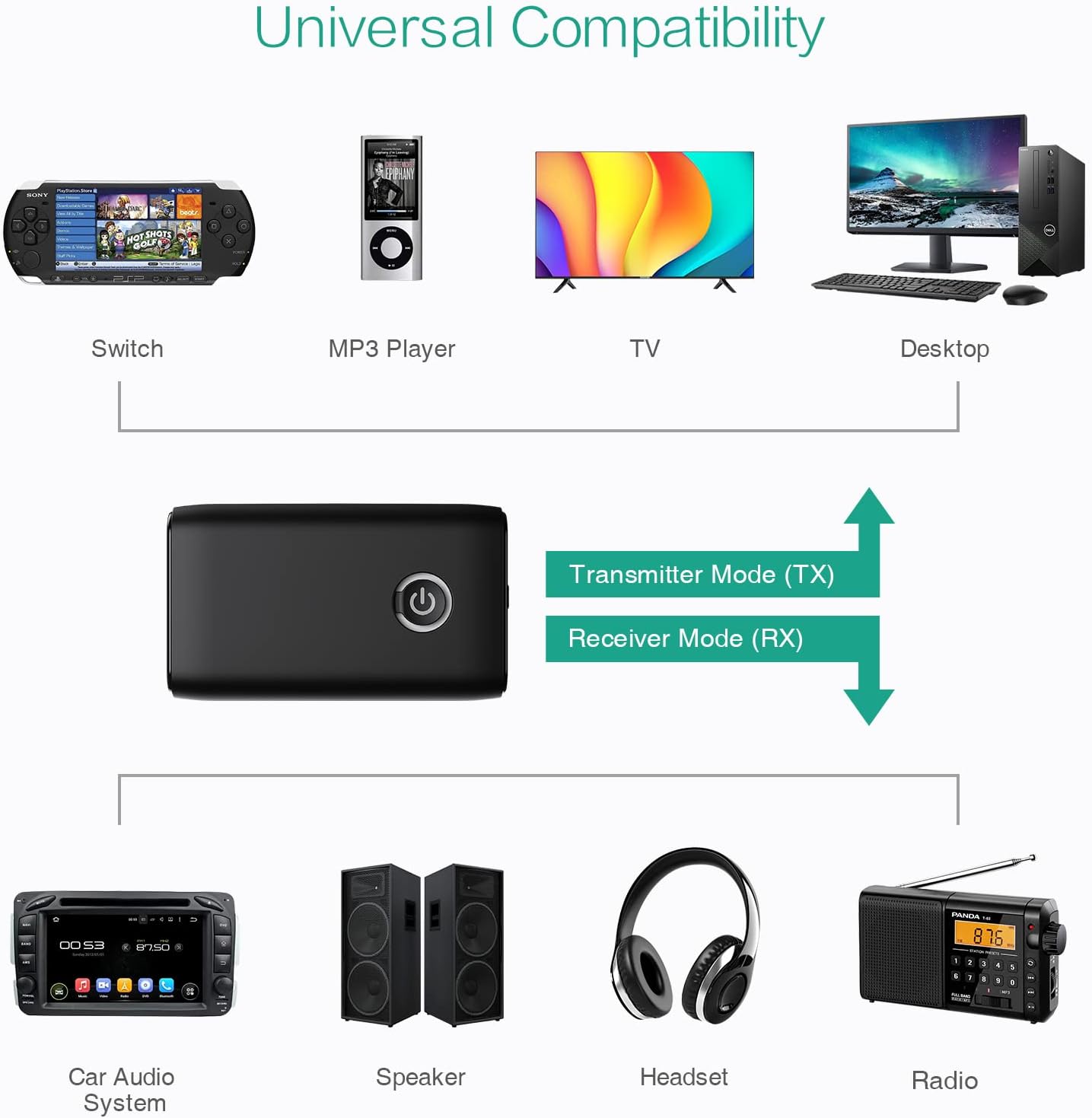
Figear 5.5: Examples of devices compatible with the ORIA Bluetooth Receiver 5.0 in both TX and RX modes.
6. Stiùireadh Obrachaidh
6.1 Smachd Ath-chluich Ciùil
- Cluich / Stad: Brùth goirid air a ’phutan ioma-ghnìomh.
- An ath cheum: (Functionality may vary depending on connected device and mode. Typically controlled via the source device.)
- Rian roimhe: (Functionality may vary depending on connected device and mode. Typically controlled via the source device.)
- Smachd tomhas-lìonaidh: Adjust volume directly on your paired device (smartphone, TV, etc.) or the connected audio system.
6.2 Hands-Free Calling (RX Mode Only)
When in Receiver (RX) mode and paired with a smartphone:
- Call Freagairt: Brùth goirid air a’ phutan ioma-ghnìomhach nuair a thig gairm a-steach.
- Call crìochnachaidh: Brùth goirid air a’ phutan ioma-ghnìomhach rè gairm.
- Call a dhiùltadh: Press and hold the Multi-function Button for 2 seconds when a call comes in.
- Deasaich an àireamh mu dheireadh: Brùth dà uair air a’ phutan ioma-ghnìomhach.
7. Cumail suas
- Cùm an inneal tioram. Seachain a bhith fosgailte do taiseachd no lionntan.
- Na feuch ri an inneal a thoirt às a chèile no atharrachadh. Cuiridh seo às don bharantas.
- Glan an inneal le clò bog, tioram. Na cleachd ceimigean cruaidh no innealan-glanaidh sgrìobach.
- Stòraich an inneal ann an àite fionnar, tioram nuair nach eilear ga chleachdadh airson ùine mhòr.
8. A ’dèanamh trioblaid
If you encounter issues with your ORIA Bluetooth Receiver 5.0, please refer to the following common solutions:
| Trioblaid | Fuasgladh |
|---|---|
| Chan eil cumhachd aig an inneal. | Ensure the device is fully charged. Connect it to a power source using the USB charging cable. |
| Chan urrainnear paidhir a dhèanamh le inneal Bluetooth. |
|
| Gun fhuaim no droch chàileachd fuaime. |
|
| Device disconnects frequently. |
|
9. Sònrachaidhean
| Feart | Mion-fhiosrachadh |
|---|---|
| Brand | ORIA |
| Teicneòlas ceangail | Bluetooth, USB |
| Inbhe conaltraidh gun uèir | Bluetooth 5.0 |
| Stòr cumhachd | Le cumhachd bataraidh, le sreang dealain |
| Feart sònraichte | Bluetooth Receiver, Portable |
| Seòrsa stàlaidh | Dèan ceangal |
| Eadar-aghaidh bathar-cruaidh | Bluetooth, USB |
| Lùghdachadh Fuaim | Teicneòlas CVC |
| Battery Life (Play/Talk) | Suas ri 8 uairean a thìde |
| Am Fuireach | 60 làithean |
| Ùine cosgais | Mu 2 uair a thìde |
10. Barantas agus Taic
This ORIA Bluetooth Receiver 5.0 comes with a Barantas 1-bliadhna bhon cheann-latha ceannach.
If you experience any problems with the product's use or function, or if the product is defective or damaged, please contact the seller directly for assistance. They will provide support and solutions to resolve your issue.