
1. Ro-ràdh
This manual provides detailed instructions for the installation, operation, and maintenance of your Fractal Design Define 7 Nano Black Solid Mini ITX PC Case. Please read this manual thoroughly before beginning assembly to ensure proper installation and to maximize the performance and longevity of your system.
The Define 7 Nano is a compact Mini ITX case designed for silent operation and flexible component support, offering a balance of size and functionality for small form factor builds.

Figear 1: Aghaidh view of the Fractal Design Define 7 Nano Black Solid Mini ITX PC Case.
2. Fiosrachadh Sàbhailteachd
Lean na ceumannan sàbhailteachd a leanas rè an stàlaidh agus an obrachaidh:
- Dì-cheangail an solar cumhachd bhon t-socaid balla an-còmhnaidh mus cuir thu a-steach no mus toir thu air falbh co-phàirtean sam bith.
- Cuir ort strap dùirn an-aghaidh statach gus casg a chur air milleadh sgaoilidh electrostatach (ESD) air co-phàirtean mothachail.
- Làimhsich na pàirtean gu faiceallach gus milleadh corporra a sheachnadh.
- Dèan cinnteach gu bheil fionnarachadh ceart timcheall air cùis a’ PC gus casg a chuir air cus teasachadh.
- Cùm a’ chùis air falbh bho lionntan agus cus taiseachd.
- Do not attempt to modify the case structure, as this may void your warranty and pose safety risks.
3. Pasgan-susbaint
Dèan cinnteach gu bheil na pàirtean uile anns a’ phacaid:
- Fractal Design Define 7 Nano PC Case
- Accessory Box (screws, zip ties, standoffs, cleaning cloth)
- Leabhar-làimhe cleachdaiche (an sgrìobhainn seo)
- Pre-installed fans (Dynamic X2 GP-12/GP-14, quantity may vary)

Figear 2: Spreadh view showing the various removable components of the Define 7 Nano case.
4. Suidheachadh agus Stàladh Cho-phàirtean
4.1. Ullachadh
- Fosgail a’ chùis: Thoir an cùis a-mach às a phacaid gu faiceallach.
- Thoir air falbh pannalan taobh: The side panels are secured with captive thumbscrews. Loosen the thumbscrews and slide the panels backward to remove them.
- Remove Top Panel (Optional): The top panel can be removed for easier access during installation or for enhanced airflow. Press the release button at the rear of the top panel and lift it off.
- Remove Front Panel (Optional): The front panel can be carefully pulled off from the bottom for access to front fan mounts and dust filters.
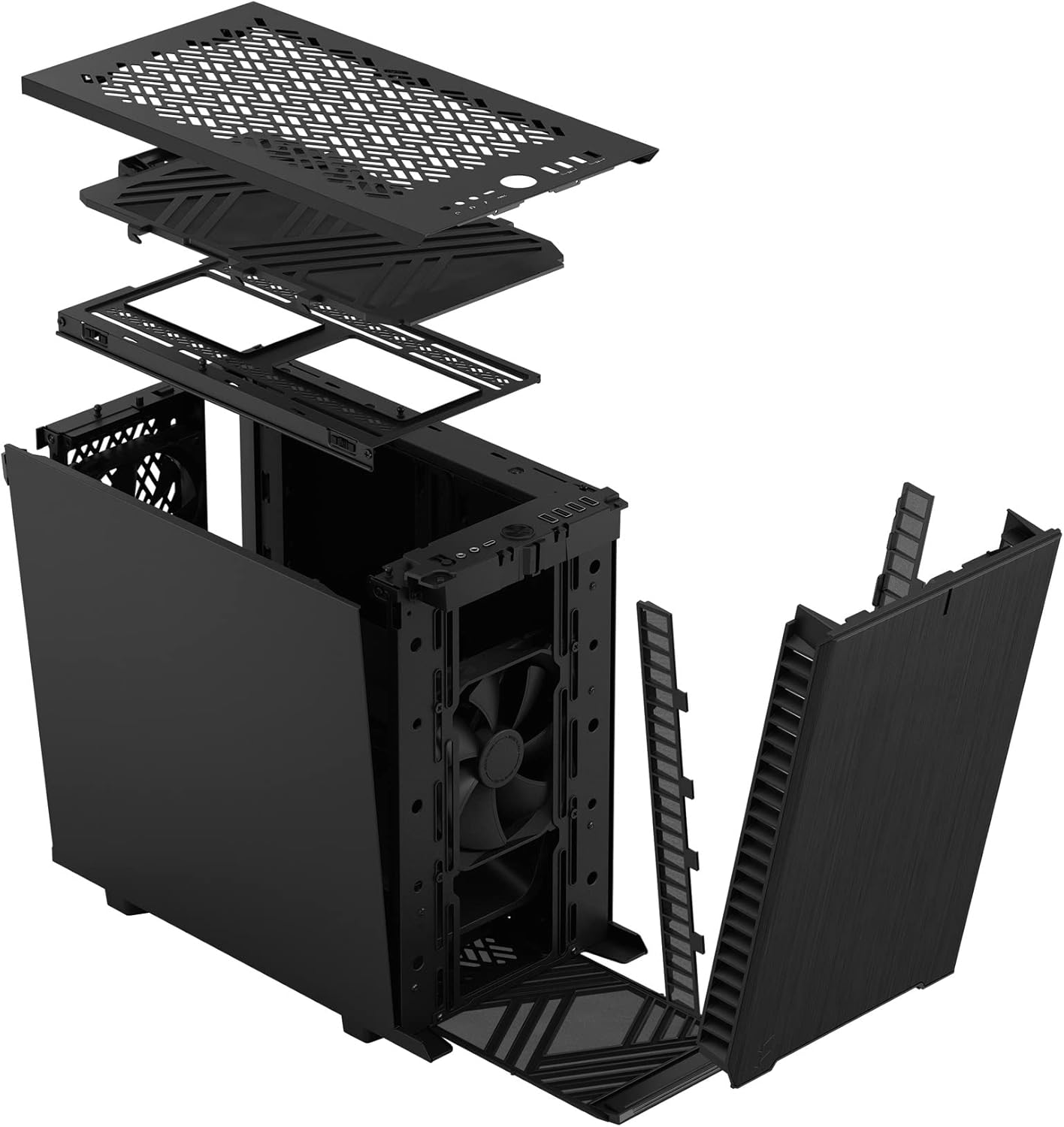
Figear 3: Spreadh view illustrating the removal process for the front and top panels.
4.2. Stàladh motherboard
The Define 7 Nano supports Mini ITX motherboards.
- Stàlaich Sgiath I/O: If your motherboard requires an I/O shield, install it into the rear opening of the case before mounting the motherboard.
- Suidheachadh a’ Bhùird-mhàthar: Align your Mini ITX motherboard with the pre-installed standoffs inside the case.
- Clàr-màthar tèarainte: Use the provided screws from the accessory box to secure the motherboard to the standoffs.
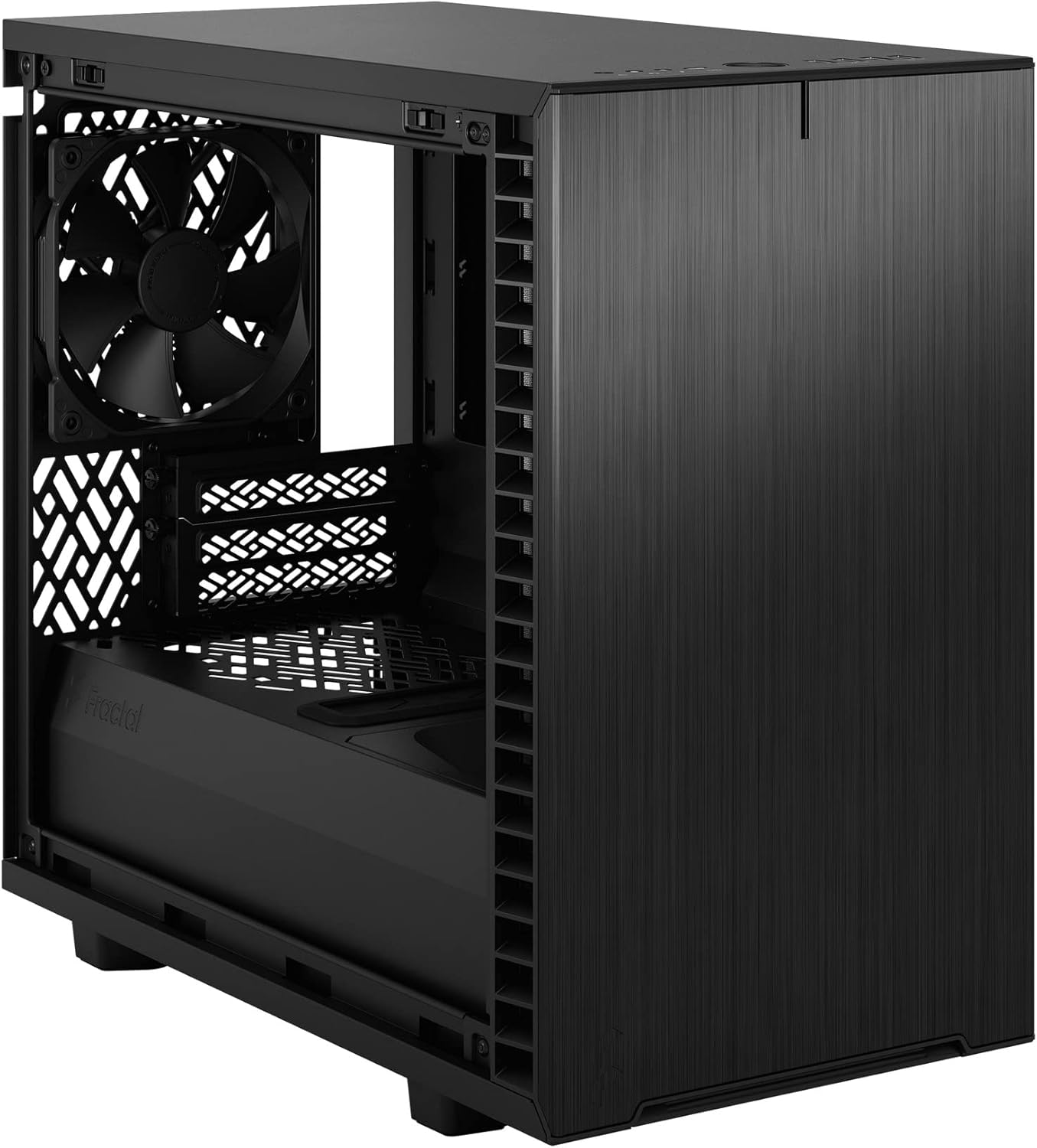
Figear 4: Taobh a-staigh view of the case, highlighting the motherboard mounting area and fan locations.
4.3. Stàladh Aonad Solarachaidh Cumhachd (PSU)
The Define 7 Nano supports ATX PSUs.
- Mount PSU Bracket: Attach the PSU mounting bracket to your power supply using the screws provided with the PSU.
- Slide PSU into Case: Slide the PSU with the attached bracket into the rear of the case.
- PSU tèarainte: Secure the PSU bracket to the case using the thumbscrews.
4.4. Stàladh Draibh Stòraidh
Tha a’ chùis a’ toirt taic do SSDan 2.5" agus HDDan 3.5".
- 2.5" Drives: Mount 2.5" drives to the dedicated SSD brackets located behind the motherboard tray or on the PSU shroud. Secure with screws.
- 3.5" Drives: Install 3.5" drives into the drive cage located beneath the PSU shroud. Secure with screws.
4.5. Stàladh Cairt Grafaigean (GPU)
- Remove PCIe Slot Covers: Thoir air falbh na còmhdaichean slot PCIe riatanach bho chùl a’ chùis.
- Cuir a-steach GPU: Carefully insert your graphics card into the primary PCIe slot on the motherboard.
- GPU tèarainte: Secure the graphics card to the case using the thumbscrews or standard screws.
4.6. Cooling System Installation (Fans/Radiators)
The Define 7 Nano offers flexible cooling options.
- Luchd-leantainn aghaidh: Up to two 120/140mm fans or a 240/280mm radiator can be installed at the front.
- Prìomh luchd-leantainn: Up to two 120/140mm fans or a 240mm radiator can be installed at the top (requires removing the solid top panel and installing the ventilated top panel).
- Neach-leantainn cùil: One 120mm fan can be installed at the rear.
- Fan Ìosal: One 120mm fan can be installed at the bottom.
Ensure fans are oriented correctly for optimal airflow (intake or exhaust).
4.7. Riaghladh càball
The case features routing channels and Velcro straps behind the motherboard tray for organized cable management.
- Càbaill slighe: Pass power and data cables through the rubber grommets to the back of the motherboard tray.
- Càbaill tèarainte: Use the pre-installed Velcro straps and included zip ties to bundle and secure cables.

Figear 5: Taobh a-staigh cùil view demonstrating the cable management system with Velcro straps.
4.8. Ceanglaichean Pannal Aghaidh
Connect the front panel cables to the corresponding headers on your motherboard:
- Power Button (PWR SW)
- Reset Button (RESET SW)
- Power LED (PWR LED)
- HDD Activity LED (HDD LED)
- Ceann-cinn USB 3.0
- USB Type-C Header (if applicable)
- Ceann-cinn claisneachd HD
Refer to your motherboard manual for exact header locations.
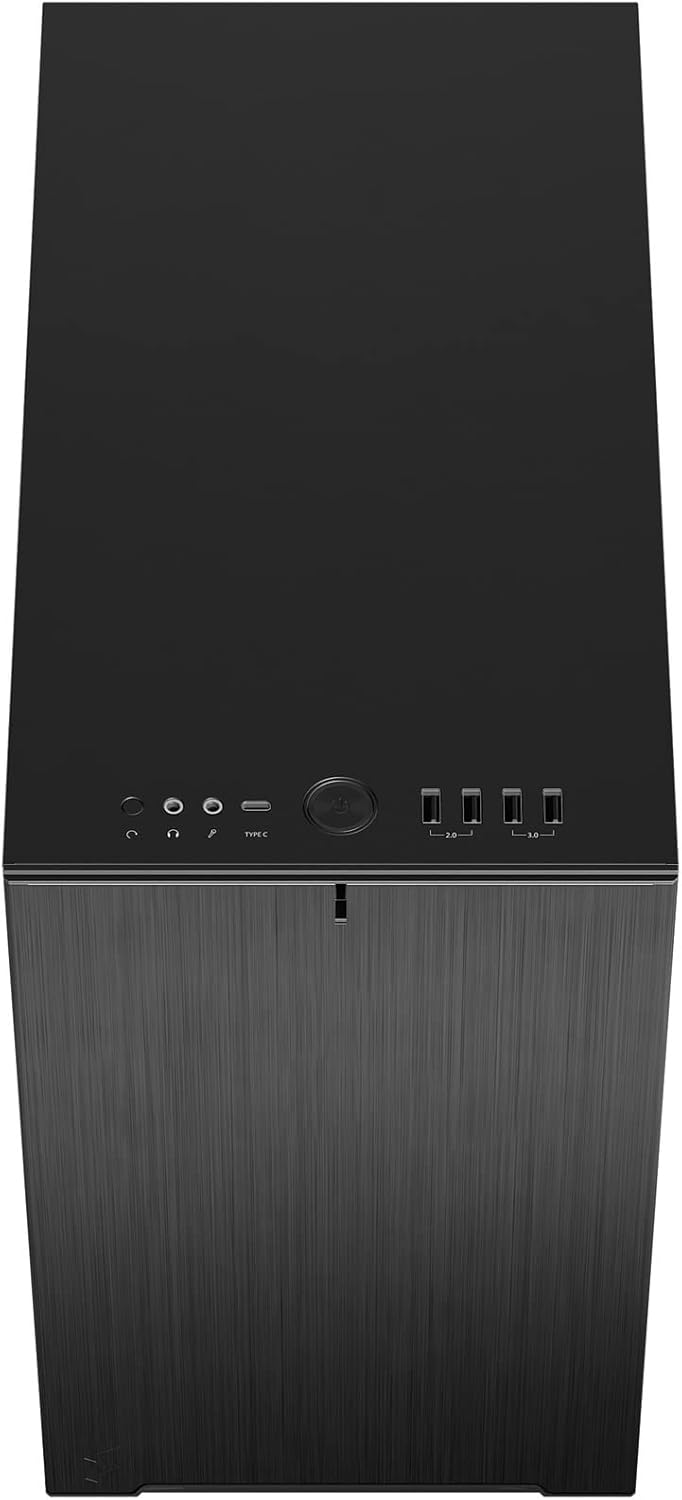
Figear 6: Mullach-aghaidh view displaying the front I/O panel with USB ports, audio jacks, and power button.
5. Stiùireadh Obrachaidh
5.1. A ’toirt cumhachd air / dheth
- Cumhachd air: Brùth am putan cumhachd a tha suidhichte air a’ phannal I/O aghaidh.
- Cumhachd dheth: Initiate a shutdown from your operating system. Alternatively, press and hold the power button for 5 seconds for a forced shutdown.
5.2. Using Front Panel Ports
The front I/O panel provides convenient access to:
- Puirt USB 3.0: Airson gluasad dàta aig astar luath le innealan co-chòrdail.
- Port USB Type-C: For modern devices requiring a Type-C connection.
- Seacaidean Fuaime: Airson ceangal chluas-cinn agus microfònan.
6. Cumail suas
Bidh cumail suas cunbhalach a’ cuideachadh le bhith a’ dèanamh cinnteach à coileanadh agus fad-beatha as fheàrr airson pàirtean do PC.
6.1. Glanadh Criathrag Duslach
The Define 7 Nano is equipped with easily removable dust filters to prevent dust buildup inside the case.
- Criathrag aghaidh: Can be accessed by removing the front panel.
- Top Filter: Located beneath the ventilated top panel (if installed).
- Criathrag Bun: Slides out from the front of the case.
Clean filters regularly (e.g., monthly) by rinsing them with water and allowing them to dry completely, or by using a soft brush or compressed air.
6.2. Glanadh Coitcheann
- Cleachd bog, damp cloth to wipe down the exterior surfaces of the case.
- Seachain a bhith a 'cleachdadh cheimigean cruaidh no stuthan sgrìobach a dh' fhaodadh cron a dhèanamh air a 'chrìoch.
- For interior cleaning, use compressed air to remove dust from components. Ensure the system is powered off and unplugged.
7. A ’dèanamh trioblaid
Tha an earrann seo a’ dèiligeadh ri cùisean cumanta a dh’ fhaodadh tu a thighinn tarsainn orra.
7.1. Gun chumhachd / Chan eil an siostam a’ tòiseachadh
- Thoir sùil air na ceanglaichean cumhachd: Ensure the PSU is properly connected to the wall outlet and the power switch on the PSU is in the 'ON' position. Verify all internal power cables (24-pin ATX, 8-pin CPU, PCIe, SATA) are securely connected.
- Ceann-sgrìobhaidhean a’ Phannal Aghaidh: Double-check that the power button header (PWR SW) is correctly connected to the motherboard.
- Motherboard/CPU: Dèan cinnteach gu bheil an CPU agus an RAM nan suidhe gu ceart.
7.2. Cus Fuaim
- Fuaim fan: Check if any fan cables are obstructing fan blades. Ensure fans are securely mounted. Consider adjusting fan speeds in your motherboard's BIOS/UEFI or operating system.
- Crith: Ensure all components (PSU, drives, GPU) are securely fastened to prevent rattling.
7.3. Overheating
- Sruth-adhair: Verify that fans are oriented correctly (intake/exhaust) and that there is adequate airflow.
- Filters Dust: Clean dust filters regularly to prevent restricted airflow.
- Pasgan Teirmeach: Ensure CPU cooler has proper thermal paste application.
8. Sònrachaidhean
| Feart | Sònrachadh |
|---|---|
| Ainm Modail | Define 7 Nano |
| Modail Àireamh | FD-C-DEF7N-01 |
| Seòrsa cùise | Mini-Tùr |
| Co-fhreagarrachd motherboard | Mini ITX |
| Meudan (L x W x H) | Mu 18.74 x 11.38 x 17.91 òirleach (Pasgan) |
| Cuideam | Mu thuairmeas. 18.37 not |
| Stuth | Aluminium |
| Dath | Soladach Dubh |
| Puirt aghaidh I / O. | 5x USB 3.0, Audio In/Out, Power Button |
| Bàigh Drive | 2.5" SSD, 3.5" HDD (specific quantities vary by configuration) |
| Modh fuarachaidh | Air |
| Fans ro-stàlaichte | Dynamic X2 GP-12 (rear), Dynamic X2 GP-14 (front) |
9. Barantas agus Taic
Fractal Design products are manufactured to the highest quality standards and come with a limited warranty. For detailed warranty information, please refer to the official Fractal Design weblàrach-lìn no a’ chairt barantais a tha air a ghabhail a-steach leis an toradh agad.
For technical support, troubleshooting assistance, or to inquire about replacement parts, please visit the official Fractal Design support page:
www.fractal-design.com/support/
Please have your product model number (FD-C-DEF7N-01) and proof of purchase ready when contacting support.