
1. Ro-ràdh
Thank you for choosing the Karlsson LED Mirror Alarm Clock. This digital alarm clock features a modern design with a clear LED display integrated into a silver mirror surface, showing time and temperature. This manual provides essential information for the safe and efficient use of your device.
Dè tha sa bhogsa:
- Karlsson LED Mirror Alarm Clock
- Càball cumhachd USB

Figear 1: Aghaidh view of the Karlsson LED Mirror Alarm Clock, showing the time (15:08) and temperature (19°C) on its reflective display.
2. Fiosrachadh Sàbhailteachd
- Na cuir an inneal fo uisge no cus taiseachd.
- Avoid extreme temperatures, direct sunlight, or dusty environments.
- Cùm a-mach à ruigsinn chloinne.
- Use only the provided USB cable or a compatible power adapter.
- When inserting batteries, ensure correct polarity (+/-).
- Na bi a’ measgachadh bataraidhean sean is ùr, no diofar sheòrsaichean bataraidhean.
- Thoir air falbh bataraidhean mura tèid an inneal a chleachdadh airson ùine fhada.
3. Toradh thallview
Dèan eòlas ort fhèin air pàirtean agus smachdan do chloc-rabhaidh.
Taisbeanadh Aghaidh:
- Taisbeanadh ùine: Shows current time in 12-hour or 24-hour format.
- Taisbeanadh teothachd: A’ sealltainn teòthachd na h-àrainneachd ann an Celsius no Fahrenheit.
Smachdan cùil:
- Putan SET: Used to enter setting modes (time, alarm).
- Putan UP: Air a chleachdadh gus luachan àrdachadh no gus seòladh tro chlàran-taice.
- Putan DOWN: Air a chleachdadh gus luachan a lùghdachadh no gus seòladh tro chlàran-taice.
- MODE/V Button: Used to switch display modes or activate voice control (if available).
- Putan RESET: Ath-shuidheachadh an inneal gu suidheachadh factaraidh.
- Cur a-steach DC 5V: Airson càball cumhachd USB a cheangal.
- Roinn Bataraidh: Holds 3 x AAA batteries for backup power.
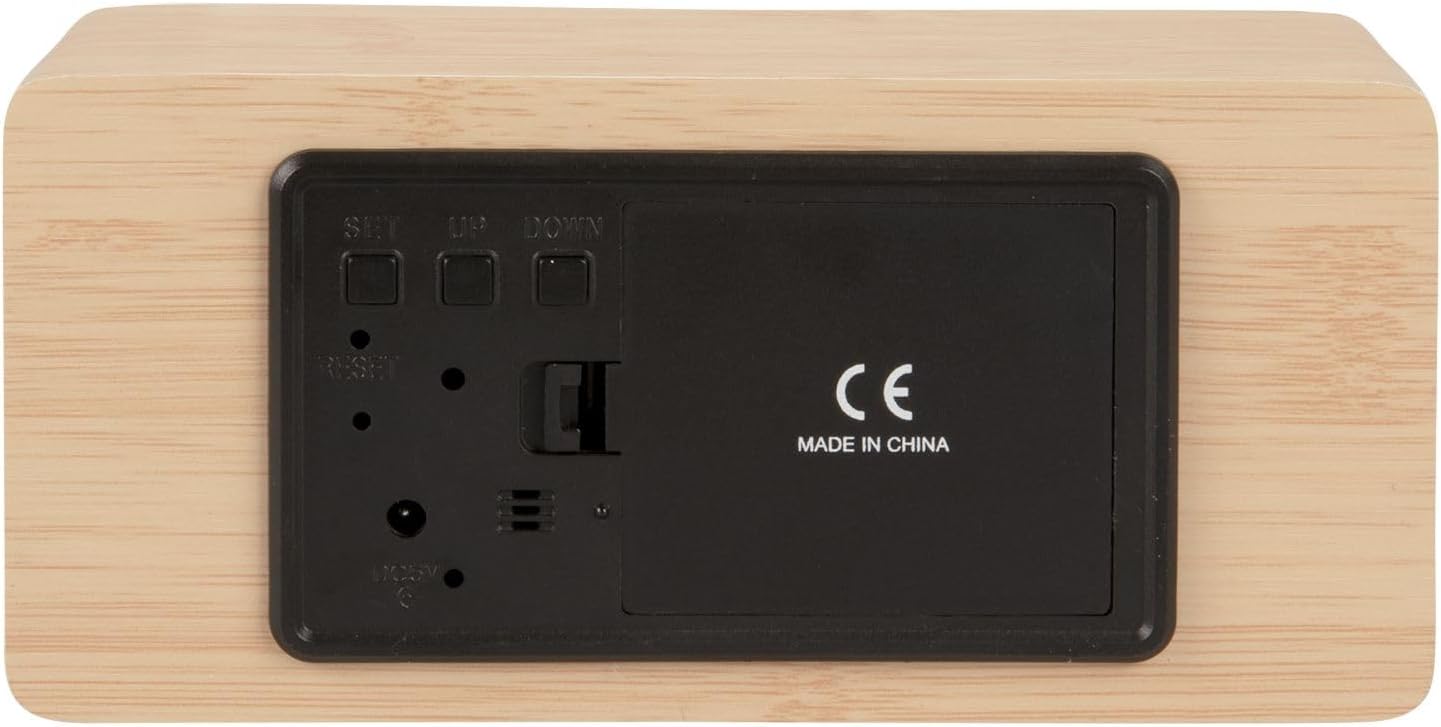
Figear 2: Cùl view of the alarm clock, highlighting the SET, UP, DOWN buttons, power input, and battery compartment.
4. Suidhich
A 'toirt cumhachd don inneal:
The alarm clock can be powered via the included USB cable or by 3 x AAA batteries (not included) for backup.
- USB Power: Connect the small end of the USB cable to the DC 5V input port on the back of the alarm clock. Connect the other end to a USB power adapter (not included) or a powered USB port.
- Cùl-taic Bataraidh: Open the battery compartment cover on the back of the clock. Insert 3 x AAA batteries, ensuring correct polarity. Close the cover securely. Batteries are primarily for backup and may not power the display continuously.

Figear 3: The USB power cable provided for connecting the alarm clock to a power source.
5. Stiùireadh Obrachaidh
A' suidheachadh an ama:
- Brùth agus cùm an SET putan gus an tòisich àireamhan na h-uairean a’ priobadh.
- Cleachd an UP or DOWN putanan gus an uair a rèiteachadh.
- Brùth SET a-rithist gus an uair a dhearbhadh agus gluasad gu suidheachadh mionaidean.
- Cleachd an UP or DOWN putanan gus na geàrr-chunntasan atharrachadh.
- Brùth SET to confirm the minutes and exit time setting mode.
A' suidheachadh an Alarm:
- Brùth an SET button once (do not hold) to cycle through display modes until 'AL' or an alarm icon appears.
- Brùth agus cùm an SET button again until the alarm hour digits flash.
- Cleachd an UP or DOWN putanan gus an uair rabhaidh a tha thu ag iarraidh a shuidheachadh.
- Brùth SET to confirm the alarm hour and move to alarm minute setting.
- Cleachd an UP or DOWN putanan gus na mionaidean rabhaidh a tha thu ag iarraidh a shuidheachadh.
- Brùth SET gus dearbhadh agus modh suidheachadh an rabhaidh fhàgail.
- Gus an inneal-rabhaidh a ghnìomhachadh/a dhì-ghnìomhachadh, brùth air a’ phutan UP button while in normal time display mode. An alarm icon will appear/disappear on the display.
Switching Display Modes (12/24 Hour, Temperature Unit):
- Ann am modh taisbeanaidh ùine àbhaisteach, brùth air an iuchair UP button to switch between 12-hour and 24-hour formats.
- Brùth an DOWN putan gus atharrachadh eadar aonadan teòthachd Celsius (°C) agus Fahrenheit (°F).
6. Cumail suas
- Clean the alarm clock with a soft, dry cloth.
- Do not use abrasive cleaners, solvents, or harsh chemicals, as these may damage the mirror surface or casing.
- Ensure the device is unplugged and batteries are removed before cleaning.
7. A ’dèanamh trioblaid
- Tha an taisbeanadh bàn: Check if the USB cable is securely connected to a power source. If using batteries, ensure they are inserted correctly and are not depleted.
- Chan eil fuaim an rabhaidh: Verify that the alarm is set and activated (alarm icon visible on display). Check the alarm volume if adjustable (this model may not have adjustable volume).
- Incorrect time/settings: Brùth an ATHARRACHADH button on the back of the unit using a thin object (e.g., a paperclip) to restore factory settings, then re-set the time and alarm.
- Tha e coltach gu bheil leughadh teòthachd ceàrr: Ensure the clock is placed in a location away from direct heat sources or drafts that could affect ambient temperature readings.
8. Sònrachaidhean
| Modail Àireamh | PTG-KA5879WD |
| Stuth | Brat-fiodha |
| Meudan (L x W x H) | 15 cm x 7 cm x 4.5 cm (mu 5.9 x 2.76 x 1.77 òirleach) |
| Cuideam | 245g (timcheall air 0.54 lbs) |
| Dath | Light wood casing, silver mirror display |
| Seòrsa Taisbeanaidh | LED didseatach |
| Feart sònraichte | Alarm |
| Stòr cumhachd | USB powered (cable included), 3 x AAA batteries (not included) for backup |
9. Barantas agus Taic
This product is manufactured by Karlsson. For any support inquiries, warranty information, or service requests, please refer to the retailer where the product was purchased or visit the official Karlsson weblàrach-lìn airson fiosrachadh conaltraidh. Cùm dearbhadh ceannach airson tagraidhean barantais.