
1. Ro-ràdh
The ARROWMAX SDS PRO PLUS Mini Electric Drill is a versatile and precise tool designed for intricate tasks, model making, DIY crafts, and more. Featuring an OLED display, LED lights, gyroscopic motion control, and a compact design, it offers both portability and high performance. This manual provides detailed instructions for setup, operation, and maintenance to ensure optimal use of your device.

Figure 1.1: The ARROWMAX SDS PRO PLUS Mini Electric Drill with its accessories, including the storage case, various drill bits, and the benchtop drill press.
2. Pasgan-susbaint
Dèan cinnteach gu bheil na nithean gu lèir a tha air an liostadh gu h-ìosal air an toirt a-steach don phacaid agad:
- (1x) SDS PRO PLUS Mini Electric Drill
- (1x) Benchtop Drill Press
- (1x) Storage Case for SDS PRO PLUS
- (10x) HSS Drill Bits (sizes ranging from 0.6mm to 2.2mm with 2.35mm diameter shaft)
- (1x) USB-C Charging Cable
- (1x) User Manual (this document)

Figure 2.1: A visual representation of the complete package contents, showing the drill, its dedicated case, the benchtop stand, and the set of 10 drill bits.
3. Suidheachadh agus Seanadh
3.1 A’ cur cosgais air an inneal
Before first use, fully charge the SDS PRO PLUS Mini Electric Drill. Connect the provided USB-C cable to the charging port on the drill and to a compatible USB power source. The OLED display will indicate the charging status.
3.2 A’ cur a-steach bìdean drile
The drill features a keyless chuck for easy bit changes. To insert a drill bit:
- Grip the chuck firmly and rotate it counter-clockwise to open the jaws.
- Insert the desired 2.35mm diameter drill bit into the chuck.
- Rotate the chuck clockwise to tighten the jaws securely around the drill bit. Ensure the bit is centered and held firmly.

Figure 3.1: Illustration detailing the process of inserting a drill bit into the keyless chuck, highlighting the 2.35mm diameter compatibility.
3.3 Assembling the Benchtop Drill Press
The industrial-grade benchtop drill press provides enhanced stability and precision for drilling tasks. Follow the instructions provided with the drill press for proper assembly. Once assembled, securely mount the SDS PRO PLUS Mini Electric Drill into the designated holder on the press.

Figure 3.2: The mini electric drill securely mounted on its benchtop press, demonstrating its use for precise drilling operations.
3.4 Bhidio Fosglaidh a’ Bhogsa agus an Suidheachaidh Tùsail
For a visual guide on unboxing and initial setup, please refer to the official video below:
Video 3.1: An unboxing and initial setup guide for the SDS PRO PLUS Mini Electric Drill, demonstrating how to unpack the product and prepare it for first use.
4. Stiùireadh Obrachaidh
4.1 Powering On/Off and Basic Operation
Press the power button (usually located on the side of the drill) to turn the device on or off. The OLED display will activate upon power-on, showing battery status and current mode.

Figure 4.1: The power button on the drill, indicating its simple one-key operation for turning the device on and off.
4.2 Speed and Direction Control
The SDS PRO PLUS offers 5 variable modes for precise control:
- Mode A (Smart Motion Control): Speed is adjustable by the angle of your wrist rotation. The greater the angle, the higher the speed. Direction (forward/reverse) is also controlled by body sensing (twist left for reverse, twist right for forward).
- Mode D (Max Operating Speed): Provides maximum operating speed. Direction is controlled by body sensing.
- Mode 1 (400 RPM): Fixed speed of 400 revolutions per minute. Press the single button to switch direction (clockwise/anti-clockwise).
- Mode 2 (550 RPM): Fixed speed of 550 revolutions per minute. Press the single button to switch direction (clockwise/anti-clockwise).
- Mode 3 (700 RPM): Fixed speed of 700 revolutions per minute. Press the single button to switch direction (clockwise/anti-clockwise).
To switch between modes, refer to the OLED display and the drill's controls. The OLED display shows the current speed setting and drilling direction.
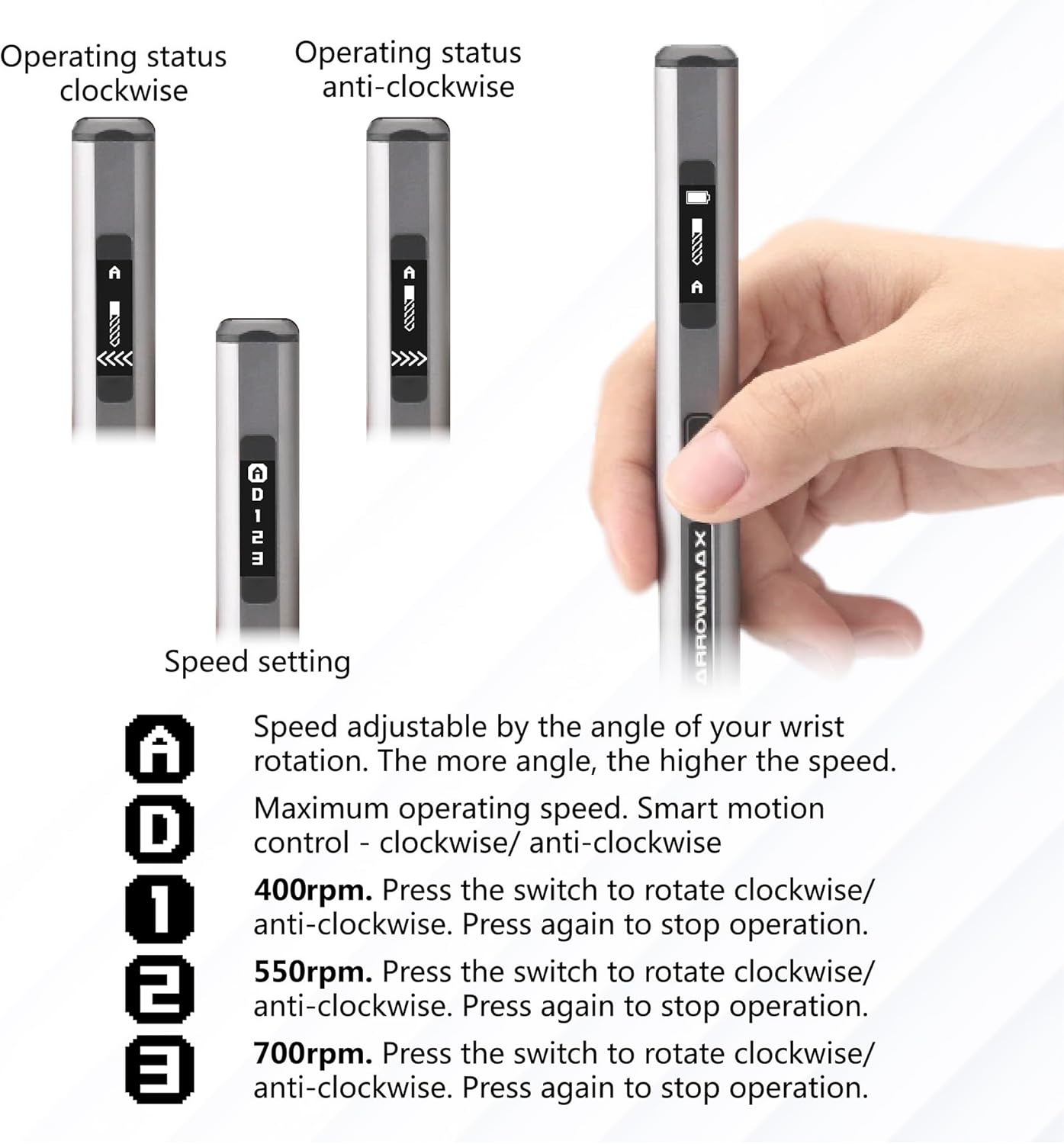
Figure 4.2: The OLED display on the drill, illustrating how operating status and speed settings are shown, including clockwise and anti-clockwise indicators.

Figure 4.3: Visual guide to the smart motion control feature, demonstrating how twisting the drill to the left or right controls the drilling direction.
4.3 Using LED Lights
The drill is equipped with four shadow-less LED lights around the chuck. These lights automatically illuminate the drilling area, providing clear visibility and improving precision, especially in low-light conditions.

Figure 4.4: The drill's chuck area with its four integrated LED lights, designed to illuminate the workspace for enhanced visibility.
5. Cumail suas
5.1 Glanadh
After each use, wipe down the drill and benchtop press with a clean, dry cloth to remove dust and debris. Do not use harsh chemicals or abrasive cleaners. Ensure the chuck area is free of obstructions.
5.2 Drill Bit Care
Keep drill bits clean and sharp. Store them in the provided case to prevent damage and loss. Replace dull or damaged bits to maintain drilling performance and prevent strain on the motor.
5.3 Stòradh
Store the SDS PRO PLUS Mini Electric Drill and its accessories in a dry, cool place, away from direct sunlight and extreme temperatures. Use the provided aluminum case for secure storage and transport.
6. A ’dèanamh trioblaid
If you encounter issues with your SDS PRO PLUS Mini Electric Drill, please refer to the following common troubleshooting steps:
| Trioblaid | Adhbhar a dh’fhaodadh a bhith ann | Fuasgladh |
|---|---|---|
| Chan eil an drile a’ tionndadh air. | Bataraidh ìosal; Putan cumhachd gun a bhith air a bhrùthadh gu ceart. | Charge the drill fully. Ensure the power button is pressed firmly. |
| Drill bit not rotating or rotating slowly. | Chuck not tightened; Low battery; Incorrect speed mode selected; Obstruction. | Tighten the chuck. Recharge the battery. Select a higher speed mode. Check for and remove any obstructions. |
| Tha an taisbeanadh OLED bàn. | Device is off; Low battery. | Press the power button to turn on. Charge the drill. |
| Motion control (Mode A/D) not responding. | Incorrect mode selected; Sensor obstruction. | Ensure Mode A or D is selected. Clean the drill body to ensure sensors are clear. |
Ma mhaireas an duilgheadas às dèidh dhut na fuasglaidhean seo fheuchainn, cuir fios gu taic luchd-cleachdaidh.
7. Sònrachaidhean
| Feart | Mion-fhiosrachadh |
|---|---|
| Brand | ARROWMAX |
| Modail Àireamh | AM-199974 |
| Stòr cumhachd | Cumhachd bataraidh |
| Seòrsa bataraidh | Bataraidh lithium ian (1 air a ghabhail a-steach) |
| Comas Bataraidh | 500mAh / 1.5 Amp Uairean |
| Voltage | 4 bholt (DC) |
| Amplinn | 1.5 Amps |
| Astar rothlach as àirde | 700 RPM (Variable up to 700 RPM) |
| Àireamh de Luas | 5 (A, D, 1, 2, 3) |
| Meud Chuck as àirde | 2.35 Millimeters (3/32-Inch) |
| Feartan sònraichte | Reverse Rotation, Variable Speed, OLED Display, LED Lights, Gyroscopic Control |
| Product Dimensions (Drill) | Mu 10.75"F x 4.75"L x 2.03"À |
| Item Weight (Drill) | 55 gram / 1.94 unnsa |
| Seòrsa drile | Drill Press (with included attachment) |
| Comas Drileadh (Fiodh) | 7.2 òirlich |
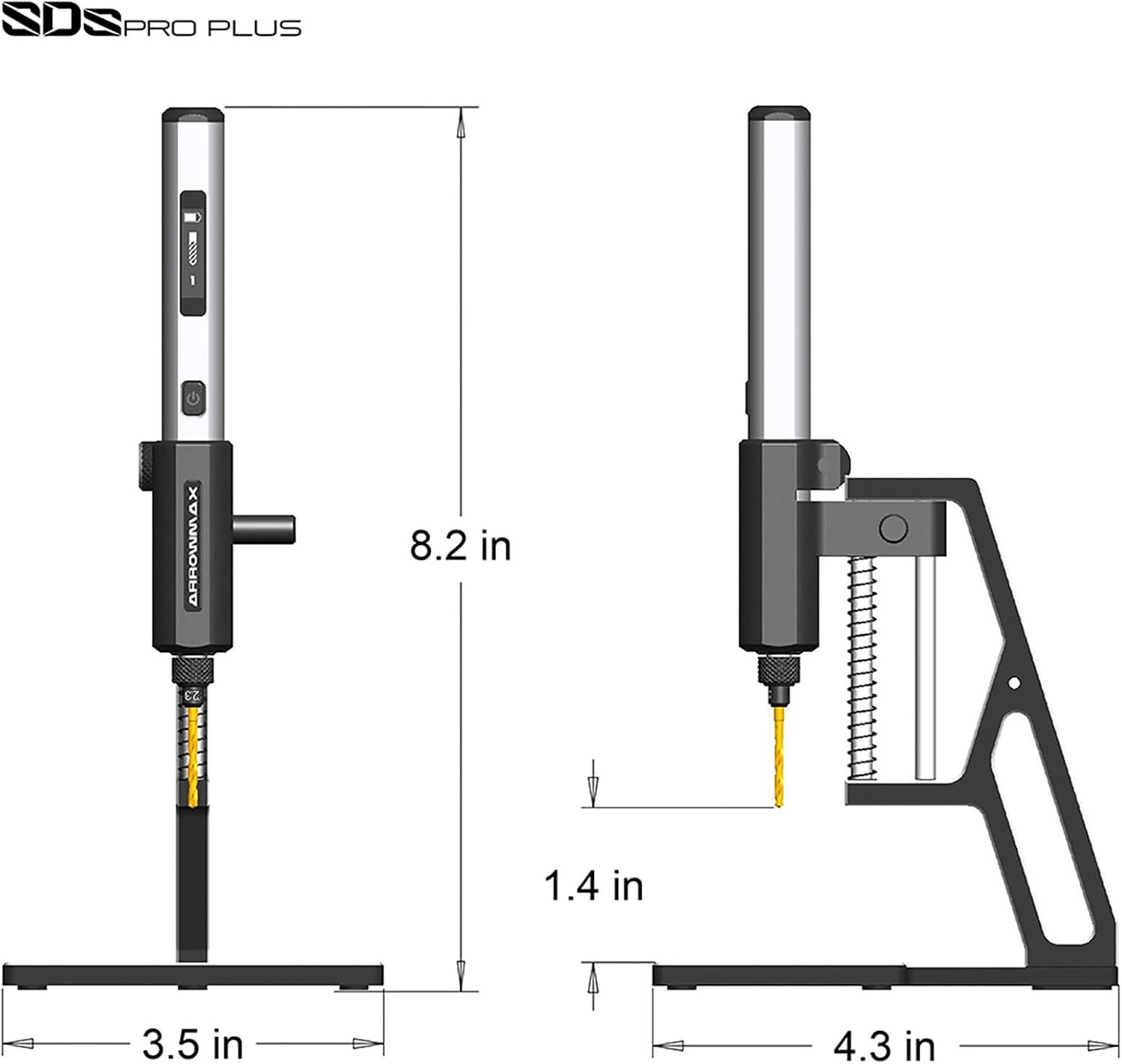
Figure 7.1: Detailed dimensions of the SDS PRO PLUS drill and its accompanying benchtop press, indicating its compact size.
8. Fiosrachadh Sàbhailteachd
Please read and understand all safety warnings and instructions before operating the SDS PRO PLUS Mini Electric Drill. Failure to follow the warnings and instructions may result in electric shock, fire, and/or serious injury.
- Always wear appropriate personal protective equipment, such as safety glasses, when operating the drill.
- Ensure your work area is well-lit and clear of clutter.
- Daingnich am pìos obrach mus dèan thu drileadh gus casg a chur air gluasad.
- Do not force the drill; let the tool do the work.
- Cùm làmhan agus corragan air falbh bhon bhioran drile rothlach.
- Disconnect the power source before changing accessories or performing maintenance.
- Na cuir a-mach an drile gu uisge no suidheachaidhean fliuch.
- Store the drill out of reach of children.
9. Barantas agus Taic
Specific warranty information for the ARROWMAX SDS PRO PLUS Mini Electric Drill is typically provided with your purchase documentation or on the manufacturer's official weblàrach. Cùm dearbhadh ceannach airson tagraidhean barantais.
For technical support, troubleshooting assistance, or to inquire about replacement parts, please visit the official ARROWMAX website or contact their customer service department. The website address can often be found on the product packaging or in the included documentation.
Based on product packaging, you may find support information at: arrowmax-rc.com