
1. Ro-ràdh
Welcome to the user manual for your new Avtex W195TS Smart TV. This television is specifically designed for mobile living, offering versatile power options (12V, 24V, and 240V) and a range of smart features, including Wi-Fi, Bluetooth, and an integrated Freesat satellite decoder. This manual provides essential information for setting up, operating, maintaining, and troubleshooting your device to ensure optimal performance and enjoyment.
2. Fiosrachadh Sàbhailteachd
Leugh a h-uile stiùireadh sàbhailteachd gu faiceallach mus cleachd thu an telebhisean. Cùm an leabhar-làimhe seo airson fiosrachadh san àm ri teachd.
- Solar cumhachd: Dèan cinnteach gu bheil an voltage is used (12V, 24V DC or 240V AC). Do not overload power outlets.
- Fionnarachadh: Na cuir bacadh air fosglaidhean fionnarachaidh. Fàg àite gu leòr timcheall an telebhisean airson sruth-adhair ceart.
- Uisge agus Taiseachd: Na cuir an telebhisean fosgailte do uisge no taiseachd. Na cuir nithean làn lionntan air an telebhisean.
- Glanadh: Tarraing a-mach am pluga bhon telebhisean mus glan thu e. Cleachd clò bog, tioram. Na cleachd innealan-glanaidh leaghaidh no innealan-glanaidh aerosol.
- Suidheachadh: Place the TV on a stable, flat surface or mount securely to a wall/bracket. Avoid direct sunlight or heat sources.
- Seirbheis: Na feuch ris an toradh seo a sheirbheis dhut fhèin. Thoir sùil air gach seirbheis gu luchd-obrach le teisteanas.
3. Pasgan-susbaint
Before setup, please check that all items are present in the box:
- Avtex W195TS Smart TV
- Smachd iomallach le bataraidhean
- Càball cumhachd 12V / 24V DC
- Inneal-atharrachaidh Cumhachd AC 240V
- Seasamh Bùird (mas e iomchaidh)
- Leabhar-làimhe cleachdaiche (an sgrìobhainn seo)
4. Toradh thallview
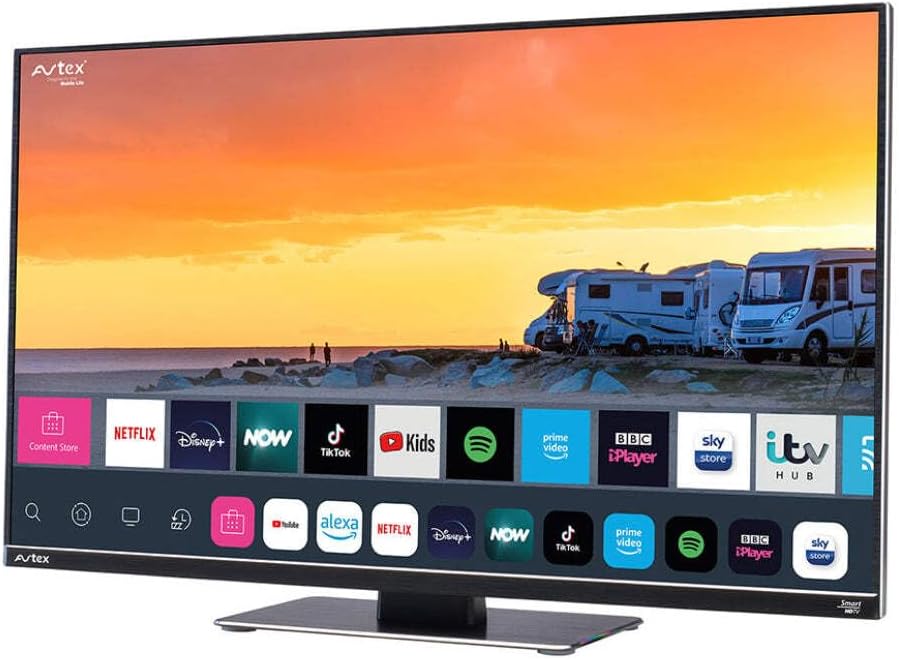
Figure 4.1: Avtex W195TS Smart TV Front View
This image shows the Avtex W195TS Smart TV from a slight angle, highlighting its slim design and the vibrant display. The screen shows a user interface with icons for popular streaming services like Netflix, Disney+, Now, TikTok, Kids, Spotify, Prime Video, BBC iPlayer, Sky Store, and ITV Hub. The background on the screen depicts a scenic view of motorhomes parked near a beach at sunset. The Avtex logo is visible on the top left and bottom left of the TV frame.
4.1. Puirt agus Ceanglaichean
- Puirt HDMI: For connecting external devices like Blu-ray players, game consoles, or set-top boxes.
- Puirt USB (2): Airson ath-chluich meadhanan bho dhràibhearan USB no airson goireasan USB a cheangal.
- Cuir a-steach antenna: For connecting a terrestrial TV antenna.
- Teachd a-steach saideal: For connecting a satellite dish for Freesat or other satellite services.
- Cur a-steach Cumhachd DC: For 12V/24V DC power connection.
- Cuir a-steach cumhachd AC: For 240V AC power connection via adapter.
- Port Ethernet: Airson ceangal lìonra uèirleas.
- Toradh claisneachd: For connecting external audio systems or headphones.
5. Suidhich
5.1. Installing the Stand (Optional)
- Cuir an telebhisean gu faiceallach le aghaidh sìos air uachdar bog, glan gus casg a chur air milleadh air an sgrion.
- Cuir an stand còmhla ris na tuill-sreap aig bonn an Tbh.
- Dèan tèarainte air an stand le bhith a’ cleachdadh na sgriothan a chaidh a thoirt seachad.
5.2. Ceangal Cumhachd
The Avtex W195TS supports multiple power inputs:
- 12V/24V DC: Connect the supplied 12V/24V DC power cable to the DC input on the TV and to your vehicle's 12V or 24V power outlet.
- 240V AC: Connect the supplied 240V AC power adapter to the AC input on the TV, then plug the adapter into a standard 240V AC wall socket.
Thoir an aire: Do not connect both DC and AC power simultaneously.
5.3. Antenna/Satellite Connection
- Terrestrial TV: Connect your aerial cable to the 'ANTENNA IN' port.
- Satellite TV (Freesat): Connect your satellite dish cable to the 'SATELLITE IN' port.
5.4. A’ chiad chumhachd air agus a’ chiad shuidheachadh
- Connect the TV to power and press the power button on the remote control or TV.
- The First-Time Setup Wizard will appear. Follow the on-screen prompts to select your language, country, and time zone.
- Perform an automatic channel scan for both terrestrial and satellite channels.
- Ceangail ris an lìonra Wi-Fi agad le bhith a’ taghadh ainm an lìonra agad agus a’ cur a-steach am facal-faire.
6. Obrachadh
6.1. Gnìomhan Smachd Iomallach
Dèan eòlas air na putanan smachd iomallach airson seòladh agus smachd furasta air feartan an telebhisean agad.
- Putan Cumhachd: Tionndaidh an telebhisean air / dheth.
- Putan stòr: Selects input sources (HDMI, USB, TV, Satellite).
- Leabhar +/-: Atharraich an ìre fuaim.
- Sianal +/-: Ag atharrachadh seanalan Tbh.
- Putanan Seòlaidh (Suas/Sìos/Clì/Deas/Ceart gu leòr): Airson seòladh is taghadh clàr-taice.
- Smart Hub/Home Button: A’ faighinn cothrom air eadar-aghaidh Smart TV.
- Putanan an aplacaid: Dedicated buttons for popular streaming apps (if available).
6.2. Feartan Tbh Smart
Your Avtex W195TS is equipped with smart TV capabilities:
- App Store: Download and install various applications for streaming, news, and entertainment.
- Seirbheisean sruthadh: Access pre-installed or downloaded apps like Netflix, Disney+, Prime Video, BBC iPlayer, etc. (subscription may be required).
- Web Brabhsair: Brobhsadh an eadar-lìn gu dìreach air an telebhisean agad.
- Sgàthan sgrion: Connect your smartphone or tablet to display content on the TV screen (compatibility may vary).
6.3. Ceangalachd Bluetooth
Pair Bluetooth devices such as headphones or external speakers for enhanced audio experience.
- Rach gu clàr-taice roghainnean an telebhisean.
- Select 'Bluetooth' or 'Connected Devices'.
- Enable Bluetooth and put your device into pairing mode.
- Tagh an inneal agad bhon liosta gus a cheangal.
6.4. Ath-chluich nam Meadhanan tro USB
Insert a USB drive into one of the USB ports to view photos, play videos, or listen to music.
- The TV will usually prompt you to open the media player.
- Seòl tron files using the remote control.
7. Cumail suas
7.1. Glanadh an telebhisean
- Sgrion: Sguab an sgrion gu socair le clò bog, gun lint. Airson comharran stòlda, sguab beaganampnigh an clò le uisge no le fuasgladh glanaidh sònraichte airson sgrion (na spraeadh gu dìreach air an sgrion).
- Casing: Cleachd clò bog, tioram gus an telebhisean a sguabadh às.asing. Seachain innealan-glanaidh sgrìobach no fuasglaidhean.
7.2. Ùrachaidhean bathar-bog
Periodically check for software updates to ensure your TV has the latest features and bug fixes. Updates can usually be found in the TV's settings menu under 'System' or 'Software Update'.
8. A ’dèanamh trioblaid
If you encounter issues with your Avtex W195TS, refer to the following common problems and solutions:
| Trioblaid | Adhbhar a dh’fhaodadh a bhith ann | Fuasgladh |
|---|---|---|
| Gun chumhachd | Càball cumhachd gun cheangal; chan eil cumhachd bhon socaid. | Check power cable connection; test outlet with another device; ensure correct voltage (12V / 24V / 240V). |
| Gun Dealbh, ach Tha Fuaim An làthair | Stòr cuir-a-steach ceàrr air a thaghadh; càball lochtach. | Press the 'Source' button on the remote to select the correct input; check HDMI/antenna cables. |
| Gun fhuaim, ach tha dealbh an làthair | Tha an fhuaim air a mhùchadh no ro ìosal; duilgheadas leis an t-siostam claisneachd taobh a-muigh. | Unmute volume or increase level; check connections to external audio devices. |
| Chan urrainn dhomh ceangal ri Wi-Fi | Facal-faire ceàrr; duilgheadas leis an router; Tbh ro fhada bhon router. | Re-enter Wi-Fi password; restart router; move TV closer to router or use an extender. |
| Iomallach smachd nach eil ag obair | Bataraidhean marbh; bacadh; duilgheadas càraideachaidh. | Cuir bataraidhean ùra an àite; thoir air falbh cnapan-starra; ath-cheangail an smachd iomallach ma tha e na smachd iomallach Bluetooth. |
9. Sònrachaidhean
| Feart | Sònrachadh |
|---|---|
| Brand | Avtex |
| Modail Àireamh | AVTEX W195TS |
| Meud sgrion | 19.5 òirlich |
| Fuasgladh | 1080p (Làn-HD) |
| Co-mheas taobh | 16:9 |
| Teicneòlas ceangail | Bluetooth, HDMI, Wi-Fi |
| Gu h-iomlan puirt USB | 2 |
| Voltage | 12 Volts, 24 Volts, 240 Volts |
| Cuideam nì | 2.5 cileagram |
| Modail Bliadhna | 2018 |
10. Barantas agus Taic
Your Avtex W195TS Smart TV comes with a manufacturer's warranty. Please refer to the warranty card included in your product packaging for specific terms and conditions, including warranty period and coverage details. Keep your proof of purchase for warranty claims.
For technical support, troubleshooting assistance beyond this manual, or warranty inquiries, please contact Avtex customer service through their official website or the contact information provided with your product. When contacting support, please have your model number (AVTEX W195TS) and serial number ready.