
1. Ro-ràdh
Welcome to the Radiant Miami Smartwatch user manual. This guide provides essential information for setting up, operating, maintaining, and troubleshooting your new smartwatch. The Radiant Miami Smartwatch (Model RAS21005) is designed for both men and women, offering a blend of modern design and advanced health monitoring features.
Key features include heart rate monitoring, blood pressure measurement, sleep tracking, and various activity tracking functions. It also supports notifications for calls and messages from compatible smartphones.

Image 1.1: The Radiant Miami Smartwatch worn on a wrist, showcasing an dealbhadh caol aige.
2. Suidhich
2.1 A’ cur cosgais air an uaireadair-smart
Before initial use, fully charge your Radiant Miami Smartwatch. Connect the charging cable to the charging port on the back of the watch and plug the USB end into a standard USB power adapter (not included) or a computer's USB port. A full charge typically takes approximately 2 hours and provides up to 10 days of battery life, depending on usage.
2.2 Stàladh is Paidhreachadh Aplacaidean
- Luchdaich sìos an aplacaid Companion: Lorg airson the official Radiant companion app on your smartphone's app store (compatible with iOS 8.4+ and Android 4.4+).
- Dèan comas air Bluetooth: Dèan cinnteach gu bheil Bluetooth air a chomasachadh air an fhòn-smart agad.
- Fosgail an App: Launch the Radiant app and follow the on-screen instructions to create an account or log in.
- Inneal Paidhir: Within the app, navigate to the 'Device' or 'Add Device' section. Select your Radiant Miami Smartwatch from the list of available devices. Confirm the pairing request on both your phone and the smartwatch if prompted.
Once paired, the smartwatch will synchronize time and data with your smartphone.
3. A’ cleachdadh an uaireadair-smart
3.1 Seòladh Bunaiteach
- Swipe Up / Down: Scrollaich tro chlàran-bìdh agus fiosan.
- Swipe clì/deas: Faigh cothrom air gnìomhan luath no diofar scrionaichean dàta.
- Tap: Tagh nì no dearbhaich gnìomh.
- Putan Taobh: Brùth gus tilleadh chun sgrìn dachaigh no gus an inneal a dhùsgadh.
3.2 Sgrùdadh Slàinte
The Radiant Miami Smartwatch continuously monitors various health metrics:
- Ìre cridhe: Access the heart rate monitor from the main menu or a quick-access screen. The watch will display your current heart rate in beats per minute (BPM).
- Bruthadh-fala: Initiate a blood pressure measurement from the dedicated function. Ensure the watch is snug on your wrist for accurate readings.
- Ocsaidean fala (SpO2): Measure your blood oxygen saturation level.
- Monitor cadail: The watch automatically tracks your sleep patterns, including awake, light, and deep sleep stagtha. View dàta cadail mionaideach san aplacaid companach.
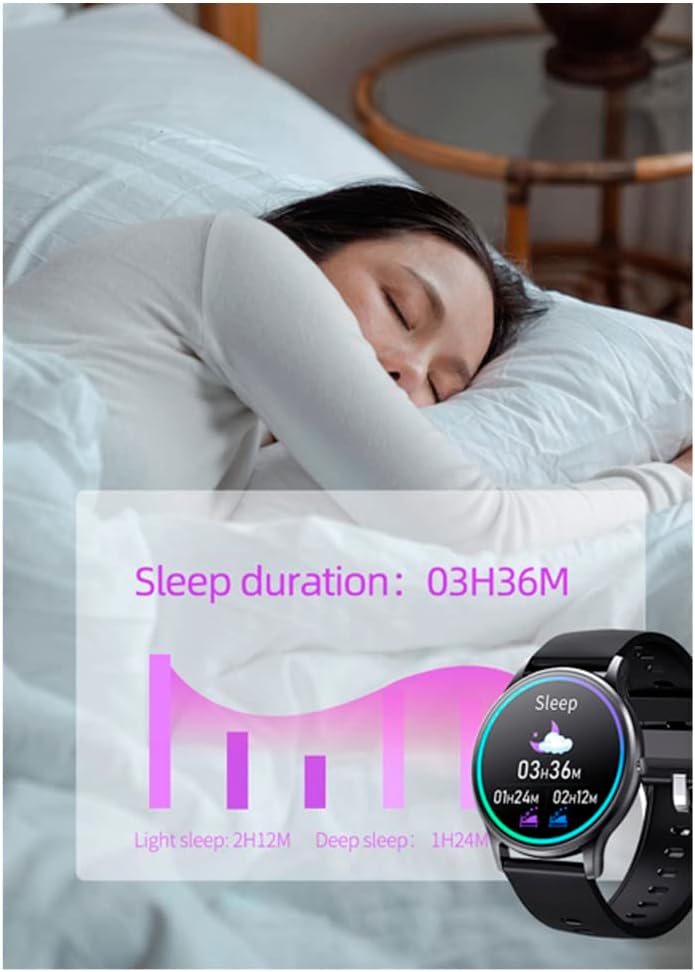
Image 3.1: The smartwatch screen showing sleep duration and different sleep stages (light, deep).
3.3 Tracadh Gnìomhachd
Cùm sùil air na gnìomhan làitheil agus na h-eacarsaichean agad:
- Ceumannan, Astar, Calaraidhean: The watch automatically records your steps, estimated distance, and calories burned throughout the day.
- Modhan ioma-spòrs: Select specific sport modes (e.g., running, walking, cycling) to get more accurate data for your workouts.

Ìomhaigh 3.2: Eisimpleiramples of activity tracking screens on the smartwatch, showing metrics for different exercises.
3.4 Fiosan agus Gairmean
Receive notifications directly on your smartwatch:
- Rabhaidhean Teachdaireachd: Get alerts for messages from apps like WhatsApp and Facebook. You can view the message text on your watch.
- Glaodh a-steach: See who is calling and reject calls directly from your smartwatch.
- Cuimhneachain crith: The watch provides vibration alerts for sedentary reminders, alarm clocks, low battery, and water intake reminders.

Image 3.3: The smartwatch screen showing an incoming message notification from Facebook.
3.5 Gnàthachadh
Pearsnaich an t-eòlas smartwatch agad:
- Coimhead air Faces: Change the watch face through the companion app's 'Dial Center' to match your style.

Image 3.4: The companion app's 'Dial Center' displaying multiple watch face options for customization.
4. Cumail suas
4.1 Glanadh
Regularly clean your smartwatch and strap to prevent skin irritation and maintain functionality. Use a soft, damp clò airson an sgrion agus an strap a sguabadh. Seachain ceimigean cruaidh no stuthan sgrìobach a chleachdadh.
4.2 Cùram Bataraidh
Gus beatha bataraidh a leudachadh:
- Seachain teòthachd anabarrach.
- Cuir cosgais air an uaireadair mus bi am bataraidh air a leigeil sìos gu tur.
- Do not leave the watch charging for extended periods after it is full.
5. A ’dèanamh trioblaid
5.1 Smartwatch Not Turning On
Dèan cinnteach gu bheil an uaireadair làn-chosgais. Mura tionndaidh e air fhathast, feuch ri a cheangal ris an charger airson co-dhiù 30 mionaidean.
5.2 Gun chomas paidhir a dhèanamh le fòn cliste
- Thoir sùil a bheil Bluetooth air a chomasachadh air an fhòn-smart agad.
- Ensure the smartwatch is within Bluetooth range of your phone.
- Ath-thòisich an dà chuid am fòn cliste agad agus an uaireadair smart agad.
- Feuch ri dì-phaidhreachadh agus ath-phaidhreachadh an inneil tron aplacaid.
5.3 Leughaidhean Slàinte Mearachdach
For accurate readings, ensure the smartwatch is worn snugly on your wrist, about one finger's width above the wrist bone. Avoid excessive movement during measurements. Note that the smartwatch is not a medical device and readings are for reference only.
5.4 Fiosan nach eil a’ nochdadh
- Verify that notifications are enabled in the companion app settings.
- Check your smartphone's notification settings to ensure the app has permission to send notifications.
- Dèan cinnteach gu bheil an uaireadair smart ceangailte tro Bluetooth.
6. Sònrachaidhean
| Feart | Sònrachadh |
|---|---|
| Modail Àireamh | RAS21005 |
| Seòrsa bataraidh | 1 Lithium metal battery (required) |
| Beatha bataraidh | Suas ri 10 latha (feitheimh) |
| Ùine cosgais | Mu thuairmeas. 2 uairean |
| Co-fhreagarrachd | iOS 8.4+ / Android 4.4+ |
| Dèanadair | RADIANT |
| Meudan toraidh | 16.3 x 14.5 x 3.5 cm |
| Cuideam nì | 100 gram |
7. Barantas agus Taic
Radiant is a recognized and respected Spanish brand in the watch industry, known for producing high-quality watches for decades. For warranty information or technical support, please refer to the documentation included with your purchase or visit the official Radiant weblàrach. Cùm dearbhadh ceannach airson tagraidhean barantais.
For further assistance, please contact Radiant customer service through their official channels.