
1. Ro-ràdh
Thank you for choosing the NUBWO USB C Headset, Model HW02. This headset is designed for clear communication and comfortable use in various environments, including office, home, and call centers. It features a noise-cancelling microphone, in-line controls, and broad compatibility with USB-C enabled devices. This manual provides essential information for setting up, operating, maintaining, and troubleshooting your headset to ensure optimal performance.
2. Pasgan-susbaint
Dèan cinnteach gu bheil a h-uile nì an làthair sa phacaid agad:
- NUBWO USB C Headset (Model HW02)
- USB-C Cable (integrated with in-line control)
- Leabhar-làimhe cleachdaiche (an sgrìobhainn seo)
3. Stiùireadh Stèidheachaidh
Follow these steps to set up your NUBWO USB C Headset:
- Ceangail na Fònaichean-cluaise: Plug the USB-C connector of the headset directly into an available USB-C port on your laptop, phone, or computer. The headset is plug-and-play, requiring no additional drivers for most operating systems (Windows 7/8/10, Android, iOS).

Image: NUBWO USB C Headset connected to a laptop, illustrating its wide compatibility with PC, laptop, tablet, and smartphone devices running Android, iOS, Windows 7, Windows 8, and Windows 10.
- Dèan rèiteachadh airson comhfhurtachd: Adjust the headband to fit comfortably on your head. The headset features an adjustable headband and breathable ear muffs for extended wear.

Image: Diagram highlighting the comfortable design elements of the headset, including a 180-degree rotatable microphone, breathable earmuffs, and an adjustable headband for personalized fit.
- Suidhich am micreofon: Rotate the microphone boom to position it optimally near your mouth for clear voice capture. The microphone is 180-degree rotatable.
Bhidio Taisbeanaidh Suidheachaidh
Bhidio: Ath-sgrùdadh mionaideachview of the NUBWO USB C Headset, demonstrating its lightweight design, in-line controls, and overall comfort for various uses. This video is provided by a seller and offers practical insights into the product's features.
4. Stiùireadh Obrachaidh
The NUBWO HW02 headset features convenient in-line controls for easy management of audio and microphone functions:
- Smachd tomhas-lìonaidh: Use the '+' and '-' buttons on the in-line control unit to adjust the speaker volume.
- Mute microfòn: Press the microphone icon button to mute or unmute the microphone. A red indicator light will typically show when the microphone is muted.
- Neach-labhairt Mute: Press the speaker icon button to mute or unmute the headset speakers. A red indicator light will typically show when the speakers are muted.
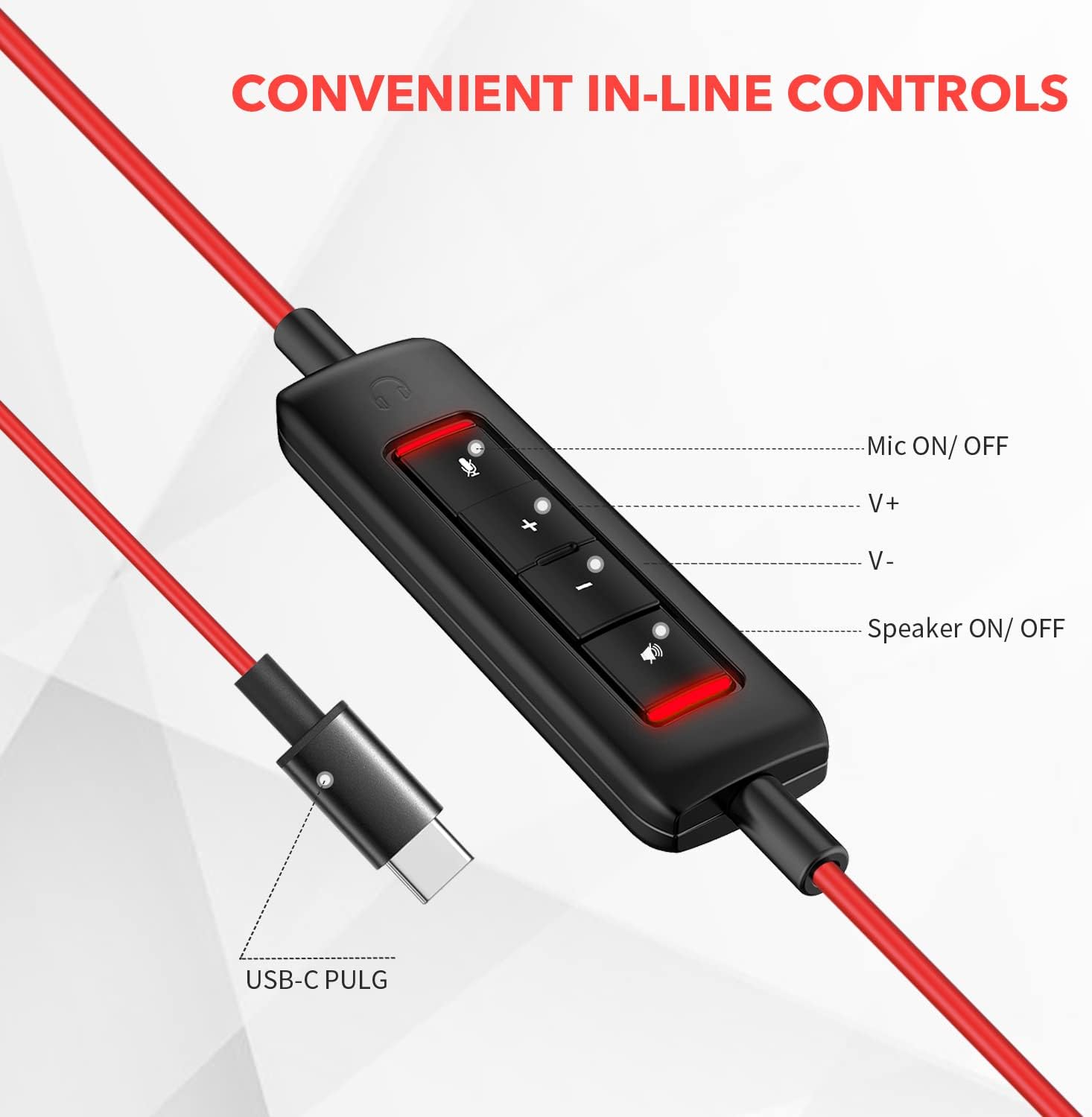
Ìomhaigh: Dlùth-shealladh view of the in-line control unit, detailing the buttons for microphone mute/unmute, volume up, volume down, and speaker mute/unmute. The USB-C plug is also shown.
5. Cumail suas
To ensure the longevity and optimal performance of your NUBWO USB C Headset, follow these maintenance guidelines:
- Glanadh: Use a soft, dry cloth to wipe down the headset and cable. Avoid using harsh chemicals or abrasive materials.
- Stòradh: When not in use, store the headset in a clean, dry place, preferably in the provided velvet bag, to protect it from dust and damage.
- Cùram càball: Avoid sharp bends or excessive pulling on the cable to prevent internal wire damage.
- Suidheachaidhean Àrainneachdail: Na cuir na fònaichean-cluaise ann an teòthachd, taiseachd no solas dìreach na grèine. Chan eil na fònaichean-cluaise dìonach bho uisge.
6. A ’dèanamh trioblaid
If you encounter issues with your NUBWO USB C Headset, refer to the following common solutions:
- Gun fhuaim bho Headset:
- Dèan cinnteach gu bheil an ceanglaiche USB-C air a chuir a-steach gu tur ann am port an uidheim.
- Check the in-line control unit to ensure the speaker is not muted (red indicator light off).
- Increase the volume using the '+' button on the in-line control and your device's system volume settings.
- Dearbhaich gu bheil an headset air a thaghadh mar an inneal toraidh claisneachd bunaiteach ann an roghainnean fuaim a’ choimpiutair agad.
- Micreofon gun a bhith ag obair:
- Ensure the microphone is not muted on the in-line control unit (red indicator light off).
- Check that the microphone boom is correctly positioned.
- Verify that the headset microphone is selected as the default input device in your device's sound settings or communication application settings.
- Dèan deuchainn air a’ mhaicreafòn le aplacaid no inneal eile gus cùisean sònraichte bathar-bog a dhiùltadh.
- Càileachd claisneachd truagh:
- Dèan cinnteach gu bheil an ceangal tèarainte agus saor bho sprùilleach.
- Avoid using the headset in environments with high electromagnetic interference.
- Adjust the audio settings on your device.
7. Sònrachaidhean
| Feart | Sònrachadh |
|---|---|
| Brand | NUBWO |
| Modail Àireamh | HW02 |
| Teicneòlas ceangail | Uèirleichte (USB-C) |
| Suidheachadh cluais | Air Cluas |
| bacadh | 32 Ach |
| Raon tricead | 20 Hz - 20,000 Hz |
| Seòrsa smachd | Volume Control, Microphone Mute, Speaker Mute (in-line) |
| Smachd fuaim | Cur às do fhuaim gnìomhach (micreafòn) |
| Cuideam nì | 0.17 cileagram |
| Stuth | Plastaig |
| Feartan a bharrachd | Adjustable Headband, Lightweight, Microphone Included |
| Innealan co-fhreagarrach | Laptops, Phones, Computers (with USB-C) |
8. Fiosrachadh Barantais
The NUBWO USB C Headset (Model HW02) comes with a Barantas Dèanadair 2-bliadhna. For details regarding warranty claims and coverage, please refer to the official NUBWO weblàrach-lìn no cuir fios gu taic teachdaiche.
Additionally, products purchased through Amazon may be eligible for a 30-day refund/replacement return policy, subject to Amazon's terms and conditions.
9. Taic
For further assistance, technical support, or inquiries regarding your NUBWO USB C Headset, please visit the official NUBWO weblàrach-lìn no cuir fios chun roinn seirbheis teachdaiche aca. Mar as trice gheibhear fiosrachadh conaltraidh air pacaigeadh an toraidh no air làthaireachd oifigeil air-loidhne a’ bhrand.