
1. Toradh thallview
The Kuephom Portable CD Player (Model PM11-Black) is a versatile audio device designed for personal and multi-user listening. It features a built-in speaker, rechargeable battery, and anti-skip protection, making it suitable for various environments including home, car, and travel. The player supports multiple audio formats and offers adjustable playback speed for learning purposes.

Image 1.1: Kuephom Portable CD Player and accessories.
Prìomh fheartan:
- Bataraidh ath-thagraidh: Integrated 1500mAh battery provides up to 8 hours of playback with earphones or 5 hours with the built-in speaker on a 4-hour charge.
- Neach-labhairt togte: Allows direct listening without external headphones or speakers.
- Dìon an-aghaidh Skip: Ensures uninterrupted audio playback during movement or light shocks.
- Memory Playing: Resumes playback from the last played track when the device is turned on again.
- Co-fhreagarrachd farsaing: Supports CD, CD-R, CD-RW, MP3, and WMA formats.
- Ioma roghainnean ceangail: Includes 3.5mm AUX input/output, USB port, and headphone jack.
- Adjustable Playback Speed: Useful for language learning or musical practice.
2. Stiùirich rèiteachaidh
2.1 A’ cur cosgais air an inneal
Before initial use, fully charge the CD player. The device features a built-in rechargeable battery, eliminating the need for disposable AA batteries.
- Locate the charging port on the side of the CD player.
- Connect the provided USB charging cable to the player and a compatible USB power source (e.g., wall charger, power bank, car charger, computer USB port).
- Lasaidh an solas comharra cosgais. Mar as trice bheir làn chosgais timcheall air 4 uairean a thìde.

Image 2.1: Charging options for the CD player.
2.2 Loading a CD
The CD player supports standard CD, CD-R, CD-RW, MP3, and WMA disc formats.
- Locate the 'OPEN' switch on the side of the player.
- Slide the switch to the 'OPEN' position to release the lid.
- Gently place the CD onto the central spindle with the label side facing up. Ensure the CD is securely seated.
- Dùin am mullach gu daingeann gus an cliog e na àite.
Video 2.2: Demonstrates the basic functions and usage scenarios of the Kuephom Portable CD Player, including loading a CD and identifying ports.
2.3 A’ ceangal innealan taobh a-muigh
- Fòn-cluaise: Plug the included earbuds or your preferred 3.5mm headphones into the headphone jack (blue port).
- Ceangal AUX: Use the provided 3.5mm audio cable to connect the player's AUX port (green port) to external speakers or a car's AUX input.
- Ath-chluich USB: Insert a USB flash drive into the USB port to play compatible audio files (MP3, WMA).

Image 2.3: Connecting the CD player to a car's audio system.
3. Stiùireadh Obrachaidh
3.1 Cumhachd air / dheth
Locate the power switch on the side of the player. Slide it to the 'ON' position to power on the device. Slide it to 'OFF' to power off.
3.2 Smachdan Ath-chluich Bunasach
The control panel on the top of the player features intuitive buttons:
- Play/Pause (►▮): Brùth gus tòiseachadh no stad air ath-chluich.
- Previous Track (◀◀): Press once to go to the beginning of the current track. Press twice to go to the previous track.
- Next Track (►►): Brùth gus leum chun ath cheum.
- Meud suas (+): A 'meudachadh an tomhas-lìonaidh.
- Meud sìos (-): A 'lùghdachadh an fhuaim.
3.3 Gnìomhan Ath-chluich Adhartach
- Repeat (REP): Cycles through repeat modes (e.g., repeat one, repeat all, random).
- Modh (MODE): Switches between different playback modes (e.g., CD, USB, AUX).
- A-B Repeat (A-B): Allows repeating a specific segment of audio.
- Prògram (PROG): Enables programming a custom playback order for tracks.
- Speed Adjustment (SPEED +/-): Adjusts the playback speed, useful for language learning or transcribing audio.

Image 3.1: The adjustable playback speed feature is beneficial for learning.
3.4 Anti-Skip and Memory Functions
- Dìon an-aghaidh Skip: This function is automatically activated when the player is turned on, providing a buffer against minor shocks and vibrations to ensure continuous playback.
- Memory Playing: The device remembers the last played track and position, resuming from that point when powered on again.
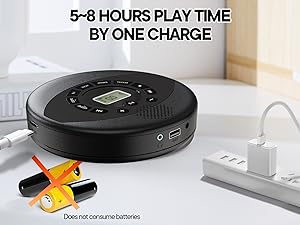
Image 3.2: Anti-shock protection for active use.
4. Cumail suas
4.1 Cleaning the CD Player
- Use a soft, dry cloth to clean the exterior of the player.
- For the lens, use a specialized CD lens cleaning kit. Do not touch the lens directly.
- Seachain a bhith a’ cleachdadh glanaidh sgudail no solventan.
4.2 Cùram Bataraidh
- Gus beatha bataraidh a leudachadh, seachain a bhith ga leigeil ma sgaoil gu tur gu tric.
- Stòraich an inneal ann an àite fionnar, tioram nuair nach eilear ga chleachdadh airson ùine mhòr.
- Charge the device at least once every three months if unused to prevent deep discharge.
4.3 Cùram CD
- Làimhsich CDan air na h-oirean aca gus lorgan-meòir agus sgrìoban a sheachnadh.
- Glan CDan le clò bog, gun lint, a’ sguabadh bhon mheadhan a-mach.
- Store CDs in their cases to protect them from dust and damage.
5. A ’dèanamh trioblaid
| Trioblaid | Adhbhar a dh’fhaodadh a bhith ann | Fuasgladh |
|---|---|---|
| Chan eil an cluicheadair a’ tionndadh air. | Tha am bataraidh air a leigeil ma sgaoil. Tha an suidse cumhachd dheth. | Charge the battery. Ensure the power switch is in the 'ON' position. |
| Gun fhuaim. | Volume is too low. Headphones/AUX cable not connected properly. CD/USB not playing. | Increase volume. Check connections. Ensure CD/USB is playing and not paused. |
| CD a’ leum no gun a bhith a’ cluich. | CD is dirty or scratched. CD is not properly seated. Incorrect CD format. | Clean the CD. Re-seat the CD. Ensure the CD format (CD, CD-R, CD-RW, MP3, WMA) is supported. |
| Chan eil ath-chluich USB ag obair. | USB drive not properly inserted. Incompatible file cruth. | Ensure USB drive is fully inserted. Check if files are MP3 or WMA format. |
6. Sònrachaidhean Bathar
| Feart | Mion-fhiosrachadh |
|---|---|
| Modail Àireamh | PM11-Black |
| Meudan toraidh | 5.7 x 5.7 x 1.2 òirleach |
| Cuideam nì | 1.01 not |
| Seòrsa bataraidh | 1 bataraidh lithium polymer (air a ghabhail a-steach) |
| Ceangalachd | Taic, USB |
| Feartan sònraichte | Anti-Skip Protection, Portable, Programmable Memory, Rechargeable |
| Co-phàirtean air an toirt a-steach | CD player X 1, Earbuds X 1, Audio cable X 1, Charging cable X 1, Pouch X 1 |
| Cruthan le taic | CD, CD-R, CD-RW, MP3, WMA |
7. Barantas & Taic
For warranty information and customer support, please contact Kuephom directly. Details regarding product warranty periods and service procedures are typically provided with your purchase documentation or can be found on the official Kuephom weblàrach.
If you encounter any issues not covered in this manual, please reach out to Kuephom customer service for assistance.