
Bathar seachadview
The typecase Touch Keyboard Case is designed to enhance the functionality and protection of your iPad Air. It features a full-size keyboard with a multi-gesture trackpad, offering a laptop-like experience. The case boasts a 360° rotatable hinge, allowing for multiple viewing angles and usage modes. An adjustable 11-color RGB LED backlight provides comfortable typing in various lighting conditions. Integrated smart features like auto sleep/wake help conserve battery life, and a dedicated holder keeps your Apple Pencil secure.
Prìomh fheartan:
- Co-chòrdalachd: Specifically designed for iPad Air 11-inch (M3 2025 / M2 2024), iPad Air 5th Gen (2022, 10.9"), and iPad Air 4th Gen (2020, 10.9").
- Pad-stiùiridh Amalaichte: Supports multi-gesture controls for precise navigation.
- Meur-chlàr backlit: 11 adjustable RGB backlight colors with laser-etched keys and a full row of iPadOS shortcuts.
- Versatile Use Modes: 360° rotatable hinge for 7 different viewing modes (Laptop, Stand, Tent, Tablet, Corner, Share, Protect).
- Dìon Smart: Premium hardshell design protects all sides of your iPad, with auto sleep/wake function.
- Neach-gleidhidh peansail: Conveniently stores your Apple Pencil.
Susbaint pacaid
Dèan cinnteach gu bheil a h-uile nì anns a’ phacaid:
- 1 x typecase Touch Keyboard Case for iPad Air 5th/4th Gen (10.9 inch)
- 1 x Càball Cìsean USB-C
- 1 x Leabhar-làimhe Cleachdaiche
Stiùireadh rèiteachaidh
1. Charging the Keyboard Case
Before initial use, fully charge the keyboard case. Connect the provided USB-C charging cable to the charging port on the keyboard and to a USB power adapter (not included).
Charging indicator: The LED indicator will show charging status. Refer to the keyboard's specific LED behavior for full charge indication.
2. A’ cur an iPad agad a-steach don chùis
Carefully align your iPad with the protective shell of the keyboard case. Gently press the iPad into place, ensuring all corners are securely seated. The case is designed to protect all sides of your iPad.
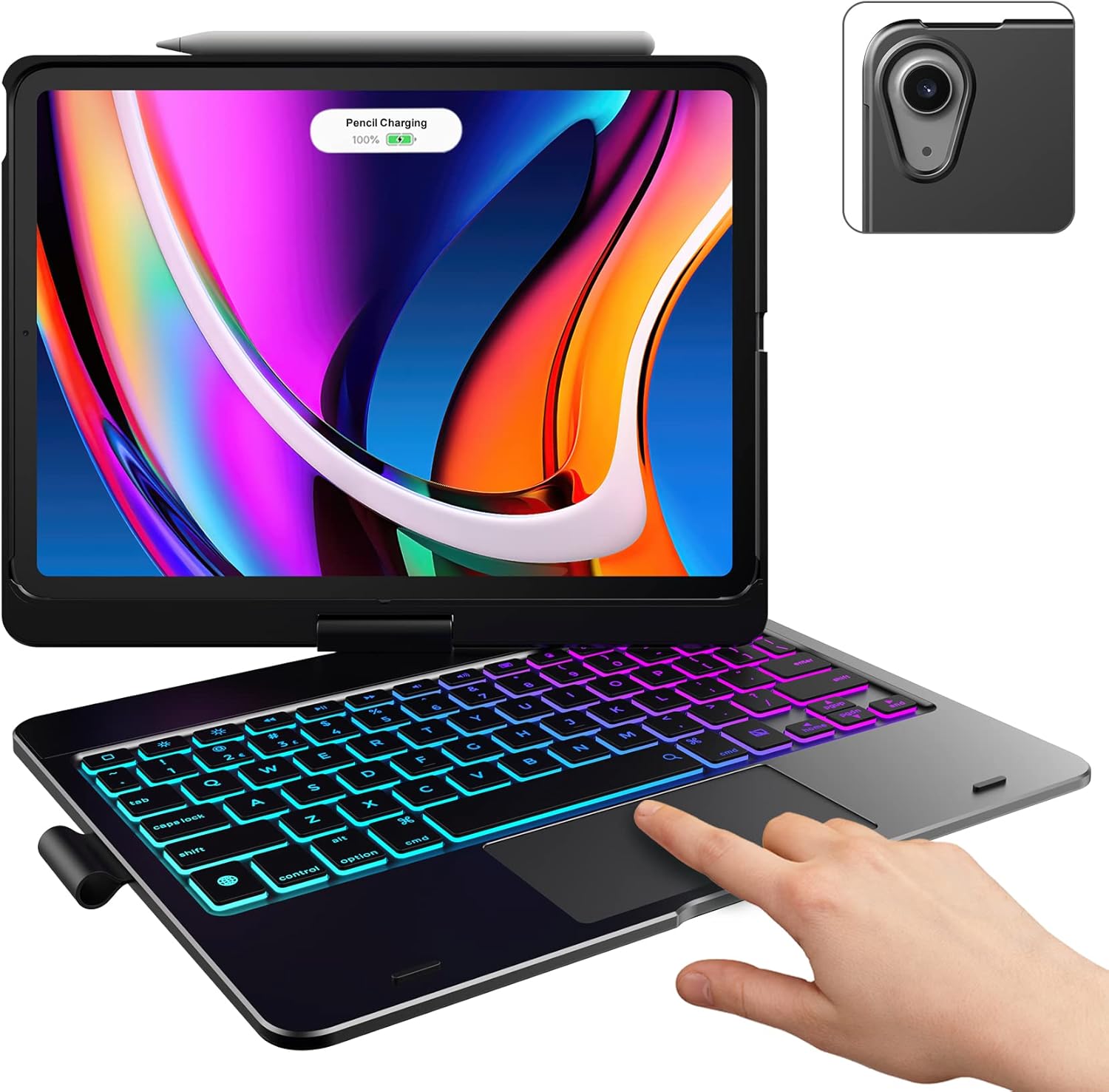
Image: The typecase keyboard case with an iPad securely inserted, ready for use. Note the integrated trackpad and backlit keys.

Image: Visual representation of the 7 versatile modes supported by the 360° rotatable hinge, including Laptop, Stand, and Tablet modes.
3. Pairing with Your iPad (Bluetooth)
- Tionndaidh air a’ mheur-chlàr le bhith a’ sleamhnachadh an suidse cumhachd chun t-suidheachaidh ON.
- Brùth an Ceangail button (or a similar Bluetooth pairing button, usually indicated by a Bluetooth icon) on the keyboard. The Bluetooth indicator light will start blinking.
- Air an iPad agad, rach gu Suidhichidhean > Bluetooth.
- Dèan cinnteach gu bheil Bluetooth air a thionndadh air On.
- Locate "typecase Keyboard" or a similar name in the "Other Devices" list and tap on it to pair.
- Once paired, the Bluetooth indicator light on the keyboard will stop blinking and remain solid, or turn off.
Note: The keyboard will automatically enter sleep mode after a period of inactivity to conserve battery. Press any key to wake it up.
Stiùireadh Obrachaidh
Gnìomhan meur-chlàr
The keyboard features a standard layout with 78 comfortably spaced keys and a dedicated row of iPadOS shortcut keys.

Ìomhaigh: Mion-fhiosrachadh view of the backlit keyboard, highlighting the iPadOS shortcut keys and the vibrant 11-color RGB backlight.
iPadOS Shortcut Keys:
| Prìomh Ìomhaigh | Gnìomh |
|---|---|
| Dhachaigh | A ’tilleadh chun sgrion Dachaigh. |
| Gile sìos | A 'lùghdachadh soilleireachd sgrion. |
| Gile suas | A 'meudachadh soilleireachd sgrion. |
| Keyboard Hide/Show | Cuiridh seo am meur-chlàr air an sgrion an gnìomh. |
| Rannsachadh | Cuiridh seo rannsachadh iPad an gnìomh. |
| Rian roimhe | Skips to the previous media track. |
| Cluich / Stad | A’ cluich no a’ cur stad air meadhanan. |
| An ath Rian | A’ leum chun ath shlighe mheadhanan. |
| Mut | A’ cur fuaim air no a’ cur dheth e. |
| Meud Sìos | Lùghdachadh meud fuaim. |
| Tomhais Suas | A 'meudachadh ìre fuaim. |
| Sgrion glasaidh | A’ glasadh scrion an iPad. |
Cleachdadh Trackpad
The integrated multi-gesture trackpad allows for precise control and navigation of your iPad. Ensure the trackpad is enabled in your iPad's settings if you experience issues.
Common Trackpad Gestures:
- Tap aon mheur: Click/Select.
- Sgroladh dà mheur: Scrollaich suas no sìos.
- Pìnich gus Zoom a dhèanamh: Zoom a-steach no a-mach air susbaint.
- Sguab suas le trì meòirean: Rach gu sgrìn dachaigh.
- Sguabadh trì meòirean gu clì/deas: Switch eadar aplacaidean fosgailte.
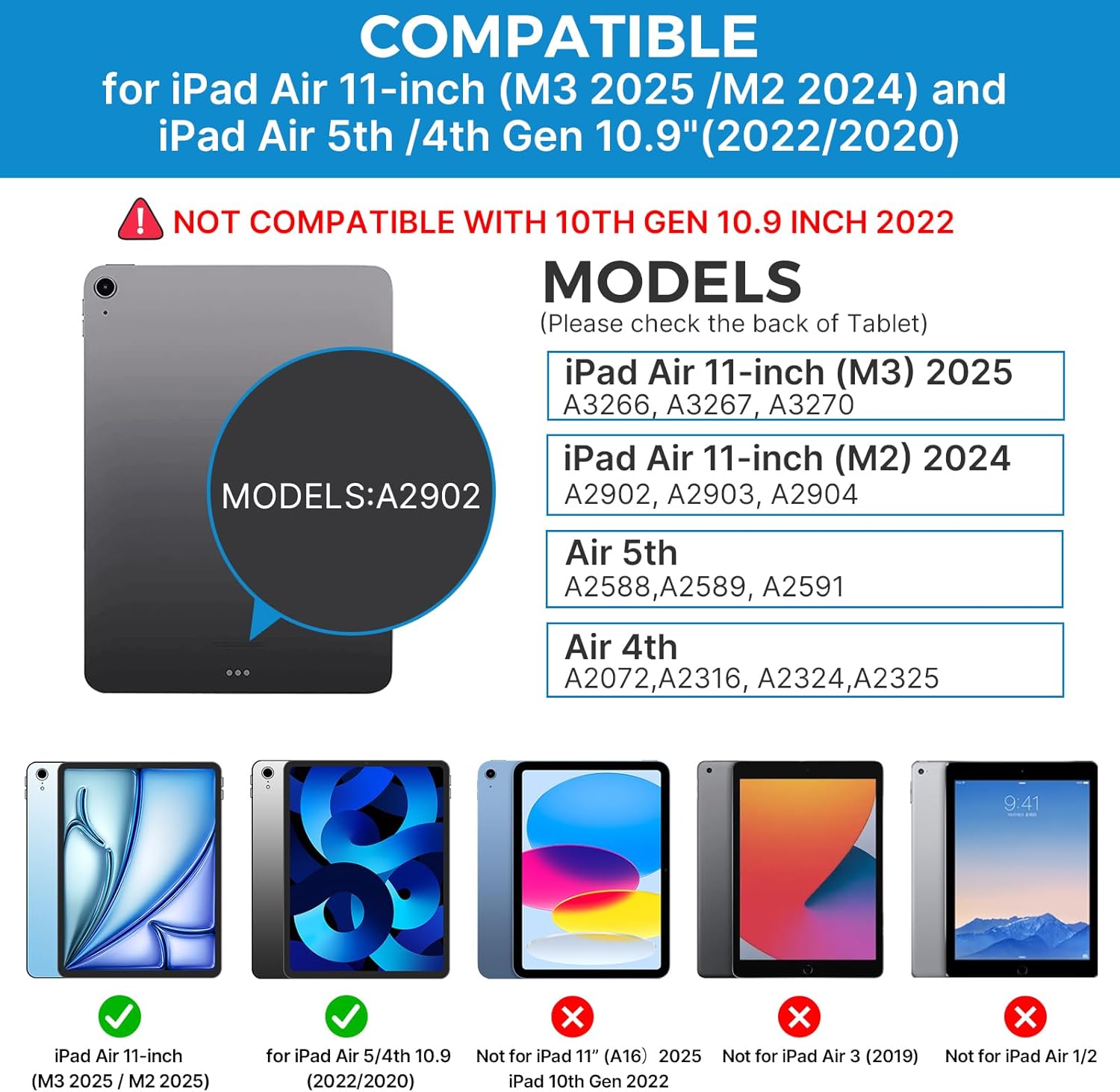
Image: A hand demonstrating the use of the multi-touch trackpad for precise cursor control on the iPad screen.
A’ cur solas-cùil an àite
The keyboard features 11 adjustable RGB backlight colors and 3 levels of brightness. Use the dedicated backlight keys on the keyboard to cycle through colors and adjust brightness levels.
Video: This video demonstrates the 360-degree rotation feature of the typecase Touch Keyboard Case, showcasing its versatility in different viewmodhan ing.
Video: This video provides a step-by-step guide on how to properly install and remove your iPad from the typecase Touch Keyboard Case, ensuring a secure fit and preventing damage.
Cùram agus cumail suas
- Glanadh: Cleachd bog, damp cloth to clean the exterior of the case and keyboard. Avoid harsh chemicals or abrasive materials.
- Stòradh: When not in use for extended periods, store the keyboard case in a cool, dry place. Ensure the iPad is removed if storing for very long durations.
- Beatha bataraidh: To maximize battery life, turn off the keyboard when not in use. The auto sleep/wake function helps conserve power.
- Seachain Liquids: Do not expose the keyboard case to excessive moisture or liquids.
- Làimhseachadh le cùram: While durable, avoid dropping the case or applying excessive force to the hinge or keyboard.
Fuasgladh thrioblaidean
If you encounter any issues with your typecase Touch Keyboard Case, please refer to the following common solutions:
Keyboard Not Connecting/Typing:
- Dèan cinnteach gu bheil am meur-chlàr air a thionndadh AIR agus làn-luchdaichte.
- Check your iPad's Bluetooth settings to confirm the keyboard is paired and connected. If not, try re-pairing.
- Ath-thòisich an dà chuid an iPad agad agus am meur-chlàr.
- Dèan cinnteach nach eil innealan Bluetooth eile a’ cur bacadh air a’ cheangal.
Trackpad Not Responding:
- Dearbhaich gu bheil am meur-chlàr ceangailte tro Bluetooth.
- Thoir sùil air roghainnean an iPad: Suidhichidhean > Ruigsinneachd > Suathadh > Cuideachadh le Touch. Ensure "Mouse Keys" is off if it's causing interference.
- Glan uachdar a’ trackpad gus sprùilleach sam bith a thoirt air falbh.
Backlight nach eil ag obair:
- Dèan cinnteach gu bheil am meur-chlàr air a luchdachadh gu leòr.
- Press the backlight adjustment keys to cycle through brightness levels and colors.
iPad Not Entering Sleep/Wake Mode:
- Ensure the iPad is correctly seated in the case.
- Thoir sùil air roghainnean an iPad: Suidhichidhean > Taisbeanadh & soilleireachd > Glasadh / Fuasgladh. Ensure this feature is enabled.
If problems persist, please contact typecase customer support for further assistance.
Sònrachaidhean
| Feart | Mion-fhiosrachadh |
|---|---|
| Modail | B09WVRD5JD |
| Co-fhreagarrachd | iPad Air 11-inch (M3 2025 / M2 2024), iPad Air 5th Gen (2022, 10.9"), iPad Air 4th Gen (2020, 10.9") |
| Ceangalachd | Bluetooth |
| Cruth meur-chlàr | 78-key standard with iPadOS shortcuts |
| Cùl-sholais | 11-color RGB, 3 brightness levels |
| Trackpad | Multi-functional, multi-gesture |
| Hinge Rotation | 360° (20,000-cycle stress tested) |
| Stòr cumhachd | Cumhachd bataraidh (bataraidh 1 lithium polymer air a thoirt a-steach) |
| Cuideam nì | 1.52 not |
| Meudan toraidh (LxWxH) | 11.02 x 8.66 x 0.79 òirleach |
| Stuth | Premium hardshell design |
Barantas agus Taic
typecase offers a comprehensive warranty and support for your product:
- Seirbheis Ath-nuadhachadh 1-bliadhna: Enjoy worry-free after-sales support with a 1-year replacement service for manufacturing defects.
- Ais-dhìoladh 30-latha: If you are not satisfied with your purchase, you may be eligible for a refund within 30 days of purchase.
- Taic teachdaiche: For any questions, technical assistance, or warranty claims, please contact typecase customer service. Refer to the contact information provided in the product packaging or on the official typecase weblàrach.

Ìomhaigh: Tharview of typecase's customer support and warranty policy, including 1-year replacement and 30-day refund.