
1. Ro-ràdh
Thank you for choosing the Awei TC-7 Wired Earphones. These in-ear earphones are designed for clear audio and convenient communication, featuring a Type-C connector for modern devices and an inline microphone with control buttons. Please read this manual carefully to ensure proper use and maintenance of your earphones.
2. Pasgan-susbaint
- Awei TC-7 Wired Earphones
- Multiple sizes of Ear Cushions (Small, Medium, Large)

Figear 2.1: The Awei TC-7 earphones include ear caps in various sizes to ensure a comfortable and secure fit for different users.
3. Toradh thallview
The Awei TC-7 earphones feature a durable design with a Type-C plug for direct connection to compatible devices. The inline remote control allows for easy management of audio playback and calls.

Figear 3.1: A close view of the Awei TC-7 earphones, showcasing their in-ear design for optimal sound delivery.

Figear 3.2: The inline remote control features multi-function buttons for managing audio and calls.

Figear 3.3: The integrated HD microphone is designed to pick up clear audio, even in noisy environments.
4. Suidhich
- Tagh Cluasagan-cluaise: Choose the ear cushion size (Small, Medium, or Large) that provides the most comfortable and secure fit for your ears. A proper fit enhances sound quality and noise isolation.
- Ceangail ris an inneal: Insert the USB-C plug of the earphones into the Type-C port of your smartphone, tablet, laptop, or other compatible device.
- Toradh claisneachd: Ensure your device's audio output is set to the connected earphones. This is usually automatic upon connection.
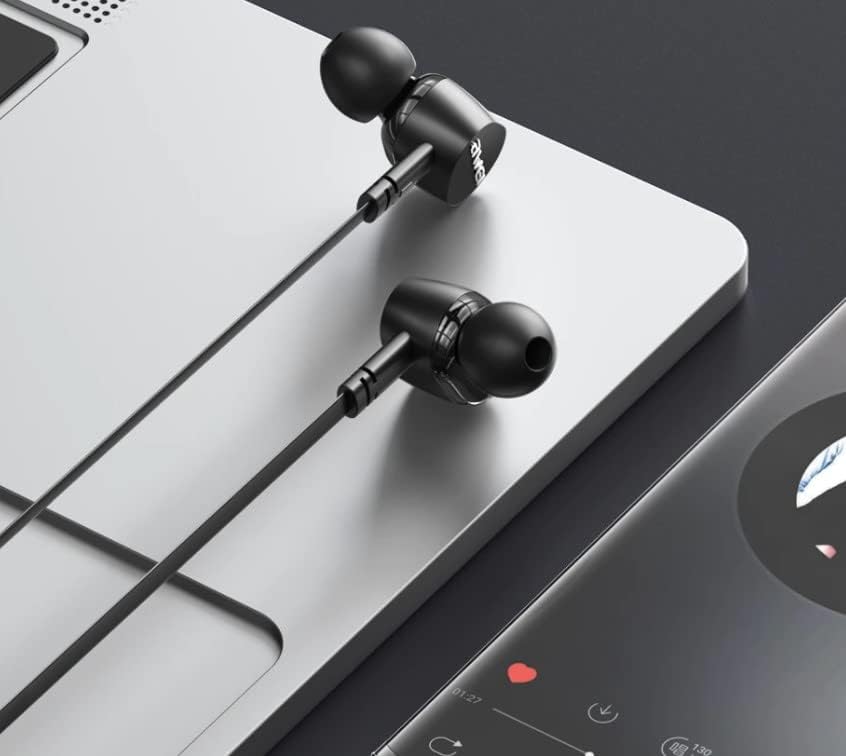
Figear 4.1: The earphones are compatible with various devices featuring a USB-C port, such as laptops and smartphones.
5. Stiùireadh Obrachaidh
The Awei TC-7 earphones feature an inline remote with buttons for convenient control of your audio and calls.
5.1. Smachd Ath-chluich Ciùil
- Cluich / Stad: Brùth am putan sa mheadhan aon uair.
- An ath cheum: Brùth putan an ionaid dà uair gu sgiobalta.
- Rian roimhe: Brùth putan an ionaid trì tursan gu sgiobalta.
- Meud suas: Brùth am putan ‘+’.
- Meud sìos: Brùth am putan '-'.
5.2. Riaghladh Call
- Freagairt/Cuireadh Call: Press the center button once during an incoming call or an active call.
- Call a dhiùltadh: Brùth is cum sìos am putan sa mheadhan airson timcheall air 2 dhiog nuair a bhios gairm a’ tighinn a-steach.
6. Cumail suas
Proper care will extend the lifespan of your Awei TC-7 earphones.
- Glanadh Chluasagan-cluaise: Regularly remove the ear cushions and clean them with a soft, damp clò. Dèan cinnteach gu bheil iad gu tur tioram mus cuir thu iad air ais.
- Cùram càball: The cable is designed to be tangle-free. Avoid excessive pulling or sharp bending to prevent internal damage.
- Stòradh: When not in use, store the earphones in a clean, dry place, away from extreme temperatures.
- Seasmhachd uisge: The earphones are rated as waterproof. However, avoid prolonged submersion and ensure the USB-C port is dry before connecting to a device after exposure to water.
7. A ’dèanamh trioblaid
If you encounter issues with your Awei TC-7 earphones, please refer to the following common solutions:
| Trioblaid | Adhbhar a dh’fhaodadh a bhith ann | Fuasgladh |
|---|---|---|
| Gun fhuaim bho chluas-cinn | Earphones not properly connected; device volume too low; incorrect audio output setting on device. | Ensure the USB-C plug is fully inserted. Increase device volume. Check device audio settings to confirm output is set to earphones. |
| Microphone nach eil ag obair | Microphone port blocked; incorrect input setting on device; application permissions. | Ensure the microphone area is clear. Check device sound settings for microphone input. Verify application permissions for microphone access. |
| Putanan nach eil a’ freagairt | Loose connection; device incompatibility; software glitch. | Reconnect the earphones. Test with another compatible device if possible. Restart your device. |
8. Sònrachaidhean
| Feart | Mion-fhiosrachadh |
|---|---|
| Ainm Modail | TC-7 |
| Teicneòlas ceangail | Uèir |
| Jack headphone | USB-C |
| Suidheachadh cluais | Anns an Ear |
| Raon tricead | 20Hz - 20kHz |
| Feartan a bharrachd | Microphone Included, Inline Control |
| Stuth | Plastaig |
| Ìre an aghaidh uisge | Uisge-dhìonach |
| Feartan càball | Tangle saor an asgaidh |
| Innealan co-fhreagarrach | Smartphones, Laptops, Tablets, Desktops with USB-C |
9. Barantas agus Taic
For warranty information and customer support, please refer to the documentation provided at the point of purchase or contact your retailer. Keep your proof of purchase for any warranty claims.