
1. Ro-ràdh
The Sunshine DT-17N Digital Multimeter is a versatile and reliable tool designed for accurate electrical measurements. It is particularly suitable for phone repair technicians and general electronics work, capable of measuring various electrical parameters including voltage, current, resistance, capacitance, and temperature. Its compact design and user-friendly features make it an essential tool for diagnosing and repairing electronic devices.

Figure 1: The Sunshine DT-17N Digital Multimeter, demonstrating its compact size for portability.
2. Fiosrachadh Sàbhailteachd
To ensure safe operation and prevent damage to the meter, please read and follow all safety instructions carefully. This multimeter features double insulation protection for enhanced user safety.
- Always ensure the test leads are in good condition and properly connected before taking measurements.
- Na cuir a-steach voltage or current that exceeds the maximum rated values for each range.
- Never use the multimeter if it appears damaged or if the test leads are frayed.
- Bi faiceallach nuair a bhios tu ag obair le voltagos cionn 30V AC RMS, 42V aig a’ char as àirde, no 60V DC, oir tha iad sin ag adhbhrachadh cunnart clisgeadh.
- Always disconnect power to the circuit and discharge high-voltage capacitors before measuring resistance, continuity, or diodes.
- Cuir am bataraidh na àite sa bhad nuair a nochdas an comharra bataraidh ìosal gus dèanamh cinnteach gu bheil na leughaidhean ceart.
3. Toradh thallview
3.1. Co-phàirtean an ioma-mheatair

Figear 2: Aghaidh view of the DT-17N Multimeter, highlighting its main display and controls.
3.2. Feartan Taisbeanaidh
The DT-17N features a large LCD display with a backlight, ensuring clear readability in various lighting conditions.

Figure 3: The multimeter's LCD display with its backlight feature, improving visibility in low-light environments.
- Taisbeanadh LCD mòr: Provides clear numerical readings.
- Cùl-solais: Improves visibility in dark or low-light conditions. Activated by pressing and holding the HOLD button.
- Aonad Tomhais: Displays the appropriate unit (e.g., V, A, Ω, °C/°F).
- Inbhe bataraidh: A’ sealltainn an ìre bataraidh gnàthach.
- Automatic Polarity Display: Shows positive or negative polarity automatically.
3.3. Controls and Input Ports
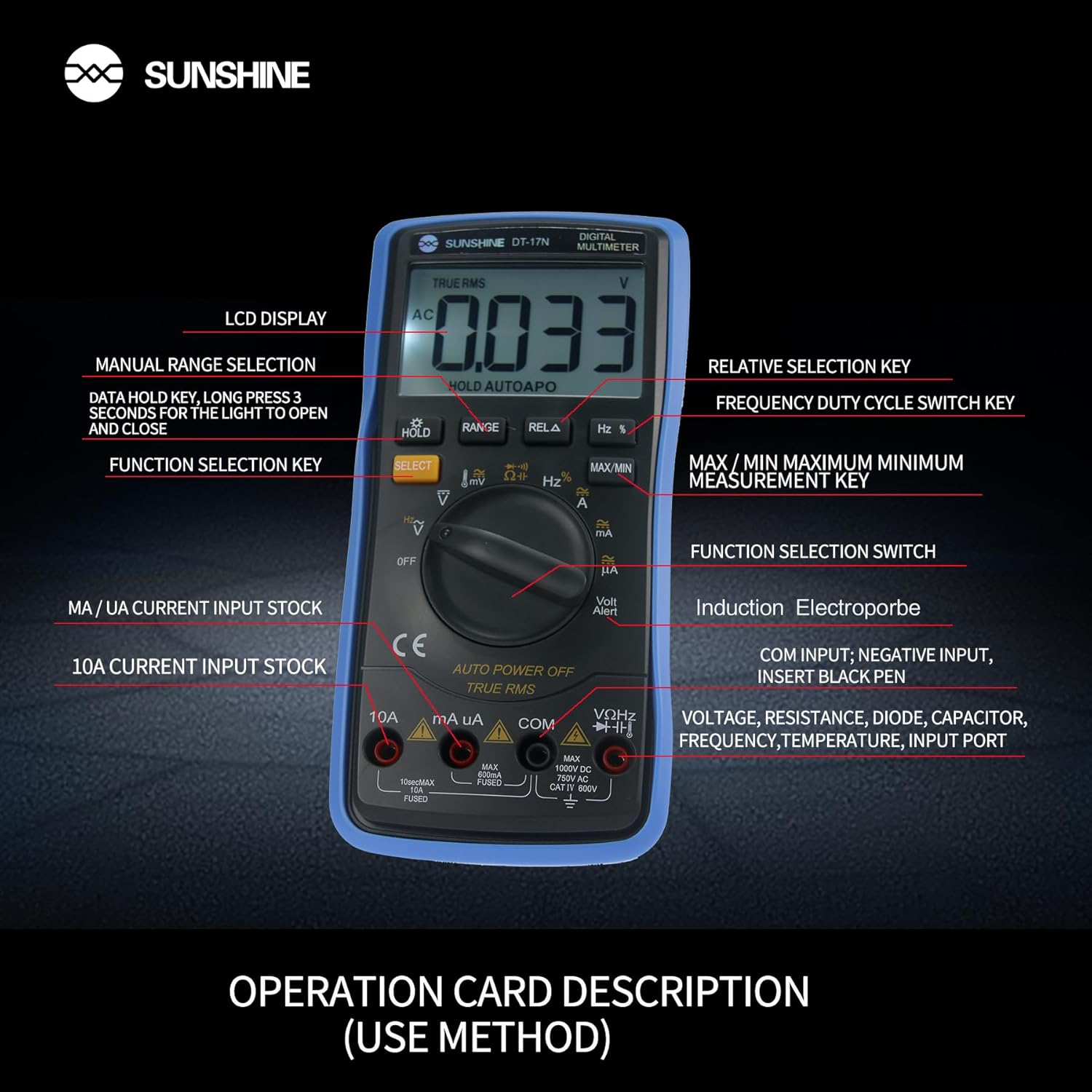
Figear 4: Mionaideach view of the multimeter's controls and input ports with their respective functions.
- Suidse Gnìomh Rothlach: Used to select the desired measurement function (e.g., Voltage, Current, Resistance, Temperature).
- Putan SELECT: Toggles between different measurement modes within a single rotary switch position (e.g., AC/DC voltage, Diode/Leantachd).
- Putan gleidhidh: Freezes the current reading on the display. Press and hold to activate/deactivate the backlight.
- Putan RANGE: Allows manual selection of measurement ranges, overriding the automatic ranging feature.
- RELA Button (Relative Selection Key): A’ tomhas an diofar eadar luach iomraidh stòraichte agus an leughadh làithreach.
- Hz % Button (Frequency Duty Cycle Switch Key): Toggles between frequency and duty cycle measurements.
- Putan MAX/MIN: Displays the maximum or minimum measured value during a measurement session.
- VΩHz Input Port: Connect the red test lead for voltage, resistance, frequency, capacitance, diode, and temperature measurements.
- COM Input Port: Connect the black test lead (common ground) for all measurements.
- mA/uA Input Port: Connect the red test lead for measuring small currents (milliamperes and microamperes).
- 10A Input Port: Connect the red test lead for measuring large currents (up to 10 Amperes).
- Volt Alert (NCV): Vol neo-conaltraidhtage detection feature.
4. Suidhich
4.1. Stàladh bataraidh
The DT-17N is battery-powered. To install or replace the battery:
- Dèan cinnteach gu bheil am multimeter air a chuir dheth.
- Lorg còmhdach roinn a’ bhataraidh air cùl an aonaid.
- Sgriub às na sgriubhaichean gleidhidh agus thoir air falbh an còmhdach.
- Insert the new battery, observing correct polarity (+ and -).
- Cuir còmhdach roinn a’ bhataraidh air ais agus daingnich e leis an sgriubha (no na sgriubhaichean).
4.2. A’ ceangal uèirichean deuchainn
Always connect the black test lead to the COM input jack. Connect the red test lead to the appropriate input jack based on the measurement you intend to perform:
- Airson Voltage, Resistance, Capacitance, Frequency, Diode, and Temperature measurements: Connect the red test lead to the VΩHz seac.
- For Current measurements (mA/uA): Connect the red test lead to the mA/uA seac.
- For High Current measurements (10A): Connect the red test lead to the 10A seac.
5. Stiùireadh Obrachaidh
The Sunshine DT-17N features automatic identification for most ranges, simplifying operation. Use the rotary switch to select the primary function and the SELECT button to toggle sub-functions.
5.1. Measuring Voltage (AC/DC)
- Tionndaidh an tionndadh rothlach chun an V suidheachadh.
- Ma tha feum air, brùth air an ROGHAINN button to toggle between AC (~) and DC (—) voltage.
- Ceangail luaidhe an deuchainn dhubh ris an COIM Seumas agus an luaidhe deuchainn dearg chun an VΩHz seac.
- Ceangail na proban deuchainn ann an co-shìnte ris a’ chuairt no ris a’ phàirt a tha thu airson a thomhas.
- Leugh an voltage luach air an taisbeanadh.

Figure 5: The multimeter showing a DC millivolt measurement on its display.
5.2. Measuring Current (AC/DC)
Rabhadh: Never connect the multimeter in parallel when measuring current, as this can damage the meter and the circuit. Always connect in series.
- Tionndaidh an tionndadh rothlach chun an mA/uA or 10A suidheachadh, a rèir an t-sruth ris a bheil dùil.
- Ma tha feum air, brùth air an ROGHAINN button to toggle between AC (~) and DC (—) current.
- Ceangail luaidhe an deuchainn dhubh ris an COIM seacaid. Ceangail an uèir deuchainn dhearg ris an mA/uA or 10A jack accordingly.
- Open the circuit and connect the test probes in series with the load.
- Leugh an luach làithreach air an taisbeanadh.
5.3. Tomhais Resistance
- Tionndaidh an tionndadh rothlach chun an Ω suidheachadh.
- Ceangail luaidhe an deuchainn dhubh ris an COIM Seumas agus an luaidhe deuchainn dearg chun an VΩHz seac.
- Dèan cinnteach gu bheil an cuairt dì-lùthaichte agus gu bheil na comasairean uile air an dì-luchdachadh.
- Connect the test probes across the component to measure its resistance.
- Leugh an luach dìon air an taisbeanadh.
5.4. A’ tomhas comas
- Tionndaidh an tionndadh rothlach chun an Capacitance symbol (often shared with diode/continuity).
- Brùth an ROGHAINN button until the capacitance mode is active.
- Ceangail luaidhe an deuchainn dhubh ris an COIM Seumas agus an luaidhe deuchainn dearg chun an VΩHz seac.
- Ensure the capacitor is fully discharged before connecting the test probes.
- Ceangail na probes deuchainn thairis air an capacitor.
- Leugh an luach capacitance air an taisbeanadh.
5.5. Measuring Frequency / Duty Cycle
- Tionndaidh an tionndadh rothlach chun an Hz % suidheachadh.
- Brùth an Hz % putan gus gluasad eadar tricead (Hz) agus cearcall dleastanais (%).
- Ceangail luaidhe an deuchainn dhubh ris an COIM Seumas agus an luaidhe deuchainn dearg chun an VΩHz seac.
- Connect the test probes in parallel to the signal source.
- Leugh luach an tricead no a’ chearcall-dhleastanais air an taisbeanadh.
5.6. Tomhas Teothachd
The DT-17N can measure temperature using a K-type thermocouple (not always included, check package contents).

Figear 6: Example of temperature measurement using the DT-17N Multimeter with a thermocouple.
- Tionndaidh an tionndadh rothlach chun an ° C / ° F suidheachadh.
- Ma tha feum air, brùth air an ROGHAINN button to choose between Celsius or Fahrenheit.
- Connect the K-type thermocouple to the VΩHz agus COIM jacks, a ’cumail sùil air polarity.
- Place the thermocouple tip on or in the object whose temperature you wish to measure.
- Leugh luach na teòthachd air an taisbeanadh.
5.7. Deuchainn Diode agus Leantainneachd
- Tionndaidh an tionndadh rothlach chun an Diod/Leantainneachd samhladh.
- Brùth an ROGHAINN putan gus gluasad eadar Deuchainn Diode agus Deuchainn Leantainneachd.
- Ceangail luaidhe an deuchainn dhubh ris an COIM Seumas agus an luaidhe deuchainn dearg chun an VΩHz seac.
- For Diode Test: Connect the probes across the diode. The display will show the forward voltagboinne e. Tionndaidh na proban gus sgrùdadh a dhèanamh airson cuairt fosgailte.
- For Continuity Test: Connect the probes across the circuit or component. A beep indicates continuity (low resistance).
5.8. Neo-cheangal Voltage (NCV) Dearbhadh
The NCV function allows detection of AC voltage without direct contact with conductors.
- Tionndaidh an tionndadh rothlach chun an NCV position (often indicated by a Volt Alert symbol).
- Move the top part of the multimeter near the conductor.
- The meter will beep and/or flash an indicator light if AC voltage air a bhrath.
5.9. Data Hold and Backlight
- Cumail dàta: Brùth an LAOIDH brùth air a’ phutan goirid gus an leughadh làithreach a reothadh air an taisbeanadh. Brùth a-rithist gus a leigeil ma sgaoil.
- Cùl-solais: Brùth agus cùm an LAOIDH button for approximately 3 seconds to turn the display backlight ON or OFF.
5.10. MAX/MIN Measurement
This function records the maximum and minimum values measured during a session.
- Select the desired measurement function (e.g., Voltagagus).
- Brùth an MAX/MIN button. The display will show 'MAX' and the maximum value recorded.
- Brùth MAX/MIN again to cycle to 'MIN' and view the minimum value.
- Brùth agus cum MAX/MIN gus am modh seo fhàgail.
6. Cumail suas
Nì cumail suas ceart cinnteach gum mair an multimeter agad fad-beatha agus gum bi e ceart.
6.1. Glanadh
Sguab às a 'chùis le sanasamp clò agus inneal-glanaidh tlàth. Na cleachd stuthan sgrìobach no fuasglaidhean. Dèan cinnteach gu bheil am meatair gu tur tioram mus cleachd thu e.
6.2. Ath-nuadhachadh bataraidh
Refer to Section 4.1 for battery replacement instructions. Always use the specified battery type.
6.3. Holster Care
The multimeter is protected by a thick rubber shockproof holster, designed for durability and a non-slip grip. Keep the holster clean and free from debris.

Figure 7: The durable rubber holster provides protection and a comfortable grip for the multimeter.
7. A ’dèanamh trioblaid
If you encounter issues with your DT-17N multimeter, refer to the table below for common problems and solutions.
| Trioblaid | Adhbhar a dh’fhaodadh a bhith ann | Fuasgladh |
|---|---|---|
| Gun taisbeanadh no taisbeanadh dorcha | Low or dead battery; Poor battery contact | Replace battery; Check battery contacts |
| Leughaidhean ceàrr | Wrong function selected; Improper test lead connection; Damaged test leads; Out of range | Select correct function; Ensure leads are in correct jacks; Replace leads; Select higher range or check specifications |
| Gun bìp leantainneachd | Circuit resistance too high; Continuity mode not selected | Ensure resistance is below threshold; Press SELECT to enter continuity mode |
| Fuse blown (for current measurements) | Overcurrent applied | Replace fuse with specified type and rating; Ensure correct current measurement procedure |
8. Sònrachaidhean
Technical specifications for the Sunshine DT-17N Digital Multimeter.
| Feart | Sònrachadh |
|---|---|
| Modail | DT-17N |
| Seòrsa Tomhais | Ioma-mheatair |
| Taisbeanadh | 5999 (5 5/6) counts, Automatic Polarity Display, Backlit LCD |
| SampÌre ling | Mu 3 tursan san diog |
| Stòr cumhachd | Cumhachd bataraidh |
| Vol obrachaidh as ìsletage | 3 bholt (DC) |
| Raon Tomhais Teòthachd | 0°C gu 1000°C (32°F gu 1832°F) |
| Induction Electroprobe Function | Yes (NCV) |
| Tionndadh A/D dùbailte aonaichte | Tha |
| Meudan nì | 5.51 x 2.76 x 1.18 òirleach |
| Cuideam nì | 0.55 cileagram |
| Dath | Gorm |
9. Barantas agus Taic
9.1. Fiosrachadh Barantais
This product comes with a warranty of 3 mìosan bhon cheann-latha ceannach. Please retain your proof of purchase for warranty claims. The warranty covers manufacturing defects under normal use.
9.2. Taic teachdaiche
For technical assistance or inquiries regarding your Sunshine DT-17N Digital Multimeter, please contact your retailer or the manufacturer's customer service department. Refer to your purchase documentation for specific contact details.