
Radwag WL-213-1002
Radwag PS 200/2000.R1 Precision Balance User Manual
Model: WL-213-1002
Ro-ràdh
This manual provides comprehensive instructions for the proper setup, operation, and maintenance of your Radwag PS 200/2000.R1 Precision Balance. This instrument is designed for precise weighing applications, offering dual range capacity of 200g/2000g with readability of 0.001g/0.01g. It features a backlit LCD display, programmable buttons, and various connectivity options to enhance your laboratory or industrial processes.
Please read this manual thoroughly before using the balance to ensure safe and efficient operation and to achieve optimal performance.
Stàladh agus stàladh
1. Unpacking agus Sgrùdadh
Carefully remove the balance from its packaging. Inspect all components for any signs of damage that may have occurred during transit. Ensure all listed accessories are present.
- PS 200/2000.R1 Precision Balance unit
- Pannal cuideam
- Adapter cumhachd
- Leabhar-làimhe cleachdaiche (an sgrìobhainn seo)
2. Suidheachadh agus Ìreachadh
Place the balance on a stable, level surface free from vibrations, drafts, and direct sunlight. Avoid locations near air conditioning vents, windows, or heavy machinery. Use the adjustable feet at the bottom of the balance to level the unit. The integrated spirit level (bubble level) on the balance indicates when it is perfectly level.

Figear 1: Aghaidh view of the Radwag PS 200/2000.R1 Precision Balance, showing the display and control panel.

Figear 2: Ceàrnach view of the balance, highlighting its compact design and adjustable feet.
3. Ceangal Cumhachd
Connect the provided power adapter to the balance's power input port and then plug it into a suitable electrical outlet. Ensure the power supply matches the balance's requirements (100-240V AC 50/60Hz or 12V DC 1.2A).

Figear 3: Cùl view of the balance, illustrating the power input and communication ports (RS232, USB).
4. Calibration tùsail
For optimal accuracy, it is recommended to perform an initial calibration after setup and whenever the balance is moved to a new location or experiences significant temperature changes. Refer to the balance's on-screen menu or the detailed technical specifications for calibration procedures.
Operating the Balance
Taisbeanadh agus Keypad
The PS 200/2000.R1 features a backlit LCD display for clear readability and an intuitive keypad for easy operation. The display provides weight readings, unit indications, and menu prompts. The keypad includes dedicated buttons for common functions and programmable function keys (F1-F4) for customized shortcuts.

Figear 4: Dùin suas view of the balance's backlit LCD display, showing a weight reading and various indicators.
Basic Weighing Operations
- Cumhachd air / dheth: Brùth an Air / dheth button to power the balance on or off.
- Neo-dhruim: Brùth an -0- button to set the display to zero. This is typically done before placing any sampleis air a' phana.
- Gnìomh Tare: Place an empty container on the weighing pan. Press the -T- button to tare the container's weight. The display will show zero, allowing you to weigh only the contents.
- Taghadh Aonad: Brùth an Aonadan button to cycle through available weighing units (e.g., grams, milligrams, kilograms).
Advanced Functions and Weighing Modes
The PS 200/2000.R1 balance offers a variety of advanced functions and weighing modes to suit diverse applications:
- Autotest: Self-diagnostic function.
- Dosing: For precise dispensing of materials.
- Percent Weighing: Measures weight as a percentage de chuideam iomraidh.
- Totalizing: Accumulates multiple weighings.
- Cunntadh phàirtean: Counts individual items based on a reference weight.
- Checkweighing: Determines if a sample's weight falls within a specified range.
- GLP Procedures: Adherence to Good Laboratory Practice guidelines for data recording.
- Newton Unit Measurement: Measures force in Newtons.
- Staitistig: Provides statistical analysis of weighing data.
- Animal Weighing: Stabilizes readings for unstable loads, such as live animals.
- Co-dhùnadh dùmhlachd: Calculates the density of a substance.
- Under-Pan Weighing: Allows weighing of objects that cannot be placed on the pan, by suspending them below the balance.

Figure 5: Illustration of key features including the plastic housing, stainless steel pan, and the under-pan weighing capability.
Connectivity and Data Management
The balance is equipped with multiple interfaces for data transfer and integration:
- 2x RS232 Ports: For connecting to printers or other serial devices.
- Port USB-A: For connecting USB flash drives or other USB peripherals.
- Port USB-B: Airson ceangal ri coimpiutair.
- Wi-Fi (Optional): For wireless data communication.
The system utilizes databases for storing information on operators (up to 10), products (up to 1000), weighings (up to 5000), tares (up to 100), and ALIBI memory (up to 100,000 weighings) ensuring data safety and continuity.

Figear 6: Os a chionnview of the balance's interfaces, ALIBI Memory for data safety, and integrated database capabilities.
Cumail suas
Glanadh
To maintain the accuracy and longevity of your balance, regular cleaning is essential. Always disconnect the power before cleaning.
- Cleachd bog, damp cloth with a mild, non-abrasive cleaning agent to wipe the exterior of the balance.
- The stainless steel weighing pan can be removed for thorough cleaning.
- Do not use harsh chemicals, solvents, or abrasive materials, as these can damage the balance's surfaces or internal components.
- Dèan cinnteach nach tèid lionntan a-steach don taigheadas cothromachaidh no don raon taisbeanaidh.
Stòradh
When not in use for extended periods, store the balance in a clean, dry environment, away from extreme temperatures, humidity, and direct sunlight. It is advisable to cover the balance to protect it from dust.
Fuasgladh thrioblaidean
This section provides solutions to common issues you might encounter with your PS 200/2000.R1 Precision Balance. If the problem persists, please contact customer support.
| Trioblaid | Adhbhar a dh’fhaodadh a bhith ann | Fuasgladh |
|---|---|---|
| Chan eil cumhachd a’ dol air a’ chothromachadh. | No power supply; faulty power adapter; power button issue. | Check power cable connection. Ensure outlet is functional. Try a different power adapter if available. |
| Leughaidhean mì-chruinn no neo-sheasmhach. | Balance not level; vibrations; drafts; temperature fluctuations; calibration needed. | Level the balance using the adjustable feet. Move to a stable, draft-free location. Allow balance to acclimate to room temperature. Perform calibration. |
| Display shows "OVERLOAD" or "----". | Weight on pan exceeds maximum capacity; pan not properly seated. | Remove excess weight. Ensure weighing pan is correctly placed. |
| Cannot connect to computer/printer. | Incorrect cable; driver issues; incorrect communication settings. | Verify correct cable type (RS232, USB). Install necessary drivers. Check communication settings on both balance and connected device. |
Sònrachaidhean Teicnigeach
The following table outlines the key technical specifications for the Radwag PS 200/2000.R1 Precision Balance:

Figure 7: Datasheet page 1, detailing metrological parameters and available functions.
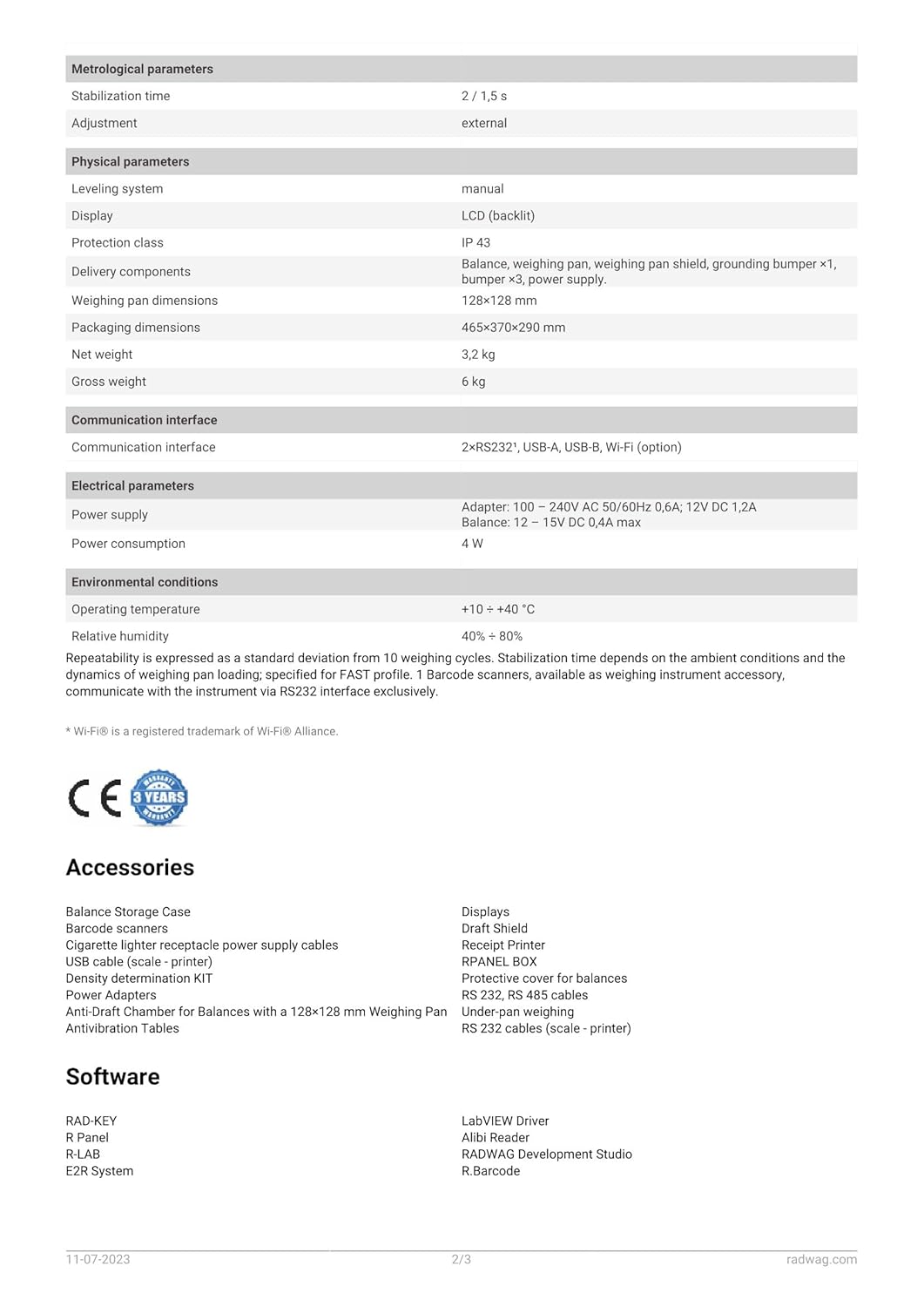
Figure 8: Datasheet page 2, detailing physical, communication, electrical, environmental parameters, accessories, and software.
Sònrachaidhean Coitcheann
- Modail: WL-213-1002
- Meudan toraidh: 13.11 x 8.11 x 3.94 òirleach
- Cuideam: 10 Punnd
- Dath: Geal
- Seòrsa taisbeanaidh: LCD (Cùl-solais)
- Feart sònraichte: Advanced Weighing Modes, Backlit Display, Programmable Buttons
Metrological Parameters
- Dual Range Max Capacity: 200g / 2000g
- Leughadh [d]: 0.001g / 0.01g
- Luchdaich as ìsle: 20 mg
- Raon Tare: -2000 g
- Repeatability (Max): 0.001 g / 0.01 g
- Repeatability (5% Max): 0.0005 g / 0.005 g
- Sreathachd: ±0.002 g / ±0.02 g
- Ùine stèidheachaidh: 2/1.5 s
- Atharrachadh: Taobh a-muigh
Paramadairean fiosaigeach
- Leveling System: Leabhar-làimhe
- Taisbeanadh: LCD (backlit)
- Clas dìon: IP 43
- Delivery Components: Balance, weighing pan, weighing pan shield, grounding bumper x1, bumper x3, power supply.
- Weighing Pan Dimensions: 128 × 128 mm
- Meudan pacaidh: 465 × 370 × 290 mm
- Cuideam lom: 3.2 kg
- Cuideam Làn: 6 kg
Eadar-aghaidh conaltraidh
- 2×RS232
- USB-A
- USB-B
- Wi-Fi (option)
Paramadairean dealain
- Solar cumhachd: Adapter: 100 - 240V AC 50/60Hz 0.6A; 12V DC 1.2A
- Cothrom: 12 - 15V DC 0.4A max
- Caitheamh cumhachd: 4 W
Suidheachaidhean Àrainneachdail
- Teòthachd obrachaidh: +10 ° C gu +40 ° C
- Taiseachd coimeasach: 40% gu 80%
Note: Repeatability is expressed as a standard deviation from 10 weighing cycles. Stabilization time depends on the ambient conditions and the dynamics of weighing pan loading specified for FAST mode. 3 Barcode scanners, available as weighing instrument accessory, communicate with the instrument via RS232 interface exclusively.
Barantas agus Taic
Radwag products are manufactured to high-quality standards. For specific warranty terms and conditions, please refer to the warranty card included with your product or visit the official Radwag weblàrach.
For technical support, service, or inquiries regarding your PS 200/2000.R1 Precision Balance, please contact Radwag customer service or visit their official weblàrach:
Visit Radwag Official Weblàrach
Additional information and resources, including updated drivers and software, may be available on the Radwag weblàrach.
Ask a question about this manual
Ask about setup, troubleshooting, compatibility, parts, safety, or missing instructions. Manuals+ will review the question and use this page’s manual context to help answer it.