
1. Ro-ràdh
Thank you for choosing the InFocus P120 INL412 Multimedia Projector. This manual provides essential information for the safe and efficient operation of your projector. Please read it thoroughly before using the device and retain it for future reference. The InFocus P120 INL412 is designed for versatile multimedia presentations, offering clear and vibrant images for various applications.
2. Fiosrachadh Sàbhailteachd
To ensure safe operation and prevent damage to the projector, please observe the following safety precautions:
- Na cuir bacadh air na fosglaidhean fionnarachaidh. Dèan cinnteach gu bheil àite gu leòr timcheall air a’ phròiseictar airson sruth-adhair ceart gus casg a chur air cus teasachadh.
- Seachain coimhead gu dìreach a-steach don lionsa proiseactair nuair a bhios an lamp air, oir faodaidh an solas soilleir milleadh a dhèanamh air na sùilean.
- Do not place the projector on an unstable cart, stand, or table. The projector may fall, causing serious injury to a child or adult, and serious damage to the unit.
- Disconnect the power cord from the wall outlet if the projector will not be used for an extended period.
- Refer all servicing to qualified service personnel. Do not attempt to open or repair the projector yourself.
- Keep the projector away from water or moisture. Do not expose it to rain or immerse it in liquid.
- Use only the power cord supplied with the projector or an authorized replacement.
3. Pasgan-susbaint
Dearbhaich gu bheil na nithean uile a tha air an liostadh gu h-ìosal air an toirt a-steach sa phacaid proiseactair agad:
- InFocus P120 INL412 Multimedia Projector
- Corda cumhachd
- Smachd iomallach le bataraidhean
- Càball VGA
- Leabhar-làimhe cleachdaiche (an sgrìobhainn seo)
- Stiùireadh tòiseachaidh luath
4. Toradh thallview
Familiarize yourself with the main components of your InFocus P120 INL412 projector.
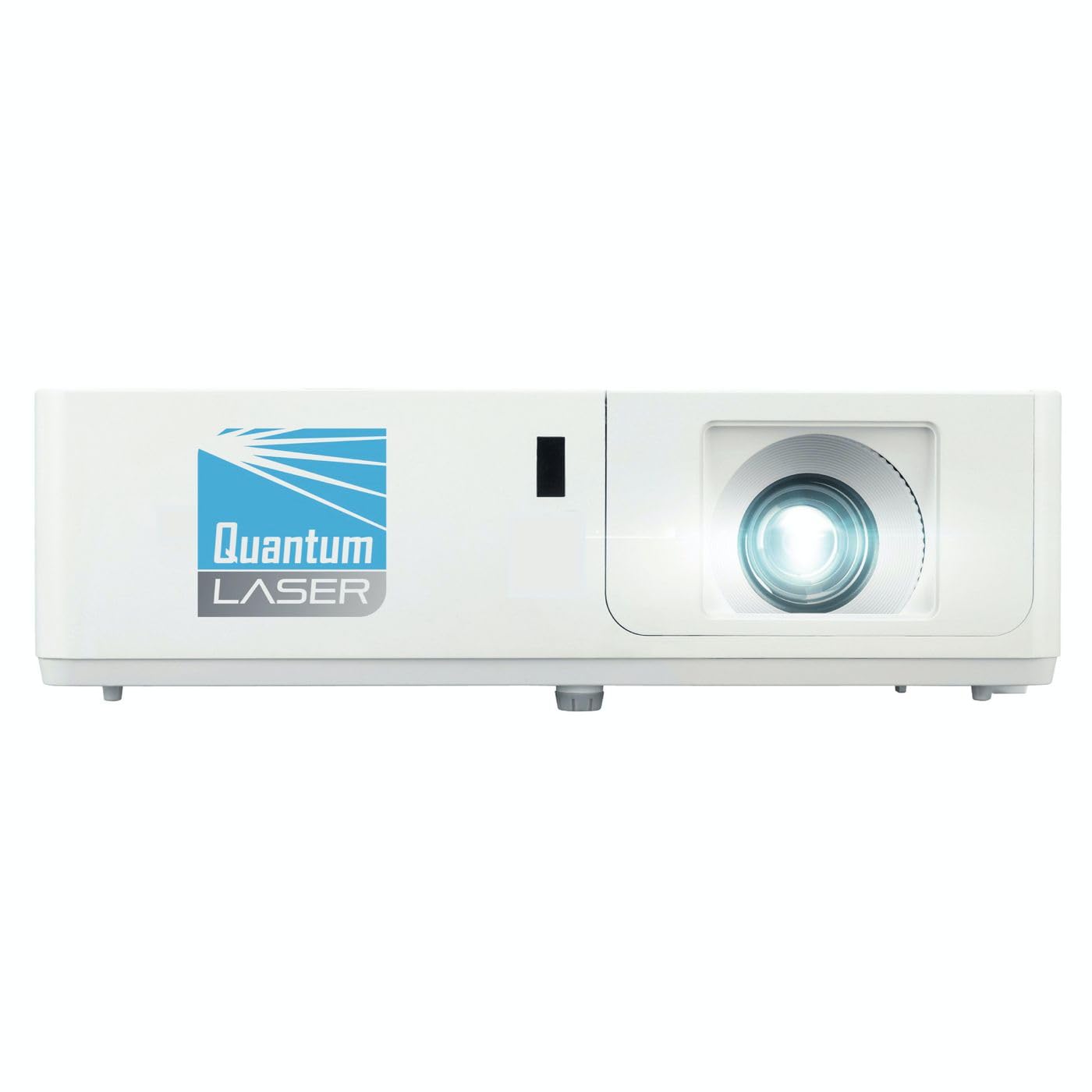
Dealbh 1: Aghaidh view of the InFocus P120 INL412 Multimedia Projector, showing the lens and ventilation grilles.
4.1 Pannal aghaidh
- Lionsa teilgean: A’ cur an ìomhaigh air an sgrion.
- Cearcall Fòcas: Bidh seo ag atharrachadh soilleireachd na h-ìomhaigh a thathar a’ proiseactadh.
- Cearcall zoom: Adjusts the size of the projected image.
- Glacadair IR: A ’faighinn comharran bhon smachd iomallach.
4.2 Prìomh Phannal
- Pannal Smachd: Buttons for power, menu navigation, source selection, and keystone correction.
- Solais comharra: Display the projector's status (e.g., power, lamp, temperature).
4.3 Pannal Cùil (Ceangal)
- Input HDMI: Connects to HDMI-enabled devices (laptops, Blu-ray players).
- Cuir a-steach VGA: Connects to computers with VGA output.
- Port USB: For service or connecting USB devices (if supported by model).
- Fuaim a-steach / a-mach: For connecting external audio sources or speakers.
- Cumhachd a-steach: A 'ceangal an sreang cumhachd.
5. Suidhich
Lean na ceumannan seo airson stèidheachadh tùsail an proiseactair agad:
- Suidheachadh: Place the projector on a stable, flat surface or mount it securely. Ensure the projector is positioned at an appropriate distance from the screen to achieve the desired image size.
- Ceangal cumhachd: Ceangail an càball cumhachd ri in-ghabhail cumhachd a’ phròiseictar agus an uairsin ri socaid dealain le talamh.
- Ceangail inneal stòr: Connect your source device (e.g., laptop, DVD player) to the projector using an appropriate cable (HDMI, VGA, etc.). Ensure the cable is securely connected to both the source and the projector.
- Cumhachd air: Press the power button on the projector's control panel or the remote control to turn on the projector. The power indicator light will illuminate.
- Atharraich Fòcas agus Zoom: Once an image is projected, rotate the focus ring on the lens until the image is sharp and clear. Use the zoom ring to adjust the image size to fit your screen.
- Ceartachadh Keystone: If the image appears trapezoidal, use the keystone correction function (either via buttons on the projector/remote or through the on-screen menu) to square the image.
6. Stiùireadh Obrachaidh
6.1 Cumhachd air / dheth
- Gus cumhachd a thoirt air: Press the power button once. The projector will go through a warm-up sequence.
- Gus cumhachd a thoirt dheth: Press the power button twice. The first press will prompt a shutdown confirmation; the second press will initiate shutdown. Allow the projector to cool down completely before unplugging.
6.2 Taghadh Stòr
Press the 'Source' button on the projector or remote control to cycle through available input sources (HDMI, VGA, etc.) until your desired source is displayed.
6.3 Stiùireadh Clàr
Press the 'Menu' button to access the on-screen display (OSD) menu. Use the arrow buttons to navigate through options and 'Enter' or 'OK' to select. Use the 'Exit' or 'Menu' button to close the OSD.
- Roghainnean ìomhaigh: Adjust brightness, contrast, color, aspect ratio, and picture mode.
- Roghainnean taisbeanaidh: Configure keystone, projection mode (front/rear, desktop/ceiling), and resolution.
- Roghainnean Fuaim: Control volume and audio output options.
- Roghainnean an t-siostaim: Manage language, timer, power-saving modes, and factory reset.
7. Cumail suas
Bidh cumail suas cunbhalach a’ dèanamh cinnteach à coileanadh as fheàrr agus a’ leudachadh fad-beatha do phròiseictar.
- Glanadh lionsa: Sguab lionsa a’ phròiseictar gu socair le clò bog, gun lint a chaidh a dhealbhadh gu sònraichte airson uachdaran optigeach. Na cleachd innealan-glanaidh sgrìobach no cus feachd.
- Glanadh a 'Chaibineit: Cleachd clò bog, tioram gus taobh a-muigh a’ phròiseictar a ghlanadh. Airson comharran stòlda, dampen the cloth slightly with water. Avoid using harsh chemicals.
- Glanadh/Ath-chur Criathrag Adhair: Check the air filter periodically. If your model has a removable filter, clean it with a soft brush or vacuum cleaner. Replace the filter as recommended in the on-screen menu or when visibly dirty to maintain proper ventilation.
- Lamp Ath-àite: Am proiseactair lamp tha fad-beatha crìochnaichte aige. Nuair a bhios an lamp life indicator appears, or the image brightness significantly decreases, replace the lamp according to the instructions provided in the full service manual or by a qualified technician. Always allow the projector to cool down completely before attempting lamp ath-chur.
8. A ’dèanamh trioblaid
Thoir sùil air a’ chlàr gu h-ìosal airson cùisean cumanta agus na fuasglaidhean aca:
| Trioblaid | Adhbhar a dh’fhaodadh a bhith ann | Fuasgladh |
|---|---|---|
| Chan eil ìomhaigh air a thaisbeanadh | Power cord disconnected, incorrect input source, source device off. | Check power connections. Select correct input source. Ensure source device is powered on. |
| Tha an ìomhaigh blurry | Lionsa a-mach à fòcas, astar teilgean ceàrr. | Adjust the focus ring on the lens. Reposition the projector closer or further from the screen. |
| Tha an ìomhaigh trapezoidal | Chan eil am proiseactair ceart-cheàrnach ris an sgrion. | Use keystone correction (manual or automatic) to square the image. |
| Bidh am proiseactair a’ teasachadh cus agus a’ dùnadh sìos | Fionnarachadh dùinte, criathrag adhair salach. | Dèan cinnteach gu bheil àite falamh timcheall air na bealaichean-adhair. Glan no cuir fear ùr na chriathrag-adhair. |
| Chan eil smachd iomallach ag obair | Dead batteries, obstruction between remote and projector, incorrect angle. | Replace batteries. Ensure clear line of sight to IR receiver. Point remote directly at the projector. |
9. Sònrachaidhean
Key technical specifications for the InFocus P120 INL412 Multimedia Projector:
| Feart | Sònrachadh |
|---|---|
| Modail Àireamh | P120 INL412 (Item model number: 7296144) |
| Seòrsa Taisbeanaidh | DLP |
| Fuasgladh Dùthchasach | 1280 x 800 |
| Fuasgladh taisbeanaidh as àirde | 1280 x 800 |
| Teicneòlas ceangail | USB (and other standard inputs like HDMI, VGA) |
| Meudan toraidh | 5.25 x 0.31 x 1.66 òirleach |
| Cuideam nì | 6.6 not |
| Dèanadair | Ann am Fòcas |
10. Barantas agus Taic
The InFocus P120 INL412 Multimedia Projector comes with a standard manufacturer's warranty. Please refer to the warranty card included in your package for specific terms and conditions, including warranty duration and coverage details. For technical support, service, or further inquiries, please visit the official InFocus support weblàrach-lìn no cuir fios chun roinn seirbheis teachdaiche aca.
Airson an fhiosrachaidh taic as ùire, tadhail air: www.infocus.com/support