
Ro-ràdh
Tapadh leibh airson ceannachasing the Northpoint NP-TL LED Desk Lamp. This modern and versatile desk lamp is designed to provide optimal lighting for your workspace while offering convenient features such as QI wireless charging and an integrated display for time and temperature. Please read this manual carefully before use to ensure proper operation and to maximize the lifespan of your product.
Stiùireadh sàbhailteachd
- Ensure the power adapter is compatible with your local power supply before connecting.
- Na dèan dì-chruinneachadh, càradh no atharrachadh air an lamp thu fhèin. Cuir fios gu luchd-obrach seirbheis teisteanasach airson cuideachadh.
- Seachain a bhith a 'cur an lamp in high-temperature, humid, or dusty environments.
- Cùm an lamp air falbh bho uisge agus lionntan eile.
- Do not look directly into the LED light source for extended periods to prevent eye strain.
- Unplug an lamp from the power outlet before cleaning or when not in use for a long time.
- Tha an toradh seo air a dhealbhadh airson cleachdadh a-staigh a-mhàin.
Susbaint pacaid
Thoir sùil air a’ phacaid airson nan nithean a leanas:
- Northpoint NP-TL LED Desk Lamp
- Adaptor Cumhachd 12V
- Leabhar-làimhe cleachdaiche
Bathar seachadview
Familiarize yourself with the components of your Northpoint NP-TL LED Desk Lamp.

Dealbh 1: Aghaidh view of the Northpoint NP-TL LED Desk Lamp, showing the adjustable light head, flexible arm, integrated display, and QI wireless charging base with mood lighting.

Ìomhaigh 2: Taobh view of the Northpoint NP-TL LED Desk Lamp, highlighting the flexible arm design and the integrated display on the lamp's body.

Image 3: The Northpoint NP-TL LED Desk Lamp in a typical desk environment, demonstrating its compact size and ambient lighting capabilities.
- Adjustable LED Head: A’ toirt seachad solais stiùiridh.
- Gàirdean sùbailte: Allows for easy positioning of the light.
- Taisbeanadh aonaichte: Shows time, date, and ambient temperature.
- Pannal Smachd Touch: For adjusting light settings and display functions.
- Pad Cosgais Gun Uèir QI: Located on the base for compatible devices.
- Mood Light Base: Provides ambient RGB lighting.
Suidhich
- Unpack: Thoir air falbh na pàirtean gu lèir bhon phacaid gu faiceallach.
- Dreuchd: Cuir an lamp air uachdar seasmhach, còmhnard.
- Ceangal cumhachd: Insert the DC plug of the 12V power adapter into the power input port on the back of the lamp base. Plug the adapter into a standard wall outlet.
- Suidheachadh Tùsail an Taisbeanaidh: Upon first power-on, the display will illuminate. You may need to set the time and date using the touch controls (refer to "Operating Instructions - Display Settings").
Stiùireadh Obrachaidh
Gnìomhan aotrom
- Cumhachd air / dheth: Tap air an Putan cumhachd (
 ) on the touch control panel to turn the lamp air neo dheth.
 - Brightness Adjustment (Dimmable): Fhad 's a tha an lamp is on, press and hold the Putan soilleireachd (often represented by a sun icon or +/-) to smoothly adjust the light intensity. Release when the desired brightness is reached.
- Atharrachadh teòthachd dath: Tap air an Mode/Color Temperature button (often represented by a 'M' or color spectrum icon) to cycle through different color temperatures: Warm White, Neutral White, and Cool White.
Cìs gun uèir QI
- Place your QI-compatible smartphone or device directly onto the wireless charging pad located on the lamp'bhunait.
- Ensure the device is centered on the charging pad for optimal charging.
- A charging indicator (if available on your device) will confirm that charging has begun.
- Remove any metallic objects or thick cases from your device that may interfere with wireless charging.
Integrated Display Settings (Time, Date, Temperature)
The integrated LCD displays time, date, and ambient temperature. Specific buttons for setting these functions are usually located near the display or on the touch panel.
- Ceann-latha suidheachadh: Look for buttons labeled "SET", "MODE", or similar. Typically, you press "SET" to enter setting mode, then use arrow buttons or +/- to adjust values, and "SET" again to confirm and move to the next setting (e.g., hour, minute, year, month, day).
- Taisbeanadh teothachd: An lamp automatically detects and displays the ambient temperature. No manual setting is required for this function.
Mood Solais
- An lamp features an integrated mood light base. Look for a dedicated Putan Mood Light (often a color wheel or RGB icon).
- Tap the button to cycle through different static colors or activate a color-changing mode.
- Press and hold the button to turn the mood light off.
Cumail suas
- Glanadh: Dì-cheangail an cumhachd mus glan thu e. Cleachd clò bog, tioram gus an l a sguabadh.amp. Do not use abrasive cleaners, solvents, or harsh chemicals.
- Stòradh: Ma tha thu a 'stòradh an lamp airson ùine mhòr, dì-phlugaich e agus stòraich e ann an àite fionnar, tioram.
- Stòr Solais LED: Tha an stòr solais LED togte a-steach agus chan urrainn don neach-cleachdaidh a chur na àite.
Fuasgladh thrioblaidean
| Trioblaid | Adhbhar a dh’fhaodadh a bhith ann | Fuasgladh |
|---|---|---|
| Lamp nach tionndaidh air. | Gun cheangal cumhachd. Adapter cumhachd lochtach. | Dèan cinnteach gu bheil an inneal-atharrachaidh cumhachd air a phlugadh gu tèarainte a-steach don dà lamp agus am balla a-mach. Try a different outlet. If the issue persists, contact customer support. |
| Chan eil cosgais gun uèir ag obair. | Device not QI-compatible. Inneal nach eil air a cho-thaobhadh gu ceart. Obstruction (e.g., thick case, metallic object). | Verify your device supports QI wireless charging. Reposition your device on the charging pad. Remove any cases or metallic objects. |
| Display shows incorrect time/date. | Cha deach an t-àm/ceann-latha a shuidheachadh no ath-shuidheachadh às dèidh briseadh cumhachd. | Refer to "Operating Instructions - Display Settings" to manually set the time and date. |
| Bidh an solas a’ priobadh no tha e neo-sheasmhach. | Solar cumhachd neo-sheasmhach. Cùis co-phàirteach a-staigh. | Feuch ris an lamp into a different power outlet. If the problem continues, discontinue use and contact customer support. |
Sònrachaidhean
| Brand | Puing a Tuath |
| Modail Àireamh | NP-TL |
| Meudan toraidh (L x W x H) | 16.6 x 6 x 33.5 cm |
| Stuth | Leathar Faux |
| Seòrsa Crìochnachaidh | Leather look |
| Seòrsa Stòr Solais | LED |
| Cumhachd | 18 watt |
| Luminous Flux | 480 m |
| Clàr-ìnnse Dhathan (CRI) | 80.00 |
| Feartan sònraichte | Dimmable, QI Wireless Charging, Temperature Display, Mood Lighting |
| Stoidhle Switch | Suathadh |
| Rangachadh IP | IP20 |
| Voltage | 12 Volt |
| Co-phàirtean air an toirt a-steach | QI Charging Station, 12V Power Adapter |

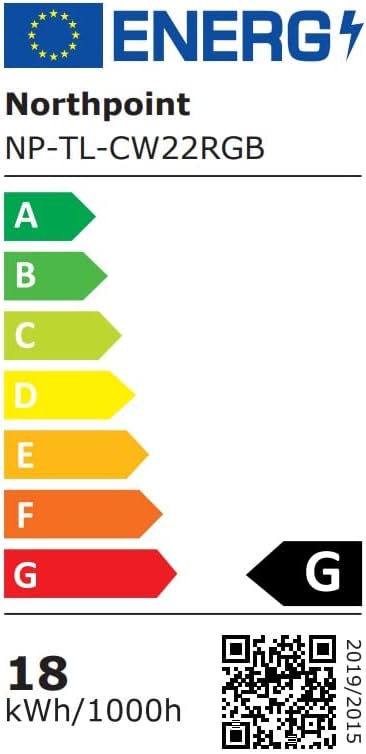
Image 4: Energy efficiency label for the Northpoint NP-TL LED Desk Lamp, indicating energy class G and 18 kWh/1000h consumption.
Barantas agus Taic
Northpoint products are manufactured to high-quality standards. For warranty information or technical support, please refer to the contact details provided with your purchase documentation or visit the official Northpoint weblàrach. Cùm dearbhadh ceannach airson tagraidhean barantais sam bith.
Note: Information regarding spare parts availability and software updates is not available at the time of printing.