
Ro-ràdh
Welcome to the VTech Bluey Ring Ring Phone user manual. This guide provides essential information for setting up, operating, and maintaining your new electronic learning toy. Designed for children aged 3-6 years, this interactive phone allows kids to engage in pretend play with characters from the popular Bluey series, fostering imaginative and educational experiences.

Ìomhaigh: Aghaidh view of the VTech Bluey Ring Ring Phone, displaying Bluey on the screen and various character buttons.
Suidhich
1. Dè tha sa bhogsa
- Fòn fàinne Bluey
- Stiùireadh tòiseachaidh luath
2. Stàladh bataraidh
The VTech Bluey Ring Ring Phone requires 2 AAA batteries. Batteries are included for demonstration purposes only. For regular use, new batteries are recommended.
- Lorg roinn a’ bhataraidh air cùl a’ fòn.
- A’ cleachdadh screwdriver, fosgail còmhdach roinn a’ bhataraidh.
- Cuir a-steach 2 bataraidh AAA ùra, a’ dèanamh cinnteach gu bheil iad a’ freagairt gu ceart (+/-).
- Cuir an àite còmhdach roinn a’ bhataraidh agus tèarainte leis an sgriubha.
Stiùireadh Obrachaidh
1. Cumhachd air / dheth
Press the power button (usually located on the top or side) to turn the phone on or off.
2. Gnìomhan Bunaiteach
- Putanan caractar: Press the buttons featuring pictures of Bluey, her family, and friends to hear phrases about each character.
- Putanan àireamh: Use the number buttons for various activities, including playing music.
- Gnìomhachadh guth: Engage in interactive pretend play with Bluey and Bingo using the voice-activated chat-and-reply feature.
- Roghainnean: Adjust the ringtone, brightness, and other phone-like features to customize the play experience.
3. Games and Activities
The phone includes four interactive games based on themes from different Bluey episodes:
- Cheer Up Bingo: If Bingo is in a bad mood, press the number buttons to play music she can dance to.
- Bingo's Handstand: Use the arrow buttons to help Bingo do a handstand.
- Bluey the Fruit Bat: When Bluey pretends to be a fruit bat, press the arrows to help her catch fruit to eat.
- Bluey's Bubbles: Help Bluey blow bubbles by blowing into the microphone.
Explore these games to watch character animations and listen to popular phrases from the show.
Video: Official VTech Bluey Ring Ring Phone Demo, showcasing various interactive features and games.
Feartan
- Four interactive games featuring Bluey and Bingo.
- Animations of characters and popular phrases from the show.
- Buttons with character images for specific phrases.
- Voice-activated chat-and-reply for interactive conversations.
- Adjustable ringtone and brightness settings.
- Durable design for children aged 3-6 years.
Cumail suas
- Glan am fòn le clò bog,amp aodach. Na bi a 'bogadh ann an uisge.
- Seachain am fòn a nochdadh do theodhachd anabarrach no do sholas dìreach na grèine.
- Thoir air falbh bataraidhean mura tèid an dèideag a chleachdadh airson ùine fhada gus casg a chuir air aodion.
Fuasgladh thrioblaidean
No Power or Intermittent Operation
- Dèan cinnteach gu bheil bataraidhean air an stàladh gu ceart le polarity ceart.
- Cuir bataraidhean AAA ùra an àite seann bhataraidhean.
- If the issue persists, try turning the unit off and on again.
Cùisean Fuaim
- Check if the volume setting is too low. While there isn't an explicit volume control button, some modes might have varying sound levels.
- Dèan cinnteach nach eil bacadh air an neach-labhairt.
Ma mhaireas na duilgheadasan, thoir sùil air an earrann Barantas is Taic airson fiosrachadh conaltraidh.
Sònrachaidhean
- Meudan toraidh: 0.98 x 3.27 x 6.69 òirleach
- Cuideam nì: 4.8 unnsa
- Àireamh Modail nì: 80-554600
- Aois air a mholadh leis an neach-dèanamh: 36 mìosan - 6 bliadhna
- Bataraidhean: 2 AAA batteries required (included for demo purposes)
- Dèanadair: VTech
- Ceann-latha sgaoilidh: Dùbhlachd 1, 2021
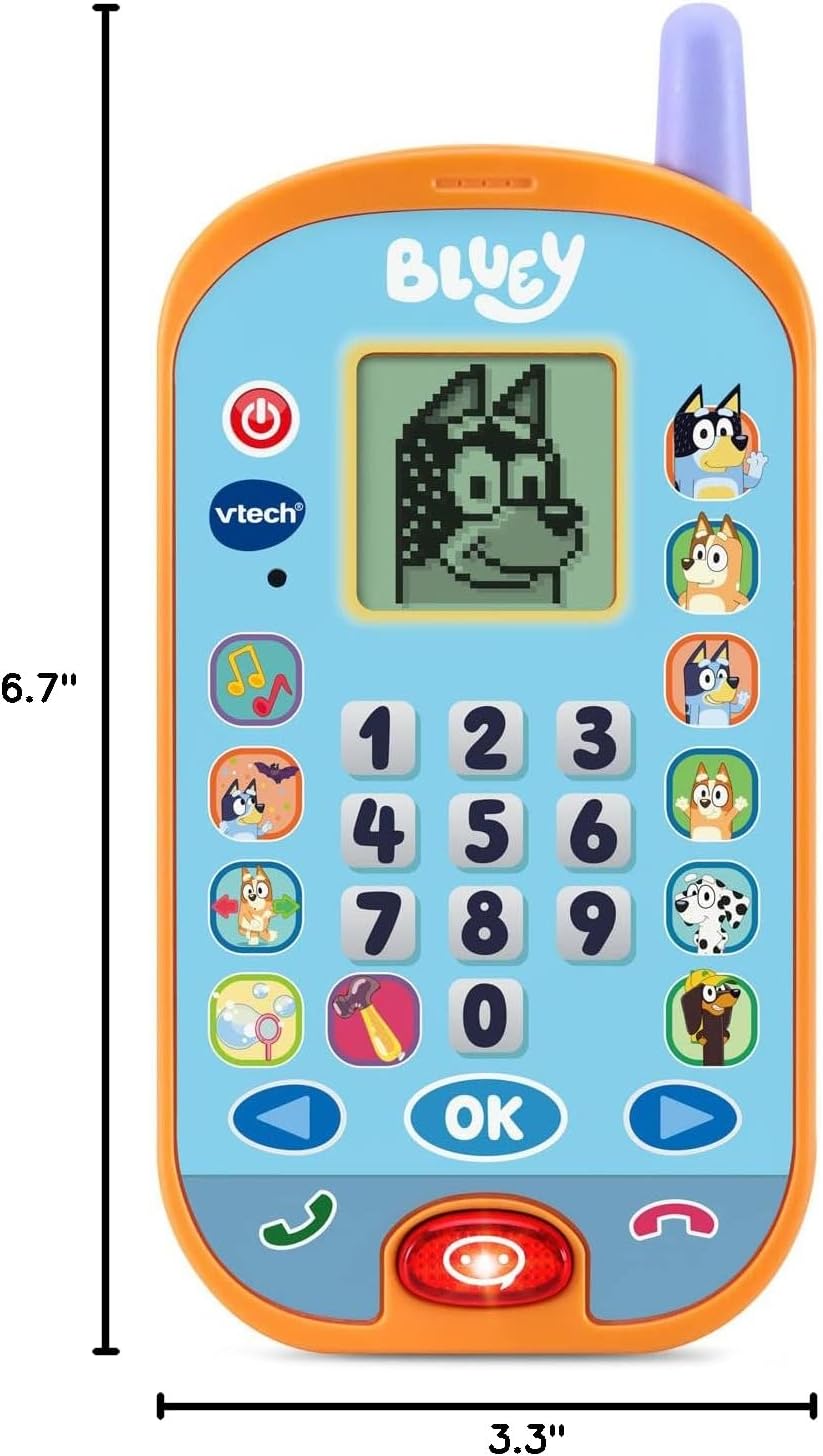
Image: VTech Bluey Ring Ring Phone with labeled dimensions.
Barantas agus Taic
This VTech product is covered by the manufacturer's standard warranty. For detailed warranty information, product support, or to inquire about replacement parts, please visit the official VTech website or contact their customer service department. Contact details can typically be found in the Quick Start Guide included with your product or on the VTech brand store page.
Bùth VTech: Visit the VTech Store on Amazon