
1. Ro-ràdh
This manual provides essential information for setting up, operating, and maintaining your TECLAST X11 2-in-1 Laptop/Tablet. The TECLAST X11 is a versatile device designed to function as both a portable tablet and a compact laptop, running on Windows 10 Home. It features a 10.1-inch Full HD display, an Intel N4020 processor, 6GB RAM, and 128GB of internal storage.
2. Dè tha sa bhogsa
- TECLAST X11 Tablet
- Adapter cumhachd
- Càball USB
- Leabhar-làimhe cleachdaiche (an sgrìobhainn seo)
Note: The keyboard and stylus pen are sold separately and are not included in the standard package.
3. Toradh thallview
3.1 Prìomh fheartan
- Dealbhadh 2-in-1: Seamlessly switch between tablet and laptop modes.
- Taisbeanadh: 10.1-inch IPS Full HD (1920x1200) touchscreen.
- Pròiseasar: Intel Gemini Lake Reflash N4020 CPU (up to 2.8GHz).
- Cuimhne & Stòradh: 6GB RAM, 128GB eMMC ROM (expandable up to 256GB via TF card).
- Siostam-obrachaidh: Windows 10 Home air a stàladh ro-làimh.
- Ceangal: Dual-band 2.4G/5G WiFi, Bluetooth 4.2.
- Camara: 5MP rear camera, 2MP front camera.
- Puirt: USB 3.0, Mini-HDMI, Headphone Jack, DC Port.
- Kickstand: Adjustable U-shaped kickstand (0° to 145°).
3.2 Cruth inneal
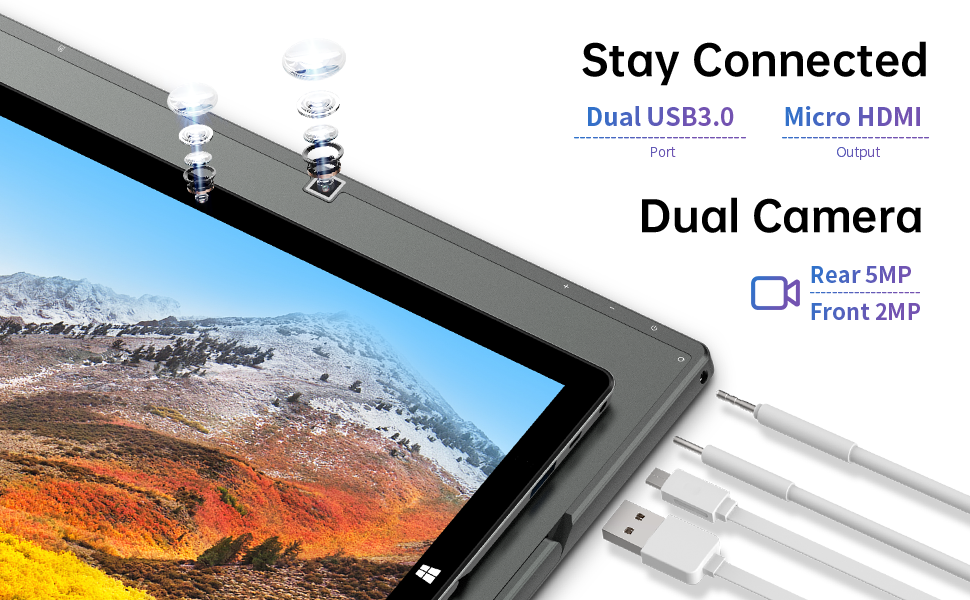
Ìomhaigh: Taobh view of the TECLAST X11 tablet highlighting the USB 3.0 port, Micro HDMI output, and front/rear cameras.

Ìomhaigh: Mion-fhiosrachadh view of the TECLAST X11's side ports, including USB 3.0, Mini-HDMI, DC power input, and headphone jack.
4. Suidhich
4.1 Cìs tòiseachaidh
Before first use, fully charge your TECLAST X11 tablet. Connect the provided power adapter to the DC port on the device and plug it into a power outlet. The charging indicator will illuminate.
4.2 A’ cur cumhachd air/dheth
- Gus cumhachd a thoirt air: Brùth agus cum sìos am putan Cumhachd gus an soillsich an scrion.
- Gus cumhachd a thoirt dheth: Press and hold the Power button, then select "Shut down" from the on-screen options. Alternatively, go to Start Menu > Power > Shut down.
- Modh cadail: Brùth air a’ phutan Cumhachd goirid gus an inneal a chur ann am modh cadail no gus a dhùsgadh.
4.3 Suidheachadh tùsail Windows
Upon first power-on, follow the on-screen instructions to complete the Windows 10 setup process. This includes selecting your region, language, connecting to a Wi-Fi network, and creating a user account.
5. Stiùireadh Obrachaidh
5.1 Atharrachadh Eadar Modhan
The TECLAST X11 is designed for flexibility, allowing you to switch between tablet and laptop modes.
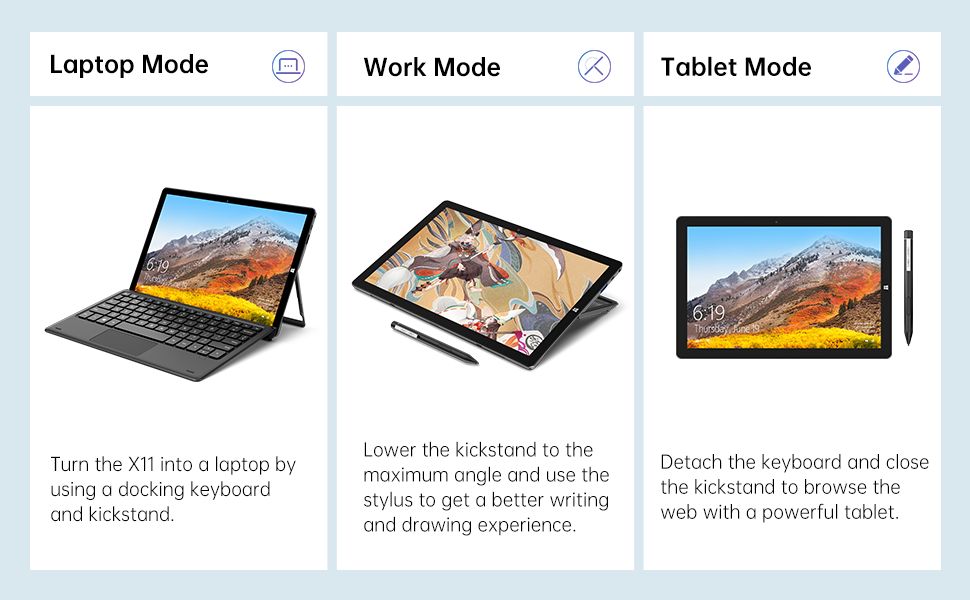
Image: The TECLAST X11 in laptop mode with the keyboard attached and kickstand deployed.
Modh Laptop: Attach the magnetic docking keyboard and deploy the integrated kickstand. The device will automatically detect the keyboard and switch to laptop interface.

Image: A user holding the TECLAST X11 in tablet mode, interacting with the touchscreen.
Modh clàr: Detach the keyboard. The device will automatically switch to tablet mode, optimizing the interface for touch input.

Ìomhaigh: Cùl view of the TECLAST X11 showing the adjustable kickstand extended.
Cleachdadh Kickstand: The integrated U-shaped kickstand can be adjusted from 0° to 145° for comfortable viewceàrnan a’ sgrìobhadh no a’ taipeadh.
5.2 A’ cleachdadh an touchscreen
The 10.1-inch IPS display supports 10-point multi-touch. Use standard touch gestures for navigation, zooming, and interaction with applications.
5.3 Ceangal Taobh a-muigh
- USB 3.0: Connect external devices such as USB drives, mice, or printers.
- Mini-HDMI: Ceangail ri monitor no Tbh taobh a-muigh airson taisbeanadh nas motha.
- Bluetooth 4.2: Pair with Bluetooth-enabled accessories like headphones or speakers.
- Wi-Fi: Connect to wireless networks for internet access. Supports 2.4G and 5G bands.
5.4 Taisbeanadh Bhidio
Video: An official TECLAST video demonstrating the features and versatility of the X11 Windows tablet with its detachable keyboard and various usage scenarios.
6. Cumail suas
6.1 A ’glanadh an inneal
- Cleachd clò bog, gun lint gus an sgrion agus na h-uachdaran a-muigh a ghlanadh.
- Airson comharran stòlda, beagan dampnigh an clò le uisge no le fuasgladh glanaidh a tha sàbhailte airson sgrion.
- Seachain ceimigean cruaidh, stuthan sgrìobach, no cus taiseachd a chleachdadh.
6.2 Cùram Bataraidh
- Gus beatha bataraidh a leudachadh, seachain teòthachd anabarrach.
- Na fàg an inneal làn-luchdaichte no làn-dhì-luchdaichte airson ùine mhòr.
- Cleachd an charger tùsail no charger co-chòrdail le teisteanas a-mhàin.
6.3 Ùrachaidhean bathar-bog
Regularly check for and install Windows updates to ensure optimal performance, security, and access to the latest features. Go to Start Menu > Settings > Update & Security > Windows Update.
7. A ’dèanamh trioblaid
| Cùis | Fuasgladh comasach |
|---|---|
| Chan eil cumhachd aig an inneal | Ensure the device is charged. Connect the power adapter and try again. If unresponsive, press and hold the Power button for 10-15 seconds to perform a hard reset. |
| Duilgheadasan le ceangal Wi-Fi | Check if Wi-Fi is enabled in Windows settings. Restart your router and the tablet. Ensure you are within range of the Wi-Fi signal. |
| Meur-chlàr nach eil a 'freagairt | Ensure the keyboard is securely attached to the magnetic docking port. Restart the tablet. Verify that the keyboard was purchased separately and is compatible. |
| Coileanadh slaodach | Close unnecessary applications. Check for Windows updates. Ensure sufficient free storage space. Run a disk cleanup. |
| Screen rotation not working | Check if auto-rotate is enabled in Windows Action Center (swipe in from the right edge of the screen or click the icon in the taskbar). |
8. Sònrachaidhean
| Feart | Mion-fhiosrachadh |
|---|---|
| Ainm Modail | X11 2-in-1 Tablet |
| Meud sgrion | 10.1 òirlich |
| Fuasgladh sgrion | 1920 x 1200 piogsail (FHD IPS) |
| Pròiseasar | Intel Gemini Lake Reflash N4020 (1.1GHz - 2.8GHz) |
| RAM | 6 GB DDR4 SDRAM |
| Dràibhear cruaidh | 128 GB eMMC (expandable up to 256GB via TF card) |
| Cairt grafaigeachd | Grafaigean aonaichte Intel UHD 600 |
| Siostam-obrachaidh | Windows 10 dachaigh |
| Seòrsa gun uèir | Bluetooth 4.2, Dual-band WiFi (2.4G + 5G) |
| Cùl WebFuasgladh cam | 5 BP |
| Aghaidh WebFuasgladh cam | 2 BP |
| Puirt | USB 3.0, Mini-HDMI, Headphone Jack, DC Port |
| Cuideam nì | 2.31 notaichean (timcheall air 1.05 kg) |
| Bataraidhean | 1 bataraidh lithium polymer (air a ghabhail a-steach) |
9. Barantas agus Taic
TECLAST provides a Seirbheis barantais 12-mìosan for the X11 2-in-1 Laptop/Tablet. If you encounter any issues or have questions regarding your device, please contact TECLAST customer support. Refer to the contact information provided with your product packaging or visit the official TECLAST weblàrach-lìn airson fiosrachadh taic.